
ByteUp C80
ByteUp C80 Portable Thermal Printer User Manual
รุ่น: C80
1. บทนำ
The ByteUp C80 Portable Thermal Printer is a compact and lightweight device designed for convenient printing on the go. It utilizes thermal printing technology, eliminating the need for ink cartridges, and supports various paper types including US Letter, A4 thermal, and tattoo transfer paper. This manual provides essential information for setting up, operating, maintaining, and troubleshooting your C80 printer.
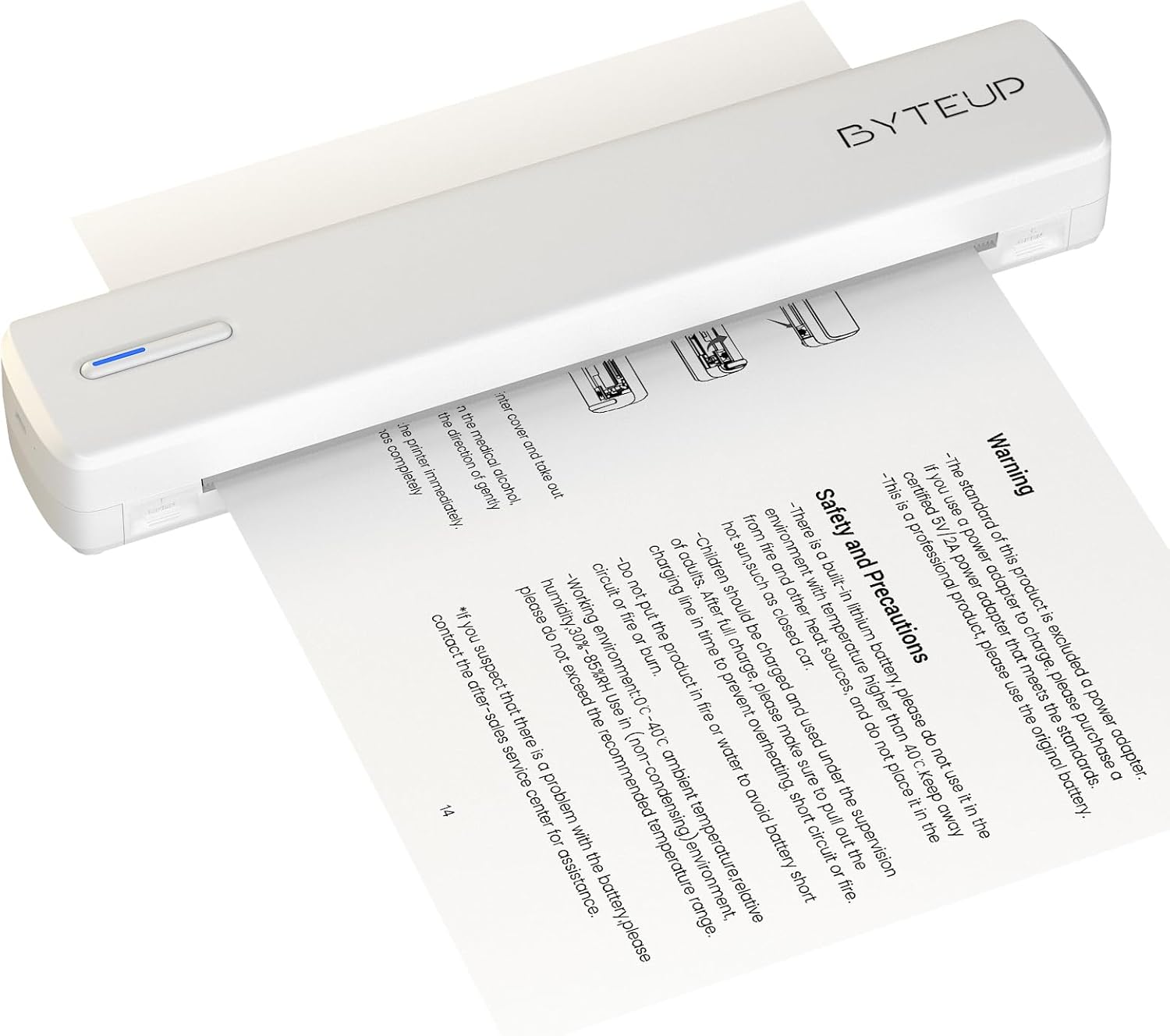
Image 1.1: The ByteUp C80 Portable Thermal Printer in operation, demonstrating paper feeding.
2. ข้อควรระวังเพื่อความปลอดภัย
To ensure safe and proper operation of your ByteUp C80 printer, please observe the following precautions:
- The standard product package does not include a power adapter. If a power adapter is required, please purchase a certified 5V/2A power adapter that meets safety standards.
- This device contains a built-in lithium battery. Do not use it in environments with temperatures exceeding 40°C (104°F) or near open flames and other heat sources.
- The battery should be charged and used under supervision. Do not leave children unattended during charging.
- Do not put the product in fire or water to avoid battery short circuit or fire.
- Operating environment: 0°C - 40°C (32°F - 104°F) ambient temperature, relative humidity 30%-85% (non-condensing).
- If you suspect a problem with the battery, please contact the after-sales service center for assistance.
3. อะไรอยู่ในกล่อง
Upon unpacking your ByteUp C80 Portable Thermal Printer, verify that all the following components are included:
- 1 x C80 Printer
- 20 x US Letter Size Thermal Paper sheets
- 1 x คู่มือผู้ใช้ (เอกสารนี้)
- 1 x Guide Card
- 1 x U disk (containing drivers and software)
4. คู่มือการติดตั้ง
4.1 การชาร์จเครื่องพิมพ์
Before first use, fully charge the printer using a compatible 5V/2A USB-C power adapter (not included). Connect the USB-C cable to the printer's charging port and the other end to the power adapter. The indicator light will show charging status.
4.2 กำลังโหลดกระดาษ
The C80 printer uses thermal paper only. It does not support regular copy paper.
- Open the paper input cover.
- Insert the thermal paper with the printable side facing up. Ensure the paper is aligned correctly and smoothly.
- Close the paper input cover. The printer will automatically feed a small amount of paper to confirm loading.

Image 4.1: The ByteUp C80 printer supports various paper sizes including US Letter, A4 Thermal, and Tattoo Transfer Paper.
5. คู่มือการใช้งาน
5.1 การเปิด/ปิดเครื่อง
- การเปิดเครื่อง: กดปุ่มเปิด/ปิดค้างไว้จนกว่าไฟแสดงสถานะจะสว่างขึ้น
- วิธีปิดเครื่อง: กดปุ่มเปิด/ปิดค้างไว้จนกว่าไฟแสดงสถานะจะดับ
5.2 ตัวเลือกการเชื่อมต่อ
The ByteUp C80 printer offers both Bluetooth and USB-C connectivity for versatile use with various devices.

Image 5.1: The ByteUp C80 printer supports both USB and Bluetooth connections for printing from laptops, smartphones, and other devices.
5.2.1 Bluetooth Connection (for iOS, Android)
- โปรดตรวจสอบให้แน่ใจว่าเครื่องพิมพ์เปิดอยู่และอยู่ในระยะที่สามารถเชื่อมต่อกับอุปกรณ์มือถือของคุณได้
- เปิดใช้งานบลูทูธบนอุปกรณ์เคลื่อนที่ของคุณ
- Open the dedicated ByteUp printing application (refer to the U disk for software installation).
- Within the app, search for available Bluetooth devices and select "C80" to pair.
- Once paired, you can select documents (PDF, Word, Images, Web) from your phone to print.
5.2.2 USB-C Connection (for Laptop/PC)
- Connect the printer to your laptop or PC using the provided USB-C cable.
- Install the printer drivers from the included U disk. Follow the on-screen instructions for installation.
- Once drivers are installed, the printer will appear as an available printer in your system's print dialogue.
- Select the C80 printer and adjust print settings as needed before printing.
5.3 การพิมพ์เอกสาร
Always remember to choose the correct paper size setting on your phone or PC to match the thermal paper you are using. The printer supports monochrome (black and white) printing only.

Image 5.2: The ByteUp C80 printer is capable of high-resolution monochrome printing, suitable for various documents including tattoo stencils.
6. การบำรุงรักษา
6.1 การทำความสะอาดหัวพิมพ์
การทำความสะอาดหัวพิมพ์อย่างสม่ำเสมอจะช่วยให้ได้คุณภาพการพิมพ์ที่ดีที่สุด
- โปรดตรวจสอบให้แน่ใจว่าเครื่องพิมพ์ปิดอยู่และถอดปลั๊กออกจากแหล่งจ่ายไฟแล้ว
- Gently open the paper input cover.
- ใช้ผ้านุ่มไม่เป็นขุยค่อยๆ งampened with isopropyl alcohol to wipe the print head surface.
- รอให้หัวพิมพ์แห้งสนิทก่อนปิดฝาและเปิดเครื่องพิมพ์
6.2 การจัดเก็บเอกสาร
Store thermal paper in a cool, dry place away from direct sunlight and excessive heat to preserve its quality and print longevity.
7 การแก้ไขปัญหา
| ปัญหา | สาเหตุที่เป็นไปได้ | สารละลาย |
|---|---|---|
| เครื่องพิมพ์ไม่เปิดเครื่อง | แบตเตอรี่อ่อนหรือไม่มีประจุ | Charge the printer fully using a 5V/2A USB-C adapter. |
| คุณภาพการพิมพ์ไม่ดี / ภาพพิมพ์สีซีดจาง | Dirty print head; Low quality thermal paper; Paper loaded incorrectly | Clean the print head (refer to Section 6.1); Use high-quality thermal paper; Ensure paper is loaded correctly with printable side up. |
| เครื่องพิมพ์ไม่เชื่อมต่อผ่านบลูทูธ | Bluetooth not enabled; Printer not in pairing mode; Interference | Ensure Bluetooth is enabled on your device; Restart printer and device; Move closer to the printer; Check app for pairing instructions. |
| เครื่องพิมพ์ไม่ได้รับการ1รู้จักจากคอมพิวเตอร์ผ่านทาง USB | ไม่ได้ติดตั้งไดรเวอร์; สาย USB/พอร์ต USB มีปัญหา | Install drivers from the U disk; Try a different USB-C cable or port. |
| กระดาษติด | ใส่กระดาษไม่ถูกต้อง; กระดาษชำรุด | Power off the printer, gently remove jammed paper, reload new paper correctly. |
8. ข้อมูลจำเพาะผลิตภัณฑ์
- ชื่อรุ่น : ซี80
- ยี่ห้อ: ByteUp
- เทคโนโลยีการพิมพ์: เทอร์มอล
- เทคโนโลยีการเชื่อมต่อ: บลูทูธ, USB-C
- เอาต์พุตเครื่องพิมพ์: ภาพขาวดำ (ขาวดำ)
- ความละเอียดการพิมพ์ขาวดำสูงสุด: 203 dpi (Dots Per Inch)
- ความเร็วในการพิมพ์สูงสุด ขาวดำ: 4 หน้าต่อนาที (ppm)
- ขนาดไฟล์มีเดียสูงสุด: 8.5x11 inches (US Letter)
- Supported Print Media: Thermal Paper (Roll paper, Fan-fold paper, Tattoo transfer paper)
- ความจุแผ่นอินพุตสูงสุด: 20 แผ่น
- การพิมพ์สองหน้า: ไม่ (เฉพาะซิมเพล็กซ์)
- อินเทอร์เฟซฮาร์ดแวร์: USB ประเภท C
- สีหมึก: Black (Thermal printing, no ink required)
- ขนาดสินค้า : ลึก 12.99 นิ้ว x กว้าง 3.35 นิ้ว x สูง 3.15 นิ้ว (33 x 8.5 x 8 ซม.)
- น้ำหนักสินค้า: 1.8 ปอนด์ (0.82 กก.)
- แบตเตอรี่: แบตเตอรี่ที่ไม่ได้มาตรฐาน 1 ก้อน (รวมอยู่ด้วย)
- ผู้ผลิต: shanyin
9. การรับประกันและการสนับสนุน
For warranty information and technical support, please refer to the contact details provided on the ByteUp official website or the guide card included in your product package. If you encounter any issues not covered in this manual, or require further assistance, please do not hesitate to contact our customer service team.
Ask a question about this manual
Ask about setup, troubleshooting, compatibility, parts, safety, or missing instructions. Manuals+ will review the question and use this page’s manual context to help answer it.