
1. บทนำและเรื่องอื่นๆview
Thank you for choosing the Mcezdy M5C-2(BLE)-6-Pin Ebike LCD Display. This advanced cycling computer is designed to provide essential riding data, smart connectivity, and convenient features for your electric bicycle. Please read this manual thoroughly before installation and use to ensure proper function and safety.

Figure 1: Mcezdy M5C-2 Ebike LCD Display showing current speed, pedal assist level, and battery voltage.
2. คุณสมบัติหลัก
- หน้าจอสีสันสดใส: Provides clear and easy-to-read riding data.
- Personalized Control: Features walk-assist mode, cruise control, real-time trip and total mileage tracking, voltage display, and adjustable bike parameters (wheel diameter, speed limits).
- การเชื่อมต่ออัจฉริยะ: Syncs with cycling applications via Bluetooth for route recording and statistics.
- การชาร์จขณะเดินทาง: Integrated Type-C charging port (5V/500mA output) for mobile devices.
- โครงสร้างทนทาน: IPX65 waterproof rating, rugged ABS and PC housing, tempered glass screen, and nylon bracket for all-weather use.
- ฉบับกว้างtagความเข้ากันได้: Supports 24V, 36V, 48V, and 60V battery systems.

รูปที่ 2: เกินview of M5C-2 display functions.
3. หมายเหตุสำคัญเกี่ยวกับความเข้ากันได้
This Ebike LCD display operates exclusively with controllers using the UART No. 2 protocol. It is not compatible with other UART protocols. Ensure your Ebike controller supports UART No. 2 to avoid compatibility issues.
How to Determine Your Ebike's Communication Protocol:
- Consult your Ebike's user manual or technical documentation.
- Check your existing Ebike display for protocol information.
- Contact your Ebike manufacturer for specific details.

Figure 3: Compatibility warning and connector types (5-Pin and 6-Pin).
4. ข้อมูลจำเพาะผลิตภัณฑ์
| ข้อมูลจำเพาะ | รายละเอียด |
|---|---|
| ยี่ห้อ | แมคเซดี้ |
| ชื่อรุ่น | M5C-2(BLE)-6-Pin |
| ประเภทจอภาพ | จอแอลซีดี |
| เทคโนโลยีการเชื่อมต่อ | บลูทูธ |
| โปรโตคอล | UART No. 2 |
| เล่มที่tagความเข้ากันได้ | 24 โวลต์ 36 โวลต์ 48 โวลต์ 60 โวลต์ |
| ระดับการกันน้ำ | IPX65 |
| วัสดุ | ABS, PC, Tempered Glass, Nylon |
| ประเภทการติดตั้ง | Handlebar Mount (22.2mm, 25.4mm, 28.6mm, 31.8mm) |
| ส่วนประกอบที่รวมอยู่ | LCD Display, User's Manual, Fault Code Description |
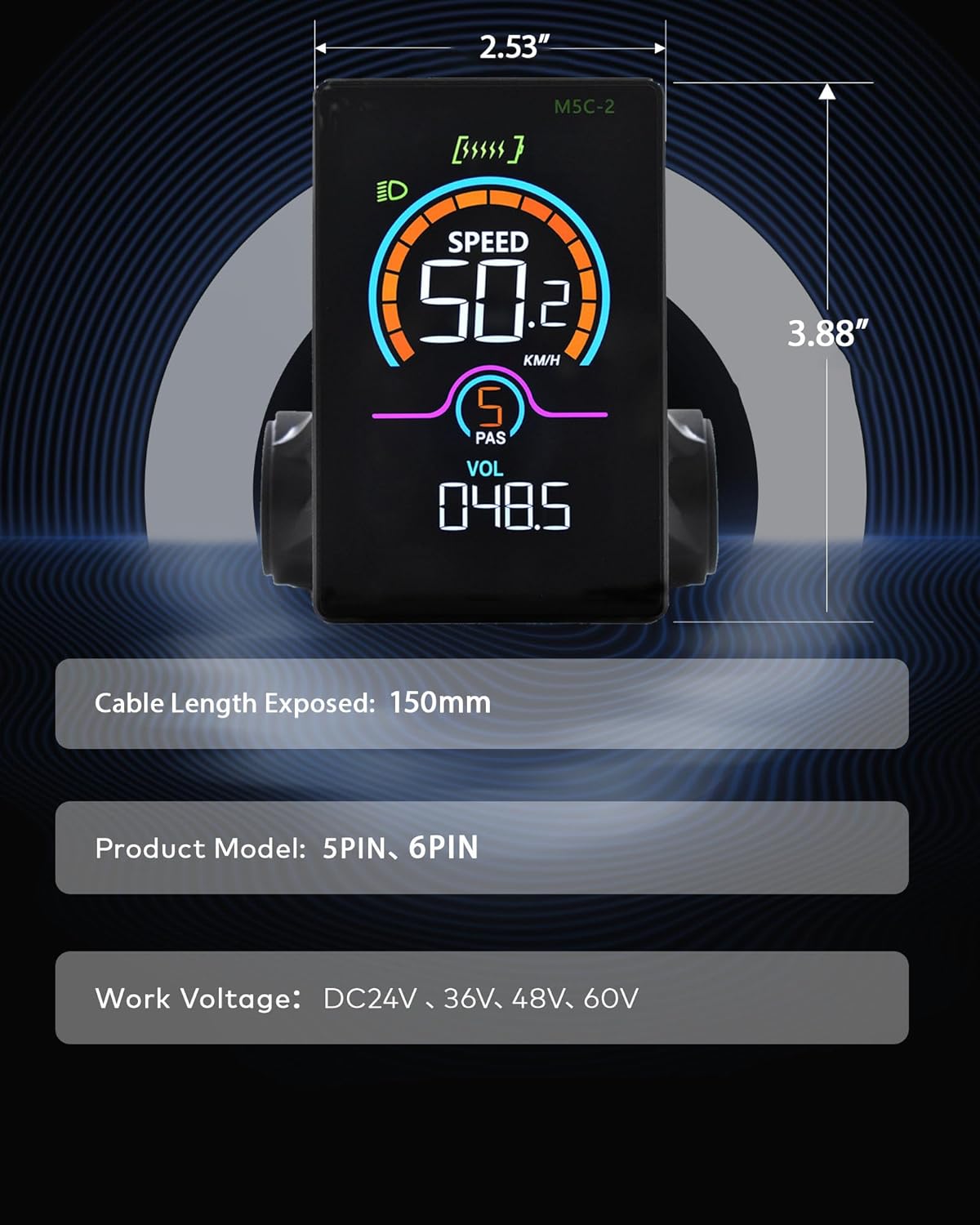
Figure 4: M5C-2 display dimensions and cable length.
5. การตั้งค่าและการติดตั้ง
Follow these steps to properly install your Mcezdy LCD Display on your Ebike.
5.1 การติดตั้งจอแสดงผล
- Loosen the screws on the display's handlebar mount.
- Position the display on your Ebike's handlebar. The adjustable mount accommodates handlebar diameters of 22.2mm, 25.4mm, 28.6mm, and 31.8mm.
- Tighten the screws securely to prevent movement during riding.

Figure 5: Display mounted on a handlebar, demonstrating adjustable fit.
5.2 การเชื่อมต่อสายเคเบิล
- Identify the display's cable connector (either 5-Pin or 6-Pin).
- Locate the corresponding connector on your Ebike's controller or wiring harness.
- Carefully align and connect the display cable to the Ebike's system. Ensure a firm connection.
Video 1: This video demonstrates the physical installation and initial power-on sequence of the Mcezdy Ebike Display, including mounting and cable connections.
6. คู่มือการใช้งาน
Familiarize yourself with the display's controls and functions.
6.1 เปิด/ปิดเครื่อง
- การเปิดเครื่อง: Press and hold the power button (usually marked with a power symbol) on the control pad for a few seconds until the display illuminates.
- วิธีปิดเครื่อง: กดปุ่มเปิด/ปิดค้างไว้จนกว่าหน้าจอจะดับลง
6.2 Switching Assistance Modes (PAS Levels)
Use the '+' and '-' buttons on the control pad to adjust the pedal assist (PAS) level. Higher numbers indicate more motor assistance.
6.3 การสลับพารามิเตอร์การแสดงผล
Briefly press the power button to cycle through different display parameters such as Trip Distance, Odometer (ODO), Max Speed, Average Speed, Range, Calorie Consumption, and Cadence.
6.4 การเชื่อมต่อแอป (บลูทูธ)
The M5C-2 display supports Bluetooth connectivity for integration with cycling applications. This allows you to record routes, track stats, and potentially adjust settings via your smartphone.
- Download the recommended cycling app (e.g., 'LINGHUI' as indicated in product images) from your smartphone's app store.
- ตรวจสอบให้แน่ใจว่าได้เปิดใช้งาน Bluetooth บนสมาร์ทโฟนของคุณแล้ว
- Power on the Ebike display.
- Open the cycling app and follow the in-app instructions to connect to your M5C-2 display.
Video 2: This video demonstrates the Bluetooth connection process between the Mcezdy Ebike Display and a smartphone application.

Figure 6: Smartphone app interface for M5C-2 display.
7. การตั้งค่าขั้นสูง
The display allows for customization of various parameters to suit your riding preferences.
7.1 การเข้าถึงเมนูหลัก
To enter the main menu, press and hold the '+' and '-' buttons simultaneously for a few seconds. Navigate through the menu using the '+' and '-' buttons, and confirm selections with the power button.
7.2 Customizable Parameters (Exampเลส)
- เส้นผ่าศูนย์กลางล้อ: Adjust for accurate speed and distance readings.
- จำกัดความเร็ว: Set the maximum assisted speed according to local regulations or personal preference.
- ความสว่าง: Adjust display backlight intensity.
- เวลาปิดเครื่องอัตโนมัติ: Configure the time before the display automatically shuts off due to inactivity.
- การเลือกหน่วย: Switch between metric (km/h) and imperial (mph) units.
- รีเซ็ตการเดินทาง: Reset trip distance data.
8. การบำรุงรักษา
การบำรุงรักษาอย่างถูกวิธีจะช่วยให้จอแสดงผลของคุณมีอายุการใช้งานยาวนานและทำงานได้อย่างมีประสิทธิภาพสูงสุด
- การทำความสะอาด: เช็ดหน้าจอแสดงผลด้วยผ้าเนื้อนุ่มและแห้งamp ผ้า หลีกเลี่ยงน้ำยาทำความสะอาดหรือตัวทำละลายที่มีฤทธิ์กัดกร่อน
- การสัมผัสน้ำ: While IPX65 rated for water resistance, avoid prolonged submersion or high-pressure water jets. Ensure the Type-C charging port cover is securely closed when not in use.
- พื้นที่จัดเก็บ: Store the Ebike and display in a dry, cool place away from direct sunlight when not in use.
- การตรวจสอบสายเคเบิล: Periodically check all cables and connectors for any signs of wear, damage, or loose connections.
9 การแก้ไขปัญหา
โปรดดูหัวข้อนี้เพื่อดูปัญหาทั่วไปและวิธีแก้ไข
9.1 หน้าจอไม่เปิดใช้งาน
- Ensure the Ebike battery is charged and properly connected.
- Check all cable connections between the display and the controller for looseness or damage.
- Verify that the power button is being pressed and held for the required duration.
9.2 การอ่านค่าความเร็ว/ระยะทางที่ไม่ถูกต้อง
- Access the advanced settings menu and verify that the wheel diameter is correctly set for your Ebike.
- Ensure the speed sensor on your Ebike is properly installed and functioning.
9.3 การแสดงรหัสข้อผิดพลาด
If the display shows an error code, refer to the 'Fault Code Description' document included with your product for specific meanings and troubleshooting steps. Common issues may include motor, controller, or sensor malfunctions.
9.4 ปัญหาการเชื่อมต่อบลูทูธ
- Ensure the display is powered on and within range of your smartphone.
- Restart both the display and your smartphone.
- Check the app's settings to ensure it has permission to use Bluetooth.
10. การรับประกันและการสนับสนุน
The Mcezdy M5C-2(BLE)-6-Pin Ebike LCD Display comes with a การรับประกันจากผู้ผลิต 1 ปี.
For technical support, warranty claims, or further assistance, please contact Mcezdy customer service through the retailer where you purchased the product or visit the official Mcezdy webเว็บไซต์.