
Della 048-OPAC-9HB
คู่มือการใช้งานเครื่องปรับอากาศเคลื่อนที่ DELLA 14,000 BTU
Model: 048-OPAC-9HB | Brand: Della
1. บทนำและข้อมูลด้านความปลอดภัย
Thank you for choosing the DELLA 14,000 BTU Portable Air Conditioner. This manual provides important information for the proper installation, operation, and maintenance of your unit. Please read it thoroughly before use and keep it for future reference.
คำแนะนำด้านความปลอดภัยที่สำคัญ:
- Always connect the unit to a grounded 115 Volt, 60 Hz power outlet.
- อย่าใช้งานเครื่องด้วยสายไฟหรือปลั๊กที่ชำรุด
- ตรวจสอบให้แน่ใจว่าวางเครื่องไว้บนพื้นผิวที่เรียบและมั่นคงเพื่อป้องกันการพลิกคว่ำ
- Maintain adequate clearance around the unit for proper airflow.
- ห้ามปิดกั้นช่องรับหรือช่องระบายอากาศ
- ถอดปลั๊กเครื่องก่อนทำความสะอาดหรือดำเนินการบำรุงรักษาใดๆ
- ให้เด็กและสัตว์เลี้ยงอยู่ห่างจากเครื่องขณะใช้งาน
2. สินค้าหมดview
The DELLA 14,000 BTU Portable Air Conditioner is a versatile 4-in-1 unit offering cooling, heating, fan, and dehumidification functions. It is designed to provide comfort in rooms up to 400 square feet.

Figure 2.1: The DELLA 14,000 BTU Portable Air Conditioner, shown with its remote control and a smartphone displaying the Della+ app interface.
คุณสมบัติหลัก:
- ความสามารถในการทำความเย็น: 14,000 BTU ASHRAE (9,800 BTU SACC) for effective cooling.
- ความสามารถในการให้ความร้อน: 11,669 BTU for supplemental heating.
- พื้นที่ให้บริการ: Cools or heats rooms up to 400 sq.ft.
- เครื่องลดความชื้น: กำจัดความชื้นได้มากถึง 68 พินต์ต่อวัน
- การทำงานที่เงียบ: ทำงานที่ระดับเสียงรบกวนต่ำเพียง 49 dB(A)
- การควบคุมอัจฉริยะ: Compatible with Alexa and WiFi via the Della+ app for remote control and Geo Fencing.
- ความเร็วพัดลม: Three adjustable fan speeds.
- สวิงอัตโนมัติ: Automatic air swing for even distribution.
- ความสามารถในการพกพา: Equipped with casters and side handles for easy movement.
- กรอง: Removable and washable double-layer filter.
3. การตั้งค่า
3.1 การแกะกล่อง
Carefully remove the air conditioner from its packaging. Retain the original packaging materials for future storage or transport. Ensure all components are present: the portable air conditioner unit, remote control, and window kit.
3.2 การติดตั้งชุดหน้าต่าง
The adjustable 3-section sealing board adapts to both horizontal and vertical windows, ensuring a snug fit and maximum efficiency.
- ต่อท่อระบายอากาศเข้ากับด้านหลังของเครื่องปรับอากาศ
- Remove the cap from the window vent kit and connect it to the exhaust hose.
- Install the sealing board into your window frame, adjusting its length to fit securely.

Figure 3.1: Damage-free installation steps for the exhaust hose and window kit. Step 1: Slide hose into the back of the AC unit. Step 2: Attach exhaust hose to sealing board port. Step 3: Install sealing board to window frame.
3.3 การจัดวางหน่วย
Place the unit near a window for exhaust hose ventilation. Ensure there is at least 20 inches of space around the unit for proper air circulation. The unit's compact size (17.3 x 13.2 x 26.2 inches) and casters allow for flexible placement.
4. คู่มือการใช้งาน
4.1 แผงควบคุม
The unit features a top-mounted LED display control panel with soft-touch controls for easy operation.
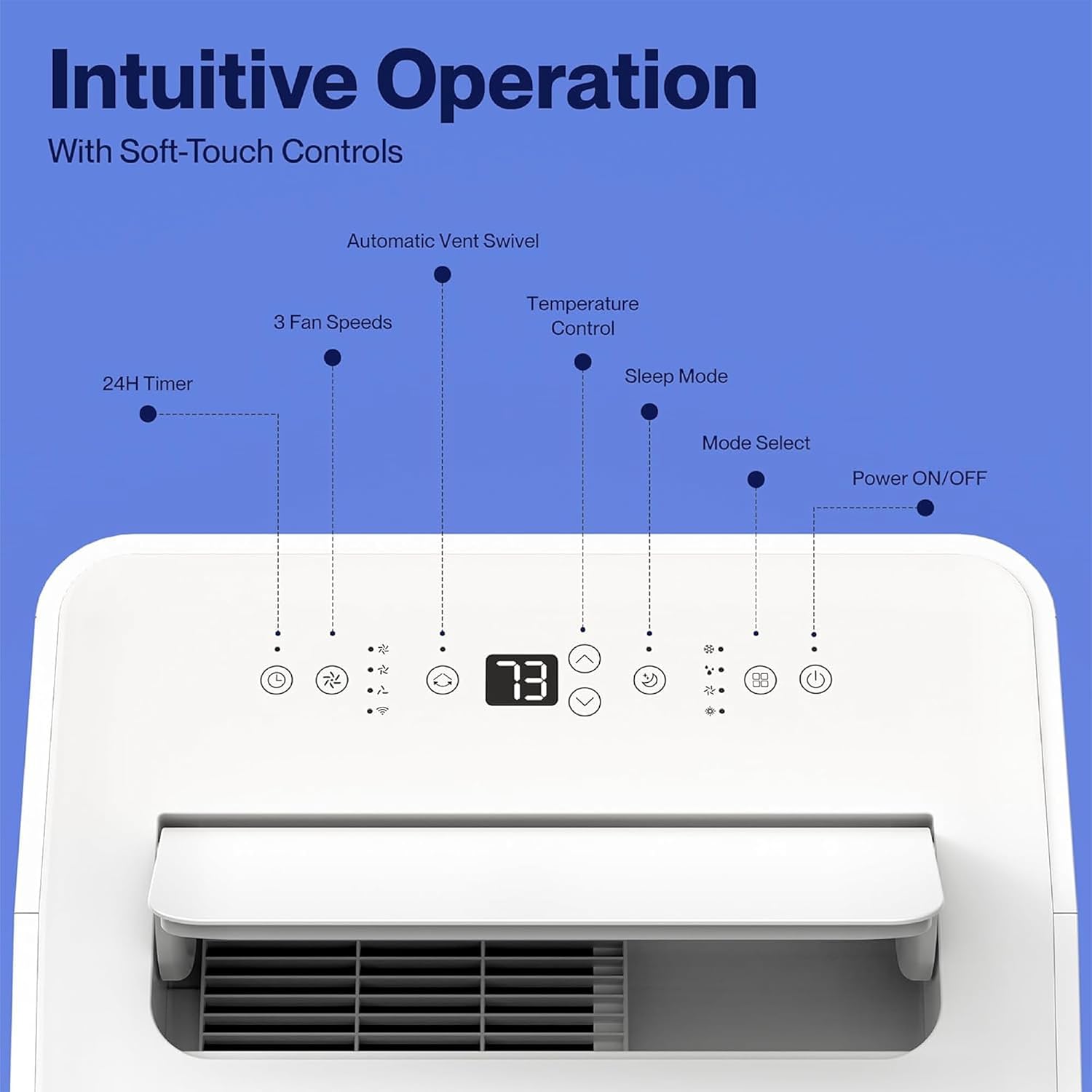
Figure 4.1: The control panel features buttons for Power ON/OFF, Mode Select, Sleep Mode, Temperature Control, 3 Fan Speeds, 24H Timer, and Automatic Vent Swivel.
4.2 การควบคุมระยะไกล
A remote control is included for convenient operation from a distance.
4.3 Della+ App & WiFi Connectivity
Control your unit from anywhere using the free Della+ app on your smartphone. The unit is compatible with Alexa and Google Assistant.
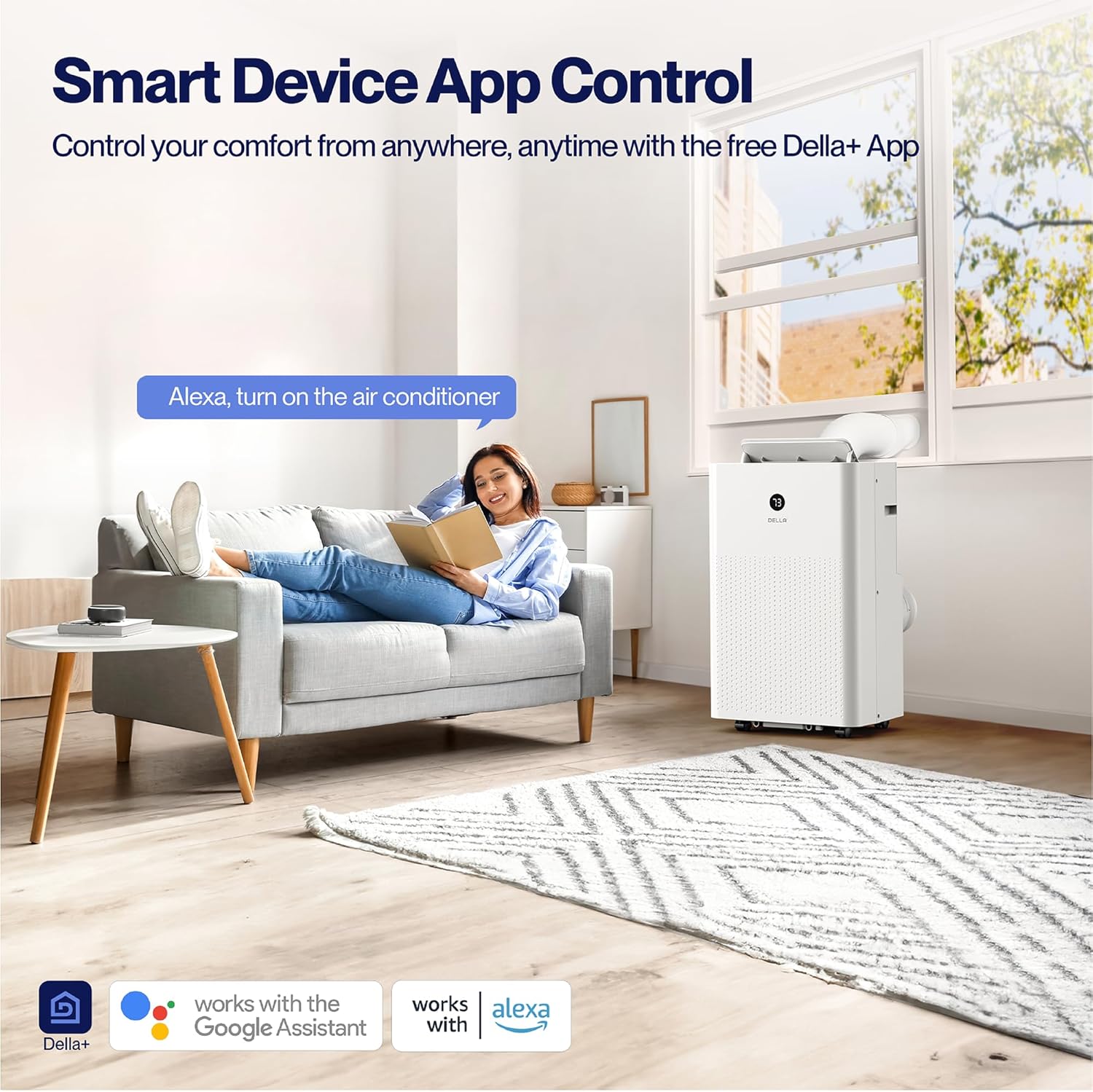
Figure 4.2: Smart Device App Control allows you to manage your unit's settings remotely.
Geo Fencing Function:
Utilize the Geo Fencing feature to automatically activate or deactivate the unit based on your mobile device's location. This allows the AC to turn on as you approach home, ensuring a comfortable environment upon arrival.
Video 4.1: This video demonstrates how to set up and customize the Geo Location function using the Della+ app, allowing the unit to activate based on your proximity to a preset location.
4.4 โหมดการทำงาน
The unit offers four primary operating modes:
- โหมดเย็น: Provides cooling with an adjustable temperature range of 61°F (16°C) to 90°F (32°C).
- โหมดความร้อน: Utilizes a built-in heat pump to warm your space quickly and efficiently.
- โหมดพัดลม: Circulates air with three adjustable fan speeds.
- โหมดแห้ง (เครื่องลดความชื้น): Removes excess moisture from the air, up to 68 pints/day.
4.5 ตัวจับเวลาและโหมดสลีป
- ตัวจับเวลา 24 ชั่วโมง: ตั้งโปรแกรมให้เครื่องเปิดหรือปิดอัตโนมัติภายในระยะเวลา 24 ชั่วโมง
- โหมดสลีป: Optimizes settings for quiet and energy-efficient operation during sleep.
5. การบำรุงรักษา
5.1 การทำความสะอาดตัวกรอง
The unit features a removable and washable double-layer filter. Regular cleaning is essential for optimal performance and air quality.
- ถอดปลั๊กเครื่องปรับอากาศออกจากเต้าเสียบไฟฟ้า
- Locate and remove the filter from the unit.
- ล้างตัวกรองด้วยน้ำสบู่อุ่นๆ ล้างออกให้สะอาด
- ปล่อยให้ตัวกรองแห้งสนิทก่อนจะใส่กลับเข้าไปในเครื่อง
5.2 Water Disposal
The unit is designed with a self-evaporate system, which minimizes the need for frequent drainage. However, manual drainage may be required, especially in high humidity conditions.

Figure 5.1: Easy water disposal options include the self-evaporate system, a water full indicator, and manual drainage ports.
- When the water full indicator illuminates, the unit will stop operating.
- Locate the drainage port at the bottom of the unit.
- Place a shallow pan or connect a drain hose (not included) to the port.
- ถอดปลั๊กท่อระบายน้ำออกเพื่อให้น้ำไหลออกได้
- Replace the drain plug securely once drainage is complete.
5.3 พื้นที่จัดเก็บ
ก่อนเก็บรักษาเครื่องเป็นเวลานาน โปรดตรวจสอบให้แน่ใจว่าได้ระบายน้ำออกหมดแล้ว และตัวกรองสะอาดและแห้งสนิท เก็บไว้ในที่แห้งและเย็น โดยควรเก็บไว้ในบรรจุภัณฑ์เดิม
6 การแก้ไขปัญหา
If you encounter issues with your DELLA portable air conditioner, refer to the table below for common problems and solutions.
| ปัญหา | สาเหตุที่เป็นไปได้ | สารละลาย |
|---|---|---|
| เครื่องไม่เปิด | No power supply; Power cord unplugged; Water tank full. | ตรวจสอบการเชื่อมต่อสายไฟ เสียบปลั๊กให้แน่น ระบายน้ำออกจากถังเก็บน้ำ |
| Unit does not cool/heat effectively | ตัวกรองอากาศสกปรก ท่อไอเสียอุดตันหรือหลุดออก ห้องกว้างเกินไป ประตู/หน้าต่างเปิดอยู่ | Clean air filter; Check hose connection/clearance; Ensure room size is within capacity; Close doors/windows. |
| หน่วยมีเสียงดัง | เครื่องไม่ได้วางบนพื้นผิวเรียบ; แผ่นกรองอากาศสกปรก; มีสิ่งกีดขวางในพัดลม | วางบนพื้นผิวที่เรียบ ทำความสะอาดตัวกรองอากาศ ตรวจสอบสิ่งกีดขวาง |
| การรั่วซึมของน้ำ | Drain plug loose; Unit tilted; Drain hose not properly connected. | Secure drain plug; Ensure unit is level; Check drain hose connection. |
7. ข้อมูลจำเพาะ
| คุณลักษณะ | รายละเอียด |
|---|---|
| หมายเลขรุ่น | 048-OPAC-9HB |
| ความสามารถในการทำความเย็น (ASHRAE) | 14,000 บีทียู |
| ความจุความเย็น (SACC) | 9,800 บีทียู |
| ความสามารถในการให้ความร้อน | 11,669 บีทียู |
| พื้นที่ให้บริการ | สูงสุด 400 ตร.ฟุต |
| ความจุเครื่องลดความชื้น | 68 ไพน์ / วัน |
| ระดับเสียง | 49 เดซิเบล(เอ) |
| ขนาด (กว้าง x ยาว x สูง) | 17.3 x 13.2 x 26.2 นิ้ว |
| น้ำหนัก | 63.9 ปอนด์ |
| เล่มที่tage | 115 โวลต์ |
| ความยาวสายไฟ | 70.8 นิ้ว |
| ความยาวท่อไอเสีย | 47 นิ้ว |
8. การรับประกันและการสนับสนุน
ข้อมูลการรับประกัน:
This DELLA Portable Air Conditioner comes with a รับประกัน 1 ปี นับจากวันที่ซื้อ โปรดเก็บหลักฐานการซื้อไว้เพื่อใช้ในการเคลมประกัน
การสนับสนุนลูกค้า:
For any questions, technical assistance, or warranty inquiries, please contact Della Customer Support. ฝ่ายสนับสนุนลูกค้าตลอด 24 ชม. พร้อมให้ความช่วยเหลือคุณ
เยี่ยมชม Della Store สำหรับข้อมูลเพิ่มเติมและทรัพยากรผลิตภัณฑ์
Ask a question about this manual
Ask about setup, troubleshooting, compatibility, parts, safety, or missing instructions. Manuals+ will review the question and use this page’s manual context to help answer it.