
1. บทนำ
The BTMETER BT-535G is a high-precision ammonia gas detector designed for continuous quantitative analysis of ammonia (NH3) concentration. It also measures ambient temperature and humidity, providing comprehensive environmental monitoring. This device is equipped with an imported electrochemical sensor for fast response, high accuracy, and stable performance. It features a clear LCD backlight display and customizable alarm settings to ensure safety and efficient monitoring in various applications.

ด้านหน้า view of the BTMETER BT-535G Ammonia Gas Detector, displaying ammonia concentration in PPM, relative humidity, and temperature.
2. คุณสมบัติของผลิตภัณฑ์
- High-Precision Ammonia Detection: Measures NH3 concentration from 0 to 100 ppm with a resolution of 0.1 ppm and an accuracy of ±5% (F.S). Features a rapid response time of less than 120 seconds.
- Clear Backlit LCD Display: Equipped with a large LCD screen with backlight, ensuring clear visibility of data even in low-light conditions.
- Adjustable Alarm Settings: Includes two customizable ammonia alarm levels (AL1 and AL2). When detected ammonia concentration reaches the preset safety limits, the device activates a buzzer and LED indicator for dual warning.
- Integrated Temperature and Humidity Meter: Monitors ambient temperature (-10°C to 50°C with ±2°C accuracy) and relative humidity (0% to 95%). Temperature units are switchable between Celsius (°C) and Fahrenheit (°F).
- Long-Life Rechargeable Battery: Built-in 2000mAh lithium-ion battery provides approximately 4 hours of standby time after a full charge. Conveniently recharges via a USB Type-C cable.
- ตำแหน่งที่หลากหลาย: Features a 180° rotating stand for desktop use and a hanging hole for wall-mounted continuous monitoring.
3. เนื้อหาบรรจุภัณฑ์
โปรดตรวจสอบสิ่งของในกล่องเมื่อได้รับสินค้า หากมีสิ่งใดขาดหายหรือเสียหาย โปรดติดต่อผู้ค้าปลีก
- BTMETER BT-535G Ammonia Gas Detector
- สายชาร์จแบบ USB Type-C
- คู่มือการใช้งาน
4. Device Layout and Display

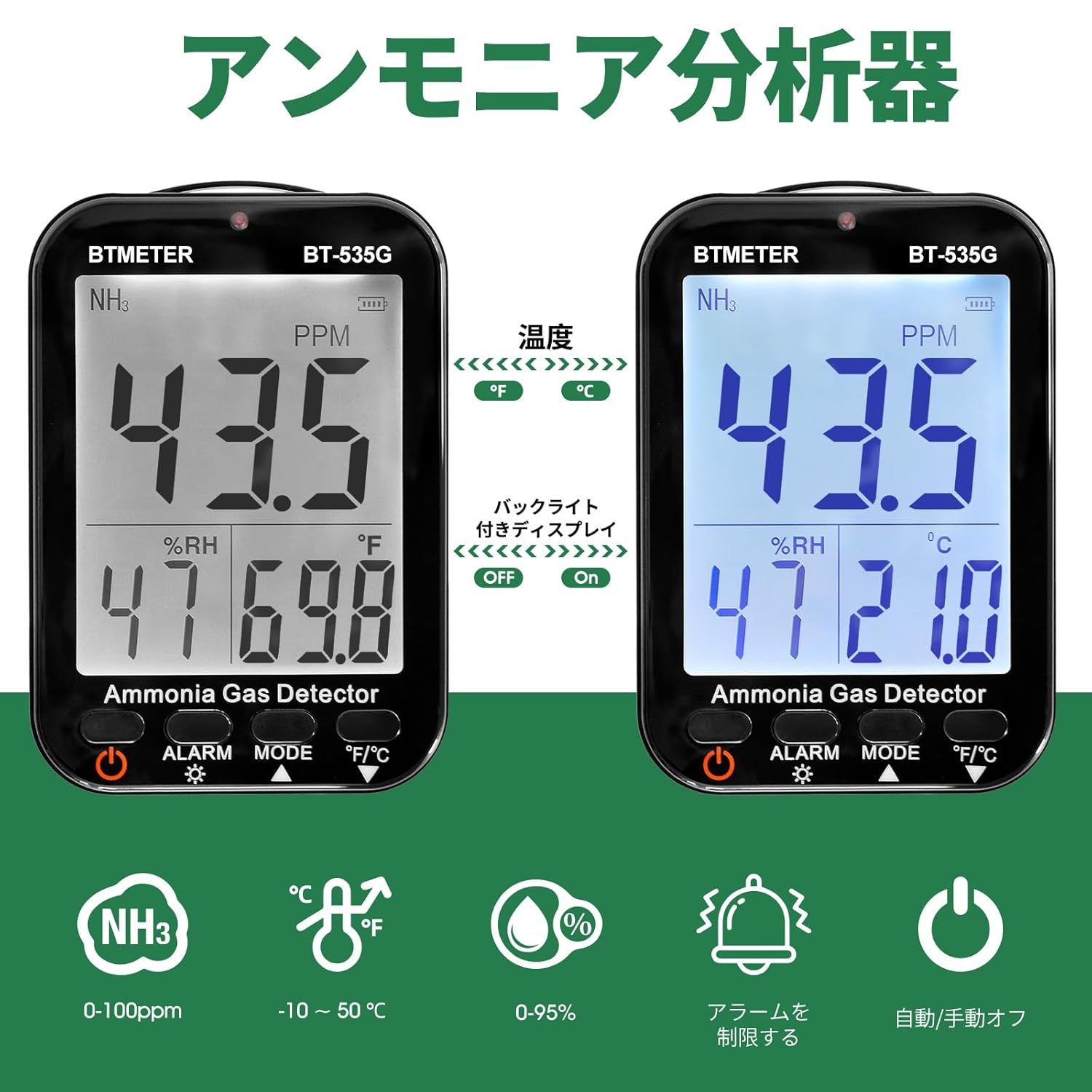
The device's LCD screen showing ammonia concentration (PPM), relative humidity (%RH), and temperature (°C or °F). It also highlights the backlight on/off function and temperature unit switching.
The BT-535G features a clear LCD display and intuitive buttons for easy operation:
- NH3: Chemical formula for ammonia.
- AL1 / AL2: First and second level alarm indications.
- หน่วยต่อนาที: Ammonia gas unit.
- Ammonia Concentration Display Area: Shows the current NH3 level.
- %ความชื้นสัมพัทธ์: Humidity unit.
- Humidity Value Display Area: Shows current relative humidity.
- °C / °F: หน่วยอุณหภูมิ
- Temperature Value Display Area: Shows current temperature.
- Battery Level Mark: แสดงพลังงานแบตเตอรี่ที่เหลืออยู่
- จอแสดงผลแบ็คไลท์: แสดงสถานะของไฟแบ็คไลท์
- ปุ่มเปิด/ปิด: Switch on/off function.
- ปุ่มปลุก: Alarm and backlight function control.
- ปุ่มโหมด: Set auto power ON/OFF.
- °F/°C ปุ่ม: Celsius/Fahrenheit switching and downward selection function.
5. การตั้งค่า
5.1 การติดตั้งแบตเตอรี่
- Using a screwdriver, carefully remove the screw from the battery compartment cover on the back of the device.
- เปิดฝาครอบแบตเตอรี่
- Connect the battery switch cable to the device's internal connector. Ensure a secure connection.
- Place the battery back into its compartment and close the cover.
- ยึดฝาครอบแบตเตอรี่ด้วยสกรู
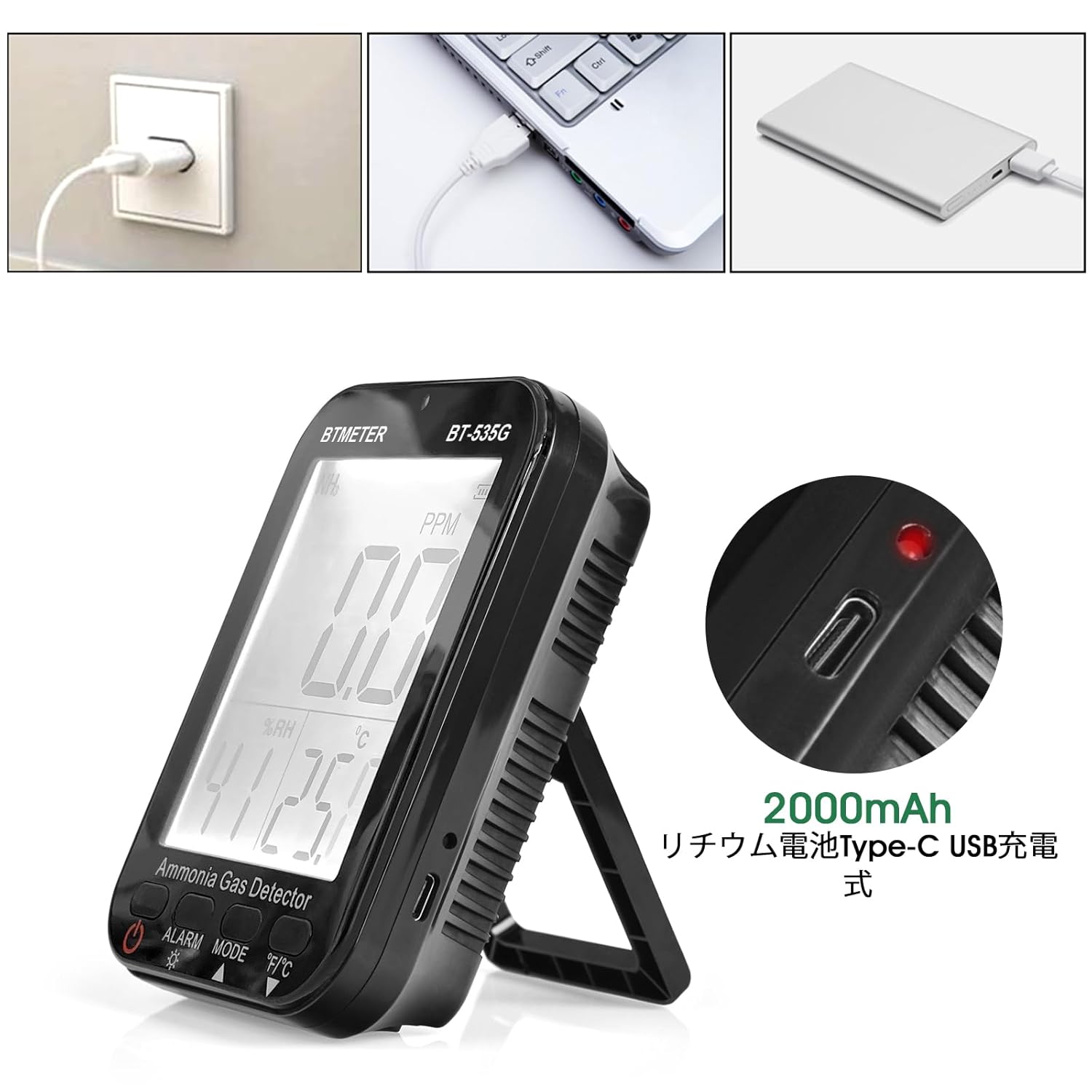
The BTMETER BT-535G detector features a USB Type-C port for convenient charging from a wall adapter, laptop, or power bank. The image shows the charging port and the internal 2000mAh lithium-ion battery.
5.2 การเปิดเครื่องครั้งแรก
After battery installation, press and hold the พลัง button to turn on the device. The LCD display will light up and show current readings.
6. คู่มือการใช้งาน
6.1 เปิด/ปิดเครื่อง
- การเปิดเครื่อง: กดค้างไว้ พลัง ปุ่ม (
 ) เป็นเวลาประมาณ 2 วินาที
 - วิธีปิด: กดค้างไว้ พลัง กดปุ่มนี้ประมาณ 2 วินาที
การควบคุมแบ็คไลท์ 6.2
กดปุ่ม เตือน ปุ่ม () briefly to toggle the backlight ON or OFF.
6.3 Temperature Unit Switching
กดปุ่ม °ฟาเรนไฮต์/°เซลเซียส ปุ่ม () briefly to switch the temperature display between Celsius (°C) and Fahrenheit (°F).
6.4 Auto Power Off Setting
กดปุ่ม โหมด ปุ่ม () to cycle through auto power off settings (e.g., 10 minutes, 20 minutes, OFF). Select the desired setting.
7. การตั้งค่านาฬิกาปลุก
The BT-535G allows you to set two independent ammonia concentration alarm thresholds (AL1 and AL2) to enhance safety.

The device's display showing two customizable alarm levels, AL1 and AL2, which can be set to specific ammonia concentration thresholds. When these thresholds are met, the device will trigger an alert.
- To enter alarm setting mode, press and hold the เตือน ปุ่ม.
- ใช้ โหมด และ °ฟาเรนไฮต์/°เซลเซียส buttons to adjust the values for AL1 and AL2.
- กดปุ่ม เตือน button again to confirm and save the settings.
When the detected ammonia concentration exceeds the set AL1 or AL2 threshold, the device will activate an audible buzzer and flash the LED indicator to alert the user.
8. การชาร์จไฟ
The BT-535G is powered by a built-in 2000mAh lithium-ion battery. To charge the device:
- Connect the provided USB Type-C charging cable to the charging port on the side of the device.
- เสียบปลายอีกด้านของสาย USB เข้ากับแหล่งจ่ายไฟ USB ที่ใช้งานร่วมกันได้ (เช่น อะแดปเตอร์ติดผนัง พอร์ต USB ของคอมพิวเตอร์ พาวเวอร์แบงค์)
- ไฟแสดงสถานะแบตเตอรี่บนจอแสดงผลจะแสดงสถานะการชาร์จ
- A full charge typically provides approximately 4 hours of standby operation.
9. การบำรุงรักษา
9.1 การทำความสะอาด
เช็ดอุปกรณ์ด้วยผ้าแห้งเนื้อนุ่ม ห้ามใช้สารทำความสะอาดที่มีฤทธิ์กัดกร่อนหรือตัวทำละลาย เพราะอาจทำให้อุปกรณ์เสียหายได้asing หรือจอแสดงผล
9.2 พื้นที่จัดเก็บ
When not in use for extended periods, store the device in a cool, dry place away from direct sunlight and extreme temperatures. Ensure the battery is partially charged before storage to prolong its lifespan.
9.3 การดูแลรักษาเซ็นเซอร์
Avoid exposing the sensor to harsh chemicals, dust, or excessive moisture, as this can affect its accuracy and lifespan. Do not attempt to clean the sensor directly.
10 การแก้ไขปัญหา
| ปัญหา | สาเหตุที่เป็นไปได้ | สารละลาย |
|---|---|---|
| อุปกรณ์ไม่เปิดเครื่อง | Low battery; Battery not connected; Device fault | Charge the device; Check battery connection; Contact support |
| การอ่านที่ไม่ถูกต้อง | Sensor contamination; Device not calibrated; Extreme environmental conditions | Ensure sensor is clean; Allow device to stabilize; Contact support for calibration |
| สัญญาณเตือนไม่ทำงาน | Alarm levels set too high; Alarm function disabled | Adjust alarm thresholds; Ensure alarm is enabled |
| แสงไฟไม่ทำงาน | Backlight turned off; Device fault | Press ALARM button to turn on; Contact support |
11. ข้อมูลจำเพาะ

This image details the high-precision electrochemical sensor, outlining its NH3 range (0-100ppm), resolution (0.1ppm), accuracy (less than ±5% F.S), response time (less than 120s), and reproducibility (less than ±1%).
| พารามิเตอร์ | ค่า |
|---|---|
| แบบอย่าง | BT-535G |
| ตรวจพบก๊าซ | แอมโมเนีย (NH3) |
| ช่วงการวัด | 0 100-ppm |
| ปณิธาน | 0.1 หน้าต่อนาที |
| ข้อผิดพลาดพื้นฐาน | ±5% (F.S) |
| เวลาตอบสนอง | < 120 วินาที |
| ระยะเวลาการฟื้นตัว | < 240 วินาที |
| ความสามารถในการทำซ้ำได้ | ±1% |
| ช่วงอุณหภูมิ | -10°C ถึง 50°C (14°F ถึง 122°F) |
| ความแม่นยำของอุณหภูมิ | ±2 องศาเซลเซียส |
| ช่วงความชื้น | ความชื้นสัมพัทธ์ 0-95% |
| แบตเตอรี่ | ลิเธียมไอออน 2000mAh |
| พอร์ตชาร์จ | ยูเอสบี ไทป์ ซี |
| ขนาด | 128 มม. (ส) x 90 มม. (ก) x 37 มม. (ล) |
| น้ำหนัก | 233กรัม |

The device is lightweight at 233g and includes a convenient wall-mount design for fixed monitoring installations.
12. การสมัคร
The BTMETER BT-535G Ammonia Gas Detector is suitable for a wide range of applications where ammonia concentration, temperature, and humidity monitoring are critical. These include:
- Poultry and livestock farms
- Industrial facilities and chemical plants
- Laboratories and research environments
- Wastewater treatment plants
- Refrigeration facilities
- Agricultural settings

The BTMETER BT-535G is suitable for a wide range of applications, such as monitoring air quality in poultry farms, industrial environments, and agricultural operations.
13. สินค้าหมดview วีดีโอ
This video demonstrates the BTMETER BT-535G Ammonia Gas Detector, including its display, battery installation, and various applications in different environments.
14. การรับประกันและการสนับสนุน
BTMETER products are designed for reliability and performance. This product comes with a standard manufacturer's warranty. For detailed warranty information, technical support, or service inquiries, please refer to the warranty card included in your package or visit the official BTMETER webเว็บไซต์.
For direct support, please contact:
- อีเมล: support@btmeter.com
- Webเว็บไซต์: www.btmeter.com