
Della TL-9K1VB-19S-I+O
คู่มือการใช้งานเครื่องปรับอากาศแบบแยกส่วนขนาดเล็ก DELLA Vario Series 9000 BTU
Model: TL-9K1VB-19S-I+O
1. บทนำ
This user manual provides detailed instructions for the installation, operation, and maintenance of your DELLA Vario Series 9000 BTU Mini Split Air Conditioner. Please read this manual thoroughly before installation and use to ensure proper function and safety. Keep this manual for future reference.
2. ข้อมูลด้านความปลอดภัย
Always adhere to local and national electrical codes. Professional installation is mandatory for this system. Do not attempt to install or service the unit yourself unless you are a qualified technician. Disconnect power before performing any maintenance or cleaning.
- ตรวจสอบให้แน่ใจว่ามีการต่อสายดินอย่างเหมาะสมเพื่อป้องกันไฟฟ้าช็อต
- ห้ามปิดกั้นช่องรับหรือช่องระบายอากาศ
- ให้เด็กและสัตว์เลี้ยงอยู่ห่างจากเครื่องภายนอก
- If unusual sounds, smells, or smoke occur, immediately turn off the unit and disconnect power. Contact qualified service personnel.
3. อะไรอยู่ในกล่อง
ตรวจสอบว่าส่วนประกอบทั้งหมดมีอยู่ก่อนเริ่มการติดตั้ง:
- 1 x Mini-Split Air Conditioner (Indoor Unit)
- 1 x Mini-Split Air Conditioner (Outdoor Unit)
- รีโมทคอนโทรล
- Installation Kit (Standard size 1/4" & 3/8" outer dimension copper pipes, drain pipe, wall sleeve, plasticine putty, screws, anchors, bracket template)
- คู่มือการใช้งาน (เอกสารนี้)

Image: All components included in the DELLA Vario Series Mini Split Air Conditioner package, including indoor unit, outdoor unit, remote control, and various installation accessories.
4. การตั้งค่าและการติดตั้ง
This DELLA Mini Split AC system requires professional installation. It is not designed for DIY installation. Line-set vacuuming is required during installation. Any alteration of line-set length requires adjusting freon levels. Consult a certified HVAC technician for proper installation to ensure optimal performance and to maintain warranty validity.
4.1 การตรวจสอบก่อนการติดตั้ง
- Ensure the installation area meets space and electrical requirements.
- Verify power supply (115V) and maximum fuse size (25A).
- ตรวจสอบให้แน่ใจว่าระบบระบายน้ำของตัวเครื่องภายในอาคารทำงานอย่างถูกต้อง
ขนาดหน่วย 4.2

Image: Detailed dimensions for both the indoor and outdoor units of the DELLA Vario Series Mini Split Air Conditioner, including length, width, and height measurements.
5. คู่มือการใช้งาน
Your DELLA Vario Series Mini Split Air Conditioner offers multiple modes and smart features for optimal comfort and energy efficiency.
5.1 ฟังก์ชั่นการควบคุมระยะไกล
The included remote control allows full command over your unit. Familiarize yourself with its buttons and their functions:
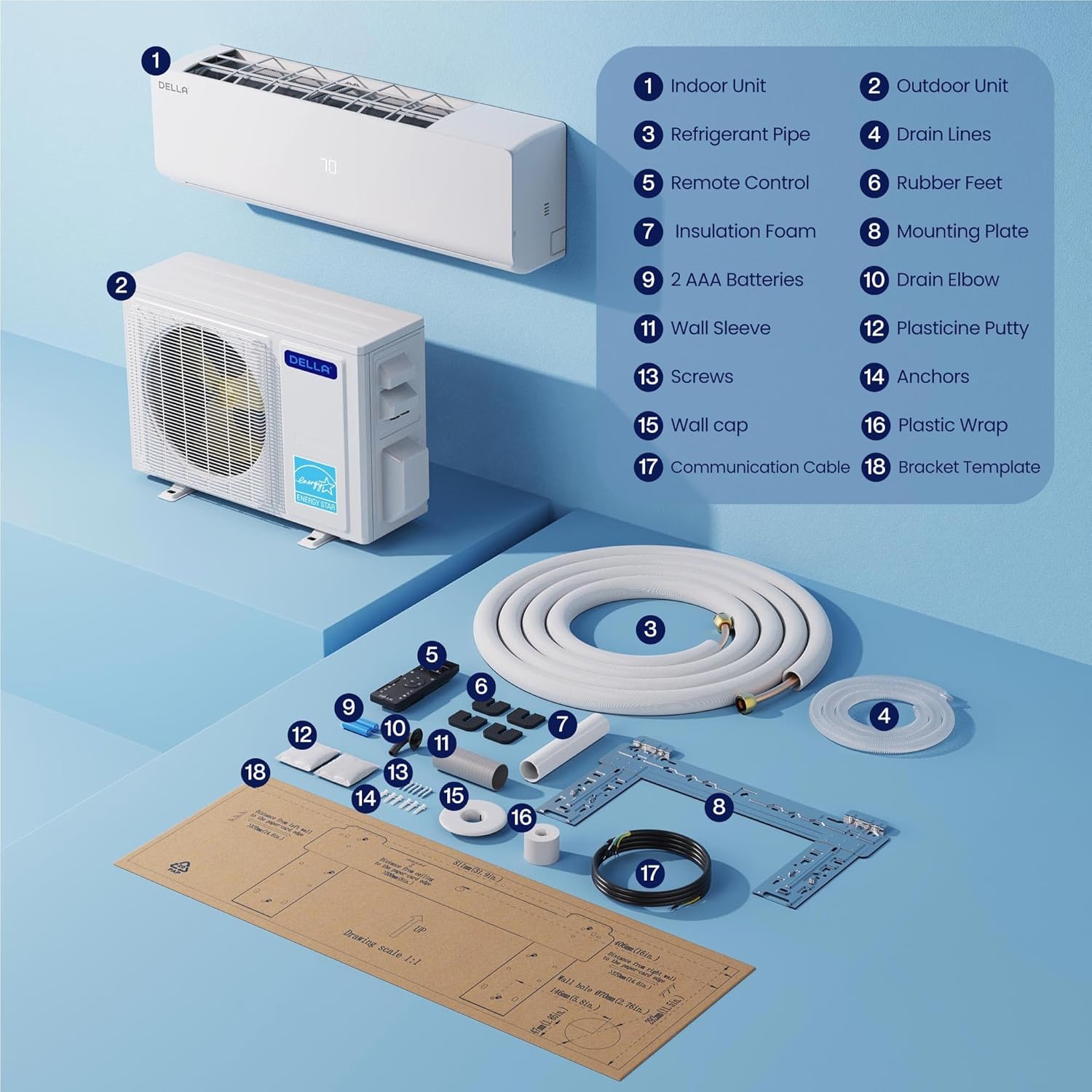
Image: A detailed diagram of the DELLA Mini Split remote control, highlighting various buttons and their corresponding functions such as mode selection, fan speed, temperature adjustment, and special features.
- เปิด/ปิด: เปิดหรือปิดเครื่อง
- โหมด: Cycles through Cool, Heat, Dry (Dehumidify), Fan Only, and Auto modes.
- อุณหภูมิขึ้น/ลง: ปรับอุณหภูมิได้ตามต้องการ
- ความเร็วพัดลม: Selects fan speed (Quiet, Low, Mid Low, Mid, Mid High, High, Turbo).
- Airflow (Swing): Controls vertical and horizontal louver movement for optimal air distribution.
- โหมดความรู้สึก: Senses room temperature at the remote control for precise comfort.
- โหมดสลีป: ปรับอุณหภูมิและความเร็วพัดลมเพื่อการนอนหลับสบายและประหยัดพลังงาน
- ตัวจับเวลา: Sets a specific time for the unit to turn on or off.
- โหมด ECO: Optimizes operation for maximum energy efficiency.
5.2 Smart App Control (Della+ App)
Control your DELLA Mini Split from anywhere using the Della+ app, compatible with Google Assistant and Alexa. The app provides advanced features including scheduling, geo-location, and detailed control over modes and settings.
Video: Demonstration of the Della+ mobile application interface, showcasing features like mode selection, fan speed adjustment, airflow control, scheduling, and timer settings for the mini split air conditioner.
- รีโมทคอนโทรล: Adjust settings from your smartphone.
- การกำหนดตารางเวลา: Program daily or weekly operation schedules.
- Geo-Location: Automatically adjust settings based on your proximity to home.
- การควบคุมด้วยเสียง: เชื่อมต่อกับ Alexa หรือ Google Assistant เพื่อการใช้งานแบบแฮนด์ฟรี

Image: Screenshots of the Della+ app showing various control screens, including temperature setting, mode selection, timer functions, and smart home integration options.
6. การบำรุงรักษา
Regular maintenance ensures the longevity and efficient operation of your DELLA Mini Split Air Conditioner.
6.1 การทำความสะอาดตัวกรอง
Clean the air filters regularly (every 2-4 weeks, depending on usage) to maintain air quality and efficiency. Refer to the detailed instructions in the full user manual (PDF) for filter removal and cleaning procedures.
6.2 การทำความสะอาดตัวเครื่องภายนอก
Keep the outdoor unit clear of debris, leaves, and other obstructions. Periodically clean the coils with a soft brush or vacuum cleaner. Ensure proper drainage from the outdoor unit.
6.3 Self-Clean Function
The unit features a PureClean tech self-clean function that stops dust buildup and defrosts the indoor unit, keeping your air fresher with advanced sterilization. Activate this function via the remote control or Della+ app as needed.
7 การแก้ไขปัญหา
ก่อนที่จะติดต่อฝ่ายสนับสนุนลูกค้า โปรดอ่านview ปัญหาและวิธีแก้ไขทั่วไปต่อไปนี้:
| ปัญหา | สาเหตุที่เป็นไปได้ | สารละลาย |
|---|---|---|
| เครื่องไม่เปิด | No power, tripped circuit breaker, remote control batteries dead. | ตรวจสอบแหล่งจ่ายไฟ รีเซ็ตเบรกเกอร์วงจร เปลี่ยนแบตเตอรี่รีโมทคอนโทรล |
| การทำความเย็น/ทำความร้อนไม่เพียงพอ | แผ่นกรองอากาศสกปรก, ชุดภายนอกอุดตัน, การตั้งค่าโหมด/อุณหภูมิไม่ถูกต้อง, สารทำความเย็นเหลือน้อย | ทำความสะอาดแผ่นกรอง ขจัดสิ่งกีดขวาง ตรวจสอบการตั้งค่า และติดต่อช่างเทคนิคเพื่อตรวจสอบสารทำความเย็น |
| เสียงรบกวนที่ผิดปกติ | ชิ้นส่วนหลวม พัดลมอุดตัน เสียงการทำงานปกติ (เช่น การไหลของสารทำความเย็น) | Inspect for loose parts, clear obstructions. If persistent or loud, contact technician. |
For issues not listed here or if solutions do not resolve the problem, please contact DELLA customer support.
8. ข้อมูลจำเพาะ
| คุณสมบัติ | รายละเอียด |
|---|---|
| ชื่อยี่ห้อ | เดลล่า |
| หมายเลขรุ่น | TL-9K1VB-19S-I+O |
| ความสามารถในการทำความเย็น | 9000 บีทียู/ชม. |
| ความสามารถในการให้ความร้อน | 10000 บีทียู/ชม. |
| เรตติ้ง SEER2 | 19 ผู้ทำนาย2 |
| แหล่งจ่ายไฟ | 115V / 60Hz / 1PH |
| กำลังไฟฟ้าเข้าสูงสุด | 750 วัตต์ |
| น้ำหนักสินค้า | น้ำหนัก 19.8 ปอนด์ (ตัวเครื่องภายใน) |
| ขนาดสินค้า (ภายในอาคาร) | 31.94 x 8 x 11.5 นิ้ว |
| พื้นที่ให้บริการ | สูงสุด 400 ตารางฟุต |
| ระดับเสียง | Ultra silent at only 28 dBa |
| คุณสมบัติพิเศษ | Dehumidifier, Fast Cooling, Remote Control, WiFi Enabled, 4D Air Flow, I Feel Mode, 24 Hour Timer, Sleep Mode, ECO Energy Saving Mode, Multiple Fan Speeds, Turbo Function, PureClean Tech |
9. การรับประกันและการสนับสนุน
DELLA offers a limited lifetime warranty for this product, ensuring unmatched support and peace of mind. For any inquiries or technical assistance, please contact DELLA customer support.
- การสนับสนุนลูกค้า: Available for technical assistance.
- การส่งคืน: นโยบายคืนสินค้าง่ายภายใน 30 วัน

Image: Graphic illustrating DELLA's lifetime coverage, highlighting best-in-class support and no additional costs.
For more detailed information, please refer to the official คู่มือการใช้งาน (PDF).
Ask a question about this manual
Ask about setup, troubleshooting, compatibility, parts, safety, or missing instructions. Manuals+ will review the question and use this page’s manual context to help answer it.