
บทนำและข้อมูลด้านความปลอดภัย
Thank you for choosing the CREATE WIND CALM SLIM LIGHT Ceiling Fan with Light. This manual provides essential information for the safe installation, operation, and maintenance of your new ceiling fan. Please read these instructions carefully before installation and use, and retain them for future reference.
คำแนะนำด้านความปลอดภัยที่สำคัญ:
- ตัดการเชื่อมต่อไฟฟ้าที่เบรกเกอร์วงจรหลักทุกครั้งก่อนการติดตั้ง บำรุงรักษา หรือทำความสะอาด
- Installation must be performed by a qualified electrician and in accordance with all local electrical codes.
- Ensure the mounting structure can support the fan's weight.
- ห้ามสอดสิ่งของเข้าไปในใบพัดของพัดลมขณะที่พัดลมกำลังทำงาน
- ควรกันเด็กและสัตว์เลี้ยงให้อยู่ห่างจากพัดลมขณะใช้งาน
- พัดลมนี้ออกแบบมาสำหรับใช้ภายในอาคารเท่านั้น
- The light intensity is not adjustable.
การติดตั้งและการตั้งค่า
Carefully unpack all components and ensure all parts are present before beginning installation. Refer to the diagrams below for visual guidance.
เนื้อหาแพ็คเกจ:
- Ceiling Fan Unit (Motor, Blades, Integrated Light)
- ตัวยึด
- รีโมทคอนโทรล
- อุปกรณ์ติดตั้ง (สกรู, พุก)
ขั้นตอนการติดตั้ง:
- การตัดการเชื่อมต่อไฟฟ้า: Turn off power at the main circuit breaker to prevent electrical shock.
- การติดตั้งตัวยึด: Secure the mounting bracket to the ceiling joist or a suitable electrical junction box. Ensure the bracket is firmly attached and can support the fan's weight.
บันทึก: Some ceiling installations, particularly those with a DCL box or existing porthole-style light openings, may require additional modifications or drilling new holes in the mounting plate to ensure secure attachment. The provided mounting holes may not align with all existing ceiling setups. Consult a qualified electrician if you encounter difficulties.
- การเชื่อมต่อสายไฟ: เชื่อมต่อสายไฟของพัดลมเข้ากับระบบสายไฟภายในบ้านตามข้อกำหนดด้านไฟฟ้าของท้องถิ่น ตรวจสอบให้แน่ใจว่าการเชื่อมต่อทั้งหมดแน่นหนาดีแล้ว
- การประกอบพัดลม: Attach the fan motor assembly to the mounting bracket. Follow the specific instructions provided in the detailed manual (if available) for blade attachment and securing the main unit.
- การติดตั้งไฟ: The LED light is integrated into the fan's body. Ensure it is properly seated and connected.
- การตรวจสอบขั้นสุดท้าย: Verify all connections are secure and the fan is properly mounted before restoring power.
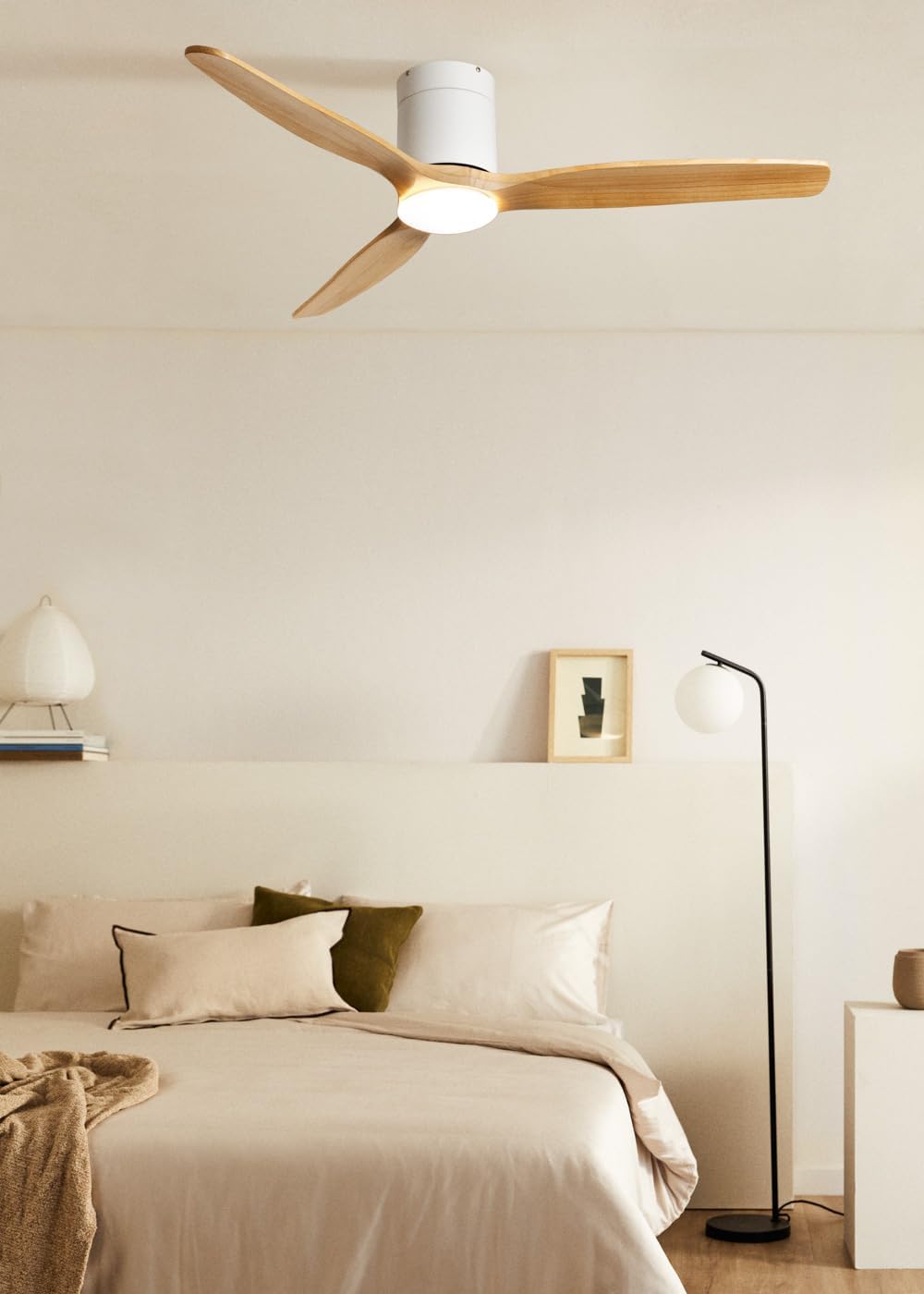
Image: The CREATE WIND CALM SLIM LIGHT ceiling fan with light wood blades and a white body, installed in a modern bedroom setting.

Image: Technical diagram illustrating the top-down dimensions of the fan, showing a total diameter of 132 cm.

Image: Technical diagram illustrating the side dimensions of the fan, showing a height of 27 cm from ceiling to blade tip.
คำแนะนำการใช้งาน
Your CREATE WIND CALM SLIM LIGHT ceiling fan is controlled via the included remote control. Ensure the remote has working batteries.
ฟังก์ชั่นการควบคุมระยะไกล:
- เปิด/ปิดเครื่อง: เปิดหรือปิดพัดลมและไฟ
- การควบคุมความเร็วพัดลม: สามารถปรับความเร็วพัดลมได้ 6 ระดับ
- เปิด/ปิดไฟ: ควบคุมไฟ LED ในตัวได้อย่างอิสระ
- Light Temperature Adjustment: Cycles through 3 color temperatures: warm (2700K), neutral (3300K), and cool (4000K). Note: Light intensity is not adjustable.
- ฟังก์ชั่นจับเวลา: Sets the fan to automatically turn off after 1, 2, 3, or 4 hours.
- โหมดฤดูร้อน/ฤดูหนาว: เปลี่ยนทิศทางการหมุนของใบพัด
ฟังก์ชั่นการใช้งาน: ฤดูร้อน/ฤดูหนาว
This feature optimizes air circulation for different seasons:
- โหมดฤดูร้อน (หมุนทวนเข็มนาฬิกา): สร้างกระแสลมพัดลงด้านล่าง ทำให้เกิดลมเย็นสบาย
- โหมดฤดูหนาว (หมุนตามเข็มนาฬิกา): Creates an upward airflow, circulating warm air accumulated near the ceiling throughout the room, improving heating efficiency.

Image: Diagram illustrating the airflow patterns for Winter mode (upward circulation of warm air) and Summer mode (downward cooling breeze).
คุณสมบัติของไฟ LED:
The integrated LED light offers three distinct color temperatures to suit your preference:
- วอร์มไวท์ (2700K): เพื่อบรรยากาศที่อบอุ่นและผ่อนคลาย
- สีขาวกลาง (3300K): สำหรับให้แสงสว่างทั่วไป
- สีขาวเย็น (4000K): For bright, task-oriented lighting.

ภาพ: ภาพระยะใกล้ view of the integrated LED light module at the center of the fan, emitting a bright white light.

Image: Diagram illustrating the three available LED light temperatures: warm (2700K), neutral (3300K), and cool (4000K).
Audible Feedback (Beep):
The fan emits an audible "beep" sound with each command from the remote control or when power is restored. This beep can be muted via the remote control settings. However, if the main power supply to the fan is cut (e.g., by a wall switch), the mute setting may reset, and the beep will return upon power restoration.
การซ่อมบำรุง
การบำรุงรักษาตามปกติจะช่วยให้พัดลมเพดานของคุณมีประสิทธิภาพสูงสุดและมีอายุการใช้งานยาวนาน
- การทำความสะอาด: ในการทำความสะอาดพัดลม ให้เช็ดใบพัดและตัวมอเตอร์ด้วยผ้าเนื้อนุ่มและแห้งamp ผ้า ห้ามใช้น้ำยาทำความสะอาดที่มีฤทธิ์กัดกร่อนหรือตัวทำละลาย เพราะอาจทำให้พื้นผิวเสียหายได้
- การกำจัดฝุ่น: Periodically dust the fan blades and light fixture to prevent dust buildup, which can affect performance and light output.
- ความสมดุลของใบมีด: If the fan wobbles, check that all blade screws are tight. Minor wobbling can sometimes be corrected using a blade balancing kit (not included).
- การตัดการเชื่อมต่อไฟฟ้า: Always ensure the power is disconnected at the circuit breaker before performing any cleaning or maintenance.
การแก้ไขปัญหา
| ปัญหา | สาเหตุที่เป็นไปได้ | สารละลาย |
|---|---|---|
| พัดลมไม่ทำงาน | ไม่มีแหล่งจ่ายไฟ; แบตเตอรี่รีโมทคอนโทรลหมด; การเดินสายไฟไม่ถูกต้อง | Check circuit breaker and wall switch. Replace remote control batteries. Verify wiring connections are secure (consult an electrician if unsure). |
| ไฟไม่เปิด | No power supply; Light function not activated on remote; LED module fault. | Check power. Ensure light button on remote is pressed. If problem persists, contact support. |
| พัดลมสั่นมากเกินไป | Loose mounting screws; Unbalanced blades; Improper installation. | Ensure mounting bracket and fan screws are tight. Check for bent blades. Use a blade balancing kit if necessary. Re-check installation steps. |
| พัดลมมีเสียงผิดปกติ | น็อตหลวม; สิ่งกีดขวาง; ปัญหาที่มอเตอร์ | Check all screws. Ensure nothing is touching the blades or motor housing. If noise persists, contact support. |
| รีโมทคอนโทรลไม่ตอบสนอง | Dead batteries; Remote not paired (unlikely for this model but general); Obstruction. | Replace batteries. Ensure clear line of sight to the fan's receiver. |
| Audible "beep" sound persists after muting. | Main power supply was cut. | The mute setting may reset if the fan's main power is disconnected. Re-apply the mute setting using the remote control. |
ข้อมูลจำเพาะทางเทคนิค
| ยี่ห้อ | สร้าง |
| ชื่อรุ่น | WIND CALM SLIM LIGHT |
| หมายเลขรุ่น | 198506_515822 |
| สี | ไม้สีอ่อน |
| การออกแบบพัดลม | พัดลมเพดาน |
| แหล่งพลังงาน | สายไฟฟ้า |
| สไตล์ | เพดาน |
| ขนาด (เส้นผ่านศูนย์กลาง x สูง) | 132ซม. x 29ซม. |
| ฟังก์ชั่นพิเศษ | LED Light, Timer, Summer-Winter Function, Remote Control |
| ประเภทการติดตั้ง | การติดตั้งบนเพดาน |
| ประเภทตัวควบคุม | รีโมทคอนโทรล |
| จำนวนความเร็ว | 6 |
| ระดับเสียง | 40 เดซิเบล |
| พลัง | 40 วัตต์ |
| จำนวนใบมีด | 3 |
| ความจุการไหลเวียนของอากาศ | 180 ลูกบาศก์เมตรต่อนาที |
| เล่มที่tage | 240 โวลต์ |
| สภาพแวดล้อมการใช้งาน | ในร่ม |
| ประเภทมอเตอร์ | DC Motor with Brushes |
| วัสดุใบมีด | ไม้ |
ข้อมูลการรับประกัน
Specific warranty details for the CREATE WIND CALM SLIM LIGHT Ceiling Fan are not provided in this manual. For information regarding warranty coverage, terms, and conditions, please refer to the documentation included with your purchase or contact CREATE customer support directly.
การสนับสนุนลูกค้า
If you have any questions, require technical assistance, or need to report an issue with your CREATE WIND CALM SLIM LIGHT Ceiling Fan, please contact CREATE customer support. Contact information can typically be found on the manufacturer's webไซต์หรือบนบรรจุภัณฑ์ผลิตภัณฑ์
Manufacturer: CREATE