1. คำแนะนำด้านความปลอดภัย
Please read all instructions carefully before using the fan and retain this manual for future reference. Improper use may result in electric shock, fire, or serious injury.
- ห้ามจุ่มพัดลมลงในน้ำหรือของเหลวอื่นๆ
- เก็บพัดลมให้ห่างจากเด็กและสัตว์เลี้ยง
- Do not block the fan blades or air inlets/outlets.
- Use only the specified charging cable and power adapter (5V/3A).
- Do not disassemble, repair, or modify the fan yourself. Contact qualified service personnel for assistance.
- Avoid exposing the fan to extreme temperatures, direct sunlight, or high humidity.
- Ensure the fan is placed on a stable surface when in use.
- This product is not water resistant. Avoid use in rain or wet conditions.
2. เนื้อหาบรรจุภัณฑ์
ตรวจสอบว่ามีสิ่งของทั้งหมดอยู่ครบเมื่อแกะกล่อง:
- 1 x F6 Portable Oscillating Campพัดลม
- สายชาร์จ 1 x USB Type-C
- 1 x รีโมทคอนโทรล
- 1 x คู่มือผู้ใช้ (เอกสารนี้)
3. สินค้าหมดview
The Generic F6 Portable Oscillating Camping Fan is designed for versatile outdoor and indoor use, featuring a powerful rechargeable battery, integrated LED lighting, and multiple operational modes.
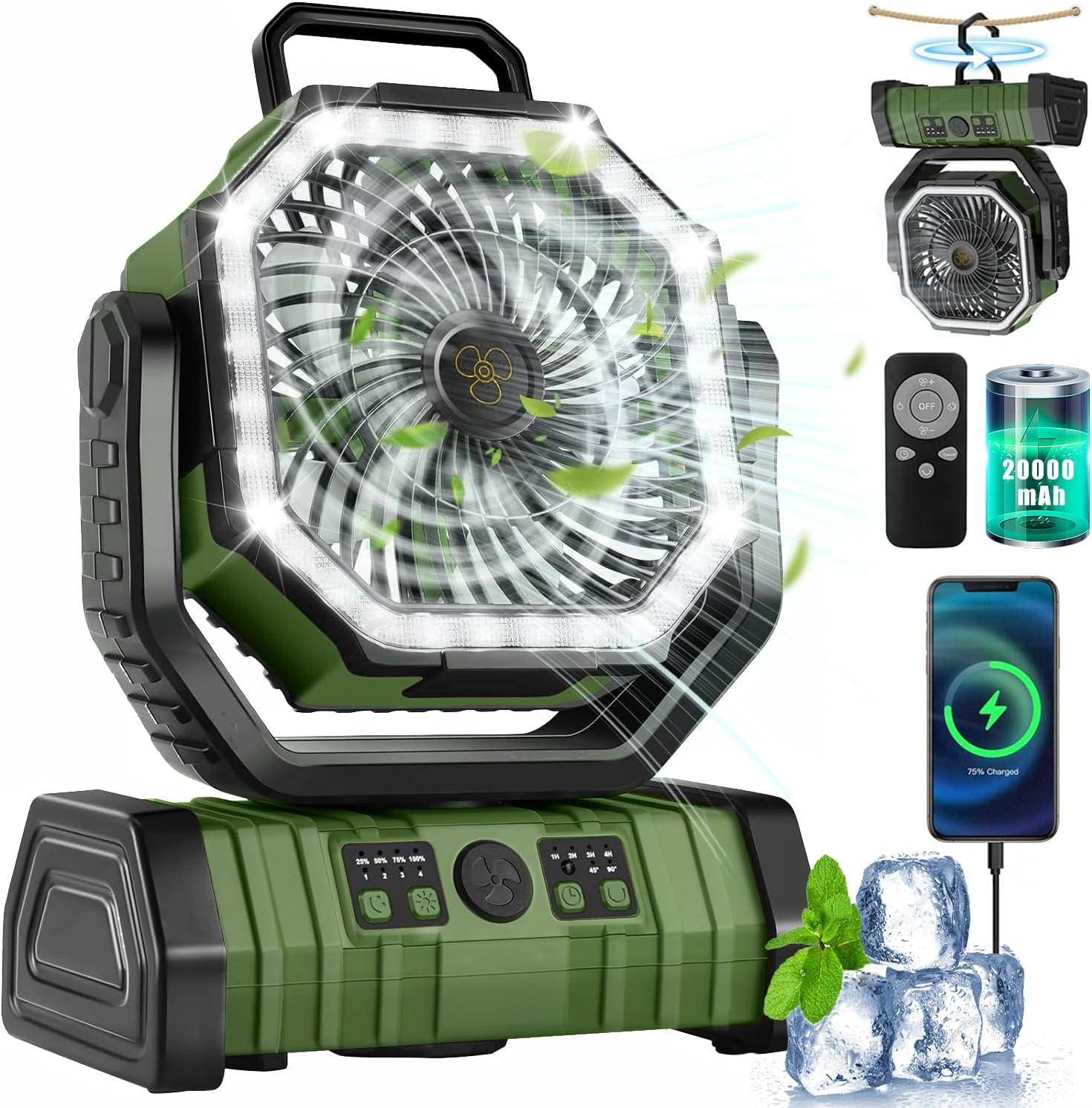
รูปที่ 3.1 : ด้านหน้า view of the F6 Camping Fan, showcasing ของมัน octagonal design and integrated LED ring.

รูปที่ 3.2: ด้านข้างและด้านหน้า views illustrating the fan's dimensions (8.7"L x 4.3"W x 12.6"H) and the 5V/3A Type-C input/output port for charging and power bank functionality.

Figure 3.3: The fan features a 20000mAh rechargeable battery, capable of providing extended operation and serving as a power bank to charge other devices.
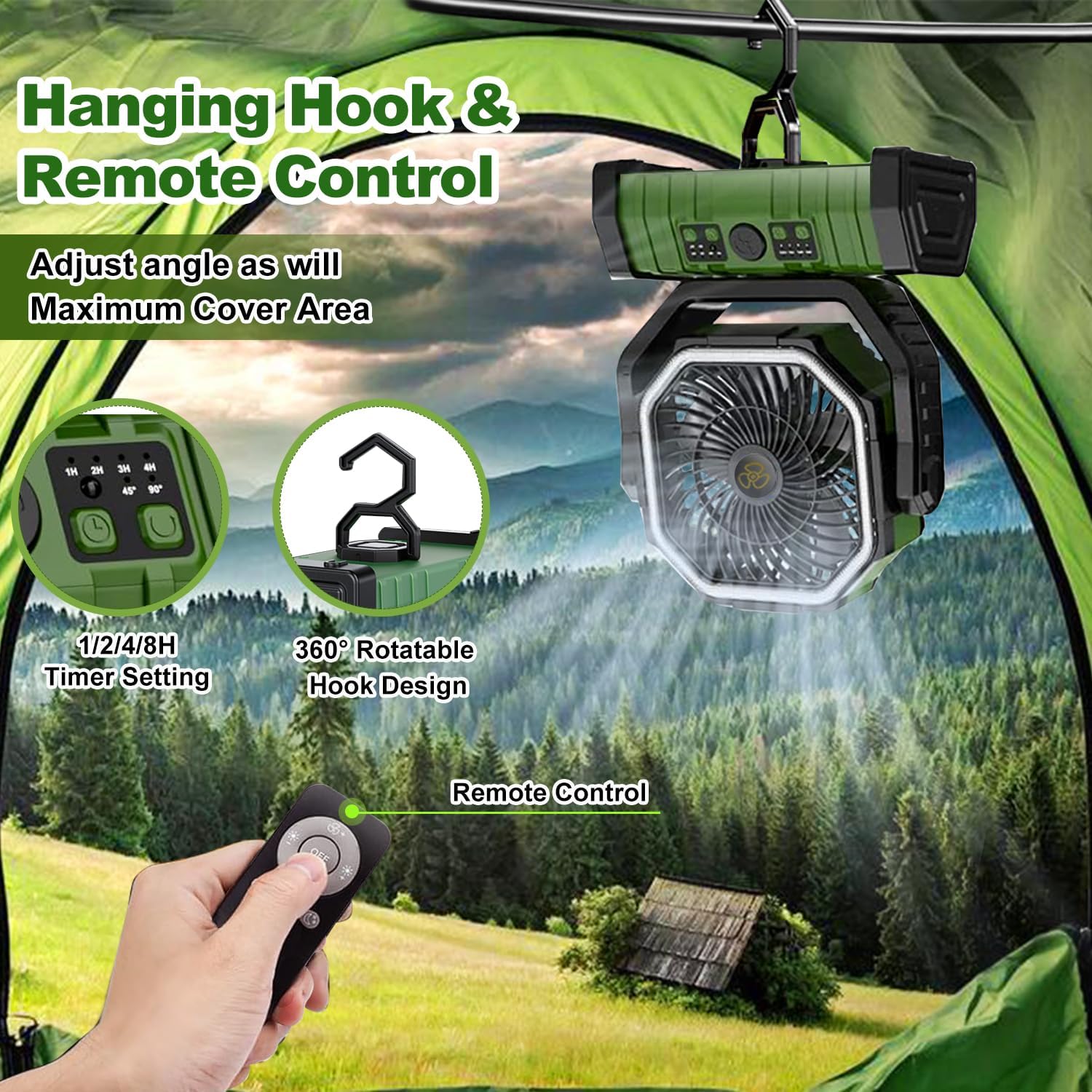
Figure 3.4: The fan includes a 360° rotatable hanging hook for versatile placement and comes with a remote control for convenient operation.
Video 3.1: An official product video demonstrating the portable camping fan's features, including its power bank functionality and LED light.
4. การตั้งค่า
Before first use, fully charge the fan's internal battery.
- ค่าใช้จ่ายเริ่มต้น: Connect the provided USB Type-C cable to the fan's Type-C input port and a compatible 5V/3A USB power adapter (not included). The battery indicator lights will show charging progress. A full charge typically takes approximately 8 hours.
- การจัดวาง: Place the fan on a flat, stable surface or use the integrated hanging hook to suspend it from a tent, RV, or other suitable structure.
- รีโมทคอนโทรล: Ensure the remote control has working batteries (if applicable, check for a battery tab to remove).
5. คู่มือการใช้งาน
5.1 การควบคุมความเร็วพัดลม
The fan offers 4 adjustable speed settings.
- Press the fan speed button on the control panel or remote to cycle through speeds 1, 2, 3, and 4.
- Pressing again after speed 4 will turn the fan off.
การทำงานของไฟ LED 5.2
The integrated LED light has 2 modes and 3 brightness levels.
- Press the light button on the control panel or remote to turn the light on.
- Continue pressing to cycle through brightness levels (Low, Medium, High).
- Pressing again after the highest brightness will turn the light off.
5.3 Oscillation and Rotation
The fan head can be manually rotated and features automatic oscillation.
- การหมุนด้วยตนเอง: สามารถหมุนหัวพัดลมได้ 270 องศาในแนวตั้งด้วยมือ เพื่อปรับทิศทางลมได้
- การแกว่งอัตโนมัติ: Press the oscillation button on the control panel or remote to activate 45° or 90° automatic horizontal oscillation. Press again to stop.
5.4 ฟังก์ชั่นจับเวลา
ตั้งค่าพัดลมให้ปิดอัตโนมัติเมื่อครบระยะเวลาที่กำหนด
- Press the timer button on the control panel or remote to select a timer setting (1H, 2H, 4H, 8H).
- The corresponding indicator light will illuminate. The fan will turn off automatically after the set time.
5.5 โหมดสลีป
For undisturbed rest, activate sleep mode.
- Press the sleep mode button (often combined with the timer or a dedicated button) on the remote control. This mode typically turns off all indicator lights for a darker environment.
5.6 ฟังก์ชั่นพาวเวอร์แบงค์
Use the fan's internal battery to charge other devices.
- Connect your device's charging cable to the fan's USB output port (5V/3A).
- The fan will begin charging your device. Monitor the fan's battery level to ensure sufficient power for both fan operation and device charging.
6. Charging the Fan
To recharge the fan's internal 20000mAh battery:
- Connect the provided USB Type-C cable to the fan's Type-C input port.
- Connect the other end of the USB cable to a 5V/3A USB power source, such as a wall adapter, power bank, or solar panel.
- The battery indicator lights on the control panel will show the current charge level and flash during charging.
- Once fully charged, all indicator lights will be solid. Disconnect the charging cable.
7. การบำรุงรักษา
การบำรุงรักษาอย่างถูกวิธีจะช่วยให้พัดลมของคุณมีอายุการใช้งานยาวนานและทำงานได้อย่างมีประสิทธิภาพสูงสุด
- การทำความสะอาด: Use a soft, dry cloth to wipe the exterior of the fan. Do not use abrasive cleaners or solvents. For the fan blades, use a soft brush or compressed air to remove dust. Ensure the fan is turned off and unplugged before cleaning.
- พื้นที่จัดเก็บ: When not in use for extended periods, store the fan in a cool, dry place, away from direct sunlight and extreme temperatures. It is recommended to charge the battery every 3-6 months to maintain its health.
8 การแก้ไขปัญหา
หากคุณพบปัญหาเกี่ยวกับพัดลม โปรดดูวิธีแก้ไขปัญหาทั่วไปต่อไปนี้:
| ปัญหา | สาเหตุที่เป็นไปได้ | สารละลาย |
|---|---|---|
| พัดลมไม่เปิด | แบตเตอรี่หมด | ชาร์จพัดลมให้เต็ม |
| ไม่ได้กดปุ่มเปิด/ปิดอย่างถูกต้อง | ตรวจสอบให้แน่ใจว่าได้กดปุ่มเปิด/ปิดอย่างแน่นหนา | |
| ไฟ LED ไม่ทำงาน | ฟังก์ชันไฟส่องสว่างไม่ได้เปิดใช้งาน | Press the light button to cycle through brightness levels. |
| แบตเตอรี่เหลือน้อยเกินไป | ชาร์จพัดลม | |
| พัดลมไม่ชาร์จไฟ | สายชาร์จหรืออะแดปเตอร์ชำรุด | Try a different USB Type-C cable and 5V/3A adapter. |
| พอร์ตชาร์จสกปรกหรือเสียหาย | Clean the port gently or contact support if damaged. | |
| รีโมทคอนโทรลไม่ทำงาน | Remote battery is dead or missing. | Replace the remote control battery. Ensure no obstructions between remote and fan. |
9. ข้อมูลจำเพาะ
| คุณสมบัติ | รายละเอียด |
|---|---|
| หมายเลขรุ่น | GF6 |
| ขนาดสินค้า | ยาว 8.7 นิ้ว x กว้าง 4.3 นิ้ว x สูง 12.6 นิ้ว |
| ประเภทแบตเตอรี่ | Rechargeable Lithium-Ion Polymer |
| ความจุของแบตเตอรี่ | 20000mAh |
| Battery Life (Fan Only) | Up to 72 Hours (depending on speed setting) |
| เอาท์พุตแสงสูงสุด | 120 ลูเมน |
| น้ำหนักสินค้า | 2.76 ปอนด์ |
| ประเภทการติดตั้ง | Tabletop Mount, Hanging Hook |
| ระดับความต้านทานต่อน้ำ | ไม่ทนน้ำ |
| เล่มที่tage | 5 โวลต์ |
| วัดtage | 15 วัตต์ |
| อินพุต/เอาท์พุต | 5V/3A ประเภท C |
| วัสดุ | พลาสติก |
10. การรับประกันและการสนับสนุน
This product comes with a standard manufacturer's warranty. For specific warranty details, please refer to the product packaging or contact the seller directly. If you have any questions, require technical support, or need assistance with your product, please reach out to the customer service team of the retailer or manufacturer.


