
การแนะนำ
Thank you for choosing the Fisher SBX696 Portable Bluetooth Speaker. This manual provides essential information for setting up, operating, and maintaining your speaker to ensure optimal performance and longevity. Please read this manual thoroughly before using the product and retain it for future reference.
ข้อมูลด้านความปลอดภัย
- ห้ามให้ลำโพงสัมผัสกับอุณหภูมิที่สูงหรือต่ำเกินไป แสงแดดโดยตรง หรือความชื้นสูง
- หลีกเลี่ยงการทำตกหรือให้ลำโพงได้รับแรงกระแทกรุนแรง
- ห้ามถอดประกอบ ซ่อมแซม หรือดัดแปลงเครื่องด้วยตนเอง โปรดติดต่อช่างผู้ชำนาญการเพื่อทำการซ่อมแซม
- เก็บลำโพงให้ห่างจากน้ำและของเหลวอื่นๆ ผลิตภัณฑ์นี้ไม่กันน้ำ
- ใช้เฉพาะสายชาร์จที่ให้มาหรือที่เทียบเท่าที่ได้รับการรับรองเท่านั้น
- ควรจัดให้มีการระบายอากาศที่เหมาะสมรอบๆ ลำโพงขณะใช้งาน
มีอะไรอยู่ในกล่อง
- Fisher SBX696 Portable Bluetooth Speaker
- สายชาร์จ
- คู่มือการใช้งาน
- บัตรรับประกัน
สินค้าเกินview
The Fisher SBX696 is a portable Bluetooth speaker designed for versatile audio playback. It features dual 6.5-inch drivers, RGB lighting, and multiple connectivity options.
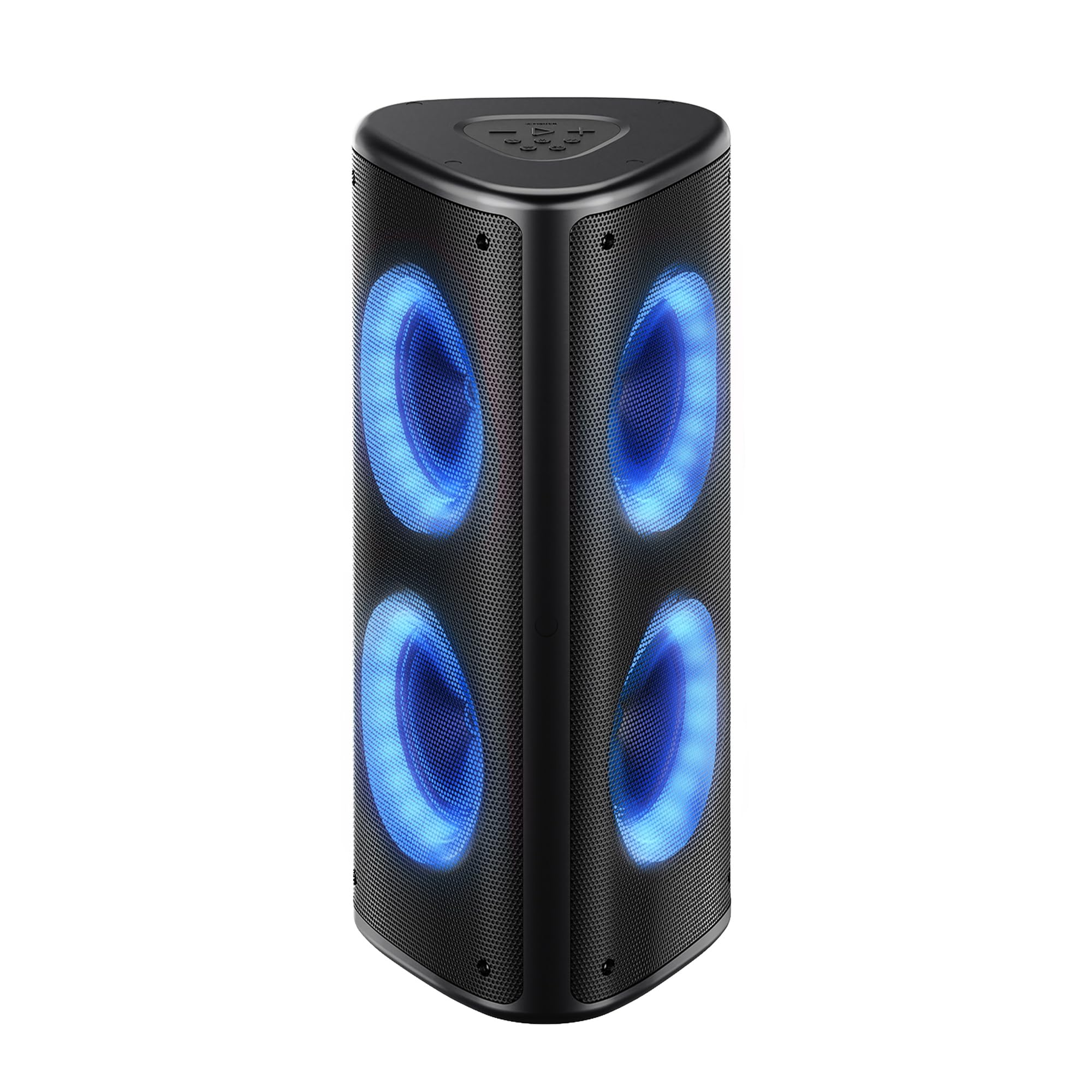
รูปที่ 1 : ด้านหน้า view of the Fisher SBX696 Portable Bluetooth Speaker, showcasing its triangular design and illuminated speaker cones.
แผงควบคุม
The main controls are located on the top panel of the speaker. The rear panel houses various input/output ports.

รูปที่ 2: รายละเอียด view of the top control panel and rear input/output ports, including USB, TF Card, AUX, and Mic inputs.
- ปุ่มเล่น/หยุดชั่วคราว: กดสั้นเพื่อเล่นหรือหยุดเสียงชั่วคราว
- ลดเสียงลง (-): กดสั้น ๆ เพื่อลดระดับเสียง
- เพิ่มระดับเสียง (+): กดสั้นเพื่อเพิ่มระดับเสียง
- แทร็กก่อนหน้า: กดค้างเพื่อไปยังเพลงก่อนหน้า
- เพลงถัดไป: กดค้างเพื่อไปยังเพลงถัดไป
- ปุ่มโหมด (M): Short press to switch between Bluetooth, USB, TF Card, AUX, and FM Radio modes.
- ปุ่มโหมดแสง: Short press to cycle through 6 dynamic RGB light modes. Long press to turn lights off/on.
- ปุ่มปรับอีควอไลเซอร์ (EQ): Short press to switch between different equalizer presets (Bass, Treble, Normal).
- สวิตช์เปิด/ปิด (เปิด/ปิด): อยู่บริเวณแผงด้านหลัง
- พอร์ต USB: สำหรับการเล่นแฟลชไดรฟ์ USB
- พอร์ต DC 5V: สำหรับชาร์จลำโพง
- ช่องเสียบการ์ด TF: สำหรับการเล่นไฟล์จาก TF (Micro SD) การ์ด
- อินพุต AUX: สำหรับเชื่อมต่ออุปกรณ์เสียงภายนอกผ่านสายสัญญาณเสียงขนาด 3.5 มม.
- อินพุตไมโครโฟน: สำหรับการเชื่อมต่อไมโครโฟน
การตั้งค่า
การชาร์จลำโพง
- เชื่อมต่อสายชาร์จ USB-C ที่ให้มาเข้ากับพอร์ต DC 5V บนลำโพง
- เชื่อมต่อปลายสายอีกด้านหนึ่งเข้ากับอะแดปเตอร์ไฟ USB (ไม่รวมอยู่ด้วย) หรือพอร์ต USB ของคอมพิวเตอร์
- The battery indicator will show charging status. A full charge typically takes 8-10 hours.
หมายเหตุ: เพื่ออายุการใช้งานแบตเตอรี่ที่ดีที่สุด โปรดชาร์จลำโพงให้เต็มก่อนใช้งานครั้งแรก
การเปิด/ปิดเครื่อง
- ในการเปิดเครื่อง ให้เลื่อนสวิตช์เปิด/ปิดที่แผงด้านหลังไปที่ตำแหน่ง "เปิด"
- หากต้องการปิดเครื่อง ให้เลื่อนสวิตช์เปิด/ปิดไปที่ตำแหน่ง "ปิด"
คำแนะนำการใช้งาน
โหมดบลูทู ธ
- เปิดลำโพง ลำโพงจะเข้าสู่โหมดจับคู่บลูทูธโดยอัตโนมัติ ซึ่งจะแสดงด้วยไฟ LED กระพริบ
- Enable Bluetooth on your device (smartphone, tablet, etc.) and search for "SBX696".
- Select "SBX696" from the list of available devices to pair. A confirmation tone will sound upon successful connection.
- ตอนนี้คุณสามารถเล่นเสียงจากอุปกรณ์ของคุณผ่านลำโพงได้
Note: The speaker has a wireless range of up to 33 feet (10 meters).
ฟังก์ชัน True Wireless Stereo (TWS)
TWS allows you to pair two SBX696 speakers together for a wider, richer stereo sound experience.

Figure 3: Illustration of two SBX696 speakers connected wirelessly via True Wireless Stereo (TWS) to a single device for enhanced sound.
- Ensure both SBX696 speakers are powered on and in Bluetooth mode, but not yet paired with any device.
- บนลำโพงตัวใดตัวหนึ่ง (ซึ่งจะเป็นลำโพงหลัก) ให้กดปุ่ม "M" (โหมด) ค้างไว้จนกว่าคุณจะได้ยินเสียงการจับคู่
- The two speakers will automatically connect to each other. A confirmation tone will sound once connected.
- Now, connect your device to the primary speaker via Bluetooth as described in the "Bluetooth Mode" section.
- To cancel TWS, long press the "M" button on either speaker.
เล่นการ์ด USB/TF
- เสียบแฟลชไดรฟ์ USB หรือการ์ด TF (Micro SD) ที่มีไฟล์เสียง MP3 files into the corresponding port on the rear panel.
- The speaker will automatically switch to USB or TF Card mode and begin playback. If not, short press the "M" button to select the correct mode.
- ใช้ปุ่มเล่น/หยุดชั่วคราว, ก่อนหน้า และ ถัดไป เพื่อควบคุมการเล่น
โหมดอินพุต AUX
- Connect an external audio device (e.g., MP3 player, TV) to the AUX input port on the rear panel using a 3.5mm audio cable (not included).
- Short press the "M" button to switch to AUX mode.
- ควบคุมการเล่นจากอุปกรณ์ที่เชื่อมต่อของคุณ
โหมดวิทยุ FM
- Short press the "M" button to switch to FM Radio mode.
- กดปุ่มเล่น/หยุดชั่วคราวค้างไว้เพื่อสแกนและบันทึกสถานีวิทยุ FM ที่ใช้งานได้โดยอัตโนมัติ
- ใช้ปุ่ม "ก่อนหน้า" และ "ถัดไป" เพื่อเลื่อนดูสถานีที่บันทึกไว้
อินพุตไมโครโฟน
- Connect a microphone (not included) to the MIC input port on the rear panel.
- Adjust the microphone volume using the connected microphone's controls or the speaker's main volume.
ไฟ RGB

Figure 4: The Fisher SBX696 speaker showcasing its 6 dynamic RGB light modes, adding visual flair to the audio experience.
- Short press the Light Mode button to cycle through the 6 dynamic RGB light modes.
- Long press the Light Mode button to turn the lights off or on.
การซ่อมบำรุง
- การทำความสะอาด: ใช้ผ้าแห้งนุ่มเช็ดทำความสะอาดภายนอกลำโพง ห้ามใช้สารทำความสะอาดที่มีฤทธิ์กัดกร่อนหรือตัวทำละลาย
- พื้นที่จัดเก็บ: เมื่อไม่ได้ใช้งานเป็นเวลานาน ควรเก็บลำโพงไว้ในที่แห้งและเย็น หลีกเลี่ยงแสงแดดโดยตรงและอุณหภูมิที่สูงหรือต่ำเกินไป
- การดูแลแบตเตอรี่ เพื่อยืดอายุการใช้งานแบตเตอรี่ ควรหลีกเลี่ยงการใช้แบตเตอรี่จนหมดบ่อยๆ ควรชาร์จลำโพงเป็นประจำ แม้จะไม่ได้ใช้งานก็ตาม
การแก้ไขปัญหา
| ปัญหา | สาเหตุที่เป็นไปได้ | สารละลาย |
|---|---|---|
| ลำโพงไม่เปิดเครื่อง | แบตเตอรี่เหลือน้อย สวิตช์เปิด/ปิดอยู่ในตำแหน่ง OFF | Charge the speaker; Slide the power switch to "ON". |
| ไม่สามารถจับคู่ผ่านบลูทูธได้ | Speaker is not in pairing mode; Device Bluetooth is off; Speaker is already connected to another device. | Ensure speaker is in Bluetooth mode (flashing LED); Turn on device Bluetooth; Disconnect from other devices. |
| ไม่มีเสียงจาก USB/การ์ด TF | Incorrect mode selected; Corrupt files; ไม่ได้ใส่การ์ด/ไดรฟ์อย่างถูกต้อง | Press "M" button to select correct mode; Ensure files are MP3 format; Reinsert card/drive. |
| การจับคู่ TWS ล้มเหลว | ลำโพงอยู่ห่างกันมากเกินไป มีลำโพงหนึ่งตัวจับคู่กับอุปกรณ์แล้ว | Ensure speakers are close; Disconnect any Bluetooth devices from both speakers before TWS pairing. |
| คุณภาพเสียงไม่ดี | Low battery; Device volume too low/high; EQ setting. | Charge speaker; Adjust device volume; Cycle through EQ settings. |
ข้อมูลจำเพาะ
| คุณสมบัติ | รายละเอียด |
|---|---|
| หมายเลขรุ่น | SBX696 |
| กำลังขับของลำโพง | 80W Peak (Dual 40W drivers) |
| ขนาดลำโพง | 6.5 นิ้ว (เส้นผ่านศูนย์กลางวูฟเฟอร์) |
| เทคโนโลยีการเชื่อมต่อ | Bluetooth 5.3, USB, AUX, TF Card, FM Radio, Mic Input |
| ช่วงบลูทูธ | สูงถึง 33 ฟุต (10 เมตร) |
| ความจุของแบตเตอรี่ | 6000mAh |
| อายุการใช้งานแบตเตอรี่โดยเฉลี่ย | Up to 5-6 hours (at 50% volume) |
| เวลาในการชาร์จ | 8-10 ชั่วโมง |
| การตอบสนองความถี่ | 20Hz - 20KHz |
| โหมดเอาต์พุตเสียง | สเตอริโอ |
| คุณสมบัติเพิ่มเติม | 6 RGB Light Modes, TWS Function, Built-in Carrying Handle |
| ขนาดสินค้า (ลึก x กว้าง x สูง) | ลึก 10.24 นิ้ว x กว้าง 10.94 นิ้ว x สูง 24.25 นิ้ว |
| น้ำหนัก | ประมาณ 13.23 ปอนด์ |
| สี | สีดำ |
การรับประกันและการสนับสนุน
The Fisher SBX696 Portable Bluetooth Speaker comes with a limited warranty. Please refer to the included Warranty Card for detailed terms and conditions. For technical support, troubleshooting assistance, or warranty claims, please contact Fisher customer service.
Contact information can typically be found on the product packaging, the official Fisher webเว็บไซต์ หรือบัตรรับประกัน