
1. บทนำ
Thank you for choosing the TCL Gaming Monitor 25G54. This monitor is designed to provide an immersive gaming experience with its advanced display technology and high performance. This manual will guide you through the setup, operation, and maintenance of your new monitor.
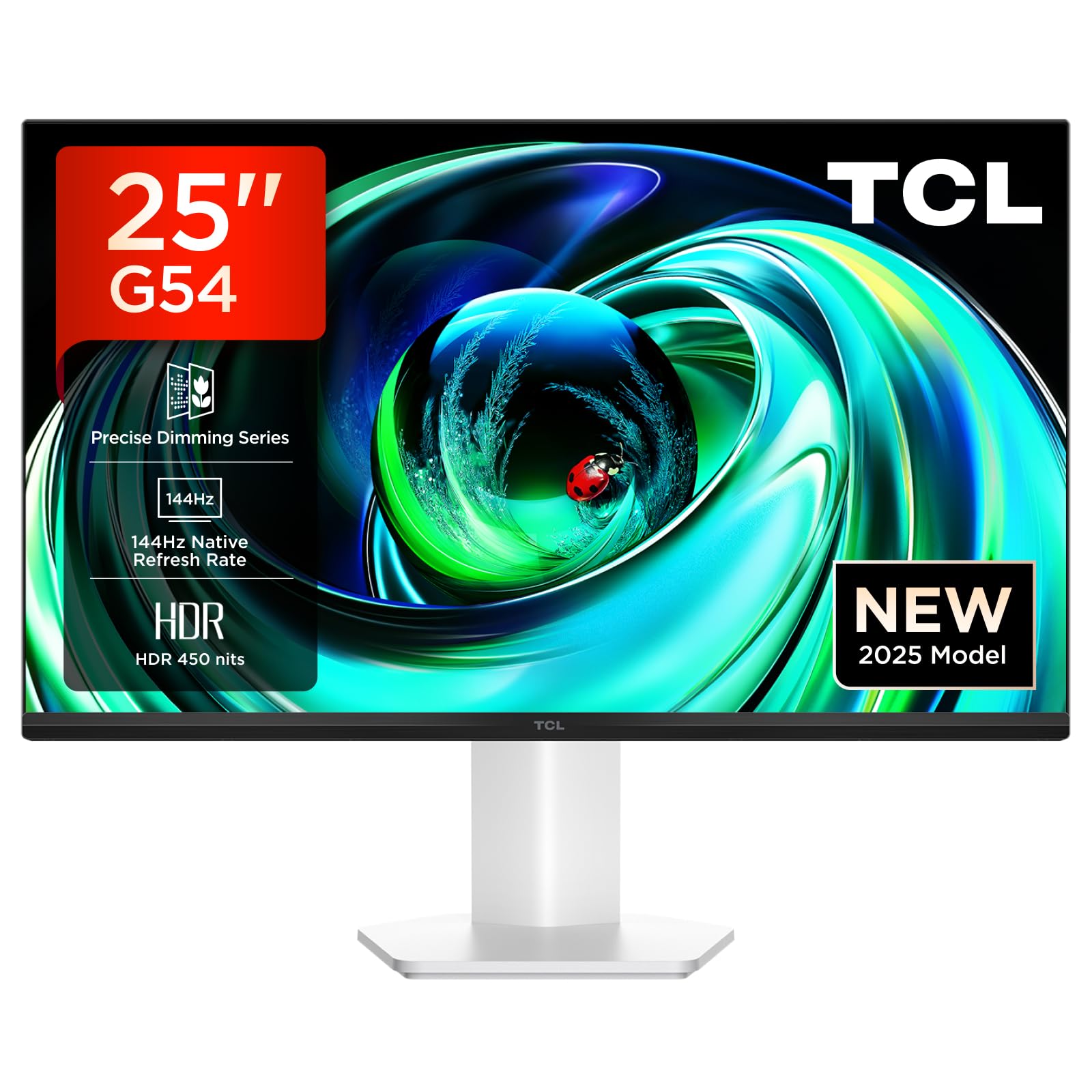
รูปที่ 1 : ด้านหน้า view of the TCL Gaming Monitor 25G54.
2. ข้อมูลด้านความปลอดภัย
โปรดอ่านคำแนะนำทั้งหมดอย่างละเอียดก่อนใช้งานจอภาพ เก็บคู่มือนี้ไว้เพื่อใช้อ้างอิงในอนาคต
- อย่าวางจอภาพไว้ในที่ที่มีฝนหรือความชื้น เพื่อป้องกันไฟไหม้หรือไฟฟ้าช็อต
- อย่าเปิดจอภาพcasinก. ไม่มีชิ้นส่วนใดที่ผู้ใช้สามารถซ่อมบำรุงเองได้ภายใน แนะนำให้ช่างผู้ชำนาญการซ่อมบำรุงเป็นผู้รับผิดชอบ
- วางจอภาพบนพื้นผิวที่มั่นคงและเรียบเพื่อป้องกันไม่ให้ตก
- ตรวจสอบให้แน่ใจว่ามีการระบายอากาศที่เหมาะสมรอบ ๆ จอภาพ อย่าปิดกั้นช่องระบายอากาศ
- ใช้เฉพาะอะแดปเตอร์ไฟฟ้าและสายไฟที่ผู้ผลิตจัดให้เท่านั้น
- หากไม่ได้ใช้งานจอภาพเป็นเวลานาน ควรดึงปลั๊กไฟออกจากเต้าเสียบ
3. เนื้อหาบรรจุภัณฑ์
ตรวจสอบว่ามีรายการทั้งหมดอยู่ในแพ็คเกจของคุณ:
- TCL Gaming Monitor 25G54
- ขาตั้งจอมอนิเตอร์ (ฐานและคอ)
- สายไฟ
- สาย HDMI
- คู่มือผู้ใช้และบัตรรับประกัน
Note: Specific cable types (e.g., DisplayPort) may vary by region or package.
4. การตั้งค่า
4.1 การประกอบขาตั้ง
- ถอดส่วนประกอบของจอภาพและขาตั้งออกจากบรรจุภัณฑ์อย่างระมัดระวัง
- ติดส่วนคอของขาตั้งเข้ากับแผงจอภาพ ตรวจสอบให้แน่ใจว่าล็อคเข้าที่อย่างแน่นหนา หรือยึดด้วยสกรูตามที่ระบุไว้ในคู่มือเริ่มต้นใช้งานฉบับย่อ
- ยึดฐานขาตั้งเข้ากับคอขาตั้งโดยยึดด้วยสกรูที่ให้มา
- วางจอภาพที่ประกอบแล้วไว้บนโต๊ะที่มั่นคง
4.2 การเชื่อมต่อจอภาพ
The monitor supports various input options. Connect the appropriate cable from your computer or gaming console to the monitor.
- การเชื่อมต่อ HDMI: Use an HDMI cable to connect your device to the monitor's HDMI port.
- การเชื่อมต่อดิสเพลย์พอร์ต: Use a DisplayPort cable to connect your device to the monitor's DisplayPort.
- การเชื่อมต่อ USB: ใช้พอร์ต USB เพื่อเชื่อมต่ออุปกรณ์ต่อพ่วง

รูปที่ 2: ด้านหลัง view showing the monitor's connectivity ports including HDMI, DisplayPort, and USB.
4.3 การเปิดเครื่อง
- เชื่อมต่อสายไฟเข้ากับแหล่งจ่ายไฟของจอภาพ จากนั้นจึงเชื่อมต่อกับเต้ารับไฟฟ้า
- Press the power button, usually located on the back or bottom of the monitor, to turn it on.
5. คู่มือการใช้งาน
5.1 เมนูการแสดงผลบนหน้าจอ (OSD)
The OSD menu allows you to adjust various monitor settings. Access it using the joystick button, typically located on the back of the monitor.

Figure 3: Illustration of the joystick button for OSD menu navigation.
การตั้งค่า OSD ทั่วไป:
- ความสว่าง/คอนทราสต์: ปรับระดับความสว่างและความคมชัดของจอภาพ
- การตั้งค่าสี: Modify color temperature, gamma, and color space (e.g., DCI-P3, sRGB).
- แหล่งสัญญาณเข้า: Manually select the active input (HDMI, DisplayPort).
- คุณสมบัติการเล่นเกม: Enable/disable FreeSync, adjust response time, and other gaming-specific enhancements.
- โหมดภาพ: Select preset display modes for different content types (e.g., Standard, Game, Movie).
5.2 การปรับตามหลักสรีรศาสตร์
The monitor stand offers ergonomic adjustments for optimal viewความสะดวกสบาย
- เอียง: ปรับมุมเอียงแนวตั้งของหน้าจอ
- หมุน: หมุนหน้าจอให้เป็นแนวนอน
- การปรับความสูง: ปรับระดับหน้าจอขึ้นหรือลงให้ตรงกับระดับสายตา
- หมุน: หมุนหน้าจอให้เป็นแนวตั้งหรือแนวนอน

Figure 4: Illustration of the monitor's ergonomic stand, showing tilt and height adjustment capabilities.
6. คุณสมบัติ
The TCL Gaming Monitor 25G54 incorporates several key technologies for superior performance:
- เทคโนโลยี LED ขนาดเล็ก: Combines QLED and OLED advantages for precise, pixel-level illumination, offering sharp contrast and a wide color gamut.
- Precise Dimming Series: Enhances overall image quality by optimizing light and shadow, providing a high-quality visual experience.
- HDR 400 nit Brightness: With a peak brightness of 450 nits and a contrast ratio of 4,500,000:1, it delivers extended dynamic range and vivid details in both dark and bright areas.
- อัตราการรีเฟรช 144Hz: Ensures smooth and fluid images in all gaming scenes and actions, minimizing motion blur.
- เวลาตอบสนอง 1 มิลลิวินาที (GTG): An extremely fast response time reduces ghosting and blurring, allowing for quick target acquisition.
- 93% DCI-P3 Wide Color Gamut: Displays vibrant colors with professional-level accuracy, revealing an immersive world of color.
- TÜV Rheinland Flicker-Free & Low Blue Light: Certified for eye protection, this mode blocks harmful blue light and eliminates flicker for prolonged viewความสะดวกสบาย

รูปที่ 5: เกินview of the TCL 25G54 Mini LED Monitor's key features.
7. การบำรุงรักษา
การบำรุงรักษาอย่างถูกต้องจะช่วยให้จอภาพของคุณมีอายุการใช้งานยาวนานและมีประสิทธิภาพเหมาะสมที่สุด
- การทำความสะอาดหน้าจอ: เช็ดหน้าจอเบาๆ ด้วยผ้านุ่มๆ ที่ไม่เป็นขุย สำหรับคราบฝังแน่น ให้ใช้น้ำยาทำความสะอาดเฉพาะสำหรับจอภาพเช็ดลงบนผ้า อย่าเช็ดลงบนหน้าจอโดยตรง
- การทำความสะอาด Casing: ใช้ผ้าแห้งนุ่มเช็ดจอภาพasinก. หลีกเลี่ยงการใช้น้ำยาทำความสะอาดที่มีฤทธิ์กัดกร่อน
- การระบายอากาศ : Ensure the ventilation openings are clear of dust and debris. Use compressed air to clean if necessary.
- หมดแรง: ควรปิดและถอดปลั๊กจอภาพทุกครั้งก่อนทำความสะอาด หรือหากจะไม่ใช้งานเป็นเวลานาน
8 การแก้ไขปัญหา
หากคุณพบปัญหาเกี่ยวกับจอภาพของคุณ โปรดดูวิธีแก้ไขทั่วไปต่อไปนี้:
| ปัญหา | สาเหตุที่เป็นไปได้ | สารละลาย |
|---|---|---|
| ไม่มีภาพบนหน้าจอ | Power cable disconnected, input cable loose, incorrect input source selected. | Check power and input cable connections. Select correct input source via OSD. |
| ภาพเบลอหรือบิดเบี้ยว | Incorrect resolution, faulty cable, graphics driver issue. | Set display resolution to 1920x1080. Try a different cable. Update graphics drivers. |
| หน้าจอกระพริบ | Refresh rate mismatch, faulty cable, external interference. | Ensure refresh rate is set to 144Hz. Try a different cable. Check for nearby electronic devices. |
| ไม่มีเสียง | Audio cable not connected, volume too low, incorrect audio output selected. | Connect headphones to the monitor's audio output. Adjust volume. Select monitor as audio output on your device. |
หากปัญหายังคงอยู่หลังจากลองวิธีแก้ปัญหาเหล่านี้แล้ว โปรดติดต่อฝ่ายบริการลูกค้าของ TCL
9. ข้อมูลจำเพาะ
| คุณสมบัติ | ข้อมูลจำเพาะ |
|---|---|
| ยี่ห้อ | ทีซีแอล |
| หมายเลขรุ่น | 25G54 |
| ขนาดหน้าจอ | 25 นิ้ว |
| ปณิธาน | 1920x1080 (FHD) |
| ประเภทแผง | ไอพีเอส |
| อัตราการรีเฟรช | 144 เฮิรตซ์ |
| เวลาตอบสนอง | 1 มิลลิวินาที (GTG) |
| ความสว่าง | 450 นิต |
| อัตราส่วนคอนทราสต์ | 4,500,000:1 น. |
| รองรับ HDR | VESA Display HDR 400 |
| ช่วงสี | 93% DCI-P3 |
| Viewอิงแองเกิล | 178 องศา |
| การเชื่อมต่อ | 1x HDMI, 1x DisplayPort, 4x USB, Headphone Output |
| การซิงค์แบบปรับตัว | ฟรีซิงค์ |
| ขนาด (ลxกxส) | 18.2 x 55.6 x 43.9 ซม. |
| น้ำหนัก | 4.39 กก. |
| คุณสมบัติพิเศษ | Mini LED, Flicker-Free, Low Blue Light |
10. การรับประกันและการสนับสนุน
Your TCL Gaming Monitor 25G54 comes with a 2-year manufacturer's warranty. For warranty claims, technical support, or service inquiries, please visit the official TCL support webไซต์หรือติดต่อผู้ค้าปลีกในพื้นที่ของคุณ
หากต้องการข้อมูลเพิ่มเติม โปรดเยี่ยมชม ร้าน TCL บน Amazon.
11. ข้อมูลการรีไซเคิล
Please dispose of this product responsibly. Electronic waste should not be disposed of with household waste. Follow local regulations for the proper disposal of electronic devices. This helps protect the environment and human health.


