
1. บทนำ
This manual provides instructions for the safe assembly, operation, maintenance, and troubleshooting of your EYESUN Exercise Bike Model QM-530W. Please read this manual thoroughly before using the product and retain it for future reference.
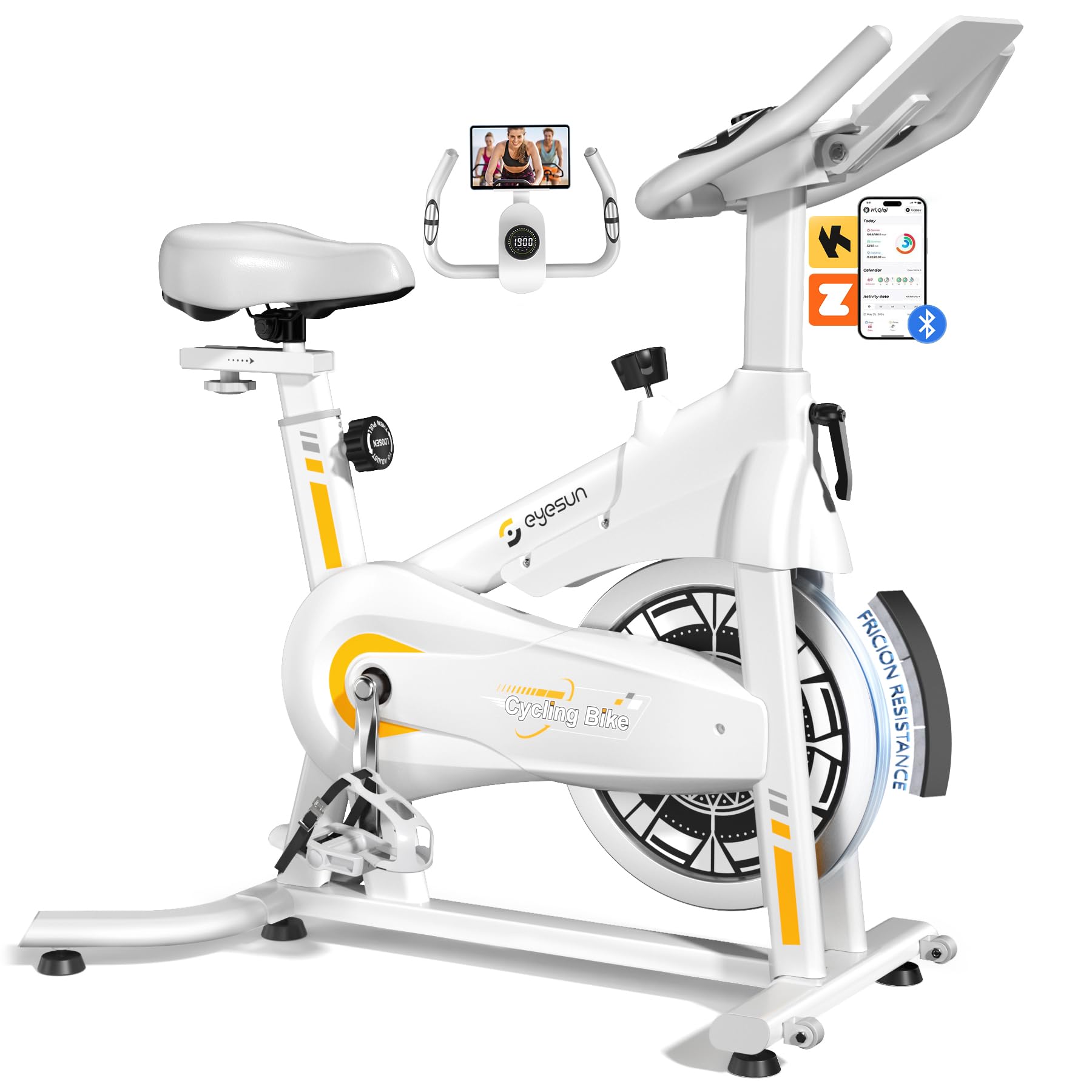
Image 1: EYESUN Exercise Bike QM-530W, White & Yellow model.
2. ข้อมูลด้านความปลอดภัย
Before beginning any exercise program, consult with your physician. It is essential to understand and follow all safety precautions to prevent injury and ensure proper operation of the exercise bike.
- ตรวจสอบให้แน่ใจว่าทุกส่วนประกอบยึดแน่นดีแล้วก่อนใช้งานทุกครั้ง
- Place the exercise bike on a flat, stable surface. Use a mat underneath to protect flooring and reduce noise.
- เก็บเด็กและสัตว์เลี้ยงให้ห่างจากอุปกรณ์ระหว่างการใช้งาน
- ควรสวมรองเท้าและชุดกีฬาที่เหมาะสม หลีกเลี่ยงเสื้อผ้าหลวมๆ ที่อาจไปเกี่ยวติดกับชิ้นส่วนที่เคลื่อนไหวได้
- จักรยานคันนี้รับน้ำหนักผู้ใช้ได้สูงสุด 330 ปอนด์ (150 กิโลกรัม)
- The resistance bar functions as an emergency stop. Press it down firmly to stop the flywheel immediately.
- Adjustable cage pedals are designed to keep your feet secure during exercise. Ensure your feet are properly secured before starting.
- Do not dismount the bike until the flywheel has completely stopped.

Image 2: Illustration of the exercise bike's sturdy construction and body muscles engaged during use.
3. เนื้อหาบรรจุภัณฑ์
ตรวจสอบให้แน่ใจว่ามีชิ้นส่วนครบทุกชิ้นก่อนเริ่มประกอบ หากมีชิ้นส่วนใดขาดหายหรือเสียหาย โปรดติดต่อฝ่ายบริการลูกค้า
- โครงหลัก (ประกอบเสร็จแล้ว)
- ชุดแฮนด์บาร์
- หลักอานและเบาะนั่ง
- กันโคลงหน้าและหลัง
- คันเหยียบ (ซ้ายและขวา)
- จอแอลซีดี
- ชุดอุปกรณ์ฮาร์ดแวร์ (น็อต แหวนรอง น็อตตัวเมีย เครื่องมือ)
- คู่มือการใช้งาน
4. คำแนะนำในการประกอบ
The EYESUN Exercise Bike is designed for quick assembly, with approximately 80% of the unit pre-assembled. Typical assembly time is around 25 minutes.
- ติดตั้งตัวกันโคลง: Secure the front and rear stabilizers to the main frame using the provided bolts and washers. Ensure they are tightened firmly.
- ติดตั้งคันเหยียบ: ระบุแป้นเหยียบด้านซ้าย (L) และด้านขวา (R) แป้นเหยียบด้านซ้ายหมุนทวนเข็มนาฬิกา และแป้นเหยียบด้านขวาหมุนตามเข็มนาฬิกา ขันแป้นเหยียบเข้ากับขาจานและขันให้แน่นด้วยประแจ
- การติดตั้งที่นั่ง: Insert the seat post into the main frame and adjust to your desired height. Secure with the adjustment knob. Attach the seat to the seat post.
- ติดตั้งแฮนด์จักรยาน: Slide the handlebar assembly into the front post. Adjust the height and secure with the adjustment knob.
- เชื่อมต่อจอ LCD: Connect the sensor cable from the main frame to the back of the LCD monitor. Ensure the connection is vertical and perpendicular to the flywheel for accurate data tracking. Mount the LCD monitor onto the handlebar post.
Video 1: Detailed assembly guide for the EYESUN Exercise Bike. This video demonstrates step-by-step installation of components.
5. การปรับเปลี่ยน
Proper adjustment of the bike ensures comfort and effectiveness during your workout.
5.1 การปรับที่นั่ง
- ความสูง: คลายปุ่มปรับระดับบนหลักอานแนวตั้ง ปรับเบาะขึ้นหรือลงจนกระทั่งขาของคุณงอเล็กน้อยที่หัวเข่าเมื่อเหยียบแป้นเหยียบในตำแหน่งต่ำสุด จากนั้นขันปุ่มให้แน่นสนิท
- ไปข้างหน้าไปข้างหลัง: Loosen the adjustment knob under the seat. Slide the seat forward or backward to achieve a comfortable position relative to the handlebars. Ensure your knees are aligned with the balls of your feet when pedals are horizontal. Tighten the knob securely.
5.2 การปรับแฮนด์
- Loosen the adjustment knob on the handlebar post. Raise or lower the handlebars to a comfortable height that allows for a relaxed upper body posture. Tighten the knob securely.
5.3 การปรับความต้านทาน
- The resistance knob is located on the main frame. Turn the knob clockwise to increase resistance and counter-clockwise to decrease resistance.
- To engage the emergency brake, press the resistance knob down firmly.

Image 3: Visual guide for adjusting handlebar and seat positions for various user heights.
Video 2: Demonstration of adjusting the seat and handlebar for optimal user comfort.
6. การใช้งานจักรยานออกกำลังกาย
6.1 ฟังก์ชั่นของจอ LCD
The upgraded LCD monitor tracks your workout data in real-time.
- เวลา: ระยะเวลาการออกกำลังกายของคุณ
- ความเร็ว: ความเร็วในการปั่นจักรยานปัจจุบัน
- ระยะทาง: ระยะทางรวมที่วิ่งได้ระหว่างการออกกำลังกาย
- แคลอรี่: แคลอรี่ที่เผาผลาญโดยประมาณ
- ชีพจร: Heart rate (if connected to a compatible sensor, not included).
- มาตรวัดระยะทาง: ระยะทางสะสมทั้งหมด
Ensure the APP sensor cable is correctly connected to the flywheel for accurate data tracking.

Image 4: Close-up of the digital LCD display and proper sensor cable connection.
6.2 การรวมแอป
The exercise bike supports Bluetooth connectivity for integration with fitness applications.
- แอพที่เข้ากันได้: FantomFite, KINOMAP, and Zwift.
- การซิงค์ข้อมูล: Supports syncing with Google Fit and Apple Health for comprehensive fitness tracking.
- ที่วางแท็บเล็ต: Use the built-in tablet holder to enjoy music or videos while riding, or to view your fitness app.

Image 5: Illustration of the exercise bike's compatibility with popular fitness applications.
วิดีโอ 3: จบview of the LCD monitor and Bluetooth connectivity features.
7. การบำรุงรักษา
การบำรุงรักษาอย่างสม่ำเสมอจะช่วยให้จักรยานออกกำลังกายของคุณใช้งานได้ยาวนานและปลอดภัย
- การทำความสะอาด: เช็ดจักรยานด้วยโฆษณาamp หลังการใช้ทุกครั้งเพื่อขจัดเหงื่อและฝุ่น หลีกเลี่ยงน้ำยาทำความสะอาดที่มีฤทธิ์กัดกร่อน
- การตรวจสอบ: ตรวจสอบสลักเกลียว น็อต และชิ้นส่วนเคลื่อนไหวทั้งหมดเป็นระยะๆ เพื่อความแน่นหนาและการสึกหรอ ขันสกรูยึดที่หลวมให้แน่น
- การหล่อลื่น: The belt drive system is designed to be low maintenance and quiet. No lubrication is typically required for the belt.
- พื้นที่จัดเก็บ: When not in use, store the bike in a dry, cool place away from direct sunlight and moisture. The built-in transport wheels allow for easy relocation.

Image 6: Features like the smooth belt drive and stable U-shaped bottom contribute to low maintenance and durability.

Image 7: The space-saving design and transport wheels facilitate easy movement and storage.
8 การแก้ไขปัญหา
If you encounter issues with your EYESUN Exercise Bike, refer to the following common problems and solutions.
| ปัญหา | สาเหตุที่เป็นไปได้ | สารละลาย |
|---|---|---|
| Squeaking or grinding noise during operation | Loose components; debris in flywheel area; worn belt. | Check and tighten all bolts and nuts. Inspect flywheel area for foreign objects. If noise persists, contact support. |
| การอ่านค่าจากจอ LCD ไม่แม่นยำ | Sensor cable not connected properly; low battery in monitor. | Ensure the APP sensor cable is securely and vertically connected to the monitor. Replace monitor batteries if necessary. |
| ความต้านทานไม่เปลี่ยนแปลง | ปัญหาเกี่ยวกับกลไกปุ่มปรับความต้านทาน | Check if the resistance knob is fully engaged. If the mechanism feels loose or unresponsive, contact support. |
| Wobbly seat or handlebars | ปุ่มปรับไม่ได้ขันแน่นพอ | Ensure all seat and handlebar adjustment knobs are tightened firmly after positioning. |
9. ข้อมูลจำเพาะ
| คุณสมบัติ | รายละเอียด |
|---|---|
| หมายเลขรุ่น | คิวเอ็ม-530ดับเบิลยู |
| ขนาดสินค้า | 100.08 x 50.55 x 106.93 ซม. (39.4 x 19.9 x 42.1 นิ้ว) |
| น้ำหนักสินค้า | 21.32 กก. (47 ปอนด์) |
| ความจุน้ำหนักสูงสุด | 330 ปอนด์ (150 กก.) |
| ระบบขับเคลื่อน | สายพานไดรฟ์ |
| วัสดุ | เหล็กอัลลอยด์ |
| กลไกต้านทาน Resistance | Friction (Adjustable Brake Pad) |
| คุณสมบัติพิเศษ | Adjustable Pedal, Adjustable Resistance Level, Adjustable Seat, Flywheel |
| ความสูงที่แนะนำสำหรับผู้ใช้ | 4'8" to 6'1" (142 cm to 185 cm) |
| Inseam Range | 25"–35" (63.5 cm – 89 cm) |
| แหล่งจ่ายไฟ (จอภาพ) | Battery Powered (Batteries Included) |
10. การรับประกันและการสนับสนุน
EYESUN provides a รับประกัน 24 เดือนโดยไม่ต้องกังวล for your exercise bike. This warranty covers manufacturing defects and ensures product quality.
For any questions, concerns, or warranty claims, please contact EYESUN customer service:
- อีเมล: support@eyesun.net
- Customer support is available 24/7.

