
1. สินค้าหมดview
The ZLLJMETER ZL128B is a smart digital multimeter designed for accurate electrical measurements. It features a 9999-count LCD display with backlight, auto-ranging capabilities, and a rechargeable lithium battery for extended use. This device integrates multiple functions including AC/DC voltage, resistance, frequency, capacitance, diode test, and non-contact voltagการตรวจจับ e (NCV)
คุณสมบัติหลัก:
- จอ LCD แสดงผล 9999 จุด
- Auto Range Functionality
- การทดสอบสายไฟที่มีกระแสไฟฟ้า
- แบบไม่สัมผัส Voltagการตรวจจับ e (NCV)
- Diode Test and On-off Beep
- ฟังก์ชันเก็บข้อมูล
- การวัดค่า RMS ที่แท้จริง
- ปิดเครื่องอัตโนมัติ
- ไฟฉายแบบบูรณาการ
- แบตเตอรี่ลิเธียมแบบชาร์จไฟได้
- Capacitance Measurement up to 100mF
- Frequency Measurement up to 10MHz
- Temperature Measurement (-50°C to 1100°C industrial, 0°C to 60°C ambient)

Figure 1: ZLLJMETER ZL128B Digital Multimeter with included accessories.

Figure 2: The ZL128B features a large, backlit color display for clear readings in various lighting conditions.
2. ข้อมูลด้านความปลอดภัย
WARNING: Read and understand all safety information and operating instructions in this manual before using the ZL128B multimeter. Failure to follow these instructions may result in electric shock, fire, or serious injury.
- ตรวจสอบให้แน่ใจเสมอว่ามัลติมิเตอร์อยู่ในโหมดการวัดที่ถูกต้องก่อนเชื่อมต่อสายวัดเข้ากับวงจร
- อย่าเกินค่าอินพุตสูงสุดที่กำหนดไว้สำหรับแต่ละช่วง
- ห้ามใช้มัลติมิเตอร์หากพบว่าชำรุดหรือสายวัดเสียหาย
- Avoid touching exposed wires or circuit components while taking measurements.
- ใช้ความระมัดระวังเมื่อทำงานกับ voltagแรงดันไฟฟ้าที่สูงกว่า 30V AC RMS, 42V peak หรือ 60V DC นั้นเป็นอันตรายจากไฟฟ้าช็อตได้
- ควรตัดกระแสไฟออกจากวงจรทุกครั้งก่อนทำการวัดค่าความต้านทาน ความจุ หรือความต่อเนื่อง
- ตรวจสอบให้แน่ใจว่าแบตเตอรี่ได้รับการชาร์จเพียงพอเพื่อการอ่านค่าที่แม่นยำ
- This device complies with IEC 61010-1 safety standards.
3. การตั้งค่า
3.1 การแกะบรรจุภัณฑ์และการตรวจสอบ
Carefully unpack the ZL128B multimeter and all accessories. Verify that all items listed below are present and undamaged:
- ZLLJMETER ZL128B Digital Multimeter
- สายทดสอบ (สีแดงและสีดำ)
- สายชาร์จ USB
- Thermocouple (for temperature measurement)
- คู่มือการใช้งาน (เอกสารนี้)
หากมีสินค้าใดสูญหายหรือเสียหาย โปรดติดต่อผู้จำหน่ายของคุณทันที
3.2 การชาร์จแบตเตอรี่
The ZL128B is equipped with a rechargeable lithium battery. Before first use, or if the battery indicator shows low power, charge the device using the provided USB cable.
- Connect the small end of the USB charging cable to the charging port on the multimeter.
- Connect the standard USB end of the cable to a USB power adapter (not included) or a computer USB port.
- The charging indicator on the multimeter will show the charging status.
- เมื่อชาร์จเต็มแล้วให้ถอดสาย USB
The multimeter can be used while charging, but it is recommended to charge it fully before critical measurements.
3.3 การเชื่อมต่อสายทดสอบ
Always ensure test leads are correctly connected for the desired measurement function.
- สำหรับการวัดส่วนใหญ่ (Vol.tage, Resistance, Capacitance, Frequency, Diode, Continuity):
- ใส่ สีแดง test lead into the "VΩHz" input jack.
- ใส่ สีดำ test lead into the "COM" input jack.
- For Current Measurements (AC/DC Current):
- ใส่ สีแดง test lead into the "10A" input jack.
- ใส่ สีดำ test lead into the "COM" input jack.
4. คู่มือการใช้งาน
The ZL128B features an intelligent auto-ranging function that simplifies operation for common measurements. For specific functions, manual mode selection may be required.
4.1 เปิด/ปิดเครื่อง
Press the power button to turn the multimeter on. The device will automatically enter auto-ranging mode. To turn off, press and hold the power button, or wait for the automatic power-off feature to activate after a period of inactivity.
4.2 Function Selection (SEL Button)
In auto mode, the multimeter attempts to identify the measurement type. For specific functions or to cycle through sub-functions within a mode (e.g., AC/DC voltagเช่น ไดโอด/ความต่อเนื่อง) กดปุ่ม เอสอีแอล ปุ่ม.
4.3 โวลต์ AC/DCtagอีการวัด
The ZL128B can measure both AC and DC voltages. In auto mode, it will detect the type of voltage. For manual selection, use the เอสอีแอล ปุ่ม.
- Connect the red test lead to the "VΩHz" jack and the black test lead to the "COM" jack.
- Turn on the multimeter. It will typically default to auto voltagการตรวจจับอี
- แตะหัววัดสีแดงและสีดำลงบนจุดในวงจรที่คุณต้องการวัดแรงดันไฟฟ้าtage.
- อ่านเล่มที่tagค่า e ที่แสดงบนหน้าจอ
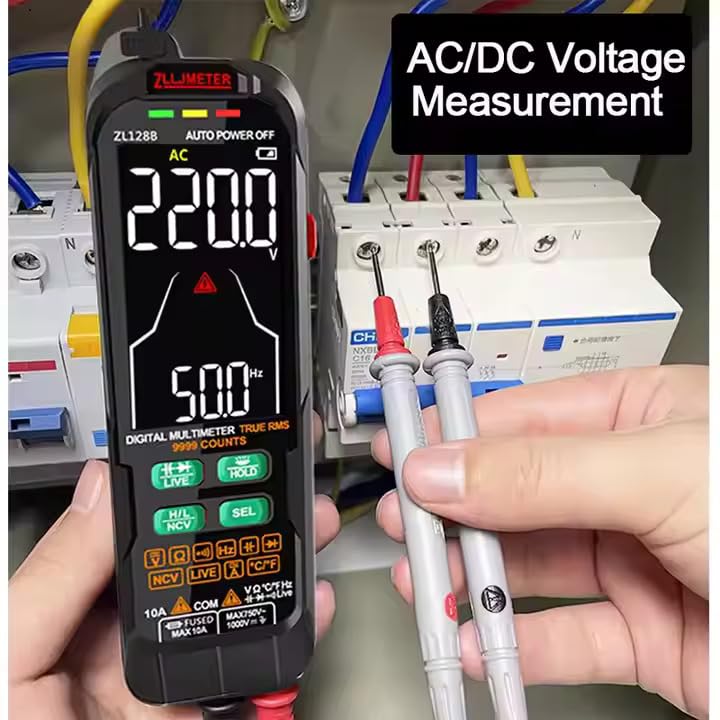
Figure 3: Measuring AC/DC Voltage. Ensure test leads are connected to the correct ports.
4.4 การวัดกระแสไฟฟ้ากระแสสลับ/กระแสตรง
ในการวัดกระแสไฟฟ้า ต้องต่อมัลติมิเตอร์แบบอนุกรมเข้ากับวงจร Always ensure the circuit is de-energized before connecting the multimeter for current measurement.
- ยกเลิกการจ่ายไฟให้กับวงจร
- Connect the red test lead to the "10A" jack and the black test lead to the "COM" jack.
- ตัดวงจร ณ จุดที่คุณต้องการวัดกระแสไฟฟ้า
- Connect the red probe to the higher potential side and the black probe to the lower potential side to complete the circuit through the multimeter.
- จ่ายกระแสไฟฟ้ากลับเข้าไปในวงจรอีกครั้ง
- อ่านค่าปัจจุบันที่ปรากฏบนหน้าจอ
- ตัดกระแสไฟออกจากวงจรก่อนถอดมัลติมิเตอร์ออก
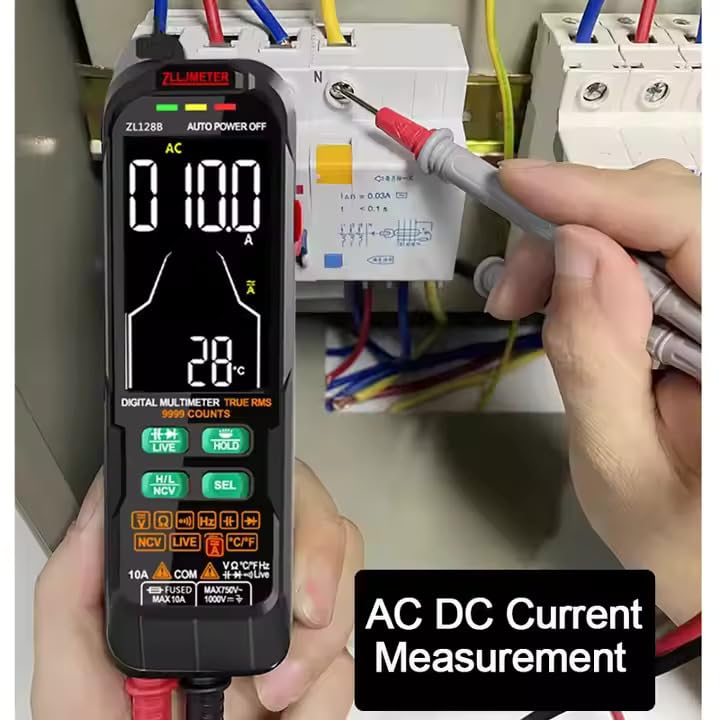
Figure 4: Measuring AC/DC Current. Connect the multimeter in series with the circuit.
4.5 การวัดความต้านทาน
To measure resistance, the component must be isolated from the circuit (de-energized and disconnected).
- Connect the red test lead to the "VΩHz" jack and the black test lead to the "COM" jack.
- Select the resistance mode (Ω) using the เอสอีแอล button if not in auto mode.
- แตะหัววัดทดสอบลงบนชิ้นส่วนที่ต้องการวัด
- อ่านค่าความต้านทาน
4.6 การวัดความจุ
WARNING: Ensure capacitors are fully discharged before measuring capacitance to prevent damage to the multimeter.
- Connect the red test lead to the "VΩHz" jack and the black test lead to the "COM" jack.
- Select the capacitance mode (F) using the เอสอีแอล ปุ่ม.
- นำหัววัดทดสอบแตะคร่อมขั้วต่อของตัวเก็บประจุ
- อ่านค่าความจุไฟฟ้า

Figure 5: Measuring Capacitance. Always discharge capacitors before measurement.
4.7 การวัดความถี่
The ZL128B can measure the frequency of AC signals.
- Connect the red test lead to the "VΩHz" jack and the black test lead to the "COM" jack.
- Select the frequency mode (Hz) using the เอสอีแอล ปุ่ม.
- Touch the test probes across the signal source.
- อ่านค่าความถี่
4.8 การทดสอบไดโอดและการตรวจสอบความต่อเนื่อง
These functions are typically grouped. Use the เอสอีแอล ปุ่มสำหรับสลับระหว่างพวกเขา
- การทดสอบไดโอด:
- Connect the red test lead to the "VΩHz" jack and the black test lead to the "COM" jack.
- Select the diode test mode (symbol: →|→).
- Place the red probe on the anode and the black probe on the cathode of the diode. A forward voltagจะแสดงค่า e drop สลับขั้วโพรบ ควรแสดงค่าวงจรเปิด (OL)
- การทดสอบความต่อเนื่อง:
- Connect the red test lead to the "VΩHz" jack and the black test lead to the "COM" jack.
- Select the continuity mode (symbol: ♫).
- Touch the probes to the two points to be tested. If continuity exists (resistance below a certain threshold), the multimeter will emit an audible beep.
4.9 ไม่สัมผัส Voltagการตรวจจับ e (NCV)
ฟังก์ชัน NCV ช่วยให้สามารถตรวจจับแรงดันไฟฟ้ากระแสสลับได้tagโดยไม่สัมผัสกับตัวนำโดยตรง
- กดปุ่ม เอ็นซีวี ปุ่มสำหรับเปิดใช้งานโหมด NCV
- Move the top end of the multimeter (where the NCV sensor is located) close to the conductor.
- มัลติมิเตอร์จะแสดงการมีอยู่ของแรงดันไฟฟ้ากระแสสลับtage through visual (LEDs) and/or audible (beeping) signals. The intensity of the signal usually increases with voltage strength or proximity.
4.10 การทดสอบสายไฟที่มีกระแสไฟฟ้า
The Live Wire test helps identify live (hot) wires in an AC circuit.
- กดปุ่ม สด button to activate Live Wire mode.
- Touch the red test probe to the conductor you suspect is live. Do not use the black test lead.
- The multimeter will indicate if the wire is live, typically with a specific icon and/or audible alarm.
4.11 Data Hold (HOLD Button)
กดปุ่ม ถือ กดปุ่มนี้เพื่อหยุดการแสดงค่าปัจจุบันบนหน้าจอ กดอีกครั้งเพื่อยกเลิกการหยุดและเริ่มการวัดแบบเรียลไทม์อีกครั้ง
4.12 ไฟฉาย
The ZL128B includes a built-in flashlight for illuminating dark work areas.
- Press the flashlight button (often integrated with another function or a dedicated button) to turn the flashlight on.
- กดอีกครั้งเพื่อปิด

Figure 6: The integrated LED flashlight assists in low-light conditions.
4.13 การวัดอุณหภูมิ
The ZL128B can measure temperature using the included thermocouple.
- ตรวจสอบให้แน่ใจว่ามัลติมิเตอร์ปิดอยู่
- Connect the thermocouple to the appropriate input jacks (usually marked for temperature or sharing VΩHz/COM). Observe polarity if indicated.
- Turn on the multimeter and select the temperature measurement mode (usually °C or °F).
- Place the tip of the thermocouple at the point where temperature is to be measured.
- อ่านค่าอุณหภูมิบนจอแสดงผล
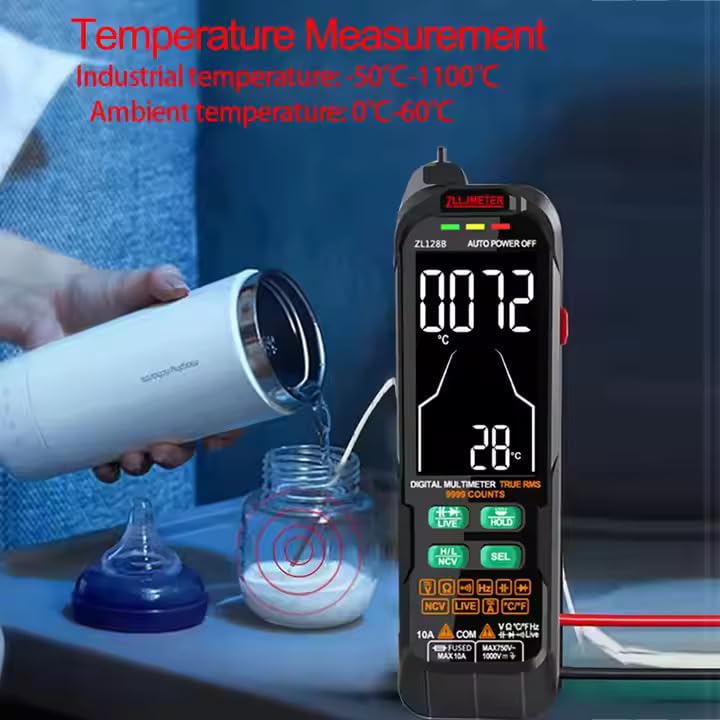
Figure 7: Measuring temperature using the included thermocouple probe.
5. การบำรุงรักษา
5.1 การทำความสะอาด
เช็ดมัลติมิเตอร์ casinจีกับโฆษณาamp ผ้าและผงซักฟอกอ่อนๆ ห้ามใช้สารกัดกร่อนหรือตัวทำละลาย ตรวจสอบให้แน่ใจว่าอุปกรณ์ปิดอยู่และตัดการเชื่อมต่อจากวงจรใดๆ ก่อนทำความสะอาด
5.2 การชาร์จแบตเตอรี่
Recharge the internal lithium battery when the low battery indicator appears on the display. Use only the provided USB cable or a compatible charger. Overcharging or using incompatible chargers may damage the battery.
5.3 พื้นที่จัดเก็บ
When not in use for extended periods, store the multimeter in a cool, dry place, away from direct sunlight and extreme temperatures. It is recommended to fully charge the battery before long-term storage and to recharge it every few months to maintain battery health.
5.4 การตรวจสอบสายทดสอบ
Regularly inspect the test leads for any signs of damage, such as cracked insulation, exposed wires, or loose connections. Replace damaged test leads immediately to ensure safety and accurate measurements.
6 การแก้ไขปัญหา
- มัลติมิเตอร์ไม่เปิดใช้งาน:
- ตรวจสอบให้แน่ใจว่าแบตเตอรี่ชาร์จเต็มแล้ว เสียบสาย USB และชาร์จอย่างน้อย 30 นาที
- ตรวจสอบว่าได้กดปุ่มเปิด/ปิดค้างไว้นานพอหรือไม่
- ไม่มีการแสดงค่าการอ่านหรือ "OL" (โอเวอร์โหลด)
- Verify that the test leads are correctly inserted into the appropriate jacks for the selected function.
- Ensure the multimeter is in the correct measurement mode.
- Check if the circuit or component being measured is within the multimeter's range. "OL" often indicates a value exceeding the maximum range or an open circuit.
- For resistance/continuity, ensure the component is isolated from power.
- การอ่านค่าที่ไม่ถูกต้อง:
- ตรวจสอบระดับแบตเตอรี่ แบตเตอรี่เหลือน้อยอาจส่งผลต่อความแม่นยำ
- Ensure test leads are making good contact with the circuit.
- Verify the correct measurement mode is selected.
- หลีกเลี่ยงการรบกวนทางแม่เหล็กไฟฟ้าที่รุนแรง
- NCV or Live Wire detection not working:
- Ensure the NCV/LIVE function is activated.
- The sensor needs to be close to the AC voltagแหล่งที่มา
7. ข้อมูลจำเพาะ
The following table provides detailed technical specifications for the ZLLJMETER ZL128B Digital Multimeter.

Figure 8: Technical specifications for ZL128B.
| พารามิเตอร์ | ข้อมูลจำเพาะ |
|---|---|
| แสดง | จอ LCD 9999 หลัก พร้อมไฟแบ็คไลท์ |
| DC ฉบับที่tage (Auto Mode) | 0.5V ~ 1000V, Accuracy: ±(1.2%+3), Resolution: 1V |
| DC ฉบับที่tage (Manual Mode) | 0.5V ~ 1000V, Accuracy: ±(1.2%+3), Resolution: 1V |
| ฉบับ ACtage (Auto Mode) | 1V ~ 750V, Accuracy: ±(1.2%+5), Resolution: 0.1V |
| ฉบับ ACtage (Manual Mode) | 0V ~ 750V, Accuracy: ±(1.2%+5), Resolution: 0.1V |
| กระแสไฟฟ้าตรง | 0mA ~ 10A |
| กระแสไฟ AC | 0mA ~ 10A |
| ความต้านทาน | 0.1Ω ~ 100MΩ, Accuracy: ±(1.2%+5), Resolution: 0.01MΩ |
| ความจุ | 0 ~ 100mF, Accuracy: ±(4.0%+5), Resolution: 0.01mF |
| ความถี่ | 0 ~ 10MHz, Accuracy: ±(2%+5), Resolution: 0.01MHz |
| ค่า RMS ที่แท้จริง | ใช่ |
| การทดสอบ Diode | ใช่ |
| เสียงบี๊บเปิด-ปิด (ความต่อเนื่อง) | ใช่ |
| NCV Voltage Pen Detection | ใช่ |
| การตรวจจับสายไฟแบบสด | ใช่ |
| การเก็บข้อมูล | ใช่ |
| ปิดเครื่องอัตโนมัติ | ใช่ |
| ไฟฉาย | ใช่ |
| แหล่งพลังงาน | แบตเตอรี่ลิเธียมแบบชาร์จไฟได้ (1000mAh) |
| ปฏิบัติการฉบับที่tagจ (นาที) | 0.5 โวลต์ |
| มาตรฐานความปลอดภัย | มอก.61010-1 |
| ขนาด (กว้าง x ยาว x สูง) | 16.5 x 8 x 2.5 ซม. |
| น้ำหนัก | 300 กรัม |
| ส่วนประกอบที่รวมอยู่ | 1 Manual, 1 Meter, 1 USB Cable, 1 Test Lead, 1 Thermocouple |
8. การรับประกันและการสนับสนุน
8.1 ข้อมูลการรับประกัน
The ZLLJMETER ZL128B Digital Multimeter comes with a รับประกัน 1 ปี from the date of purchase. This warranty covers manufacturing defects and malfunctions under normal use. It does not cover damage caused by misuse, accidents, unauthorized modifications, or improper operation.
โปรดเก็บใบเสร็จรับเงินไว้เป็นหลักฐานการซื้อสำหรับการเรียกร้องการรับประกัน
8.2 การสนับสนุนลูกค้า
For technical assistance, warranty claims, or any questions regarding the ZLLJMETER ZL128B, please contact the manufacturer or authorized distributor.
ผู้ผลิต: Shenzhen Zhuoliang Laojiang Instrument Co., Ltd.
ผู้นำเข้า/ผู้บรรจุ (อินเดีย): เอ็มดีเอส ออโต้เมค โซลูชั่นส์
- Address: Q-106, Phase 3, Shivalik Nagar, BHEL, Haridwar, Uttarakhand-249403, India
- ติดต่อ: +91-9870694636
- อีเมล: mohit@mdsautomech.in
When contacting support, please have your product model (ZL128B) and purchase details ready.