
1. บทนำ
This manual provides essential information for the safe and efficient operation of your VAR TECH Programmable DC Power Supply, model PPS-3020 S. Please read this manual thoroughly before using the device to ensure proper functionality and to prevent damage or injury.
1.1 ข้อควรระวังเพื่อความปลอดภัย
- ควรต่อแหล่งจ่ายไฟเข้ากับเต้ารับที่มีสายดินเสมอ
- ห้ามใช้งานอุปกรณ์ในสภาพเปียกหรืองamp เงื่อนไข.
- ตรวจสอบให้แน่ใจว่ามีการระบายอากาศที่เหมาะสมเพื่อป้องกันภาวะความร้อนมากเกินไป
- อย่าเปิดcasinก. ส่งต่อการบริการไปยังบุคลากรที่มีคุณสมบัติ
- ตรวจสอบเล่มที่ถูกต้องtage and current settings before connecting to a load.
2. สินค้าหมดview
The VAR TECH PPS-3020 S is a programmable DC power supply offering 0-30V and 0-20A output with a USB interface for remote control. It features high precision, stability, and multiple protection functions.
2.1 คุณสมบัติหลัก
- 0-30 V, 0-20 A Programmable output with USB Interface.
- 5 L.E.D. Multicolour meters of 4 Digits for CV (Constant Voltage) and CC (Constant Current) indication.
- 6 Sets of Memory for storing and recalling settings.
- Output On/Off Facility for safe load connection/disconnection.
- Supports MODBUS-RTU Commands for remote control.
- มากกว่าVoltagระบบป้องกันไฟรั่ว (OVP), ระบบป้องกันกระแสเกิน (OCP) และระบบป้องกันอุณหภูมิสูงเกิน (OTP)
2.2 แผงควบคุมด้านหน้าและไฟแสดงสถานะ

รูปที่ 1: เค้าโครงแผงด้านหน้า
- จอแสดงผลดิจิทัล: Multi-color LED displays for Voltage (V), Current (A), Power (W), and Set Values (V-SET, I-SET).
- CV/CC Indicators: LEDs indicating Constant Voltage or Constant Current mode.
- ปุ่ม V-SET: Press to adjust voltagอี การตั้งค่า
- ปุ่ม I-SET: Press to adjust current setting.
- ADJUST Knob: Rotary encoder for fine adjustment of voltage และค่าปัจจุบัน
- ปุ่มหน่วยความจำ: Access memory functions.
- ปุ่มรายการ: Navigate through memory slots.
- ปุ่มเปิด/ปิด: Toggles output power.
- LEFT / RIGHT Buttons: Used for digit selection during setting adjustments.
- พอร์ต USB: For PC connection and remote control.
- สวิตช์ไฟ: Main power ON/OFF button.
- ขั้วเอาท์พุท: Positive (+), Negative (-), and Ground (GND) terminals for load connection.
2.3 แผงด้านข้างและด้านหลัง
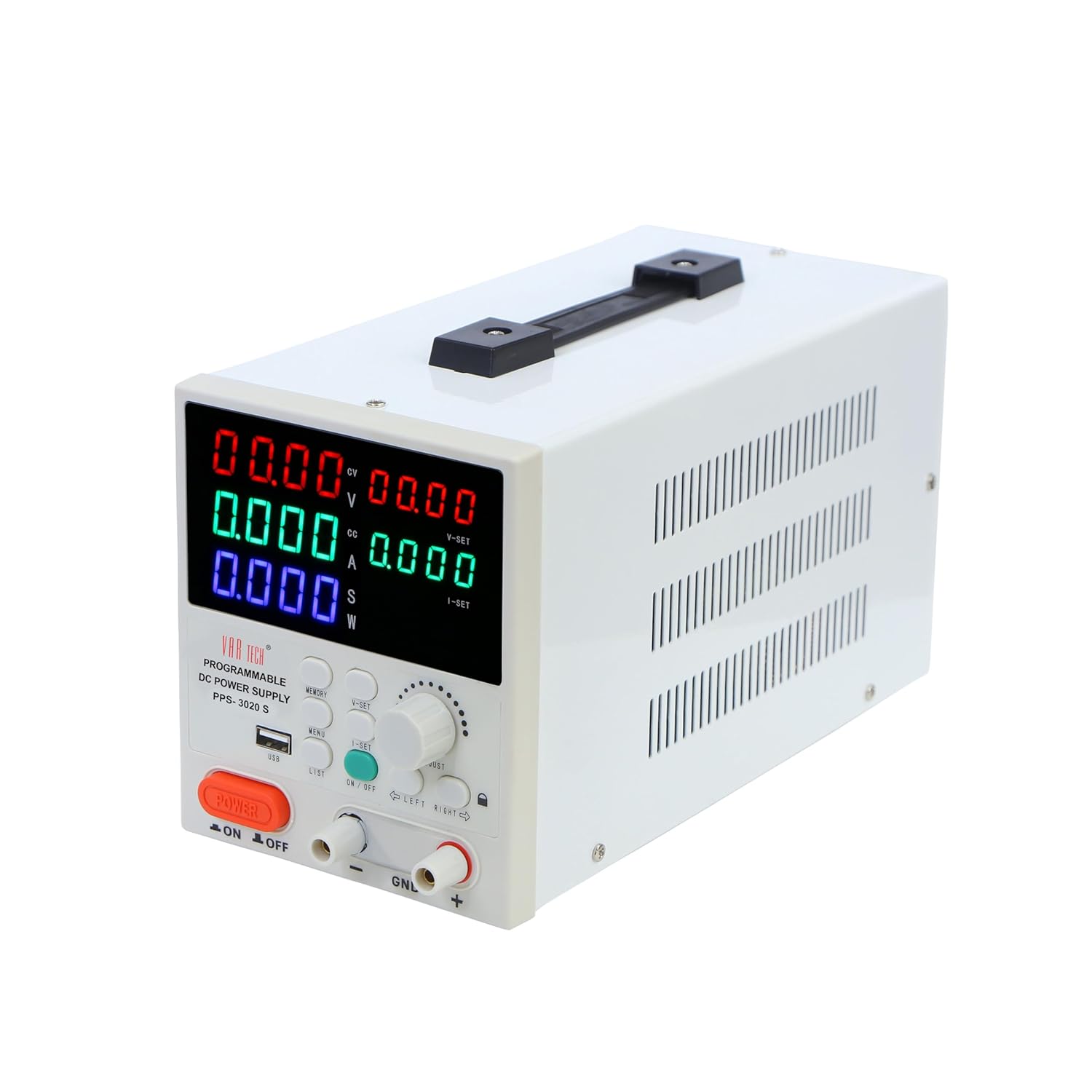
รูปที่ 2: มุม View with Side Vents
The side panels feature ventilation grilles for heat dissipation. The rear panel typically includes the AC power input socket, a cooling fan, and potentially additional communication ports (not explicitly shown in provided images but common for such devices).
3. การตั้งค่า
3.1 การแกะบรรจุภัณฑ์และการตรวจสอบ
Carefully remove the power supply from its packaging. Inspect the unit for any signs of physical damage. Retain the packaging for future transport or storage.
3.2 การเชื่อมต่อสายไฟ
- Ensure the main power switch on the front panel is in the OFF position.
- Connect the provided AC power cord to the power input socket on the rear panel of the power supply.
- Plug the other end of the AC power cord into a suitable grounded electrical outlet.
3.3 Output Terminal Connection
Connect your load to the output terminals using appropriate test leads. Ensure correct polarity:
- Connect the positive (+) terminal of the power supply to the positive input of your load.
- Connect the negative (-) terminal of the power supply to the negative input of your load.
- The GND terminal is for chassis ground and should be connected to the load's ground if required for safety or noise reduction.
Caution: Do not short-circuit the output terminals for extended periods, even with protection enabled.
4. คู่มือการใช้งาน
4.1 เปิด/ปิดเครื่อง
- กดปุ่มหลัก เปิด/ปิดเครื่อง switch on the front panel to turn the unit on. The displays will illuminate.
- หากต้องการปิดให้กดปุ่ม เปิด/ปิดเครื่อง เปลี่ยนอีกครั้ง
4.2 การตั้งค่าปริมาณtagอีและปัจจุบัน
- กดปุ่ม วี-เซ็ต ปุ่มเพื่อเข้าสู่ฉบับtagโหมดการตั้งค่า ระดับเสียงtagหน้าจอจะกะพริบ
- ใช้ ปรับ knob to change the voltage value. Turn clockwise to increase, counter-clockwise to decrease.
- ใช้ ซ้าย และ ขวา buttons to select the digit you wish to adjust for finer control.
- กด วี-เซ็ต again to confirm the setting or wait a few seconds for it to auto-confirm.
- Repeat steps 1-4 for current setting using the ไอ-เซ็ท ปุ่ม.
4.3 การควบคุมเอาท์พุต
หลังจากตั้งระดับเสียงที่ต้องการแล้วtagและกระแสไฟฟ้า ให้กดปุ่ม เปิด / ปิด button (typically green) to enable or disable the output. When the output is ON, the corresponding indicator will light up, and power will be supplied to the load. When OFF, no power is supplied.
4.4 ฟังก์ชันหน่วยความจำ
The PPS-3020 S allows you to store and recall up to 6 sets of voltage และการตั้งค่าปัจจุบัน
- เพื่อบันทึก: ตั้งค่าวอลลุ่มที่ต้องการtage and current. Press and hold the หน่วยความจำ button until a memory slot number (e.g., 'M1') flashes on the display. Use the ปรับ ลูกบิดหรือ รายการ button to select a memory slot (M1-M6), then press หน่วยความจำ อีกครั้งเพื่อบันทึก
- ในการเรียกคืน: กดปุ่ม หน่วยความจำ button briefly. The current memory slot will be displayed. Use the ปรับ ลูกบิดหรือ รายการ button to select the desired memory slot. Press หน่วยความจำ again to load the stored settings.
4.5 USB Interface and MODBUS-RTU
The USB port on the front panel allows connection to a computer for remote control and monitoring. The device supports MODBUS-RTU commands, enabling integration into automated test systems or custom software applications. Refer to the separate software manual or communication protocol guide for detailed instructions on using the USB interface and MODBUS-RTU commands.
5. การบำรุงรักษา
5.1 การทำความสะอาด
To clean the unit, disconnect it from the power source. Use a soft, dry cloth to wipe the exterior. Do not use abrasive cleaners or solvents. Ensure no liquids enter the device.
5.2 พื้นที่จัดเก็บ
When not in use for extended periods, store the power supply in a cool, dry environment, away from direct sunlight and excessive dust. It is recommended to use the original packaging for storage.
6 การแก้ไขปัญหา
| ปัญหา | สาเหตุที่เป็นไปได้ | สารละลาย |
|---|---|---|
| ไม่มีไฟฟ้าเมื่อเปิดเครื่อง | ไม่ได้เสียบสายไฟ; ปลั๊กไฟชำรุด; ฟิวส์ภายในขาด | Check power cord connection; Test outlet; Contact service for fuse replacement. |
| ไม่มีเอาต์พุต voltagอี/กระแส | Output is OFF; Voltage/current set to zero; Overload/protection activated. | Press Output ON/OFF button; Adjust V/I settings; Check load for short-circuit or excessive current draw. |
| เครื่องร้อนเกินไป | Blocked ventilation; Excessive ambient temperature; Continuous high load. | Ensure clear airflow around vents; Operate in a cooler environment; Reduce load or operating time. |
| การอ่านที่ไม่ถูกต้อง | Poor connection; External interference; Unit requires calibration. | Check all connections; Isolate from strong electromagnetic fields; Contact service for calibration. |
7. ข้อมูลจำเพาะ
| พารามิเตอร์ | ค่า |
|---|---|
| ยี่ห้อ | วีเออาร์เทค |
| แบบอย่าง | PPS-3020 S |
| ปริมาณการส่งออกtage | 0-30 โวลต์ DC |
| กระแสไฟขาออก | 0-20 A |
| เอาท์พุต วัดtage | 600 วัตต์ |
| แสดง | 5 L.E.D. Multicolour meters, 4 Digits |
| อินเทอร์เฟซ | USB (MODBUS-RTU support) |
| การป้องกัน | มากกว่าVoltagอี กระแสเกิน อุณหภูมิเกิน |
| ชุดความจำ | 6 |
| ขนาดสินค้า | 26 x 16 x 12.5 ซม. |
| น้ำหนักสินค้า | 2.5 กก. |
| วิธีการทำความเย็น | อากาศ |
| ประเทศต้นกำเนิด | จีน |
8. การรับประกันและการสนับสนุน
VAR TECH products are designed for reliability and performance. This product comes with a standard manufacturer's warranty against defects in materials and workmanship. For warranty claims, technical support, or service inquiries, please contact VAR TECH customer service. Please have your model number (PPS-3020 S) and purchase information ready when contacting support.
ข้อมูลติดต่อ:
Email: info@var-tech.com