
1. บทนำ
Thank you for choosing the DEPSTECH DS650-DL Dual-Lens Articulating Industrial Endoscope. This device is designed for detailed visual inspection in hard-to-reach areas, featuring a dual-lens system with 210° bidirectional rotation, a 4.5-inch IPS monitor, and 1080P high-definition imaging. It is an essential tool for home maintenance, vehicle inspection, and machinery checks.
Please read this manual thoroughly before use to ensure proper operation and to maximize the product's lifespan.
2. ข้อมูลด้านความปลอดภัย
- Do not use the endoscope in environments with flammable or explosive gases.
- The probe is IP67 waterproof, but the main unit is not. Avoid exposing the main unit to water or excessive moisture.
- อย่าพยายามถอดประกอบหรือดัดแปลงอุปกรณ์ การกระทำเช่นนี้จะทำให้การรับประกันเป็นโมฆะและอาจทำให้เกิดความเสียหายได้
- เก็บอุปกรณ์ให้พ้นจากมือเด็ก
- Avoid direct eye exposure to the LED lights.
- The device features overheat protection. If the temperature exceeds 70°C, a warning will display. If it exceeds 80°C, the device will automatically shut down to prevent damage. Allow the device to cool down before resuming operation.
3. เนื้อหาบรรจุภัณฑ์
ตรวจสอบให้แน่ใจว่าสินค้าทุกชิ้นครบถ้วนและอยู่ในสภาพดีก่อนเปิดบรรจุภัณฑ์
- DEPSTECH DS650-DL Endoscope Unit
- กล่องเก็บของ
- คู่มือการใช้งาน
- สายชาร์จ Type-C
- การ์ดหน่วยความจำ 32GB (ติดตั้งไว้ล่วงหน้าหรือรวมแยกต่างหาก)

Image: Contents of the DEPSTECH DS650-DL package.
4. การตั้งค่า
4.1 การชาร์จอุปกรณ์
Before first use, fully charge the endoscope unit. Connect the provided Type-C charging cable to the charging port on the device and to a suitable USB power adapter (not included).
4.2 การใส่การ์ดหน่วยความจำ
If the 32GB memory card is not pre-installed, locate the TF card slot on the side of the monitor unit. Insert the memory card with the contacts facing down until it clicks into place.
4.3 การเปิด/ปิดเครื่อง
Press and hold the power button (usually located near the monitor) for a few seconds to turn the device on or off. The IPS monitor will display the startup screen.
5. การดำเนินการ
5.1 ทำความเข้าใจเกี่ยวกับระบบควบคุม

ภาพ: เหนือview of the endoscope controls and ports.
- ปุ่มตกลง/ยืนยัน: ยืนยันการเลือกในเมนู
- Up/Zoom In Button: Navigates up in menus or zooms in on the image.
- Down/Zoom Out Button: Navigates down in menus or zooms out on the image.
- 180° Rotation Button: Rotates the real-time image on the screen by 180 degrees.
- Lens Switch Button: Toggles between front camera, side camera, and dual-view โหมด.
- ปุ่มภาพถ่าย/วิดีโอ: กดสั้นๆ เพื่อถ่ายรูป กดค้างเพื่อเริ่ม/หยุดบันทึกวิดีโอ
- Power Button/LED Adjustment: Short press to adjust LED brightness (3 levels), long press to power on/off.
- Articulating Angle Dial: Controls the 210° bidirectional rotation of the probe tip.
- ช่องเสียบการ์ด TF: สำหรับการใส่การ์ดหน่วยความจำ
- พอร์ต Type-C: สำหรับการชาร์จและถ่ายโอนข้อมูล
- ปุ่มรีเซ็ต: Resets the device (use a pin to press).
5.2 Using the Dual-Lens and Articulation
The DS650-DL features both a front camera and a side camera, allowing for a wider inspection range. The probe tip can be articulated up to 210° in two directions for comprehensive viewการไอเอ็นจี
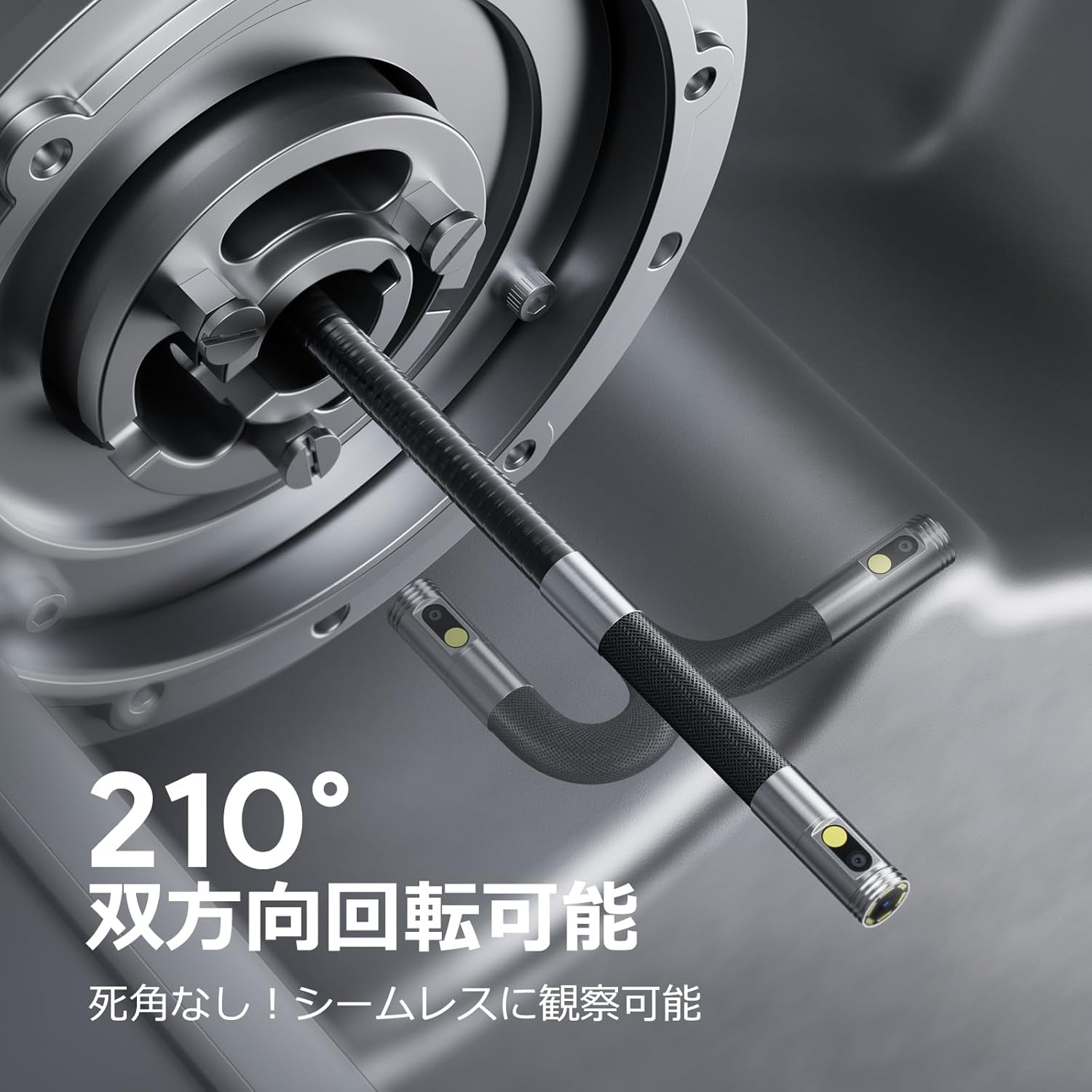
Image: Endoscope probe demonstrating 210° bidirectional articulation.
- ใช้ ปุ่มสลับเลนส์ to cycle between the front camera, side camera, or a split-screen dual-view โหมด.
- หมุน Articulating Angle Dial to precisely adjust the direction of the probe tip. This allows you to navigate around obstacles and view areas from multiple angles without repositioning the entire cable.
5.3 การบันทึกภาพนิ่งและวิดีโอ
The device supports capturing both still images and video recordings directly to the inserted 32GB memory card.

Image: Monitor display showing photo and video capture features.
- การถ่ายภาพ: กดสั้น ๆ ปุ่มรูปภาพ/วิดีโอ.
- การบันทึกวิดีโอ: กดค้างไว้ ปุ่มรูปภาพ/วิดีโอ กดค้างไว้เพื่อเริ่มบันทึก กดค้างไว้อีกครั้งเพื่อหยุดบันทึก
- ถูกจับ files are saved to the 32GB memory card. You can store approximately 10,000 images or 50 videos.
5.4 การปรับความสว่าง LED
The probe is equipped with high-brightness LED lights to illuminate dark inspection areas. Short press the Power Button/LED Adjustment button to cycle through 3 levels of LED brightness.

Image: IP67 waterproof probe with adjustable LED illumination.
5.5 การถ่ายโอนข้อมูล
You can transfer captured images and videos to a computer via the Type-C cable or by directly accessing the memory card.

Image: High-speed data transfer from endoscope to PC.
6. การบำรุงรักษา
- การทำความสะอาดโพรบ: After use, especially in dirty or wet environments, gently wipe the probe with a soft, damp cloth. Ensure no debris remains on the camera lenses.
- การทำความสะอาดจอภาพ: Use a soft, dry cloth to clean the IPS monitor. Avoid abrasive cleaners or solvents.
- พื้นที่จัดเก็บ: Store the endoscope in its provided storage case in a cool, dry place, away from direct sunlight and extreme temperatures. This prevents damage from improper storage and moisture.
- การดูแลแบตเตอรี่ เพื่อยืดอายุการใช้งานแบตเตอรี่ ควรหลีกเลี่ยงการปล่อยประจุแบตเตอรี่จนหมดบ่อยๆ ควรชาร์จอุปกรณ์เป็นประจำ แม้จะไม่ได้ใช้งานเป็นเวลานานก็ตาม
7 การแก้ไขปัญหา
| ปัญหา | สาเหตุที่เป็นไปได้ | สารละลาย |
|---|---|---|
| อุปกรณ์ไม่เปิดเครื่อง | แบตเตอรี่เหลือน้อย; อุปกรณ์ทำงานผิดปกติ | ชาร์จอุปกรณ์ให้เต็ม หากปัญหายังคงอยู่ โปรดติดต่อฝ่ายสนับสนุน |
| ไม่มีภาพปรากฏบนหน้าจอ | Cable not connected properly; camera lens obstructed. | Ensure the probe cable is securely connected. Check for obstructions on the lens. |
| ภาพไม่ชัดหรือไม่คมชัด | Lens is dirty; focus distance incorrect. | Clean the camera lens. Ensure the object is within the optimal focal range (3-10cm). |
| ไม่สามารถบันทึกภาพถ่าย/วิดีโอได้ | การ์ดหน่วยความจำเต็มหรือเสียบไม่ถูกต้อง | Check if the 32GB memory card is inserted correctly. Delete old files or replace the card if full. |
| Device shuts down automatically. | เปิดใช้งานการป้องกันความร้อนสูงเกินไป | Allow the device to cool down. Avoid using in excessively hot environments. |
8. ข้อมูลจำเพาะ
| คุณสมบัติ | รายละเอียด |
|---|---|
| ยี่ห้อ | ดีพสเทค |
| หมายเลขรุ่น | ดีเอส650ดีเจ |
| แสดง | 4.5-inch IPS LCD Monitor |
| ความละเอียดของกล้อง | 1080พ |
| เส้นผ่านศูนย์กลางของโพรบ | 8.5มม. |
| มุมข้อต่อ | 210° Bidirectional |
| ประเภทสายเคเบิล | 1.5M Semi-rigid |
| ระดับการกันน้ำ | IP67 (Probe only) |
| แสงสว่าง | ไฟ LED ปรับได้ |
| พื้นที่จัดเก็บ | การ์ด Micro SD ขนาด 32GB (รวมอยู่ด้วย) |
| รวมแบตเตอรี่แล้ว | ใช่ |
| ขนาดแพ็คเกจ | 43.1 x 21.4 x 7.4 ซม. |
| น้ำหนักแพ็คเกจ | 1.33 กก. |
9. การรับประกันและการสนับสนุน
9.1 การรับประกันของผู้ผลิต
This DEPSTECH product comes with a การรับประกันจากผู้ผลิต 24 เดือน. Your order number serves as your proof of purchase for warranty claims. Please retain it.
9.2 การสนับสนุนลูกค้า
For any questions, technical assistance, or warranty inquiries, please contact our professional support team:
อีเมล: support.jp@depstech.com
We aim to respond to all inquiries within 24 hours (excluding weekends and public holidays, where responses will be provided on the next business day).

Image: DEPSTECH customer support and warranty information.