
btfarm TL01-2
btfarm 6.6FT 400 LED Christmas Tree Lights with Remote (Model TL01-2)
คู่มือการใช้งาน
สินค้าเกินview
The btfarm 6.6FT 400 LED Christmas Tree Lights are designed for both indoor and outdoor decorative lighting. These lights feature a USB plug-in for versatile power options, a remote control for convenient operation, and multiple lighting modes with dimmable settings and a timer function. The flexible wire construction helps prevent tangling, making installation straightforward.

ภาพ: เหนือview of the btfarm Christmas Tree Lights, showing the top ring, cascading light strands, USB plug, and remote control.
สิ่งที่รวมอยู่
- 1 x USB plug-in Christmas tree lights (6.6FT, 400 LED)
- 1 x รีโมทคอนโทรล
- 1 x คู่มือผู้ใช้
ข้อมูลจำเพาะ
| ยี่ห้อ | บีทีฟาร์ม |
| หมายเลขรุ่น | TL01-2 |
| ความยาวแสง | 6.6 ฟุต (2 เมตร) |
| จำนวน LED | 400 LEDs (16 strands, 25 LEDs each) |
| Suitable Tree Height | 5-7 ฟุต |
| สีอ่อน | สีขาวอุ่น |
| แหล่งพลังงาน | USB Plug-in (Corded Electric) |
| คุณสมบัติพิเศษ | Dimmable, Remote Controlled, Timer, Twinkling |
| ระดับการป้องกันน้ำเข้า (IP) | IP65 (Lights only, USB plug is not waterproof) |
| การใช้งานภายใน/ภายนอกอาคาร | ในร่ม, กลางแจ้ง |
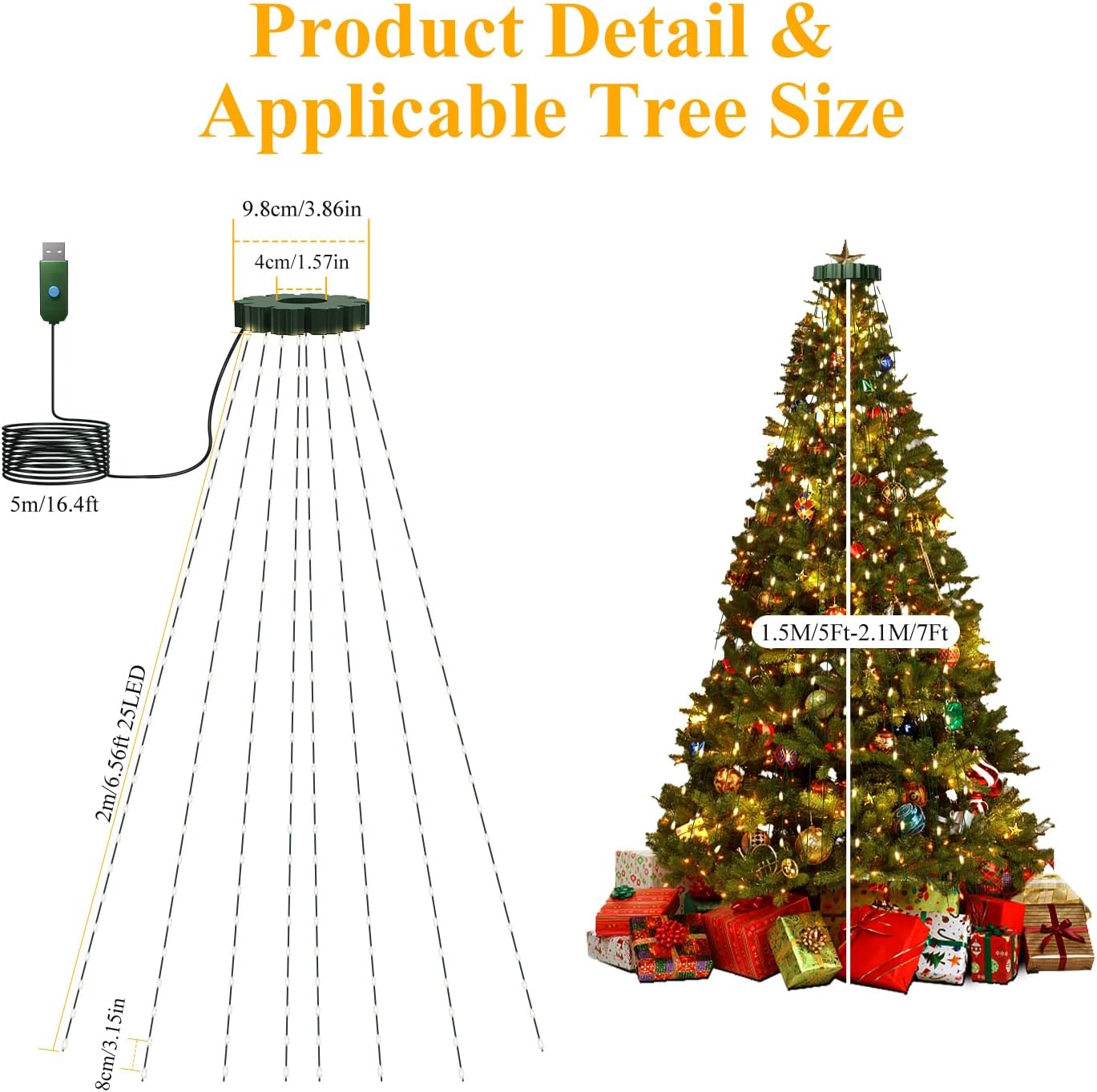
Image: Diagram illustrating the dimensions of the light set, including the 9.8 cm top ring and 2-meter (6.6 ft) light strands, and showing suitability for 5-7 ft Christmas trees.
คำแนะนำการตั้งค่า
- แกะกล่องไฟ: Carefully remove the lights from the packaging. The flexible wire design helps prevent tangling, but gentle handling is recommended.
- จัดวางวงแหวนด้านบน: Place the circular top ring of the light set over the top of your Christmas tree. Ensure it sits securely.
- พันเส้นใยให้สวยงาม: Allow the 16 individual light strands to cascade down the tree evenly. Adjust them as needed to achieve desired coverage.
- เชื่อมต่อพลังงาน: Plug the USB connector into a compatible USB power source (e.g., USB wall adapter, power bank).
- เปิดใช้งานด้วยรีโมต: After connecting the USB plug, use the remote control to turn on the lights.

Image: Visual guide showing three steps for easy installation: 1. Placing the ring on top of the tree, 2. Arranging the light strands, and 3. Plugging in the USB connector.
คำแนะนำการใช้งาน
The btfarm Christmas Tree Lights are operated using the included remote control. Ensure the remote is pointed towards the USB receiver for optimal functionality.
ฟังก์ชั่นการควบคุมระยะไกล:
- เปิด/ปิด: Press the green "ON" button to turn the lights on, and the red "OFF" button to turn them off.
- MODE (1-8): Select from 8 different lighting modes:
- การผสมผสาน
- ในคลื่น
- ลำดับ
- สโลว์โกล
- Chasing Flash
- จางช้า
- กระพริบตาแฟลช
- มั่นคงต่อไป
- ตัวจับเวลา: Activate the built-in timer function. The lights will automatically turn off after 6 hours and turn back on after 18 hours, repeating the cycle.
- DIM (+/-): Adjust the brightness level. There are 4 brightness settings: 25%, 50%, 75%, and 100%.

Image: The remote control displaying buttons for ON/OFF, Timer, Mode selection (1-8), and Dimming (+/-), with a visual representation of the 8 lighting modes on a Christmas tree.

Image: Illustration of the timer function (6 hours on/18 hours off) and the four dimmable brightness levels (25%, 50%, 75%, 100%) on a lit Christmas tree.
Video: Demonstrates the functionality of the USB Christmas Tree Lights with Remote, showcasing various lighting modes and dimming capabilities.
การซ่อมบำรุง
- การทำความสะอาด: Gently wipe the lights with a soft, dry cloth. Do not use harsh chemicals or abrasive cleaners.
- พื้นที่จัดเก็บ: When not in use, carefully coil the light strands and store them in their original packaging or a suitable container in a cool, dry place. Avoid excessive bending or tangling.
- การตรวจสอบ: Periodically inspect the wires and LED bulbs for any damage. Do not use if any damage is detected.
การแก้ไขปัญหา
- ไฟไม่ติด:
- Ensure the USB plug is securely connected to a working power source.
- ตรวจสอบว่าแบตเตอรี่ของรีโมทคอนโทรลใช้งานได้และใส่ถูกต้องแล้ว
- Point the remote directly at the USB receiver (the small green box near the USB plug).
- Press the "ON" button on the remote after plugging in the USB.
- รีโมตไม่ตอบสนอง:
- ตรวจสอบแบตเตอรี่รีโมทคอนโทรล
- ตรวจสอบให้แน่ใจว่าไม่มีสิ่งกีดขวางระหว่างรีโมทและตัวรับสัญญาณ USB
- Reduce the distance between the remote and the receiver.
- Lights are too dim/bright:
- Use the "DIM +" or "DIM -" buttons on the remote to adjust brightness.
ข้อมูลด้านความปลอดภัย
- ปลั๊กยูเอสบี: The USB plug is ไม่กันน้ำ. It must be kept dry and away from water and fire sources.
- ระดับการกันน้ำ: The light strands themselves have an IP65 waterproof rating, allowing them to withstand rain, snow, and frost.
- ปริมาณต่ำtage: ไฟทำงานที่ระดับเสียงต่ำtage design, ensuring they remain safe to touch even after prolonged use, making them suitable for environments with children and pets.
- แหล่งพลังงาน: Use only with compatible USB power sources.
- ความร้อนสูงเกินไป: If the USB plug or any part of the lights becomes excessively hot, immediately unplug the device and discontinue use.
- การติดตั้ง: Ensure proper installation to prevent damage to the lights or injury.

Image: Depicts the lights on a Christmas tree outdoors in snowy conditions, highlighting their waterproof, snowproof, windproof, and cold-resistant features. A close-up shows the sealed LED bulbs.
การรับประกันและการสนับสนุน
For warranty information or product support, please refer to the contact details provided with your purchase or visit the btfarm official webเว็บไซต์.
Ask a question about this manual
Ask about setup, troubleshooting, compatibility, parts, safety, or missing instructions. Manuals+ will review the question and use this page’s manual context to help answer it.