
การแนะนำ
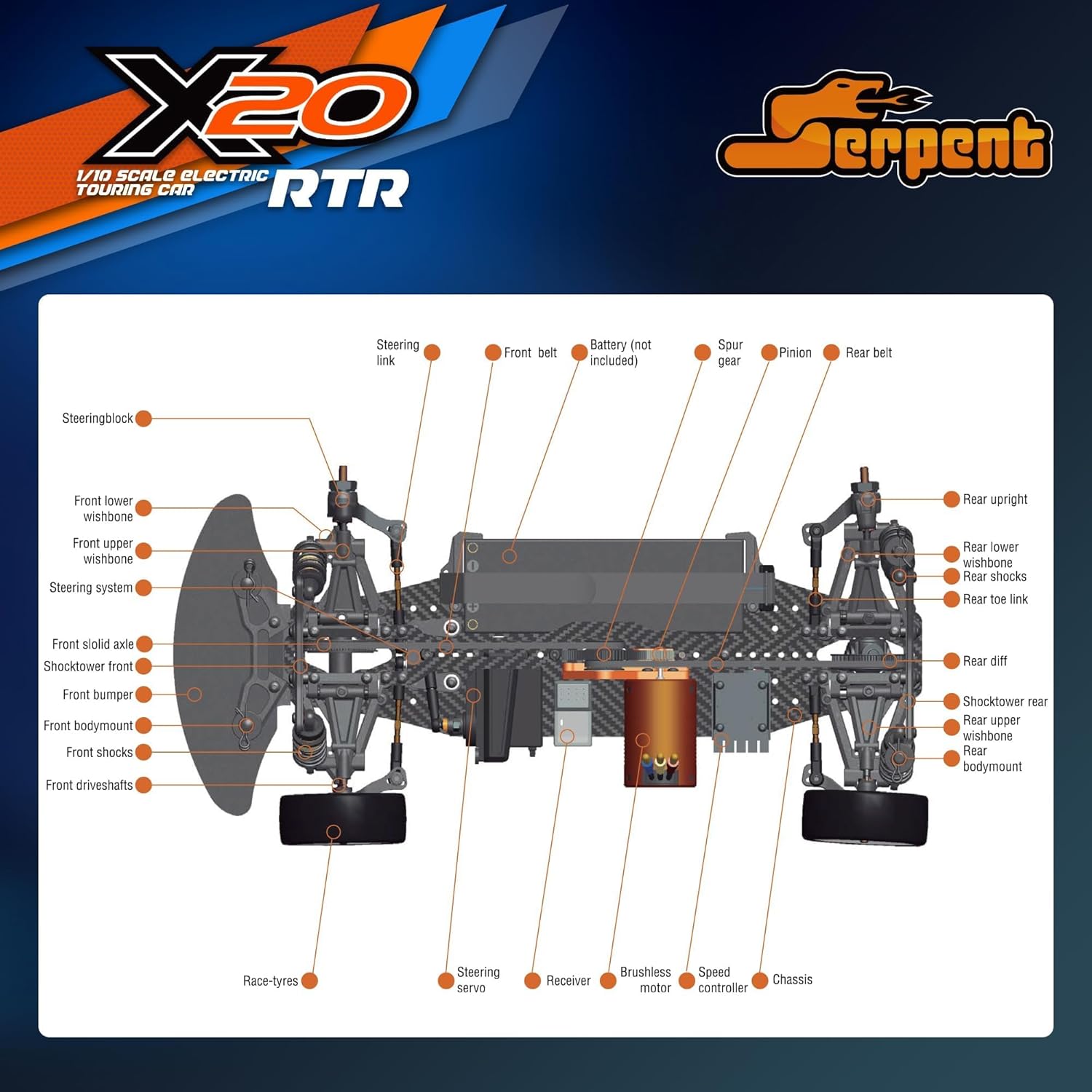
This manual provides essential information for the setup, operation, and maintenance of your Serpent X20 1/10 RC Touring Car. Please read it thoroughly before operating the vehicle to ensure safe and optimal performance. The Serpent X20 is a 1/10 scale 4WD electric touring car, featuring a brushless motor, carbon fiber, and CNC aluminum parts, designed for high-speed racing.
มีอะไรอยู่ในกล่อง
Upon opening your Serpent X20 package, you should find the following components:
- รีโมทคอนโทรล
- คู่มือผลิตภัณฑ์ (เอกสารนี้)
- Sticker Sheet for customization
- Serpent X20 1/10 RC Touring Car (pre-assembled)
หมายเหตุ: แบตเตอรี่และที่ชาร์จไม่ได้รวมอยู่ในชุด ต้องซื้อแยกต่างหาก
คุณสมบัติหลัก
- Race-Ready Excellence: Factory assembled 1/10 scale Touring RC Car with racing tires, pre-cut and pre-painted bodywork, and high-quality Dragon-RC electronics.
- Precision Chassis Design: Ultra-narrow, symmetrical black fiberglass chassis plate optimized for flex and durability, with countersunk holes and strategically placed gear differentials, spools, and gear bags for maximum performance.
- Enhanced Suspension: Features lower front wishbones, anti-roll bar compatibility, and a C-hub/steering block system for precise steering and feedback.
- Powerful Electronics: Equipped with Dragon-RC 45A electronic speed controller and a brushless 9T motor for impressive acceleration and speed.
- Versatile Racing Experience: Suitable for both competitive racing and leisure use on various tracks.
คู่มือการติดตั้ง
Follow these steps to prepare your Serpent X20 for its first use.
1. การแกะกล่องและการตรวจสอบเบื้องต้น
Carefully remove all components from the packaging. Inspect the car and remote control for any visible damage. Ensure all parts listed in "What's in the Box" are present.

2. Applying Decals (Optional)
The included sticker sheet allows for personalization of your RC car. Carefully peel and apply the desired decals to the car body.

3. การติดตั้งแบตเตอรี่
Remove the car body by detaching the body clips. Install a fully charged LiPo battery (not included) into the designated battery compartment. Secure the battery with the provided straps or holders. Connect the battery to the Electronic Speed Controller (ESC).

4. การตั้งค่าการควบคุมระยะไกล
Install batteries into the remote control. Power on the remote control first, then the car. Ensure the remote and car are properly bound. Adjust the trim settings on the remote control for steering and throttle as needed to ensure the car remains straight and stationary when the controls are neutral.

5. การตรวจสอบก่อนเริ่มการทำงาน
Before each run, check the following:
- ตรวจสอบให้แน่ใจว่าสกรูทั้งหมดแน่น
- Verify battery charge levels in both the car and remote.
- Check tire condition and ensure they are securely mounted.
- Test steering and throttle response.
- Inspect the suspension for proper movement and dampการไอเอ็นจี
คำแนะนำการใช้งาน
Operating your Serpent X20 is straightforward, but practice is key to mastering its performance.
- เปิดเครื่อง: Turn on the remote control first, then the RC car.
- การขับขี่: Use the steering wheel on the remote for direction and the trigger for throttle (forward) and brake/reverse.
- การควบคุมความเร็ว: The brushless motor provides significant power. Start with gentle throttle inputs to get accustomed to the car's speed and handling.
- การหมุน: Practice smooth turns. The car's enhanced suspension allows for precise handling.
- Braking/Reversing: Push the trigger forward from neutral to brake, then push again for reverse.
- หมดแรง: Always turn off the RC car first, then the remote control.
หมายเหตุด้านความปลอดภัยที่สำคัญ: Always operate your RC car in a safe, open area away from people, pets, and obstacles. Avoid public roads. This product is recommended for users aged 18 and above.
Official Product Video: Unboxing and Operating Instructions
Video: This official video from Serpent Store demonstrates the unboxing process of the Serpent X20 RC car and provides a visual guide on its initial setup and operation, including battery installation and remote control usage.
การซ่อมบำรุง
Regular maintenance will extend the life and performance of your Serpent X20.
- การทำความสะอาด: After each use, clean the car to remove dirt, dust, and debris. Use a soft brush or compressed air. Avoid water directly on electronics.
- การตรวจสอบ: Periodically check for loose screws, worn tires, damaged suspension components, or frayed wires. Replace any damaged parts immediately.
- การหล่อลื่น: Apply appropriate RC-specific lubricants to moving parts like gears and bearings as recommended by Serpent.
- การดูแลแบตเตอรี่ Follow the manufacturer's instructions for charging, discharging, and storing LiPo batteries to ensure safety and longevity.
- พื้นที่จัดเก็บ: เก็บรถไว้ในที่แห้งและเย็น หลีกเลี่ยงแสงแดดโดยตรงและอุณหภูมิที่สูงหรือต่ำเกินไป
การแก้ไขปัญหา
ต่อไปนี้เป็นปัญหาทั่วไปและแนวทางแก้ไข:
| ปัญหา | สาเหตุที่เป็นไปได้ | สารละลาย |
|---|---|---|
| รถไม่ตอบสนองต่อรีโมท | Low battery in car or remote; not bound; power switch off. | Charge/replace batteries; re-bind remote and car; ensure power is on. |
| Car runs slowly or inconsistently. | Low car battery; motor/ESC overheating; debris in drivetrain. | Recharge battery; allow components to cool; clean drivetrain. |
| พวงมาลัยไม่อยู่ตรงกลาง | Steering trim incorrect; damaged steering servo. | Adjust steering trim on remote; inspect/replace servo. |
| เสียงผิดปกติระหว่างการทำงาน | Damaged gears; loose components; motor issue. | Inspect gears for damage; tighten loose parts; consult support if motor issue persists. |
ข้อมูลจำเพาะ
| คุณสมบัติ | รายละเอียด |
|---|---|
| ขนาดสินค้า | 6.8 x 9 x 21 นิ้ว |
| น้ำหนักสินค้า | 4.7 ปอนด์ |
| หมายเลขรุ่น | 400039-ร |
| อายุที่แนะนำโดยผู้ผลิต | 18 ปีขึ้นไป |
| ผู้ผลิต | งู |
| มาตราส่วน | 1/10 |
| ระบบขับเคลื่อน | ระบบขับเคลื่อน 4 ล้อ (XNUMXWD) |
| ประเภทมอเตอร์ | Brushless 9T |
| ตัวควบคุมความเร็วแบบอิเล็กทรอนิกส์ (ESC) | Dragon-RC 45A, Waterproof |
| วัสดุตัวถัง | Black Fiberglass |
| วัสดุชิ้นส่วน | Carbon Fiber & CNC Aluminum |
การรับประกันและการสนับสนุน
For warranty information, technical support, or to purchase replacement parts, please contact Serpent customer service directly. Refer to the official Serpent webโปรดตรวจสอบเว็บไซต์หรือข้อมูลติดต่อที่ระบุไว้ในบรรจุภัณฑ์ของผลิตภัณฑ์ของคุณเพื่อรับรายละเอียดการสนับสนุนล่าสุด
คุณยังสามารถเยี่ยมชม Serpent Store on Amazon สำหรับข้อมูลผลิตภัณฑ์และอุปกรณ์เสริมเพิ่มเติม