
1. บทนำ
The Radioddity GM-30 PRO is a versatile GMRS handheld radio designed for reliable communication. It features 8-band reception, including GMRS, VHF, UHF, NOAA, FM, Airband, 220MHz, and 350MHz, offering broad frequency coverage for various applications. With 1000 programmable channels and wireless app programming, this radio provides flexibility and ease of use for both beginners and experienced users.
2. ข้อมูลด้านความปลอดภัย
Please read and understand all safety instructions before operating the radio. Failure to do so may result in personal injury or damage to the radio.
- การปฏิบัติตาม FCC: This device complies with FCC regulations. Operation is subject to the condition that this device does not cause harmful interference.
- ความปลอดภัยของแบตเตอรี่: Use only approved batteries and chargers. Do not short-circuit, incinerate, or disassemble the battery. Avoid exposing the battery to extreme temperatures.
- การดูแลเสาอากาศ: Do not touch the antenna during transmission. Ensure the antenna is properly attached before use.
- การป้องกันการได้ยิน: Keep the volume at a comfortable level to avoid hearing damage.
- สภาพแวดล้อมที่ระเบิดได้: Do not operate the radio in potentially explosive atmospheres unless it is certified for such use.
3. เนื้อหาบรรจุภัณฑ์
ตรวจสอบว่ามีรายการทั้งหมดอยู่ในแพ็คเกจของคุณ:
- 2 x Radioddity GM-30 Pro GMRS Radio
- 2 x Li-ion Battery (with one screw)
- ไมโครโฟนลำโพง 2 ตัว
- 2 x เสาอากาศ
- คลิปหนีบเข็มขัด 2 ชิ้น
- สายคล้องข้อมือ 2 x
- สายชาร์จ 2 x USB-C
- อะแดปเตอร์ 2 ตัว
- 1 x คู่มือผู้ใช้

4. การตั้งค่า
4.1 การติดตั้งแบตเตอรี่
- จัดชุดแบตเตอรี่ให้ตรงกับร่องที่ด้านหลังวิทยุ
- เลื่อนชุดแบตเตอรี่ขึ้นจนกระทั่งล็อคเข้าที่
- Secure the battery with the provided screw if desired.
4.2 การติดเสาอากาศ
ขันเสาอากาศตามเข็มนาฬิกาเข้าไปในขั้วต่อที่ด้านบนของวิทยุจนแน่น
4.3 Attaching the Belt Clip and Wrist Strap
Attach the belt clip to the designated slot on the back of the radio. Thread the wrist strap through the loop on the top of the radio for secure carrying.
4.4 การชาร์จแบตเตอรี่
The GM-30 PRO features a USB-C charging port on the battery pack, allowing for convenient charging. You can charge the battery directly via the radio or separately.
- Connect the USB-C charging cable to the battery pack or the radio.
- Plug the other end of the USB-C cable into the wall adapter, power bank, or car charger.
- ไฟ LED จะแสดงสถานะการชาร์จ (โดยทั่วไปจะเป็นสีแดงเมื่อกำลังชาร์จ และสีเขียวเมื่อชาร์จเต็มแล้ว)


4.5 Installing Additional Speaker Microphone (Optional)
Open the rubber K-type connector cover on the side of the radio. Plug the speaker microphone into the jack.
5. คู่มือการใช้งาน
5.1 การเปิด/ปิดเครื่อง
Rotate the Power/Volume knob clockwise to turn the radio on. Rotate counter-clockwise until it clicks to turn the radio off.
5.2 แสดงผลเกินview
The 1.77" TFT color display provides clear visibility of channels, frequencies, and settings. The backlight is adjustable for optimal viewในสภาพแสงต่างๆ

5.3 การนำทางพื้นฐาน
ใช้ เมนู button to access the main menu. The EXIT button returns to the previous screen or exits the menu. The arrow keys (Up/Down) navigate through menu options or adjust values. P1 และ P2 are programmable side keys for quick access to functions.
5.4 Channel Mode and Frequency Mode (VFO)
The radio operates in two main modes: Channel Mode (MR) and Frequency Mode (VFO).
- โหมดช่องสัญญาณ (MR): Allows selection from up to 1000 pre-programmed channels across 10 zones.
- โหมดความถี่ (VFO): อนุญาตให้ป้อนความถี่และสแกนโดยตรง
5.5 Selecting a Channel/Zone
The GM-30 PRO supports 1000 channels organized into 10 zones. Use the navigation keys to scroll through channels or zones. You can also directly input channel numbers using the keypad.

5.6 8-Band Reception
The radio can receive across a wide range of frequencies:
- GMRS (General Mobile Radio Service)
- VHF (ความถี่สูงมาก)
- UHF (ความถี่สูงพิเศษ)
- NOAA Weather Radio (National Oceanic and Atmospheric Administration)
- วิทยุเอฟเอ็ม
- Airband
- แบนด์ 220MHz
- แบนด์ 350MHz


5.7 Wireless Programming via App
The GM-30 PRO can be programmed wirelessly using the "Walkie-talkie tool" app, available for iOS and Android devices. This eliminates the need for a PC or programming cable.
- Download the "Walkie-talkie tool" app from your device's app store.
- Open the app and select "RADIODDITY" as the brand and "GM-30 PRO" as the model.
- Connect to the radio via Bluetooth and begin programming channels, frequencies, and zones.


5.8 การคัดลอกความถี่ด้วยปุ่มเดียว
The SK2 side key can be programmed for one-key frequency copy, allowing you to quickly scan and copy active frequencies.

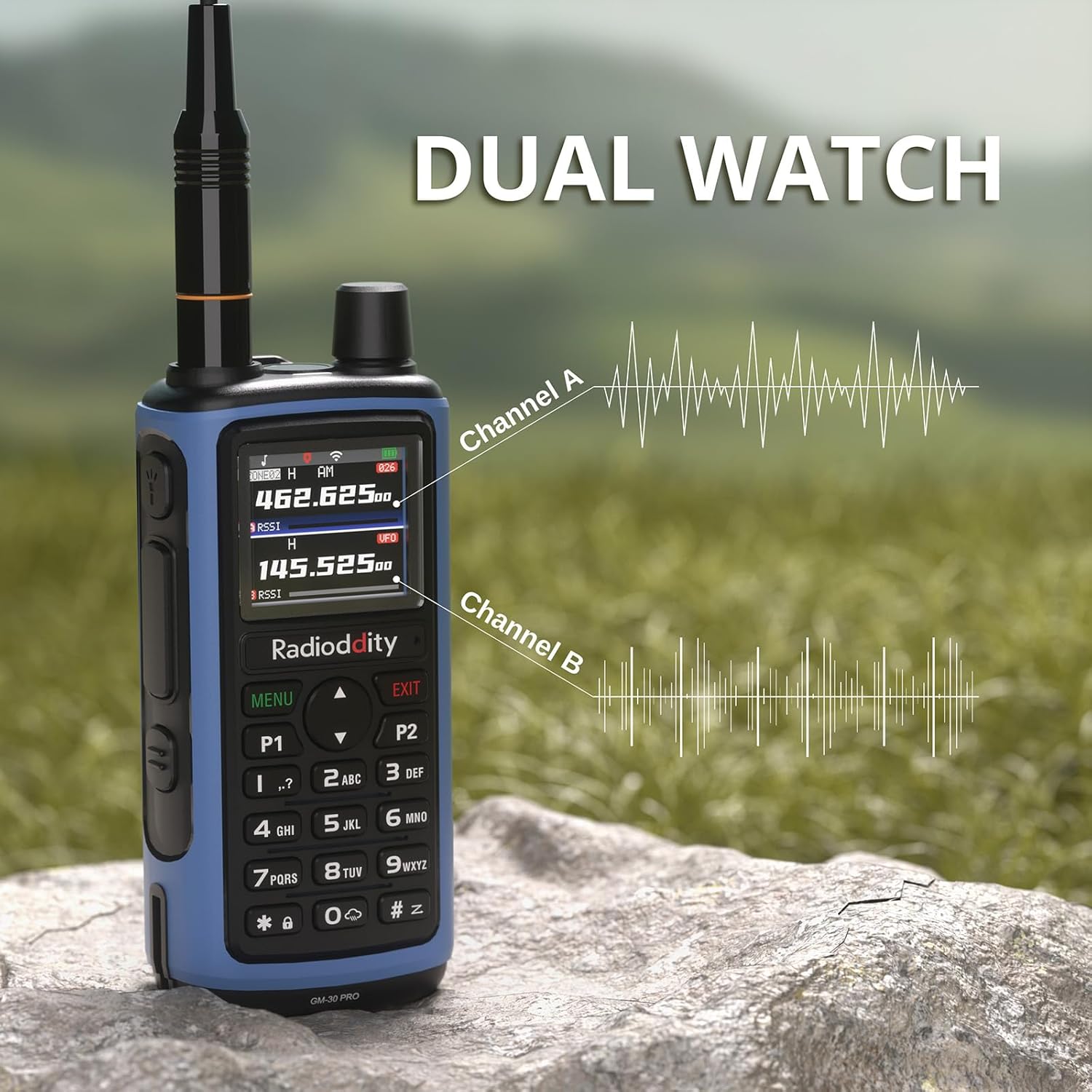
5.9 นาฬิกาคู่
The Dual Watch function allows you to monitor two channels simultaneously, ensuring you don't miss important communications.
5.10 การใช้งานแบบแฮนด์ฟรี VOX
VOX (Voice Operated Exchange) allows for hands-free transmission when your voice is detected, eliminating the need to press the PTT button.

5.11 Advanced Scanning
The radio supports various scanning modes, including channel scan, frequency scan (with adjustable range), and CTCSS/DCS tone scan. These functions can be accessed directly from the radio's menu.
5.12 การใช้ไฟฉาย
The built-in LED flashlight on top of the radio can be activated for illumination in low-light conditions. This feature is useful for emergencies or general utility.

5.13 โทรออก
ในการส่งสัญญาณ ให้กดปุ่ม Push-To-Talk (PTT) ที่ด้านข้างของวิทยุค้างไว้ พูดให้ชัดเจนใส่ไมโครโฟน ปล่อยปุ่ม PTT เพื่อรับสัญญาณ
5.14 การแจ้งเตือนฉุกเฉิน
The radio includes an emergency alert function. Refer to the manual for specific instructions on how to activate and use this feature in an emergency.
6. การบำรุงรักษา
6.1 การบำรุงรักษาแบตเตอรี่
- ค่าใช้จ่ายเริ่มต้น: ชาร์จแบตเตอรี่ให้เต็มก่อนใช้งานครั้งแรก
- การชาร์จปกติ: Avoid overcharging. Charge the battery when the low battery indicator appears.
- พื้นที่จัดเก็บ: For long-term storage, charge the battery to 50% and store in a cool, dry place. Recharge every 3-6 months to prevent deep discharge.
6.2 การทำความสะอาดวิทยุ
ใช้แบบนุ่มๆamp cloth to clean the radio's exterior. Do not use harsh chemicals or solvents. Ensure the radio is dry before use.
7 การแก้ไขปัญหา
If you encounter issues with your Radioddity GM-30 PRO, refer to the following common problems and solutions:
- วิทยุไม่เปิด: Ensure the battery is correctly installed and charged. Check the Power/Volume knob.
- ไม่มีการรับ/ส่งสัญญาณ: Verify antenna connection. Check channel settings and frequency. Ensure you are within range of other radios or repeaters.
- คุณภาพเสียงไม่ดี: Adjust squelch level. Check speaker mic connection if applicable.
- ปัญหาด้านการเขียนโปรแกรม: Ensure the "Walkie-talkie tool" app is updated and connected via Bluetooth. Refer to the app's instructions for detailed programming steps.
For further assistance, please contact Radioddity customer support.
8. ข้อมูลจำเพาะ
| คุณสมบัติ | ข้อมูลจำเพาะ |
|---|---|
| ยี่ห้อ | กัมมันตภาพรังสี |
| หมายเลขรุ่น | จีเอ็ม-30 โปร |
| จำนวนช่องสัญญาณ | 1000 |
| ช่วงความถี่ | GMRS (Transmit), 8-Band Receive (GMRS, VHF, UHF, NOAA, FM, Airband, 220MHz, 350MHz) |
| แสดง | จอแสดงผลสี TFT ขนาด 1.77 นิ้ว |
| ความจุของแบตเตอรี่ | ลิเธียมไออน 2500mAh |
| พอร์ตชาร์จ | ยูเอสบี-ซี |
| การเขียนโปรแกรมไร้สาย | Via "Walkie-talkie tool" App (iOS & Android) |
| คุณสมบัติพิเศษ | VOX, Dual Watch, One-Key Frequency Copy, Advanced Scanning, Built-in LED Flashlight |
| ระยะการสนทนาสูงสุด | 5 ไมล์ |
| ระดับความต้านทานต่อน้ำ | ไม่ทนน้ำ |
| รหัส FCC | 2AN62-GM30PRO |
9. การรับประกันและการสนับสนุน
9.1 ข้อมูลการรับประกัน
The Radioddity GM-30 PRO GMRS Radio comes with an รับประกัน 18 เดือน นับจากวันที่ซื้อ การรับประกันนี้ครอบคลุมข้อบกพร่องจากการผลิตและรับรองว่าผลิตภัณฑ์ทำงานได้ตามที่ตั้งใจไว้ภายใต้การใช้งานปกติ โปรดเก็บหลักฐานการซื้อไว้เพื่อใช้ในการเรียกร้องการรับประกัน
9.2 การสนับสนุนลูกค้า
For technical assistance, troubleshooting, or warranty inquiries, please contact Radioddity customer support through their official website or the retailer where the product was purchased. Radioddity aims to provide excellent customer service and support for its products.