
1. บทนำ
This manual provides detailed instructions for the installation, operation, and maintenance of your Cuifati Triple Lens 2MP Wireless Outdoor Security Camera. Please read this manual thoroughly before using the product to ensure proper functionality and safety. Keep this manual for future reference.
2. คุณสมบัติของผลิตภัณฑ์
- Triple Lens Security Camera: Equipped with three 2MP HD lenses, supporting simultaneous recording from three screens for wide coverage in large areas like orchards and farmlands.
- การเข้ารหัสวิดีโอที่มีประสิทธิภาพ: Utilizes H.265 video encoding technology, significantly reducing storage space usage. Supports cloud storage and local storage with up to 128GB memory cards (not included), ensuring data security and reliability.
- ระบบเตือนภัยอัจฉริยะ: Integrated motion detection and human detection functions provide real-time alarm image pushes. Supports two-way voice communication and voice alarms for easy remote communication and emergency handling.
- การใช้งานภายในและภายนอกอาคาร: Features external antennas for stronger, more stable signal. Includes a bracket and power supply for easy installation. Excellent water and dustproof performance makes it suitable for both indoor and outdoor environments.
- ตัวเลือกการเชื่อมต่อที่หลากหลาย: The WiFi security camera supports 2.4G WiFi, AP Hotspot, and Ethernet connections to suit various network environments. Allows remote viewing ของ footage via a mobile application, providing control over the situation anytime, anywhere.

รูปที่ 2.1: เกินview of camera features including triple lens, real-time viewing, easy setup, motion detection, two-way audio, and 2.4G WiFi connectivity.

Figure 2.2: The camera's water and dustproof design ensures reliable outdoor performance.
3. เนื้อหาบรรจุภัณฑ์
ก่อนการติดตั้ง โปรดตรวจสอบให้แน่ใจว่ามีอุปกรณ์ทั้งหมดที่ระบุไว้ด้านล่างนี้อยู่ในบรรจุภัณฑ์ของคุณ:
- Cuifati Triple Lens Security Camera
- ตัวยึด
- อะแดปเตอร์ไฟฟ้า (ปลั๊ก EU)
- สกรูยึดและปลั๊กผนัง
- ขั้วต่อกันน้ำ
- คู่มือการใช้งาน (เอกสารนี้)
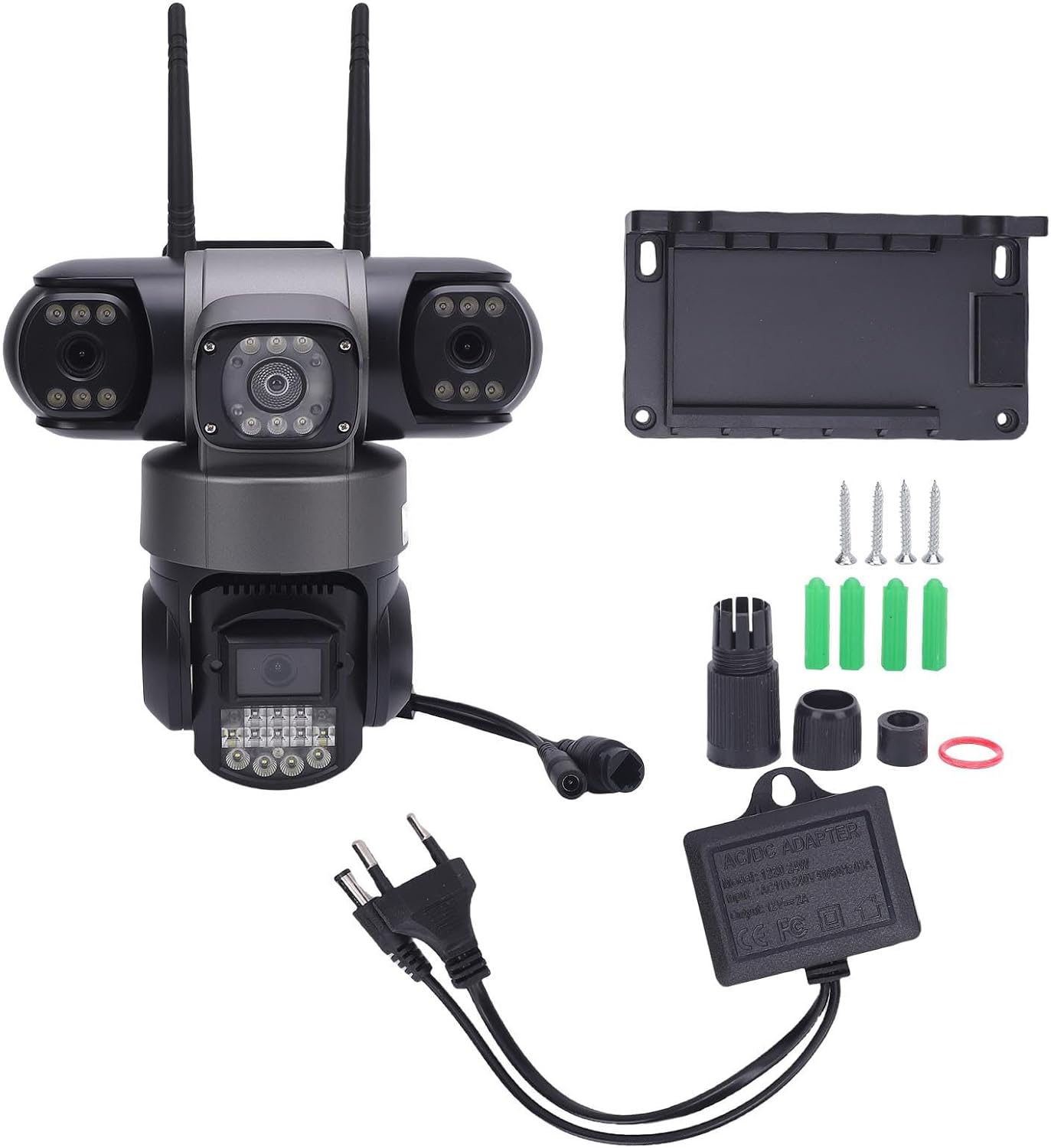
รูปที่ 3.1: ส่วนประกอบที่รวมอยู่ในแพ็คเกจผลิตภัณฑ์
4. การตั้งค่าและการติดตั้ง
4.1 การติดตั้งทางกายภาพ
- เลือกตำแหน่ง: Select a suitable outdoor or indoor location that provides the desired viewing angle and is within range of your 2.4G WiFi network or Ethernet connection. Ensure the location allows for power access.
- ติดวงเล็บ: ใช้สกรูและพุกที่ให้มาเพื่อยึดขายึดเข้ากับพื้นผิวที่เลือกอย่างแน่นหนา
- ติดกล้อง: Securely attach the camera to the mounting bracket. Adjust the camera's angle for optimal coverage.
- เชื่อมต่อพลังงาน: Connect the power adapter to the camera and plug it into a power outlet. Ensure the connection is secure and waterproof if installed outdoors.
4.2 การเชื่อมต่อเครือข่าย
The camera supports 2.4G WiFi, AP Hotspot, and Ethernet connections.
- ดาวน์โหลดแอป: Download the designated mobile application (refer to packaging or quick start guide for app name) from your device's app store.
- ลงทะเบียน/เข้าสู่ระบบ: Create an account or log in to the application.
- เพิ่มอุปกรณ์: ทำตามคำแนะนำในแอปเพื่อเพิ่มกล้องตัวใหม่ของคุณ โดยปกติแล้วจะต้องสแกนคิวอาร์โค้ดบนกล้องหรือป้อนรหัสประจำตัวของกล้องด้วยตนเอง
- กำหนดค่าเครือข่าย: Select your preferred connection method (WiFi, AP Hotspot, or Ethernet) and follow the prompts to connect the camera to your network. For WiFi, enter your 2.4G WiFi network name and password.
- ตั้งค่าเริ่มต้น: Complete any initial setup steps within the app, such as setting a device password or adjusting basic settings.
5. คู่มือการใช้งาน
5.1 Real-time Viewกำลังทำ
Open the mobile application and select your camera from the device list to view อยู่ footage. The triple lens design allows for simultaneous viewing of three distinct areas.

Figure 5.1: The camera's three lenses provide simultaneous monitoring of multiple areas.
5.2 Motion and Human Detection
The camera is equipped with advanced motion and human detection capabilities. When motion or a human figure is detected, the camera can trigger an alarm and send real-time notifications to your mobile device.
- เปิด/ปิด: Access the camera settings in the app to enable or disable motion and human detection.
- ความไว: ปรับความไวในการตรวจจับเพื่อลดการแจ้งเตือนที่ผิดพลาดให้น้อยที่สุด
- การตั้งค่าการแจ้งเตือน: Configure how you receive alerts (e.g., push notifications, email).

Figure 5.2: The camera's motion and humanoid detection system.

Figure 5.3: Real-time motion detection alerts sent to your mobile device.
5.3 เสียงสองทาง
Utilize the two-way audio feature to communicate with individuals near the camera. This is useful for deterring intruders or communicating with visitors.
- เปิดใช้งานไมโครโฟน: ในไลฟ์สด view interface of the app, tap the microphone icon to speak through the camera's speaker.
- ฟัง: ไมโครโฟนในตัวของกล้องช่วยให้คุณได้ยินเสียงจากบริเวณใกล้เคียงกับกล้อง
5.4 การเล่นวิดีโอ
บันทึกแล้วฟูtage สามารถเข้าถึงได้และอีกครั้งviewed through the mobile application. The camera supports both cloud storage and local storage (via a microSD card, not included).
- การบันทึกการเข้าถึง: Navigate to the 'Playback' or 'Recordings' section within the app.
- เลือกวันที่/เวลา: Choose the desired date and time to review เหตุการณ์ที่บันทึกไว้
- ดาวน์โหลด/แชร์: Options to download clips or share them may be available within the app.

รูปที่ 5.4: เรื่องview บันทึกเสียงฟูtage บนอุปกรณ์เคลื่อนที่ของคุณ
6. การบำรุงรักษา
การบำรุงรักษาตามปกติจะช่วยให้กล้องรักษาความปลอดภัยของคุณมีประสิทธิภาพสูงสุดและมีอายุการใช้งานยาวนาน
- การทำความสะอาดเลนส์: Periodically clean the camera lenses with a soft, dry cloth to remove dust, dirt, or water spots that may obstruct the viewหลีกเลี่ยงการใช้น้ำยาทำความสะอาดที่มีฤทธิ์กัดกร่อน
- การตรวจสอบที่อยู่อาศัย: Check the camera housing and mounting bracket for any signs of damage or loosening. Ensure all connections are secure.
- การอัปเดตซอฟต์แวร์: Check the mobile application regularly for firmware updates for your camera. Keeping the firmware updated can improve performance and security.
- แหล่งจ่ายไฟ: ตรวจสอบให้แน่ใจว่าอะแดปเตอร์แปลงไฟและสายไฟอยู่ในสภาพสมบูรณ์
7 การแก้ไขปัญหา
หากคุณพบปัญหาเกี่ยวกับกล้อง โปรดดูปัญหาทั่วไปและวิธีแก้ไขต่อไปนี้:
| ปัญหา | สาเหตุที่เป็นไปได้ | สารละลาย |
|---|---|---|
| Camera offline/No video feed | No power; Weak WiFi signal; Network disconnection | Check power connection; Move camera closer to router or use Ethernet; Restart camera and router. |
| การตรวจจับการเคลื่อนไหวไม่ทำงาน | Detection disabled; Incorrect sensitivity; Obstruction in view | Enable detection in app settings; Adjust sensitivity; Clear any obstructions. |
| คุณภาพวิดีโอไม่ดี | Dirty lens; Low bandwidth; Poor lighting | Clean lenses; Ensure stable internet connection; Check lighting conditions. |
| ไม่สามารถเชื่อมต่อ WiFi | Incorrect WiFi password; 5G WiFi network; Out of range | Verify 2.4G WiFi password; Ensure router is 2.4G compatible; Move camera closer to router. |
8. ข้อมูลจำเพาะ
| ยี่ห้อ | กุยฟาติ |
| หมายเลขรุ่น | Cuifati432dc1swh5-11 |
| ขนาดสินค้า | 22 x 22 x 15.98 ซม. |
| น้ำหนัก | 893 กรัม |
| การกำหนดค่าเลนส์ | Triple 2MP HD Lenses |
| การเข้ารหัสวิดีโอ | เอช.265 |
| การเชื่อมต่อ | 2.4G WiFi, AP Hotspot, Ethernet |
| ตัวเลือกการจัดเก็บข้อมูล | Cloud Storage, Local Storage (up to 128GB microSD card, not included) |
| คุณสมบัติพิเศษ | Motion Detection, Human Detection, Two-Way Audio, Voice Alarm |
| การจัดอันดับด้านสิ่งแวดล้อม | กันน้ำและกันฝุ่น |
| แหล่งจ่ายไฟ | Included Power Adapter (EU Plug) |

Figure 8.1: Camera dimensions and rotation capabilities.
9. การรับประกันและการสนับสนุน
Specific warranty information for this product is not available in the provided data. Please refer to the product packaging or contact the retailer/manufacturer directly for warranty details and customer support. For technical assistance, consult the mobile application's help section or the manufacturer's official webเว็บไซต์.