
การแนะนำ
Thank you for choosing the URBN UPR123 10000mAh Wireless Power Bank. This device is designed to provide convenient and efficient charging for your mobile devices, featuring both wireless and wired charging capabilities, a strong magnetic hold, and a built-in kickstand. Please read this manual carefully to ensure proper use and to maximize the lifespan of your power bank.
มีอะไรอยู่ในกล่อง
- 1 x URBN UPR123 Wireless Power Bank (Main Unit)
- สายชาร์จ USB 1 เส้น
- 1 x คู่มือผู้ใช้ (เอกสารนี้)
- ใบรับประกัน 1 ใบ
สินค้าเกินview
Familiarize yourself with the components of your URBN Wireless Power Bank.
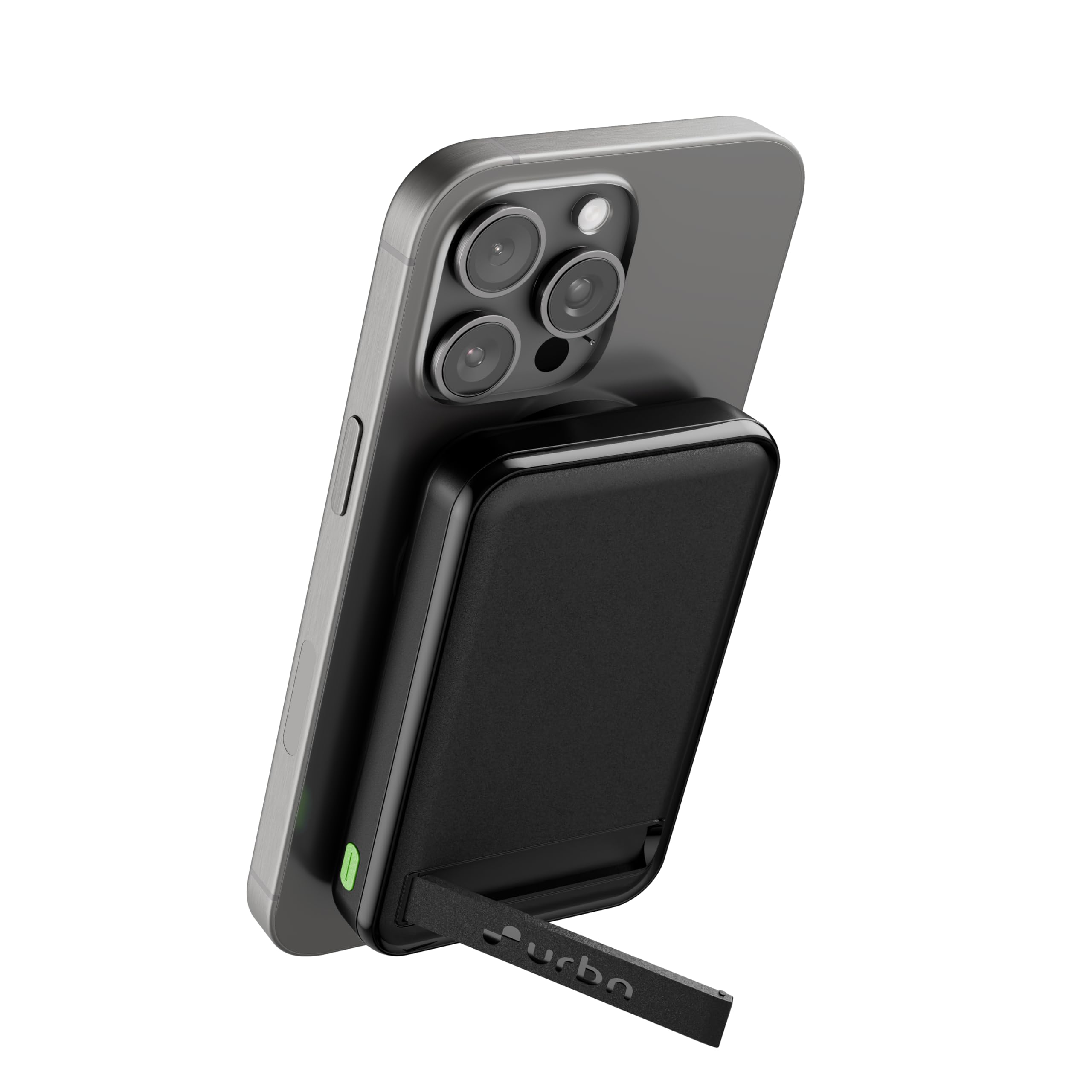
ภาพ: ด้านหน้า view of the URBN UPR123 Wireless Power Bank in black, showcasing การออกแบบที่กะทัดรัด
ภาพ: ด้านบน view of the power bank highlighting the 15W Wireless Charging area, 22.5W USB-A Output port, and 20W USB-C Input/Output port, along with LED indicators.
คุณสมบัติหลัก:
- ความจุ 10000mAh: สามารถชาร์จสมาร์ทโฟนส่วนใหญ่ได้หลายครั้ง
- การชาร์จแบบไร้สาย 15W: MagSafe compatible for iPhone 12 and newer, and other Qi-enabled devices.
- 22.5W Wired Charging: Fast charging via USB-A port.
- 20W USB-C Input/Output: For charging the power bank and other devices.
- ขาตั้งในตัว: ช่วยให้ใช้งานได้โดยไม่ต้องใช้มือ viewขณะชาร์จ
- แรงยึดเกาะแม่เหล็กสูง: Ensures secure attachment to compatible devices.
- ไฟ LED แสดงสถานะ: แสดงระดับแบตเตอรี่และสถานะการชาร์จ
การตั้งค่า
การชาร์จพาวเวอร์แบงค์ครั้งแรก:
- Connect the provided USB charging cable to the USB-C port on the power bank.
- Connect the other end of the USB cable to a compatible USB wall adapter (not included).
- The LED indicator lights will illuminate to show the charging progress. All four LEDs will be solid when the power bank is fully charged.
- เพื่อประสิทธิภาพสูงสุด ควรชาร์จพาวเวอร์แบงค์ให้เต็มก่อนใช้งานครั้งแรก
คำแนะนำการใช้งาน
1. Wired Charging:
The power bank supports fast wired charging via its USB-A and USB-C ports.
- Connect your device's charging cable to either the USB-A output port (22.5W) or the USB-C input/output port (20W) on the power bank.
- เชื่อมต่อปลายสายอีกด้านเข้ากับอุปกรณ์ของคุณ
- Charging will begin automatically. The LED indicators will show the remaining power.
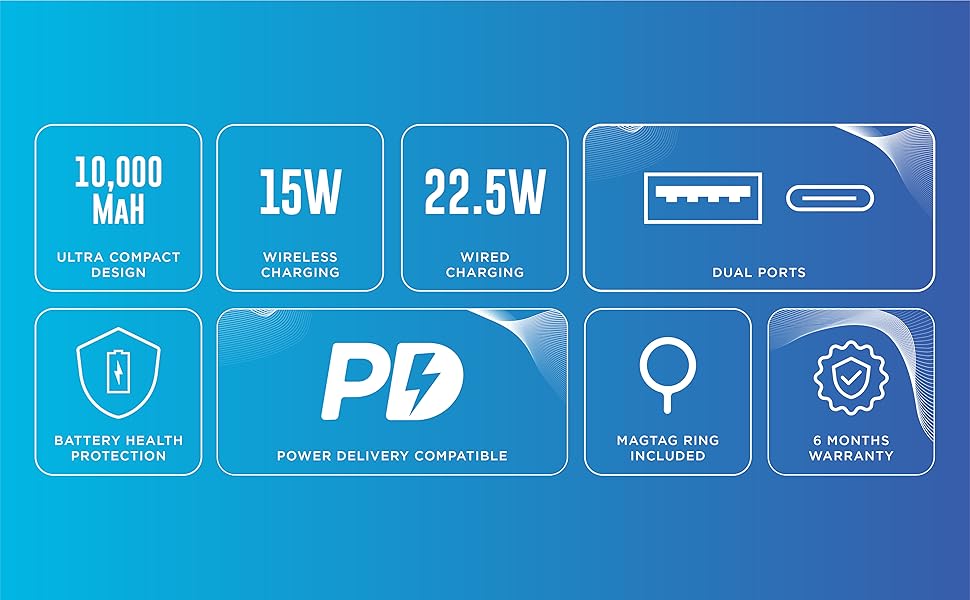
Image: Illustration showing a smartphone being charged via wired connection to the power bank, alongside a phone wirelessly charging.
2. Wireless Charging (MagSafe Compatible):
For devices with MagSafe or Qi wireless charging capability.
- Align your MagSafe-compatible iPhone (iPhone 12 and above) or other Qi-enabled device with the magnetic charging area on the power bank.
- The strong magnets will securely attach the power bank to your device.
- Wireless charging will commence automatically. The LED indicators will show the power bank's remaining charge.
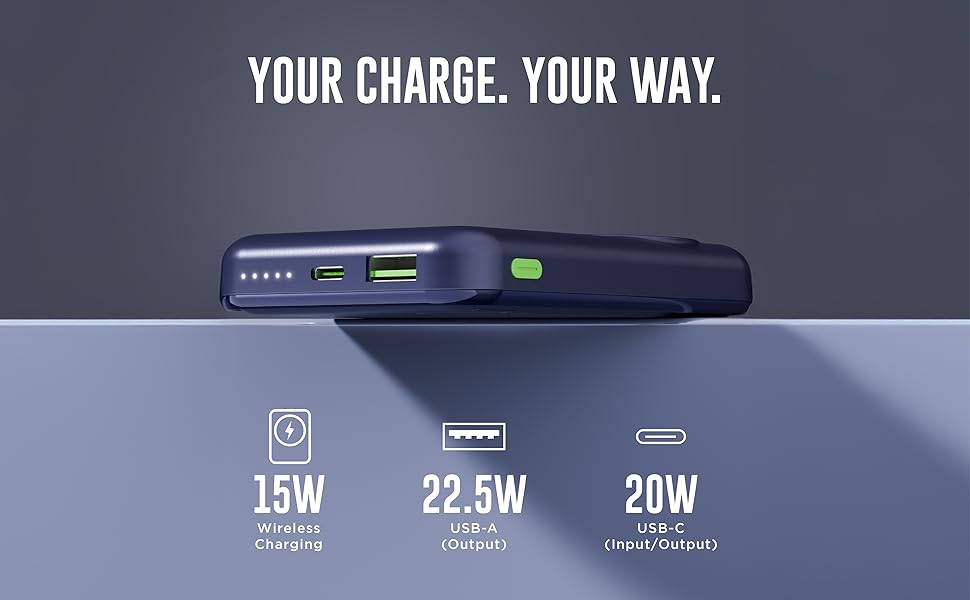
Image: The power bank is shown magnetically attached to the back of a smartphone, with its integrated kickstand extended for hands-free use.
3. Using the Built-in Kickstand:
ขาตั้งในตัวช่วยให้ใช้งานได้สะดวกโดยไม่ต้องใช้มือ viewการไอเอ็นจี
- Gently pull out the kickstand located on the back of the power bank.
- Position your device (with the power bank attached) on a flat surface to enjoy hands-free viewอยู่ในแนวตั้งหรือแนวนอนก็ได้
- Push the kickstand back into its slot when not in use.
4. การชาร์จแบบส่งผ่าน:
The power bank supports pass-through charging, allowing you to charge both the power bank and your device simultaneously.
- Connect the power bank to a wall adapter using the USB-C port.
- Then, connect your device to the power bank (either wired or wirelessly).
- The power bank will charge your device first, and then recharge itself.
5. MagTag Ring (Included):
แม็กTag Ring can be attached to non-MagSafe compatible phone cases to enhance magnetic attachment for wireless charging.
- Refer to the MagTag Ring's separate instructions for proper attachment to your phone case.
- Once attached, it provides a stronger magnetic connection for the power bank.
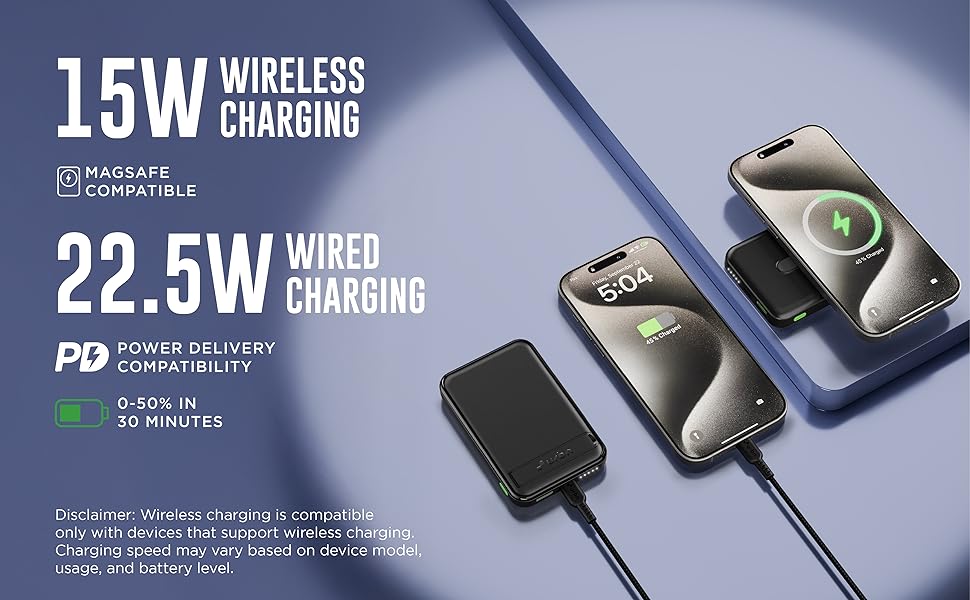
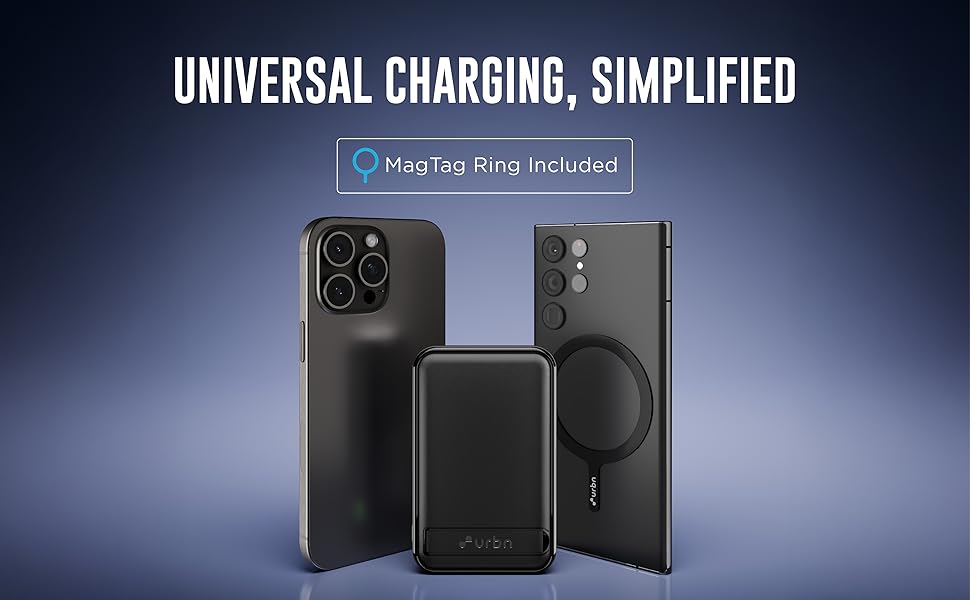
Image: The power bank positioned between an iPhone and an Android phone with a MagTag ring attached to its case, illustrating universal charging compatibility.
การบำรุงรักษาและการดูแล
- การทำความสะอาด: เช็ดพาวเวอร์แบงค์ด้วยผ้านุ่มและแห้ง ห้ามใช้สารเคมีรุนแรงหรือวัสดุที่มีฤทธิ์กัดกร่อน
- พื้นที่จัดเก็บ: เก็บพาวเวอร์แบงค์ไว้ในที่แห้งและเย็น หลีกเลี่ยงแสงแดดโดยตรงและอุณหภูมิที่สูงหรือต่ำเกินไป
- การดูแลแบตเตอรี่ เพื่อยืดอายุการใช้งานแบตเตอรี่ ควรชาร์จพาวเวอร์แบงค์ให้เต็มอย่างน้อยทุกสามเดือน หากไม่ได้ใช้งานเป็นประจำ หลีกเลี่ยงการชาร์จแบตเตอรี่จนหมดบ่อยเกินไป
- หลีกเลี่ยงผลกระทบ: อย่าทำตกหรือให้พาวเวอร์แบงค์ได้รับแรงกระแทกรุนแรง
- การสัมผัสน้ำ: Keep the power bank away from water and liquids.
การแก้ไขปัญหา
| ปัญหา | สาเหตุที่เป็นไปได้ | สารละลาย |
|---|---|---|
| พาวเวอร์แบงค์ชาร์จไม่เข้า | Low battery; faulty cable or adapter; loose connection. | Ensure the power bank is connected to a working power source with the provided USB-C cable and a compatible adapter. Check connections. |
| อุปกรณ์ไม่ชาร์จแบบไร้สาย | Misalignment; non-Qi compatible device; thick phone case; foreign objects between power bank and device. | Ensure proper alignment of the device on the power bank's wireless charging area. Remove thick cases or metal objects. Verify device supports Qi wireless charging. |
| Device not charging via cable | Faulty cable; device not compatible; power bank battery depleted. | Try a different charging cable. Ensure your device is compatible. Recharge the power bank. |
| ชาร์จช้า | Using a non-fast charging cable/adapter; device not supporting fast charging; high background app usage. | Use a fast-charging compatible cable and adapter. Close unnecessary apps on your device. |
| พาวเวอร์แบงค์จะร้อนขึ้นขณะใช้งาน | Normal operation during charging/discharging; excessive load. | It is normal for the power bank to get slightly warm. If it becomes excessively hot, disconnect it immediately and contact support. |
ข้อมูลจำเพาะทางเทคนิค
| ชื่อรุ่น | UPR123 |
| ความจุของแบตเตอรี่ | 10000 มิลลิแอมป์ |
| ประเภทเซลล์แบตเตอรี่ | ลิเธียมโพลีเมอร์ |
| เอาท์พุทชาร์จไร้สาย | สูงสุดถึง 15W |
| เอาต์พุต USB-A | 22.5W (สูงสุด) |
| อินพุต/เอาต์พุต USB-C | 20W (สูงสุด) |
| ประเภทขั้วต่อ | USB ประเภท C |
| ขนาด (ยาว x กว้าง x หนา) | 9.5L x 6W x 3Th Centimeters |
| น้ำหนัก | 250 กรัม |
| คุณสมบัติพิเศษ | Fast Charging, LED Indicator Lights, Over Charging Protection, Short Circuit Protection, Wireless Charging, Built-in Kickstand, Strong Magnetic Hold |
| อุปกรณ์ที่รองรับ | Headphones, Smartphones (iPhone 12 & above, Android & other Qi-enabled devices), Smartwatches |
| ประเทศต้นกำเนิด | อินเดีย |
ข้อมูลด้านความปลอดภัย
Please read and follow these safety guidelines to prevent injury or damage to your device and the power bank.
- อย่าวางพาวเวอร์แบงค์ไว้ในที่ที่มีอุณหภูมิสูงหรือต่ำเกินไป (สูงกว่า 45°C หรือต่ำกว่า 0°C)
- ห้ามถอดประกอบ ดัดแปลง หรือซ่อมแซมอุปกรณ์ด้วยตนเอง
- เก็บให้ห่างจากน้ำ ความชื้น และวัสดุไวไฟ
- ห้ามใช้หากพาวเวอร์แบงค์ชำรุด บวม หรือรั่ว
- หลีกเลี่ยงการทำพาวเวอร์แบงค์ตกหรือกระแทกอย่างรุนแรง
- เก็บให้พ้นจากมือเด็ก
- ทิ้งพาวเวอร์แบงค์อย่างมีความรับผิดชอบตามกฎระเบียบท้องถิ่น
Built-in Protection Features:
The URBN UPR123 Power Bank includes multiple safety protections:
- โอเวอร์โวลtagการป้องกันอี
- ระบบป้องกันกระแสไฟเกิน
- การป้องกันการชาร์จไฟเกิน
- ระบบป้องกันไฟฟ้าลัดวงจร
- การป้องกันอุณหภูมิแบตเตอรี่
- Chip Shutdown Thermal Protection
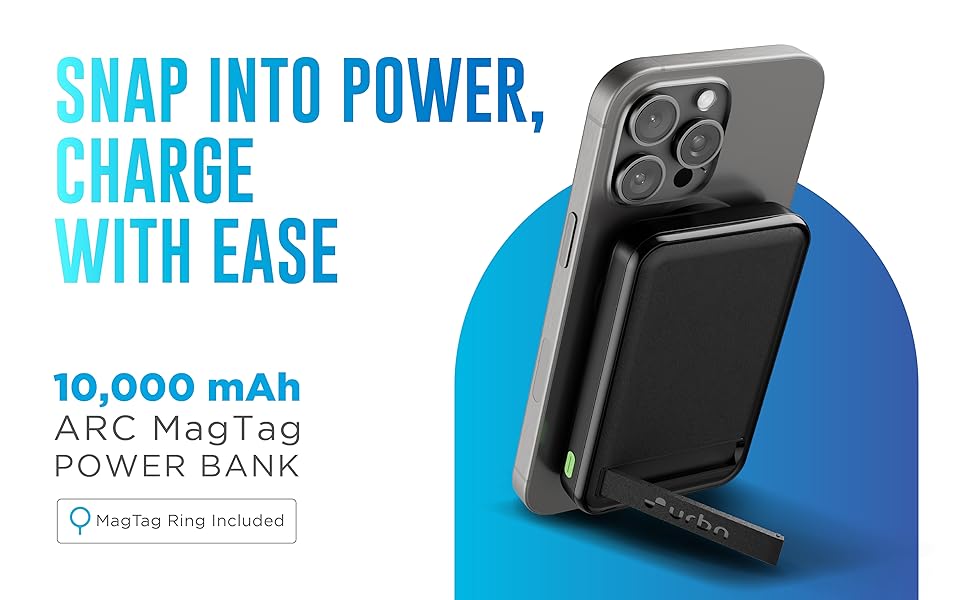
Image: Visual representation of the power bank's safety features, including overvoltage, overcurrent, overcharge, short circuit, battery temperature, and chip shutdown thermal protection.
การรับประกันและการสนับสนุน
ข้อมูลการรับประกัน:
Your URBN UPR123 Wireless Power Bank comes with a รับประกันการเปลี่ยนสินค้า 6 เดือน นับจากวันที่ซื้อสินค้า โปรดเก็บใบเสร็จรับเงินและบัตรรับประกันไว้เพื่อใช้ในการเรียกร้องการรับประกัน
The warranty covers manufacturing defects. It does not cover damage caused by misuse, accidents, unauthorized repairs, or normal wear and tear.
การสนับสนุนลูกค้า:
For any questions, technical assistance, or warranty claims, please contact URBN customer support.
- ผู้ผลิต: Acetron Tech Ventures Pvt Ltd.
- ข้อมูลติดต่อผู้ผลิต: Veeflex Electrikials Private Limited, Rajprabha Enclave, Building No. 6, Unit No. 209&210, 1st Floor, Bhoidapada, Sativali Road, Vasai (E) Pin code : - 401208
- Packer Contact Information: ACETRON TECH VENTURES PVT LTD Rajprabha Enclave, Building No. 6, Unit No. 111&112, 1st Floor, Bhoidapada, Sativali Road, Vasai (E) Pin code : - 401208
- ข้อมูลติดต่อผู้นำเข้า: ACETRON TECH VENTURES PVT LTD Rajprabha Enclave, Building No. 6, Unit No. 111&112, 1st Floor, Bhoidapada, Sativali Road, Vasai (E) Pin code : - 401208
Please visit the official URBN webไซต์สำหรับรายละเอียดการติดต่อฝ่ายสนับสนุนล่าสุด