1. บทนำ
The Generic RHT20 is an environmental test equipment designed for accurately measuring and logging humidity and temperature data. This datalogger features an integrated LCD for real-time display of readings and provides reliable data collection for various applications. This manual provides essential information for the proper setup, operation, maintenance, and troubleshooting of your RHT20 device.
2. ข้อมูลด้านความปลอดภัย
- อ่านคำแนะนำทั้งหมดอย่างละเอียดก่อนใช้งานอุปกรณ์
- อย่าให้เครื่องสัมผัสกับอุณหภูมิที่สูงหรือต่ำเกินไป แสงแดดโดยตรง หรือความชื้นสูง
- หลีกเลี่ยงการทำเครื่องตกหรือได้รับแรงกระแทกรุนแรง
- ห้ามเปิดหรือดัดแปลงอุปกรณ์ด้วยตนเอง โปรดส่งต่ออุปกรณ์ดังกล่าวให้ช่างผู้ชำนาญการเป็นผู้ดำเนินการซ่อมแซม
- ทิ้งแบตเตอรี่ตามระเบียบข้อบังคับในท้องถิ่น
3. เนื้อหาบรรจุภัณฑ์
ตรวจสอบว่าสินค้าทั้งหมดมีอยู่และอยู่ในสภาพดีเมื่อแกะกล่อง:
- RHT20 Humidity & Temperature Datalogger Unit
- คู่มือการใช้งาน
- USB Cable (for data transfer and power, if applicable)
- ซีดีซอฟต์แวร์ (ถ้ามี)
4. อุปกรณ์โอเวอร์view
Familiarize yourself with the components of your RHT20 datalogger:
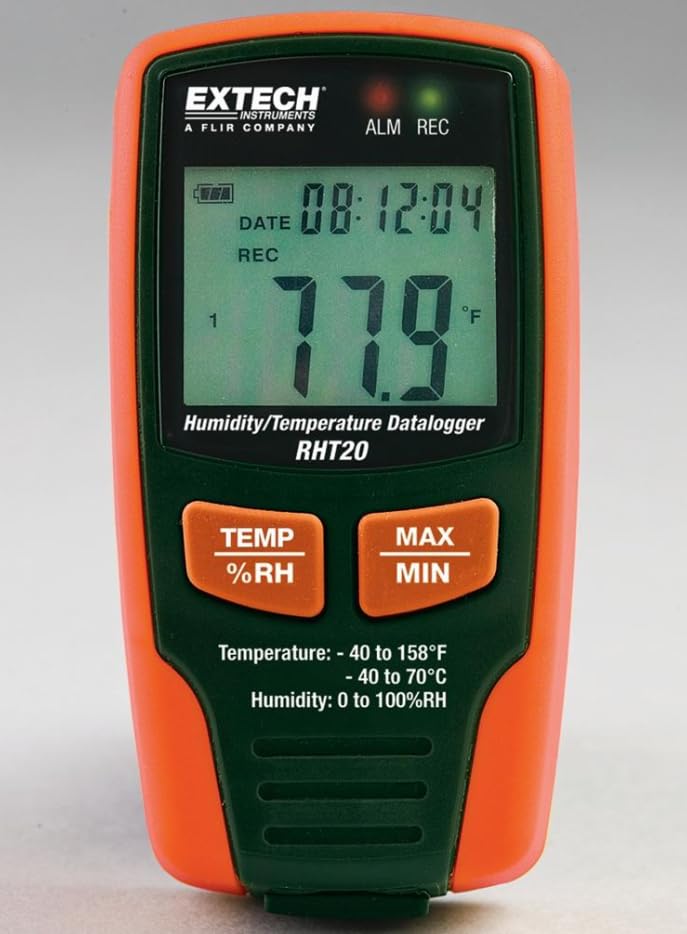
รูปที่ 1: ด้านหน้า view of the RHT20 Datalogger. This image displays the device's main body, featuring a prominent LCD screen for displaying real-time humidity and temperature readings, along with control buttons located below the screen.
4.1 ส่วนประกอบ
- จอแสดงผล LCD: Shows current temperature, humidity, battery status, and logging indicators.
- ปุ่มโหมด: Cycles through display modes or menu options.
- ปุ่ม ตลท.: เข้าสู่เมนูการตั้งค่าหรือยืนยันการเลือก
- ปุ่ม START/STOP: เริ่มหรือหยุดการบันทึกข้อมูล
- พอร์ต USB: For connecting to a computer for data download and configuration.
- เซ็นเซอร์: Integrated humidity and temperature sensor (typically located at the top or side).
- ช่องใส่แบตเตอรี่: ตั้งอยู่บริเวณด้านหลังของอุปกรณ์
5. การตั้งค่า
5.1. การติดตั้งแบตเตอรี่
- Locate the battery compartment cover on the back of the RHT20.
- เลื่อนหรือคลายเกลียวฝาเพื่อเปิดออก
- Insert the required batteries (e.g., AAA batteries) observing the correct polarity (+/-) as indicated inside the compartment.
- ใส่ฝาปิดช่องใส่แบตเตอรี่กลับเข้าที่อย่างแน่นหนา
5.2. การเปิด/ปิดเครื่อง
- การเปิดเครื่อง: กดปุ่มค้างไว้ เริ่ม/หยุด button for approximately 3 seconds until the LCD illuminates.
- วิธีปิดเครื่อง: กดปุ่มค้างไว้ เริ่ม/หยุด button for approximately 3 seconds until the LCD turns off.
5.3. การติดตั้งซอฟต์แวร์ (ทางเลือก)
If your application requires advanced configuration or data analysis, install the provided software (if applicable) on your computer by following the on-screen instructions from the installation CD or downloaded file.
6. คู่มือการใช้งาน
6.1. การวัดพื้นฐาน
Upon powering on, the RHT20 will immediately display the current ambient temperature and humidity readings on the LCD. Ensure the device is placed in the environment you wish to monitor.
6.2. การกำหนดการตั้งค่า
To adjust settings such as logging interval, alarm thresholds, or time/date:
- กดปุ่มค้างไว้ ชุด ปุ่มเพื่อเข้าสู่เมนูการตั้งค่า
- ใช้ โหมด button to navigate through different parameters.
- ใช้ ชุด button to select a parameter and adjust its value.
- กด โหมด to confirm the value and move to the next setting, or press เริ่ม/หยุด เพื่อออกจากเมนูการตั้งค่า
6.3. เริ่มการบันทึกข้อมูล
To begin recording data:
- Ensure the device is powered on and configured as desired.
- กดปุ่ม เริ่ม/หยุด button briefly. A logging indicator (e.g., a blinking REC icon) will appear on the LCD, confirming that data logging has started.
6.4. การหยุดการบันทึกข้อมูล
To cease recording data:
- กดปุ่ม เริ่ม/หยุด button briefly. The logging indicator will disappear from the LCD, indicating that data logging has stopped.
6.5. การดาวน์โหลดข้อมูล
วิธีการเรียกดูข้อมูลที่บันทึกไว้:
- Connect the RHT20 to your computer using the provided USB cable.
- Launch the RHT20 software (if applicable).
- Follow the software's instructions to download and analyze the recorded data.
7. การบำรุงรักษา
7.1. การทำความสะอาด
- เช็ดอุปกรณ์ด้วยผ้านุ่มแห้ง
- ห้ามใช้น้ำยาทำความสะอาดที่มีฤทธิ์กัดกร่อน ตัวทำละลาย หรือสารเคมีรุนแรง
- Ensure no liquid enters the sensor area or USB port.
7.2. การจัดเก็บ
- เมื่อไม่ได้ใช้งานเป็นเวลานาน ควรถอดแบตเตอรี่ออกเพื่อป้องกันการรั่วไหล
- เก็บอุปกรณ์ไว้ในที่แห้งและเย็น หลีกเลี่ยงแสงแดดโดยตรงและอุณหภูมิที่สูงหรือต่ำเกินไป
8 การแก้ไขปัญหา
- อุปกรณ์ไม่เปิดเครื่อง: ตรวจสอบการติดตั้งแบตเตอรี่และให้แน่ใจว่าแบตเตอรี่ยังใหม่
- การอ่านค่าที่ไม่ถูกต้อง: Ensure the sensor is clean and unobstructed. Allow the device to stabilize in the environment for a few minutes.
- ข้อมูลไม่ถูกบันทึก: Verify that logging was initiated correctly (check for the logging indicator on the LCD). Ensure sufficient memory is available.
- ไม่สามารถเชื่อมต่อกับคอมพิวเตอร์ได้: Check USB cable connection. Ensure software drivers are installed correctly. Try a different USB port.
9. ข้อมูลจำเพาะ
| ข้อมูลจำเพาะ | ค่า |
|---|---|
| ยี่ห้อ | ทั่วไป |
| แบบอย่าง | rht20 |
| น้ำหนักสินค้า | 7 ปอนด์ (ประมาณ 3.17 กก.) |
| ผู้ผลิต | เอ็กซ์เทค |
| ASIN | B0FB7Y8MPX |
| วันที่พร้อมใช้งานครั้งแรก | 29 พฤษภาคม 2025 |
10. การรับประกันและการสนับสนุน
สำหรับข้อมูลการรับประกัน การสนับสนุนทางเทคนิค หรือสอบถามเกี่ยวกับบริการ โปรดดูเอกสารประกอบที่ให้มาพร้อมกับสินค้าที่ซื้อ หรือติดต่อผู้ผลิตโดยตรง โปรดเก็บหลักฐานการซื้อไว้เพื่อใช้เรียกร้องสิทธิ์การรับประกัน


