
1. บทนำ
This manual provides essential information for the safe and effective use of the GODIYMODULES 3S 20A Li-ion Lithium Battery BMS Protection Board. This module is designed to protect 3-series (3S) lithium-ion battery packs, including 18650, 26650, and lithium polymer batteries, with a nominal voltage of 3.6V or 3.7V per cell. It ensures safe charging and discharging by preventing overcharge, over-discharge, overcurrent, and short circuits.
โปรดอ่านคู่มือนี้อย่างละเอียดก่อนการติดตั้งและการใช้งาน เพื่อให้มั่นใจได้ถึงการทำงานที่ถูกต้องและความปลอดภัย
2. สินค้าหมดview
The 3S 20A BMS (Battery Management System) protection board is a compact electronic circuit designed to manage and protect lithium battery packs. It is suitable for applications requiring a 12.6V output, such as drill motors and other portable power tools.
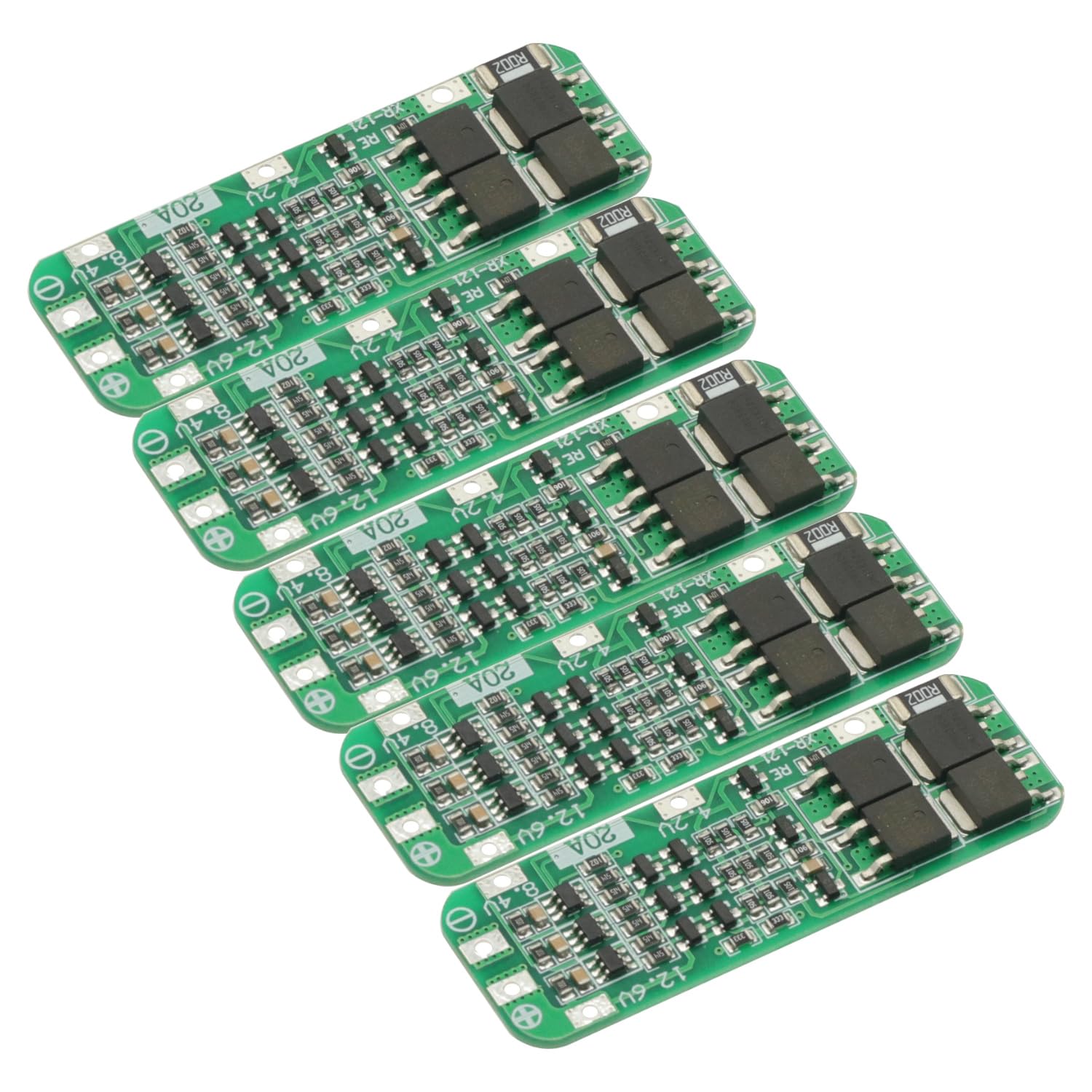
รูปที่ 2.1: ด้านบน view of the GODIYMODULES 3S 20A BMS Protection Board. This image shows the compact green PCB with various electronic components and solder points for battery connections.
คุณสมบัติหลัก:
- การป้องกันการชาร์จไฟเกิน: ป้องกันไม่ให้เซลล์ถูกชาร์จเกินแรงดันไฟฟ้าที่ปลอดภัยtagอี จำกัด
- การป้องกันการคายประจุเกิน: หยุดการคายประจุเมื่อเซลล์มีปริมาตรถึงระดับปลอดภัยขั้นต่ำtage.
- การป้องกันกระแสเกิน: Limits the current drawn from the battery pack to prevent damage.
- การป้องกันไฟฟ้าลัดวงจร: Automatically disconnects the load in case of a short circuit.
- Cell Balancing (Passive): Helps to equalize the voltage across individual cells in the pack (implied by 3S BMS, though not explicitly stated as active balancing).
รูปที่ 2.2: ระยะใกล้ view of the electronic components on the BMS board. This image highlights the integrated circuits, resistors, and capacitors that manage battery protection functions.
3. ข้อมูลจำเพาะ
| คุณสมบัติ | ข้อมูลจำเพาะ |
|---|---|
| ชื่อโมดูล | 3S 12.6V Li-ion Lithium Battery 18650 Charger Protection PCB Board |
| ประเภทแบตเตอรี่ที่เหมาะสม | Nominal 3.6V/3.7V Lithium Battery (18650, 26650, Lithium Polymer) |
| ปริมาณการชาร์จtage | 12.6โวลต์ |
| กระแสไฟขาออกสูงสุด | 20เอ |
| ขนาดสินค้า | 64mm x 20mm x 3.4mm (approx. 1.98 x 6.4 x 0.33 cm) |
| วัสดุ | Metal, PCB |
| จำนวนเซลล์ | 3 Series (3S) |
4. การติดตั้งและการเดินสายไฟ
Correct wiring is critical for the safe and proper operation of the BMS board. Incorrect wiring can damage the board or the battery pack.

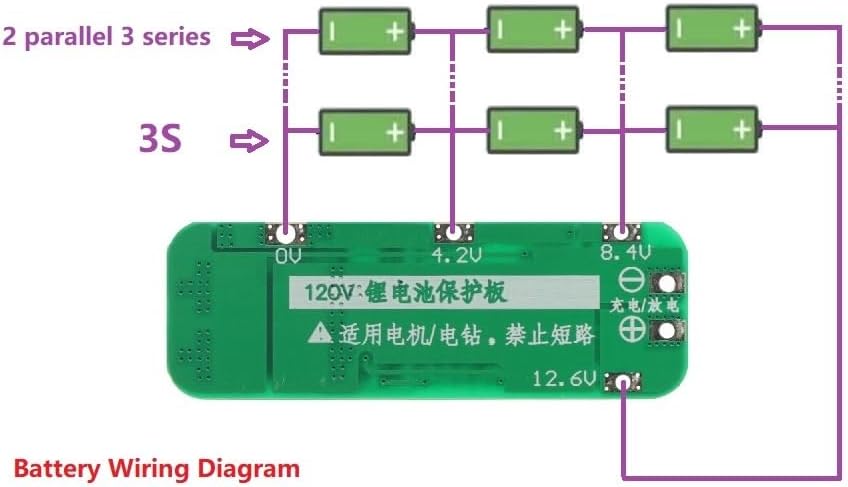
Figure 4.1: Wiring diagram for connecting a 3S lithium battery pack to the BMS protection board. This diagram illustrates the connections for 0V, 4.2V, 8.4V, and 12.6V points, as well as the charge/discharge terminals.
คำแนะนำในการเดินสายไฟ:
- ระบุจุดเชื่อมต่อ: Locate the 0V, 4.2V, 8.4V, and 12.6V solder points on the BMS board. These correspond to the negative terminal of the first cell, the positive terminal of the first cell (and negative of the second), the positive terminal of the second cell (and negative of the third), and the positive terminal of the third cell, respectively.
- Connect 0V: Connect the negative terminal of your first battery cell (B-) to the 0V point on the BMS board.
- Connect 4.2V: Connect the positive terminal of the first battery cell (B1+) to the 4.2V point on the BMS board. This is also the negative terminal of the second cell.
- Connect 8.4V: Connect the positive terminal of the second battery cell (B2+) to the 8.4V point on the BMS board. This is also the negative terminal of the third cell.
- Connect 12.6V: Connect the positive terminal of the third battery cell (B3+) to the 12.6V point on the BMS board. This is the main positive output/charge terminal.
- เชื่อมต่ออุปกรณ์ชาร์จ/เครื่องชาร์จ: The main charge/discharge terminals are typically labeled P+ and P- or similar. Connect your charger and load to these points. The 12.6V point is usually the main positive output.
Important Precautions for Wiring:
- Strict Adherence: Strictly follow the diagram for wiring 0V/4.2V/8.4V/12.6V. Deviations will cause damage to the chip and potentially the batteries.
- การเปิดใช้งานครั้งแรก: After all connections are made, the board requires an initial charge activation. Connect a 12.6V charger to the board; this will activate the output.
- การจับคู่แบตเตอรี่: Do not mix new and old batteries, or batteries with significantly different capacities or internal resistances. For optimal performance and safety, the internal resistance and capacity of the three battery cells should be as close as possible.
- การบัดกรี: Ensure all solder joints are clean and secure to prevent intermittent connections or shorts.

Figure 4.2: Close-up of the BMS board showing the clearly marked 0V, 4.2V, 8.4V, and 12.6V connection points, essential for correct battery pack assembly.
5. การดำเนินการ
Once properly wired and activated, the BMS board operates automatically to protect your battery pack during charging and discharging cycles.
การชาร์จ:
- Connect a 12.6V lithium battery charger to the designated charge input terminals (P+ and P-).
- The BMS will manage the charging process, ensuring that individual cells do not overcharge. It will cut off charging if any cell reaches its overcharge protection voltage.
การปลดประจำการ:
- Connect your load (e.g., drill motor) to the designated output terminals (P+ and P-).
- The BMS will monitor the discharge current and cell voltages. It will cut off the output if the current exceeds 20A (overcurrent protection) or if any cell voltage drops below its over-discharge protection threshold.
6. ข้อควรระวังและความปลอดภัย
Adhering to these safety guidelines is crucial to prevent damage to the BMS, batteries, and connected equipment, as well as to ensure personal safety.
- Professional Knowledge: Buyers should possess professional knowledge regarding this module and lithium battery management before purchasing and using.
- ขั้วที่ถูกต้อง: Always double-check polarity before making any connections. Reverse polarity will instantly damage the BMS board.
- ความปลอดภัยในการบัดกรี: Use appropriate soldering techniques and safety equipment. Avoid prolonged heat application to the board components.
- การป้องกันไฟฟ้าลัดวงจร: Ensure no metal objects or wires can accidentally short circuit the battery terminals or BMS connections.
- สภาพแวดล้อม : Operate the BMS and battery pack within recommended temperature and humidity ranges.
- สุขภาพแบตเตอรี่: Use only healthy, matched lithium cells. Damaged or unbalanced cells can lead to performance issues or safety hazards.
- กระแสไฟสูงสุด: Do not exceed the maximum continuous discharge current of 20A. Exceeding this limit can cause the BMS to overheat and fail.
7 การแก้ไขปัญหา
If you encounter issues with your BMS board, consider the following troubleshooting steps:
- ไม่มีสัญญาณออกหลังจากต่อสาย:
- Ensure the board has been activated by connecting a 12.6V charger for the first time.
- Verify all wiring connections (0V, 4.2V, 8.4V, 12.6V) are correct and secure according to the diagram.
- Check for any short circuits on the output terminals.
- ชุดแบตเตอรี่ไม่ได้ชาร์จ:
- Confirm the charger is functioning and providing 12.6V.
- Check if any individual cell voltage is already at its overcharge limit, causing the BMS to cut off charging.
- Inspect charger connections to the BMS.
- Output Cuts Off Unexpectedly:
- This often indicates overcurrent or over-discharge protection. Reduce the load or check individual cell voltagใช่
- Ensure the load current does not exceed 20A.
- Check if any cell voltage has dropped below its safe discharge limit.
- Verify battery cell health and balance. Unbalanced cells can trigger protection prematurely.
- BMS Board Overheating:
- This usually indicates excessive current draw. Ensure your application's current requirements are within the 20A limit.
- Check for any partial short circuits or faulty components in the load.
8. การบำรุงรักษา
The GODIYMODULES 3S 20A BMS Protection Board is designed for durability and requires minimal maintenance. However, following these guidelines can help ensure its longevity and reliable performance:
- รักษาความสะอาดและแห้ง: Protect the board from dust, dirt, and moisture. Avoid exposure to liquids.
- ตรวจสอบการเชื่อมต่อ: Periodically check all wiring connections for looseness or corrosion. Re-solder if necessary.
- หลีกเลี่ยงความเสียหายทางกายภาพ: Handle the board carefully to prevent bending, dropping, or other physical impacts.
- การควบคุมอุณหภูมิ: Ensure the operating environment does not expose the board to extreme temperatures.
- การตรวจสอบสุขภาพแบตเตอรี่: Regularly monitor the health of your battery cells. A BMS cannot fully compensate for severely degraded or mismatched cells.
9. การรับประกันและการสนับสนุน
This product is manufactured to high-quality standards. For specific warranty information or technical support, please refer to the seller or manufacturer's official channels. Keep your purchase receipt for any warranty claims.
For further assistance, please contact GODIYMODULES customer support through the platform where the product was purchased.