
EDJO K399
คู่มือผู้ใช้คีย์บอร์ดไร้สายตามหลักสรีรศาสตร์ EDJO K399
รุ่น : K399
1. บทนำ
The EDJO K399 Ergonomic Wireless Keyboard is designed to provide a comfortable and efficient typing experience. Its wave-shaped key layout and integrated wrist rest aim to reduce strain during extended use. This keyboard features 2.4GHz wireless connectivity and is compatible with both Mac and Windows operating systems.

Image 1.1: The EDJO K399 Ergonomic Wireless Keyboard, showcasing its curved design and integrated wrist rest.
2. เนื้อหาบรรจุภัณฑ์
โปรดตรวจสอบว่าสินค้าทั้งหมดมีอยู่ในแพ็คเกจของคุณ:
- 1 x EDJO K399 Wireless Keyboard
- 1 x USB Receiver
3. คำแนะนำในการตั้งค่า
Follow these steps to set up your EDJO K399 Wireless Keyboard:
- ติดตั้งแบตเตอรี่: Open the battery compartment on the underside of the keyboard. Insert the required batteries (not included, typically AA or AAA) according to the polarity indicators.
- ค้นหาตัวรับ USB: The USB receiver is stored in a dedicated slot within the keyboard's battery compartment for safekeeping. Carefully remove it.
- เชื่อมต่อตัวรับสัญญาณ USB: Plug the USB receiver into an available USB-A port on your computer, laptop, or compatible device.
- เปิดคีย์บอร์ด: Locate the power switch on the keyboard (usually on the top right or underside) and slide it to the 'ON' position. The keyboard should automatically connect to your device.

Image 3.1: Illustration showing the USB receiver stored in the battery compartment and icons for 2.4G connection, 33ft wireless range, and compatibility with Windows, Mac OS, Linux, and Chrome OS.
4. คู่มือการใช้งาน
4.1 Basic Typing and Ergonomic Design
The EDJO K399 features a wave-shaped key layout and an integrated palm rest to promote a natural typing posture and reduce wrist and hand strain. The keys are designed with a crater mechanism for accurate and responsive feedback.

Image 4.1: A user demonstrating natural typing posture on the EDJO K399 keyboard, highlighting its curved ergonomic structure.
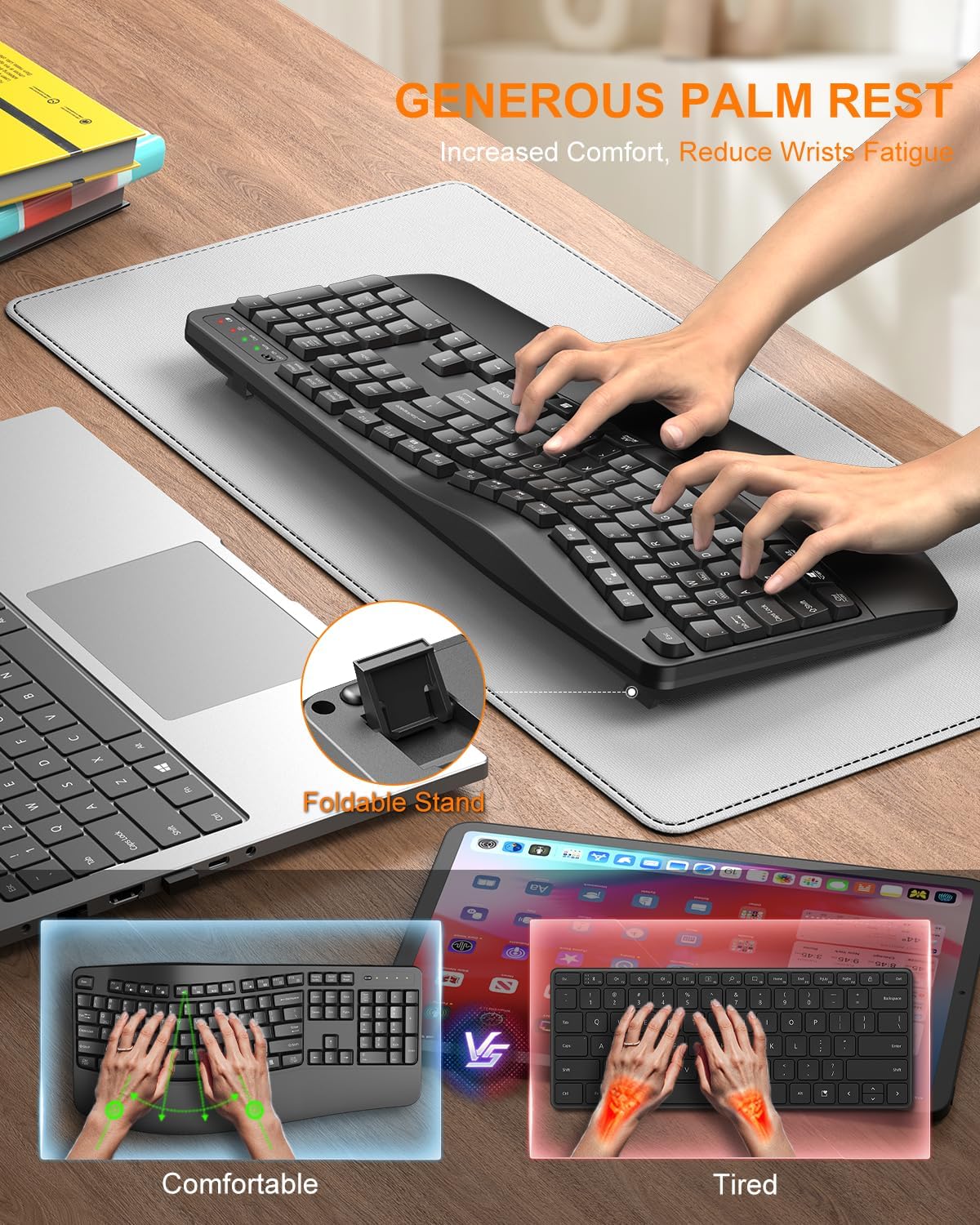
Image 4.2: The wide palm rest and foldable stand of the EDJO K399 keyboard, designed for increased comfort and reduced wrist fatigue. The foldable stand allows for adjustable tilt angles (8° and 12°).
4.2 ปุ่มลัดมัลติมีเดีย
The keyboard includes 12 combined multimedia keys for quick access to various functions:
- F1: Music
- F2: ลดระดับเสียง
- F3: เพิ่มระดับเสียง
- F4: ปิดเสียง
- F5: เพลงก่อนหน้า
- F6: เพลงถัดไป
- F7: เล่น/หยุดชั่วคราว
- F8: หยุด
- F9: Browser
- F10: Email
- F11: My Computer
- F12: เครื่องคิดเลข

Image 4.3: Visual representation of the 12 combined multimedia keys and their functions.
4.3 System Layout Switching (Mac/Windows)
The EDJO K399 keyboard supports dual system layouts for Mac and Windows. You can switch between them with a single touch:
- สำหรับ Windows: กดปุ่ม เอฟเอ็น+คิว keys simultaneously. The Win/Mac indicator light will turn red.
- สำหรับระบบปฏิบัติการ Mac: กดปุ่ม Fn + ว keys simultaneously. The Win/Mac indicator light will turn green.

Image 4.4: Instructions for switching between Windows (Fn+Q, red light) and Mac OS (Fn+W, green light) layouts.
ไฟแสดงสถานะ 4.4 ดวง
The keyboard features several LED indicator lights:
- ไฟแสดงสถานะพลังงานต่ำ: Illuminates when battery power is low.
- Mac OS & Windows Indicator: Shows current operating system layout (Red for Windows, Green for Mac).
- Caps ล็อคตัวบ่งชี้: ไฟจะสว่างขึ้นเมื่อกดปุ่ม Caps Lock
- Num ล็อคตัวบ่งชี้: ไฟจะสว่างขึ้นเมื่อเปิดใช้งาน Num Lock

ภาพที่ 4.5: ภาพระยะใกล้ view of the keyboard's indicator lights, including Low Power, Mac OS & Windows, Caps Lock, and Num Lock.
5. การบำรุงรักษา
5.1 การทำความสะอาด
ในการทำความสะอาดแป้นพิมพ์ ให้ใช้ผ้านุ่มที่ไม่เป็นขุยเช็ดเบาๆampened with water or a mild cleaning solution. Avoid excessive moisture. Do not immerse the keyboard in liquid. The keyboard is designed to be spill-resistant, but it is not waterproof.

Image 5.1: The EDJO K399 keyboard demonstrating its spill-resistant properties, made from scratch-resistant ABS material with a stable double-sided PCB board and non-fading keycap letters.
5.2 การเปลี่ยนแบตเตอรี่
When the low power indicator light illuminates, replace the batteries promptly to ensure uninterrupted operation.
6 การแก้ไขปัญหา
- แป้นพิมพ์ไม่ตอบสนอง:
- ตรวจสอบให้แน่ใจว่าแป้นพิมพ์เปิดอยู่
- ตรวจสอบระดับแบตเตอรี่และเปลี่ยนหากจำเป็น
- ตรวจสอบให้แน่ใจว่าตัวรับสัญญาณ USB เสียบเข้ากับพอร์ต USB ที่ใช้งานได้อย่างแน่นหนาแล้ว
- ลองเสียบตัวรับสัญญาณ USB เข้ากับพอร์ต USB อื่น
- รีสตาร์ทเครื่องคอมพิวเตอร์ของคุณ
- การเชื่อมต่อล่าช้าหรือขาดๆ หายๆ:
- Ensure the keyboard is within the 33ft wireless range of the USB receiver.
- Minimize obstructions between the keyboard and the receiver.
- ควรหลีกเลี่ยงการวางตัวรับสัญญาณไว้ใกล้กับอุปกรณ์ไร้สายอื่นๆ ที่อาจก่อให้เกิดการรบกวน
- Keys not typing correctly (e.g., 'Z' types 'Y'):
- Ensure the correct system layout (Mac or Windows) is selected using Fn+Q or Fn+W.
7. ข้อมูลจำเพาะ
| คุณสมบัติ | รายละเอียด |
|---|---|
| หมายเลขรุ่น | เค399 |
| ยี่ห้อ | เอดโจ |
| เทคโนโลยีการเชื่อมต่อ | ระบบไร้สาย 2.4GHz (ตัวรับสัญญาณ USB-A) |
| ช่วงสาย | สูงถึง 33 ฟุต (10 เมตร) |
| คำอธิบายแป้นพิมพ์ | เมมเบรน |
| อุปกรณ์ที่รองรับ | Laptop, PC, Smart TV (Windows, Mac OS, Linux, Chrome OS) |
| คุณสมบัติพิเศษ | Ergonomic Design, Wave Keys, Integrated Wrist Rest, Adjustable Tilt, 12 Multimedia Keys, Spill-Resistant |
| ขนาดสินค้า | 17.6 x 8.7 x 1.4 นิ้ว (44.7 x 22.1 x 3.6 ซม.) |
| น้ำหนักสินค้า | 1.65 ปอนด์ (0.75 กก.) |
| วัสดุ | พลาสติก (ABS) |
| สี | สีดำ |
8. การรับประกันและการสนับสนุน
EDJO is committed to providing quality products and customer satisfaction. For any inquiries, issues, or technical assistance, please contact our dedicated support team.
- บริการลูกค้า: Our team is available to provide expert assistance.
- เวลาตอบสนอง: คาดว่าจะตอบกลับภายใน 24 ชั่วโมง
- นโยบายการเปลี่ยนทดแทน: 365-day replacement for eligible issues.
- การสนับสนุนด้านเทคนิค: มีบริการสนับสนุนทางเทคนิคตลอดอายุการใช้งาน
To contact support, please refer to your purchase platform or the EDJO official webเว็บไซต์สำหรับรายละเอียดการติดต่อ

Image 8.1: EDJO customer support information, highlighting various support services available.