
อัลโก้ 8180
Algo 8180 PoE IP Paging and SIP Loud Ringer
คู่มือการใช้งาน
Brand: Algo | Model: 8180
1. สินค้าหมดview
The Algo 8180 SIP Audio Alerter is a high-performance IP speaker designed for versatile audio applications, including voice paging, emergency notifications, and loud ringing. It features a Wideband G.722 HD voice codec for clear audio and is suitable for various environments such as education, enterprise, and public spaces. The device can function as a loud ringer, playing custom WAV files from its 1GB memory, and supports up to 10 Ring extensions for integration with telephone systems. It also supports multicast send/receive for scalable integration with other Algo IP devices.
This product bundle includes the Algo 8180 IP Audio Alerter, an Ethernet Cable, Cable Ties, and a 6th Avenue Fiber Cloth.
2. คุณสมบัติหลัก
- Wideband Audio Performance: Equipped with the Wideband G.722 codec for clear, intelligible voice paging and emergency alerts.
- Scalable Multicast Compatibility: Supports up to 50 multicast zones for dynamic paging across expansive areas, minimizing network traffic.
- Dynamic Volume Control & Talkback: Features Ambient Noise Compensation to automatically adjust speaker volume and supports two-way communication.
- Multi-Application Functionality: Multiple SIP registrations for Page (50), Emergency Alert (10), and Ring (10) extensions, allowing diverse use cases.
- Custom WAV File สนับสนุน: Capable of playing custom WAV files from its 1GB memory for alerts and ringing.
3. ส่วนประกอบและการควบคุม

รูปที่ 3.1: Algo 8180 IP Audio Alerter shown with included Ethernet cable, cable ties, and fiber cloth.

รูปที่ 3.2: ด้านโปรfile of the Algo 8180, highlighting its compact design.

รูปที่ 3.3: หลัง view of the Algo 8180, displaying the RJ45 network port, speaker output terminals, audio output, and relay connections. The serial number and MAC address are also visible.

รูปที่ 3.4: Dimensional drawing of the Algo 8180, indicating its height (7 inches / 17.8 cm), width (4 inches / 10.2 cm), and depth (2.6 inches / 6.5 cm).
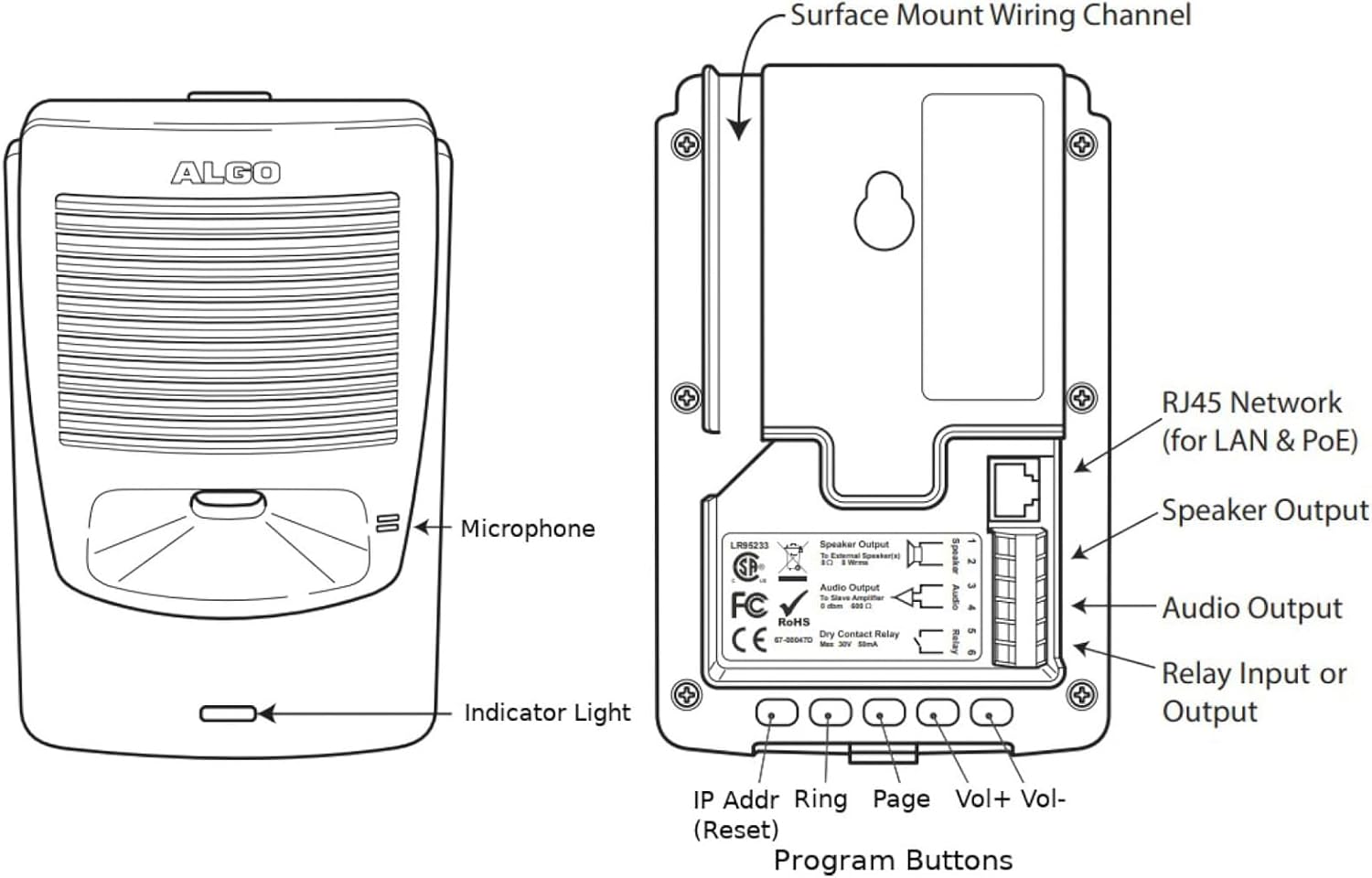
รูปที่ 3.5: Detailed diagram of the Algo 8180, identifying the microphone, indicator light, RJ45 network port (for LAN & PoE), Speaker Output, Audio Output, Relay Input or Output, and Program Buttons (IP Addr, Ring, Page, Vol+, Vol-).
3.1. พอร์ตและการเชื่อมต่อ
- พอร์ตเครือข่าย RJ45: Used for Ethernet connection and Power over Ethernet (PoE).
- เอาท์พุตลำโพง: Terminals for connecting external speakers (8 Ohm, 8 Wrms).
- เอาต์พุตเสียง: For connecting to a slave amplifier (0 dBm, 600 Ohm).
- Dry Contact Relay: Input or output for external device control (Max 30V, 50mA).
3.2. Front Panel Indicators and Controls
- ไมโครโฟน: Integrated for talkback functionality.
- ไฟแสดงสถานะ: Provides visual status of the device.
- ปุ่มโปรแกรม: Located on the rear, these buttons are used for configuration and control:
- IP Addr (Reset): Used to display or reset the IP address.
- แหวน: For configuring ring group settings.
- หน้าหนังสือ: For configuring paging settings.
- เล่ม+ / ฉบับ-: ปรับระดับเสียงของลำโพง
4. การตั้งค่า
4.1. การแกะกล่อง
Carefully remove all components from the packaging. Verify that all items listed in the bundle contents are present and undamaged.
4.2. การติดตั้ง
The Algo 8180 can be surface mounted. Use appropriate screws and anchors for the mounting surface. Ensure the mounting location allows for proper cable routing and access to controls.
4.3. Network Connection (PoE)
- Connect one end of the provided Ethernet cable to the RJ45 port on the Algo 8180.
- Connect the other end of the Ethernet cable to a PoE-enabled network switch or a PoE injector.
- The device will power on automatically via PoE. The indicator light will illuminate to show power status.
4.4. ช่องต่อสัญญาณเสียง (ไม่จำเป็น)
If connecting external speakers or a slave ampเครื่องฟอก:
- For external speakers, connect speaker wires to the 'Speaker Output' terminals. Observe polarity.
- For a slave amplifier, connect an audio cable to the 'Audio Output' terminals.
4.5. Relay Connections (Optional)
To integrate with external devices via the dry contact relay:
- Connect the control wires from the external device to the 'Dry Contact Relay' terminals.
- Configure the relay behavior via the device's web อินเทอร์เฟซ
5. การดำเนินการ
5.1. การกำหนดค่าเริ่มต้น (Web อินเตอร์เฟซ)
เข้าถึงอุปกรณ์ได้ web interface for full configuration. The IP address can be found using a network scanner or by pressing the 'IP Addr' button on the device.
- เปิด web browser and enter the Algo 8180's IP address.
- Log in using the default credentials (refer to the Algo documentation for default username/password).
- Configure SIP registration details, network settings, and audio parameters.
5.2. Paging Functionality
The Algo 8180 supports SIP paging and multicast paging.
- SIP Paging: Register the device as a SIP extension on your IP PBX. Dial the extension to initiate a voice page.
- เพจแบบหลายผู้รับ: Configure multicast zones in the web interface. Send multicast audio streams to the configured IP address and port.
5.3. Loud Ringer Functionality
The device can act as a loud ringer for telephone systems.
- Register the Algo 8180 as a SIP extension for ringing.
- Upload custom WAV files for ringtones via the web อินเทอร์เฟซ
- Assign ring extensions to specific ring groups or individual telephones.
5.4. Emergency Alerting
Pre-configured WAV files can be triggered for emergency alerts.
- Configure emergency alert extensions in the web อินเทอร์เฟซ
- Alerts can be triggered by dialing the assigned extension or via a connected button.
5.5. Dynamic Volume Control (Ambient Noise Compensation)
The Algo 8180 can automatically adjust its volume based on ambient noise levels. Enable and configure this feature in the web interface to ensure messages are always audible without being excessively loud.
5.6. ฟังก์ชันสนทนาโต้ตอบ
The integrated microphone allows for two-way communication during paging or emergency situations. This feature can be enabled and configured via the web อินเทอร์เฟซ
6. การบำรุงรักษา
6.1. การทำความสะอาด
To clean the Algo 8180, gently wipe the exterior with a soft, dry, or slightly damp ใช้ผ้าเช็ดทำความสะอาด ห้ามใช้สารทำความสะอาดที่มีฤทธิ์กัดกร่อนหรือตัวทำละลาย ตรวจสอบให้แน่ใจว่าได้ปิดเครื่องก่อนทำความสะอาด
6.2. การอัปเดตเฟิร์มแวร์
Periodically check the Algo website for firmware updates. Firmware updates can provide new features, performance improvements, and security enhancements. Follow the instructions provided by Algo for the update process, typically performed via the web อินเทอร์เฟซ
7 การแก้ไขปัญหา
| ปัญหา | สาเหตุที่เป็นไปได้ | สารละลาย |
|---|---|---|
| No power/Indicator light off | No PoE connection; Faulty Ethernet cable; PoE source issue. | Verify Ethernet cable connection; Ensure PoE switch/injector is active; Try a different PoE port or cable. |
| ไม่มีเสียงออก | Volume too low; Incorrect SIP registration; Network connectivity issue; Speaker wiring issue. | Increase volume via web interface or buttons; Check SIP registration status; Verify network connection; Inspect speaker wiring. |
| ไม่สามารถเข้าถึงได้ web อินเทอร์เฟซ | ที่อยู่ IP ไม่ถูกต้อง ปัญหาการเชื่อมต่อเครือข่าย ไฟร์วอลล์บล็อกการเข้าถึง | Confirm IP address (press IP Addr button); Check network cable; Temporarily disable firewall for testing; Ensure device is powered on. |
| คุณภาพเสียงไม่ดี | Network congestion; Incorrect codec settings; Environmental noise. | Check network bandwidth; Verify G.722 codec is used; Enable Ambient Noise Compensation. |
| Ringer not activating | Incorrect ring extension configuration; WAV file issue; SIP registration problem. | Review ring extension settings in web interface; Ensure WAV file is valid and uploaded; Verify SIP registration for ringing. |
8. ข้อมูลจำเพาะ
| ข้อมูลจำเพาะ | ค่า |
|---|---|
| ยี่ห้อ | อัลโก |
| แบบอย่าง | 8180 |
| ขนาดสินค้า | 7 x 5 x 3 นิ้ว (17.8 x 12.7 x 7.6 ซม.) |
| น้ำหนักสินค้า | 1.73 ปอนด์ (0.78 กก.) |
| แหล่งพลังงาน | การจ่ายพลังงานผ่านอีเทอร์เน็ต (PoE) |
| ตัวแปลงสัญญาณเสียง | Wideband G.722 HD voice |
| หน่วยความจำ | 1GB for custom WAV files |
| การลงทะเบียน SIP | Page (50), Emergency Alert (10), Ring (10) |
| โซนมัลติคาสต์ | สูงถึง 50 |
| เอาท์พุตรีเลย์ | Dry Contact, Max 30V, 50mA |
| ผู้ผลิต | อัลโก |
| วันที่พร้อมใช้งานครั้งแรก | 23 พฤษภาคม 2025 |
| ยูพีซี | 094148724423 |
9. ข้อมูลการรับประกัน
Algo products typically come with a manufacturer's warranty covering defects in materials and workmanship. For specific warranty terms, duration, and conditions, please refer to the official warranty statement provided with your product or visit the Algo Communications Products Ltd. webเว็บไซต์.
10. การสนับสนุนด้านเทคนิค
For technical assistance, troubleshooting beyond this manual, or further product information, please contact Algo Technical Support. You can find contact details and additional resources, including FAQs and software downloads, on the official Algo Communications Products Ltd. webเว็บไซต์.
Webเว็บไซต์: www.algosolutions.com
Ask a question about this manual
Ask about setup, troubleshooting, compatibility, parts, safety, or missing instructions. Manuals+ will review the question and use this page’s manual context to help answer it.