
1. บทนำ
Thank you for choosing the DinoFire USB Type C Wireless Presentation Clicker. This device is designed to enhance your presentations with its dual Bluetooth and 2.4GHz RF connectivity, versatile USB-A and USB-C compatibility, and ergonomic design. This manual provides detailed instructions for setup, operation, and maintenance to ensure optimal performance.

Image: The DinoFire USB Type C Wireless Presentation Clicker, a sleek black device with control buttons.
2. ข้อมูลด้านความปลอดภัย
- ความปลอดภัยของเลเซอร์: Do not point the laser beam directly at people or animals. Avoid direct eye exposure to the laser beam. This product uses a Class 2 laser.
- การจัดการแบตเตอรี่: Use only specified AAA batteries. Do not mix old and new batteries, or different types of batteries. Dispose of used batteries according to local regulations.
- พื้นที่จัดเก็บ: เก็บอุปกรณ์ให้ห่างจากอุณหภูมิที่สูงหรือต่ำมาก แสงแดดโดยตรง และความชื้น
- เด็ก: เก็บให้พ้นจากมือเด็ก
3. การตั้งค่า
3.1. การติดตั้งแบตเตอรี่
- Locate the battery compartment cover on the back of the presenter.
- เลื่อนฝาเปิดออก
- ใส่แบตเตอรี่ AAA สองก้อน (ไม่ได้รวมอยู่ในชุด) ลงในช่องใส่แบตเตอรี่ โดยตรวจสอบให้แน่ใจว่าขั้วบวก/ลบถูกต้อง
- ปิดฝาช่องใส่แบตเตอรี่ให้แน่น

Image: The presenter showing the battery compartment and the integrated USB receiver storage.
3.2. Connecting via USB Receiver (2.4GHz RF Mode)
- Open the battery compartment cover and remove the integrated USB receiver. This receiver features both USB-A and USB-C connectors for broad compatibility.
- Plug the appropriate connector (USB-A or USB-C) of the receiver into an available USB port on your computer.
- Turn on the presenter using the ON/OFF switch located on the side.
- The computer should automatically detect and install the necessary drivers. The presenter is now ready for use in 2.4GHz RF mode.
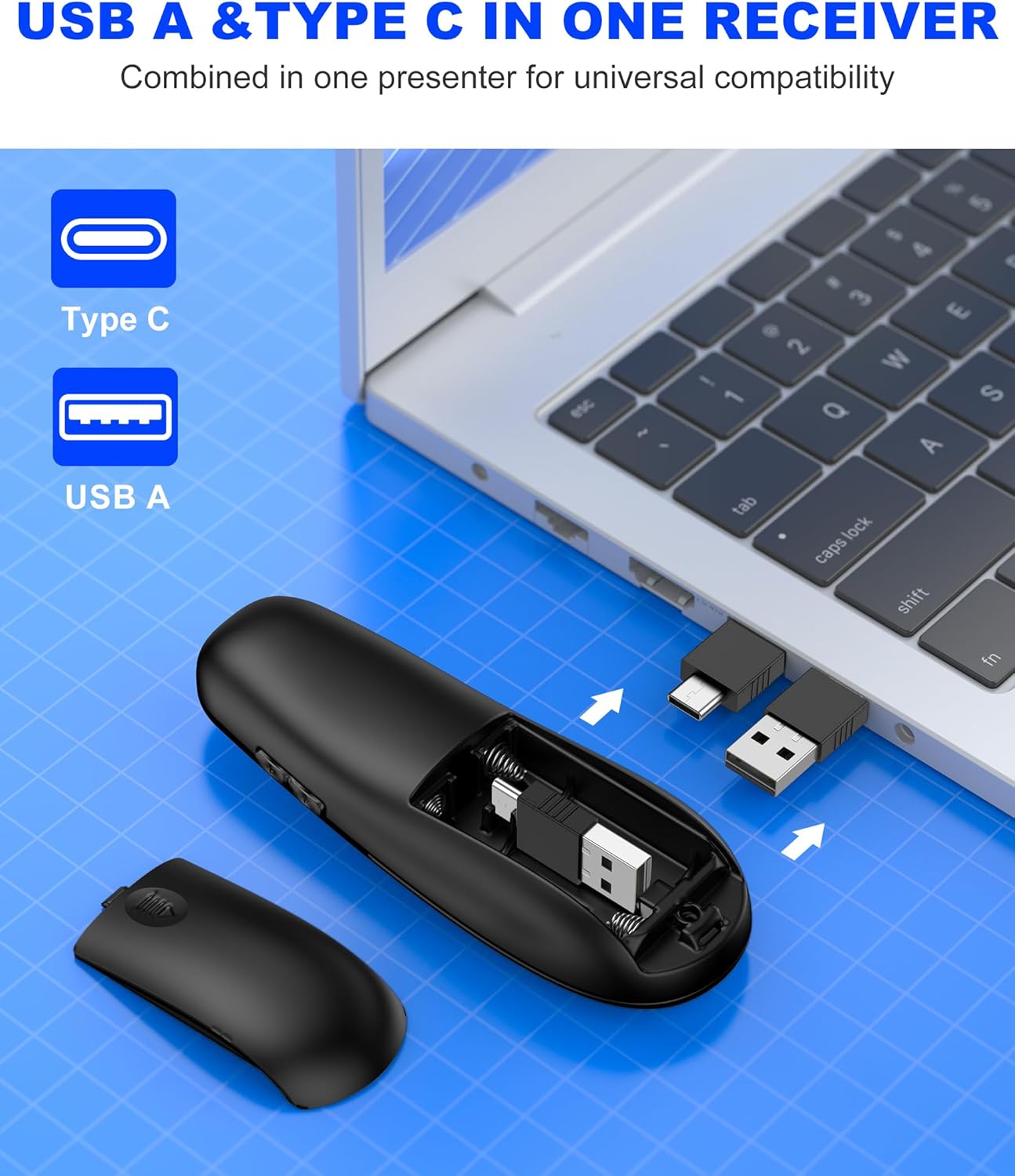
Image: Close-up of the dual USB-A and USB-C receiver, highlighting its versatile design.
3.3. Connecting via Bluetooth (BT Mode)
- Ensure the presenter is turned on.
- กดปุ่มค้างไว้ เชื่อมต่อ button (usually a small circular button near the laser pointer) for a few seconds until the indicator light flashes, indicating pairing mode.
- บนคอมพิวเตอร์ของคุณ ไปที่การตั้งค่าบลูทูธและค้นหาอุปกรณ์ใหม่
- Select "DinoFire Presenter" (or similar name) from the list of available devices to pair.
- Once paired, the indicator light on the presenter will stop flashing and remain solid. The presenter is now ready for use in Bluetooth mode.
- To switch between BT and RF modes, simply press the dedicated BT/RF switch button on the presenter.
4. คู่มือการใช้งาน
The DinoFire Wireless Presentation Clicker offers a range of functions to control your presentations effectively.
- เลื่อนหน้าขึ้น/ลง: ใช้ปุ่มลูกศร (▲ / ▼) to navigate through your presentation slides.
- ตัวชี้เลเซอร์: Press the dedicated laser button (often a triangle icon) to activate the bright laser light for highlighting key areas.
- Full/Black Screen: A dedicated button allows you to toggle between a full screen display and a black screen to draw audience attention.
- การควบคุมระดับเสียง: Adjust the audio volume of your computer directly from the presenter.
- การเปิดใช้งานไฮเปอร์ลิงก์: Activate hyperlinks within your presentation with a dedicated button.
- Window Switching: Seamlessly switch between open windows on your computer.
- โหมดสลีปอัตโนมัติ: The presenter automatically enters sleep mode after 30 seconds of inactivity to conserve energy. Press any button to wake it up.

Image: Diagram illustrating the various functions of the presentation clicker buttons, including page navigation, window switching, hyperlink, and volume control.
5. คุณสมบัติ
- BT & RF 2.4 GHz Dual Modes: Quickly switch between Bluetooth and 2.4GHz RF modes for flexible connectivity with various devices.
- Plug & Play USB A & C Connectors: Equipped with dual USB-A/USB-C connectors combined in one receiver for universal compatibility with laptops and desktop computers.
- การออกแบบตามหลักสรีรศาสตร์: Features a curved design for a comfortable grip, allowing for extended use without discomfort.
- ช่วงการควบคุมไร้สายแบบยาว: Enjoy a maximum wireless control range of 164 feet (50 meters), providing freedom to move around the room during presentations.
- Bright Laser Light: The integrated laser pointer helps to effectively highlight content on your slides.

Image: Illustration showing the presenter's long control range, indicating up to 164 feet for wireless control and 628 feet for laser light.

Image: A hand holding the presenter, illustrating its comfortable, ergonomic grip.
6. การบำรุงรักษา
- การทำความสะอาด: ใช้ผ้าแห้งเนื้อนุ่มเช็ดทำความสะอาดพื้นผิวของเครื่องนำเสนอ ห้ามใช้สารทำความสะอาดที่มีฤทธิ์กัดกร่อนหรือตัวทำละลาย
- พื้นที่จัดเก็บ: When not in use, store the USB receiver inside the presenter's battery compartment to prevent loss. Store the presenter in a cool, dry place.
- การเปลี่ยนแบตเตอรี่: Replace batteries when the indicator light shows low power or when the device becomes unresponsive.
7 การแก้ไขปัญหา
| ปัญหา | สาเหตุที่เป็นไปได้ | สารละลาย |
|---|---|---|
| Presenter not responding (RF Mode) | USB receiver not properly connected or not detected. | ตรวจสอบให้แน่ใจว่าเสียบตัวรับสัญญาณ USB เข้ากับพอร์ต USB ที่ใช้งานได้สนิทแล้ว ลองเสียบเข้ากับพอร์ต USB อื่นดู |
| Presenter not responding (Bluetooth Mode) | ไม่จับคู่หรืออยู่นอกช่วง | Ensure Bluetooth is enabled on your computer. Re-pair the device following the Bluetooth connection steps. Move closer to the computer. |
| ตัวชี้เลเซอร์ไม่ทำงาน | Low battery or laser button not pressed. | Replace batteries. Ensure the laser button is pressed firmly. |
| ช่วงไร้สายสั้น | การแทรกแซงหรือสิ่งกีดขวาง | Minimize obstacles between the presenter and the receiver. Avoid using near other wireless devices that may cause interference. |
| Presenter automatically enters sleep mode too quickly | This is normal behavior for energy saving. | Press any button to wake the presenter from sleep mode. |
8. ข้อมูลจำเพาะ
- ยี่ห้อ: ไดโนไฟร์
- ชื่อรุ่น : AAA+USB A&C+BT
- Model Number (Mfr Part Number): ดับเบิ้ลยูพี506
- เทคโนโลยีการเชื่อมต่อ: Bluetooth, Radio Frequency (2.4GHz)
- Max Wireless Control Range: 164 ฟุต (50 เมตร)
- อุปกรณ์ที่รองรับ: Laptops, Desktop Computers (Bluetooth-enabled)
- ผู้รับ: Dual USB-A / USB-C
- ประเภทแบตเตอรี่: แบตเตอรี่ AAA 2 ก้อน (ไม่รวม)
- คุณสมบัติพิเศษ: Ergonomic Design, Laser Pointer, Dual Mode Connectivity
- สี: สีดำ
9. การรับประกันและการสนับสนุน
The DinoFire USB Type C Wireless Presentation Clicker comes with a รับประกัน 3 ปี.
For technical support, troubleshooting assistance, or warranty claims, please contact DinoFire customer service through the retailer where the product was purchased or visit the official DinoFire webเว็บไซต์สำหรับข้อมูลการติดต่อ
ผู้ผลิต: Shenzhen Qixun Space Technology Co., Ltd.