
1. คำแนะนำด้านความปลอดภัยที่สำคัญ
- โปรดอ่านคำแนะนำเหล่านี้อย่างละเอียดก่อนใช้งานอุปกรณ์
- เก็บคำแนะนำเหล่านี้ไว้เพื่อใช้อ้างอิงในอนาคต
- ปฏิบัติตามคำเตือนทั้งหมดเกี่ยวกับผลิตภัณฑ์และในคู่มือการใช้งาน
- ปฏิบัติตามคำแนะนำทั้งหมด
- ห้ามใช้อุปกรณ์นี้ใกล้น้ำ
- ทำความสะอาดด้วยผ้าแห้งเท่านั้น
- อย่าปิดกั้นช่องระบายอากาศใดๆ ติดตั้งตามคำแนะนำของผู้ผลิต
- ห้ามติดตั้งใกล้แหล่งความร้อน เช่น หม้อน้ำ เครื่องทำความร้อน เตา หรืออุปกรณ์อื่น ๆ (รวมถึง ampเครื่องให้ความร้อน) ที่ผลิตความร้อน
- ปกป้องสายไฟไม่ให้ถูกเหยียบหรือถูกหนีบ โดยเฉพาะที่ปลั๊ก เต้ารับไฟฟ้า และจุดที่สายไฟออกจากเครื่อง
- ใช้เฉพาะอุปกรณ์เสริม/สิ่งที่แนบตามที่ผู้ผลิตกำหนดเท่านั้น
- ถอดปลั๊กอุปกรณ์นี้ในระหว่างพายุฝนฟ้าคะนองหรือเมื่อไม่ได้ใช้งานเป็นเวลานาน
- แจ้งบริการทั้งหมดให้ช่างที่ผ่านการรับรองทราบ จำเป็นต้องให้บริการเมื่ออุปกรณ์ได้รับความเสียหายในลักษณะใดก็ตาม เช่น สายไฟหรือปลั๊กชำรุด ของเหลวหกหรือมีวัตถุตกลงไปในอุปกรณ์ อุปกรณ์โดนฝนหรือความชื้น ไม่สามารถทำงานได้ตามปกติ หรือตกหล่น
2. เนื้อหาบรรจุภัณฑ์
ตรวจสอบว่ารายการทั้งหมดที่ระบุไว้ด้านล่างนี้รวมอยู่ในแพ็คเกจของคุณ:
- ซาวด์บาร์ GOBOULT X400
- ซับวูฟเฟอร์ BoomX
- รีโมทคอนโทรล
- คู่มือการใช้งาน (เอกสารนี้)
- บัตรรับประกัน
- อะแดปเตอร์แปลงไฟ/สายไฟ
- สายเสริม

ภาพ: เหนือview of the GOBOULT X400 system components and key features.
3. คู่มือการติดตั้ง
3.1 การจัดวาง
For optimal audio performance, place the soundbar centrally below your television. Position the BoomX subwoofer on the floor near the soundbar, ensuring it has adequate space for bass dispersion. The two satellite speakers should be placed to the left and right of your listening area for a true 5.1 surround sound experience.

Image: Recommended placement of the soundbar and subwoofer in a home environment.
3.2 การเชื่อมต่อซับวูฟเฟอร์
Connect the wired BoomX subwoofer to the 'SUBWOOFER OUT' port on the soundbar using the provided cable.
3.3 การเชื่อมต่อสายไฟ
Connect the power cable to the soundbar's power input and then plug it into a wall outlet. Ensure the power switch on the soundbar (if present) is in the 'ON' position.
3.4 การเชื่อมต่ออินพุตเสียง
The GOBOULT X400 offers multiple connectivity options:
- อาร์ค HDMI: For the best audio quality and control, connect an HDMI cable from your TV's HDMI ARC port to the soundbar's HDMI ARC port. This allows your TV remote to control the soundbar's volume.
- ออปติคอล: Connect an optical cable from your TV's optical output to the soundbar's OPTICAL input.
- ช่องเสริม: Use a 3.5mm auxiliary cable to connect devices with an AUX output to the soundbar's AUX input.
- ยูเอสบี: เสียบแฟลชไดรฟ์ USB เข้ากับพอร์ต USB เพื่อเล่นเสียง fileโดยตรงเลย
ภาพ: รายละเอียด view of the soundbar's input ports for various audio sources.
3.5 5.1 Channel Surround Sound Configuration
The X400 system includes a soundbar, a subwoofer, and two satellite speakers to deliver a 5.1 channel surround sound experience. Ensure the satellite speakers are connected to the soundbar and positioned appropriately to create an immersive audio field around the listener.

Image: Visual guide for setting up the 5.1 channel surround sound system.
4. คู่มือการใช้งาน
4.1 เปิด/ปิดเครื่อง
กดปุ่ม พลัง กดปุ่มบนรีโมทคอนโทรลหรือซาวด์บาร์เพื่อเปิดหรือปิดเครื่อง
4.2 การเลือกแหล่งที่มาของอินพุต
กดปุ่ม ป้อนข้อมูล button on the remote control to cycle through available input sources: Bluetooth, HDMI ARC, Optical, AUX, USB. The selected input will be displayed on the soundbar's LED panel.
4.3 การควบคุมระดับเสียง
ใช้ เล่ม+ และ ฉบับ- buttons on the remote control or the soundbar to adjust the volume level.
4.4 การจับคู่บลูทูธ
- Select Bluetooth input mode on the soundbar. The LED display will show "BT" and flash, indicating it's in pairing mode.
- บนอุปกรณ์มือถือของคุณ เปิดใช้งาน Bluetooth และค้นหาอุปกรณ์ที่มีอยู่
- Select "GOBOULT X400" from the list. Once connected, the LED display will show a steady "BT".
โหมดอีควอไลเซอร์ 4.5 โหมด
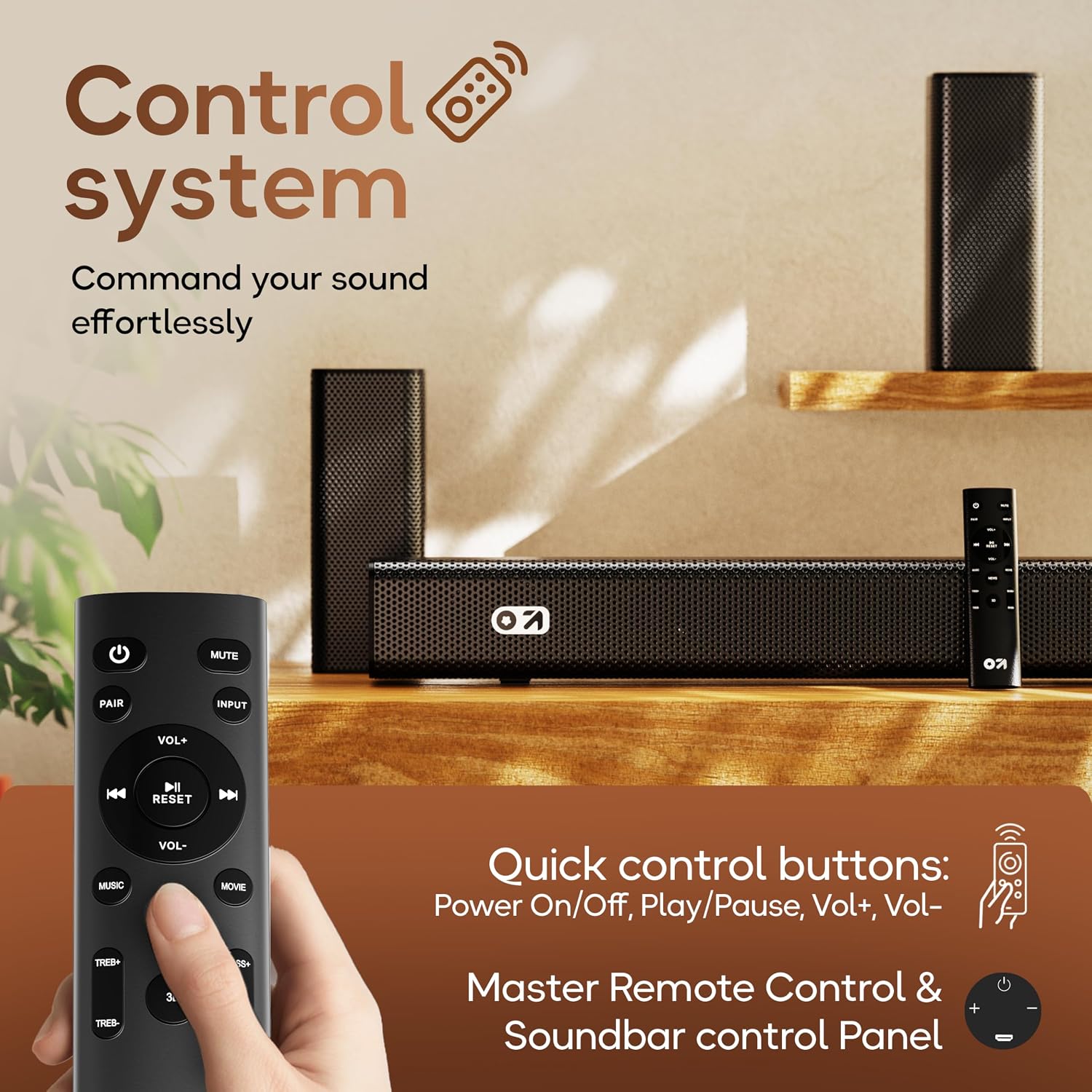
The GOBOULT X400 features multiple equalizer (EQ) modes to optimize your listening experience. Press the dedicated ภาพยนตร์, ดนตรี, หรือ ข่าว buttons on the remote control to switch between modes.
4.6 ฟังก์ชั่นการควบคุมระยะไกล

Image: Layout and functions of the GOBOULT X400 remote control.
- พลัง: เปิดหรือปิด Soundbar
- ปิดเสียง: ปิดเสียงหรือเปิดเสียง
- ป้อนข้อมูล: เลือกแหล่งสัญญาณเสียงเข้า
- ฉบับ+/ฉบับ-: ปรับระดับเสียงหลัก
- เล่น/หยุดชั่วคราว: Controls media playback (Bluetooth/USB modes).
- ก่อนหน้าถัดไป: Skips tracks (Bluetooth/USB modes).
- โหมดปรับเสียง EQ (ภาพยนตร์, เพลง, ข่าว): เลือกเสียงที่ตั้งไว้ล่วงหน้าfiles.
- คู่: เริ่มการจับคู่บลูทูธ
- รีเซ็ต: รีเซ็ตการตั้งค่าเสียงเป็นค่าเริ่มต้น
- TREB+/TREB-: ปรับระดับเสียงแหลม
- เบส+/เบส-: ปรับระดับเสียงเบส
5. การบำรุงรักษา
To ensure the longevity and optimal performance of your GOBOULT X400 soundbar system, follow these maintenance guidelines:
- การทำความสะอาด: Use a soft, dry cloth to clean the surfaces of the soundbar and subwoofer. Do not use liquid cleaners, aerosols, or abrasive materials, as they may damage the finish or internal components.
- การระบายอากาศ : ตรวจสอบให้แน่ใจว่าช่องระบายอากาศบนซาวด์บาร์และซับวูฟเฟอร์ไม่ถูกปิดกั้น การไหลเวียนของอากาศที่เหมาะสมจะช่วยป้องกันความร้อนสูงเกินไป
- พื้นที่จัดเก็บ: หากจะเก็บเครื่องไว้เป็นเวลานาน ควรถอดปลั๊กออกจากเต้ารับไฟฟ้า และเก็บไว้ในที่แห้งและเย็น หลีกเลี่ยงแสงแดดโดยตรงและอุณหภูมิที่สูงหรือต่ำเกินไป
- การสัมผัสน้ำ: แม้ว่าผลิตภัณฑ์จะกันน้ำได้ แต่ควรหลีกเลี่ยงการสัมผัสน้ำโดยตรงหรือความชื้นสูงเพื่อป้องกันความเสียหาย
6 การแก้ไขปัญหา
If you encounter issues with your GOBOULT X400, refer to the following common problems and solutions:
| ปัญหา | สาเหตุที่เป็นไปได้ | สารละลาย |
|---|---|---|
| ไม่มีไฟฟ้า | สายไฟไม่ได้เชื่อมต่อ เต้ารับไฟฟ้าไม่ทำงาน | ตรวจสอบให้แน่ใจว่าสายไฟเชื่อมต่อกับซาวด์บาร์และเต้ารับไฟฟ้าที่ใช้งานได้แน่นหนาแล้ว |
| ไม่มีเสียง | แหล่งสัญญาณเข้าไม่ถูกต้อง; ระดับเสียงต่ำเกินไป; เปิดใช้งานโหมดปิดเสียง; การเชื่อมต่อสายเคเบิลไม่ถูกต้อง | Select the correct input source. Increase volume. Deactivate mute. Check audio cable connections. |
| การจับคู่บลูทูธล้มเหลว | ซาวด์บาร์ไม่ได้อยู่ในโหมดจับคู่; อุปกรณ์อยู่ไกลเกินไป; มีสัญญาณรบกวน | Ensure soundbar is in Bluetooth pairing mode. Move device closer. Clear previous pairings on your device. |
| รีโมตคอนโทรลไม่ทำงาน | แบตเตอรี่หมด; มีสิ่งกีดขวาง; รีโมทอยู่นอกระยะ | Replace remote control batteries. Remove any obstructions between remote and soundbar. Ensure remote is within operating range. |
| ซับวูฟเฟอร์ไม่สร้างเสียงเบส | Subwoofer cable loose; Bass level set too low | Check the connection of the subwoofer cable to the soundbar. Increase bass level using the remote control. |
7. ข้อมูลจำเพาะ
Detailed technical specifications for the GOBOULT X400 Soundbar System:

ภาพ: ภายใน view of the BoomX Dual Driver, highlighting its design for enhanced bass response.
| คุณสมบัติ | ข้อมูลจำเพาะ |
|---|---|
| ยี่ห้อ | โกบูลท์ |
| ชื่อรุ่น | เบสบ็อกซ์ X400 |
| กำลังขับสูงสุดของลำโพง | 400 วัตต์ |
| จำนวนช่องสัญญาณเสียง | 5.1 |
| เทคโนโลยีการเชื่อมต่อ | Auxiliary, Bluetooth, USB, HDMI ARC, Optical |
| เวอร์ชันบลูทูธ | 5.3 |
| ช่วงบลูทูธ | 10 เมตร |
| โหมดเอาต์พุตเสียง | ล้อมรอบ |
| ประเภทลำโพง | ซาวด์บาร์พร้อมซับวูฟเฟอร์แบบมีสาย |
| วิธีการควบคุม | ระยะไกล |
| คุณสมบัติผลิตภัณฑ์ | Bass Boost, LED Light, USB Port, Water Resistant |
| แหล่งพลังงาน | สายไฟ |
| ขนาดสินค้า (ลึก x กว้าง x สูง) | 8D x 9W x 7.5H เซนติเมตร (ซาวด์บาร์) |
| น้ำหนักสินค้า | 7.6 กิโลกรัม |
8. การรับประกันและการสนับสนุน
8.1 ข้อมูลการรับประกัน
The GOBOULT X400 Soundbar System comes with a การรับประกันจากผู้ผลิต 1 ปี from the date of purchase. This warranty covers manufacturing defects and ensures reliable operation under normal use. Please retain your purchase receipt and the warranty card for any warranty claims.
8.2 การสนับสนุนลูกค้า
For technical assistance, troubleshooting, or warranty inquiries, please contact GOBOULT customer support. Refer to the contact information provided on your warranty card or visit the official GOBOULT webเว็บไซต์สำหรับรายละเอียดการสนับสนุน