
1. บทนำ
This manual provides essential information for the proper use and maintenance of your TAOPON Smartwatch. Please read it thoroughly before using the device to ensure optimal performance and longevity.

Figure 1: TAOPON Smartwatch displaying various health metrics and time on its screen.
2. อะไรอยู่ในกล่อง
- 1 x TAOPON Smartwatch
- สายนาฬิกา 1 เส้น
- 1 x สายชาร์จ
- 1 x User Manual (including French language section)

Figure 2: Package contents of the TAOPON Smartwatch, showing the watch, strap, magnetic charging cable, and user manual.
3. การตั้งค่า
3.1 การชาร์จเริ่มต้น
ก่อนใช้งานครั้งแรก โปรดชาร์จสมาร์ทวอทช์ให้เต็มก่อน เชื่อมต่อสายชาร์จแม่เหล็กเข้ากับจุดชาร์จด้านหลังของนาฬิกา และเสียบปลาย USB เข้ากับอะแดปเตอร์แปลงไฟ USB มาตรฐาน (ไม่ได้รวมอยู่ในชุด)
3.2 การติดตั้งและการจับคู่แอป
- Scan the QR code in the manual or search for the companion app (e.g., 'H Band' as mentioned in reviews) on your smartphone's app store (Android 5.0+ or iOS 10.0+ required).
- ติดตั้งและเปิดแอป
- เปิดใช้งานบลูทูธบนสมาร์ทโฟนของคุณ
- Follow the in-app instructions to pair your smartwatch. Ensure the watch is sufficiently charged and within Bluetooth range.
3.3 การตั้งค่าพื้นฐาน
After pairing, you can customize settings such as time format, units of measurement, and personal profile information within the app.

Figure 3: The smartwatch is compatible with Android 5.0 and above, and iOS 10.0 and above, supporting Bluetooth 5.3.
4. คู่มือการใช้งาน
4.1 การนำทาง
- หน้าจอสัมผัส: ปัดไปทางซ้าย ขวา ขึ้น หรือลง เพื่อเลื่อนดูเมนูและฟังก์ชันต่างๆ แตะเพื่อเลือก
- มงกุฎโรตารี่: Rotate the crown to scroll through interfaces. Press once to return to the home page or function page.
- ปุ่มด้านข้าง: Long press to power on/off the device. A dedicated button is available for ECG measurements.

Figure 4: The rotary crown allows for quick scrolling through the watch interface.

Figure 5: Place your finger on the dedicated side button to initiate an ECG measurement.
4.2 คุณสมบัติการตรวจสอบสุขภาพ
The smartwatch supports various health monitoring functions. For accurate readings, ensure the watch is worn snugly on your wrist.
- ECG, PPG, HRV: Monitor heart electrical activity, pulse, and heart rate variability.
- Blood Components & Uric Acid: Provides indicative measurements of certain blood parameters.
- Heart Rate & Blood Oxygen (SpO2): Continuous or on-demand measurement of heart rate and blood oxygen saturation.
- ความดันโลหิต: Provides an estimate of blood pressure.
- Stress & Sleep Tracking: Monitors stress levels and analyzes sleep patterns (deep sleep, light sleep, wake time).
- อุณหภูมิร่างกาย: Measures skin temperature.
- การฝึกหายใจ: การฝึกหายใจแบบมีคำแนะนำเพื่อช่วยลดความเครียด
Note: Health data provided by this device is for reference only and should not be used for medical diagnosis or treatment. Consult a medical professional for any health concerns.

Figure 6: The smartwatch offers a comprehensive suite of health tracking features.

Figure 7: ECG and HRV measurements can be taken easily, providing insights into heart health.

Figure 8: Monitor your heart rate and blood pressure to stay informed about your physical condition.

Figure 9: Track blood composition and blood oxygen levels for general health awareness.

Figure 10: The app analyzes sleep cycles and provides stress monitoring and breathing training to improve rest and reduce anxiety.

Figure 11: New functionalities include temperature and Micro-PE measurements. These data are for indicative purposes only and not for medical use.
4.3 คุณสมบัติการสื่อสาร
- การโทรผ่านบลูทูธ: Make and receive calls directly from your watch using the built-in speaker and microphone. Access frequent contacts, call logs, and a dial pad.
- การแจ้งเตือน: Receive real-time alerts for SMS, Facebook, Twitter, WhatsApp, and other apps. Note: Message content is not displayed, and replies are not supported directly from the watch.
- ผู้ช่วยเสียง: Connect to your smartphone's voice assistant (e.g., Siri) to ask questions, check weather, set alarms, etc.
- SOS Alert Mode: After adding emergency contacts in the mobile application, long-press the circular button and slide to activate the SOS function.

Figure 12: Make and receive Bluetooth calls directly from your smartwatch.

Figure 13: Receive real-time notifications from your favorite messaging and social media applications.

Figure 14: Access your smartphone's voice assistant for hands-free commands.

Figure 15: Activate SOS alert mode to quickly contact emergency numbers.
โหมดกีฬา 4.4 โหมด
The smartwatch features over 130 sports modes to track various activities, including walking, running, cycling, and more. It records real-time exercise data such as calories burned, steps, and distance.

Figure 16: Choose from over 130 sports modes to track your workouts and monitor progress.
ไม่เคยปรับแต่ง
- หน้าปัดนาฬิกา: Select from over 160 pre-installed watch faces or create custom watch faces using your own photos via the app.

Figure 17: Personalize your smartwatch with over 160 watch faces or create your own.
4.6 คุณสมบัติอื่นๆ
The smartwatch includes additional functionalities for daily convenience:
- การควบคุมเพลง: เล่น หยุดชั่วคราว ข้ามเพลง และปรับระดับเสียงสำหรับเพลงที่กำลังเล่นอยู่บนสมาร์ทโฟนที่เชื่อมต่อของคุณ
- การควบคุมกล้อง: สั่งการชัตเตอร์กล้องสมาร์ทโฟนของคุณจากระยะไกล
- นาฬิกาปลุก: ตั้งนาฬิกาปลุกหลายตัว
- พยากรณ์อากาศ: View สภาพอากาศปัจจุบัน
- นาฬิกาจับเวลาและตัวจับเวลา: Use for various timing needs.
- ค้นหาหมายเลขโทรศัพท์: ค้นหาสมาร์ทโฟนที่เชื่อมต่ออยู่กับคุณ
- ไฟฉาย: ใช้หน้าจอเป็นแหล่งกำเนิดแสง
- Calculator & Games: Basic utility and entertainment functions.
- Sedentary Reminder & Drinking Water Reminder: Prompts to encourage activity and hydration.

Figure 18: Control music playback on your smartphone directly from the watch.

Figure 19: Remotely control your smartphone's camera for easy photo capture.

Figure 20: A visual representation of the diverse functions available on the smartwatch.
5. การบำรุงรักษา
5.1 การทำความสะอาด
ทำความสะอาดสมาร์ทวอทช์และสายนาฬิกาเป็นประจำด้วยผ้าแห้งนุ่มๆ หากจำเป็น ให้ใช้ผ้าที่ชื้นเล็กน้อยเช็ดทำความสะอาดamp เช็ดทำความสะอาดด้วยผ้าและสบู่เหลวอ่อนๆ จากนั้นล้างออกและเช็ดให้แห้งสนิท หลีกเลี่ยงสารเคมีรุนแรงหรือวัสดุที่มีฤทธิ์กัดกร่อน
5.2 ความต้านทานน้ำ (IP67)
The smartwatch is IP67 waterproof, meaning it is resistant to daily water exposure such as hand washing, rain, and sweating during exercise. It is ไม่ suitable for swimming, showering, or prolonged submersion in water.

Figure 21: The smartwatch features IP67 water resistance, suitable for daily use like hand washing and rain, but not for swimming or prolonged water immersion.
5.3 การดูแลแบตเตอรี่
เพื่อยืดอายุการใช้งานแบตเตอรี่ ควรหลีกเลี่ยงอุณหภูมิที่สูงหรือต่ำเกินไป และอย่าปล่อยให้แบตเตอรี่หมดเกลี้ยงบ่อยๆ ควรชาร์จอุปกรณ์เป็นประจำ
6 การแก้ไขปัญหา
- อุปกรณ์ไม่เปิด: ตรวจสอบให้แน่ใจว่านาฬิกาชาร์จเต็มแล้ว
- ไม่สามารถจับคู่กับสมาร์ทโฟนได้: Make sure Bluetooth is enabled on your phone, the app is open, and the watch is within range. Restart both devices if necessary.
- การอ่านค่าสุขภาพที่ไม่แม่นยำ: ตรวจสอบให้แน่ใจว่าสวมนาฬิกาพอดีกับข้อมือ ไม่แน่นหรือหลวมเกินไป หลีกเลี่ยงการเคลื่อนไหวมากเกินไปขณะทำการวัด
- ไม่ได้รับการแจ้งเตือน: Check app permissions on your smartphone to ensure the app has access to notifications. Verify Bluetooth connection.
- หน้าจอสัมผัสไม่ตอบสนอง: Try restarting the watch. If the issue persists, contact customer support.
7. ข้อมูลจำเพาะ
| คุณสมบัติ | ข้อมูลจำเพาะ |
|---|---|
| ยี่ห้อ | เตาปูน |
| หมายเลขรุ่น | Montre Connectée Homme |
| สี | สีดำ |
| ระบบปฏิบัติการ | Proprietary (compatible with iOS, Android) |
| ขนาดหน้าจอ | 1.97 นิ้ว |
| ประเภทหน้าจอ | หน้าจอสัมผัส AMOLED |
| ปณิธาน | 390 * 450 HD |
| การเชื่อมต่อ | บลูทูธ 5.3 |
| อุปกรณ์ที่รองรับ | แอนดรอยด์ 5.0+ / iOS 10.0+ |
| ประเภทแบตเตอรี่ | ลิเธียมไอออน |
| ความจุของแบตเตอรี่ | 325mAh |
| ระดับความต้านทานต่อน้ำ | IP67 (Daily waterproof, not for swimming) |
| คุณสมบัติพิเศษ | Health monitoring (ECG, PPG, HRV, blood components, BMI, micro physical exam, heart rate, blood oxygen, blood pressure, stress, sleep, body temperature), breathing training, Bluetooth calls, message reminders, voice assistant, 130+ sports modes, 160+ watch faces, DIY watch faces, music control, camera control, timer, stopwatch, alarm, flashlight, calculator, games, weather forecast, sedentary reminder, drinking water reminder. |

Figure 22: The 1.97-inch AMOLED display offers a broad view and high resolution for clear visuals.
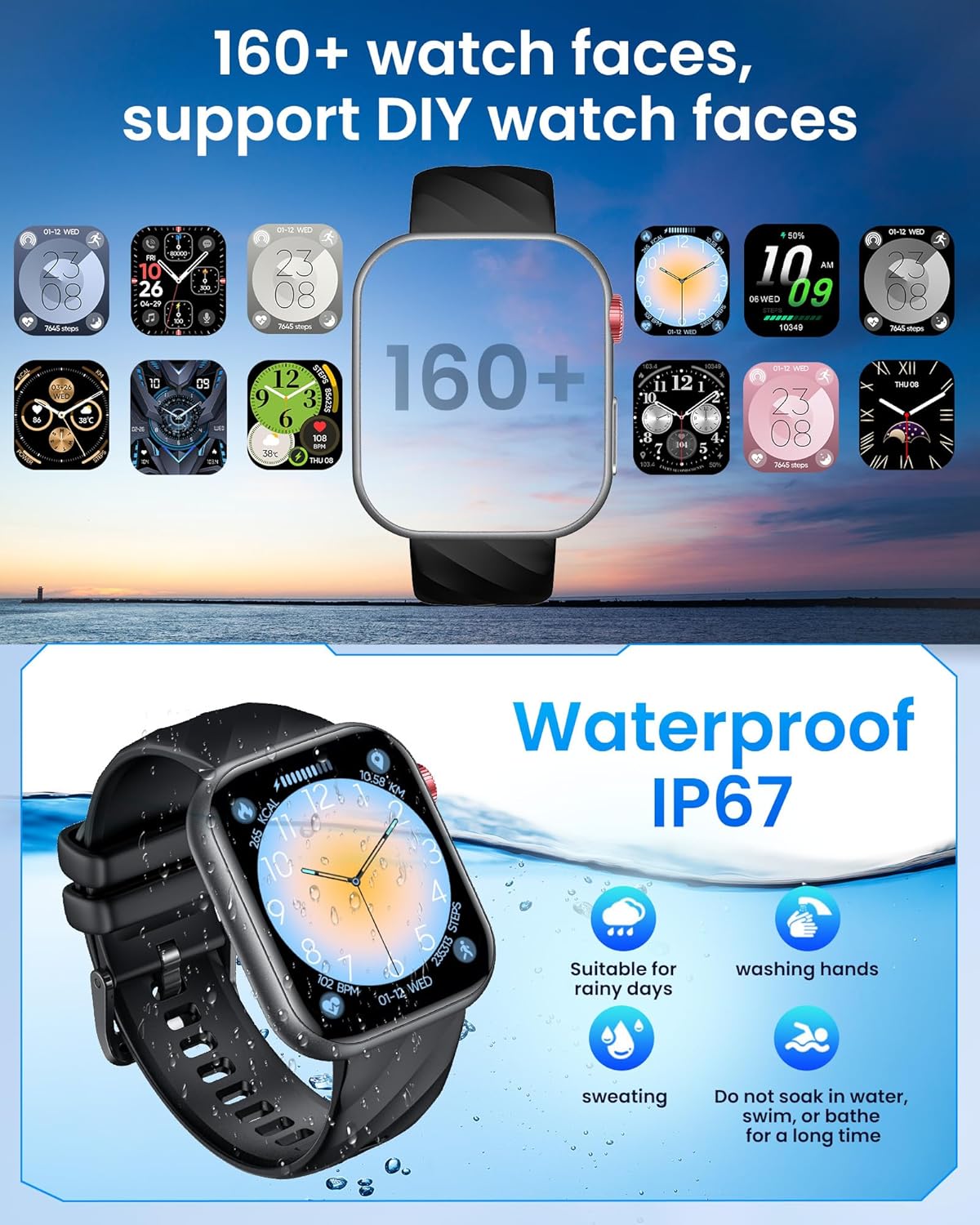
Figure 23: The watch supports over 160 watch faces and is IP67 waterproof.
8. การรับประกันและการสนับสนุน
8.1 การรับประกันของผู้ผลิต
ผลิตภัณฑ์นี้มีการรับประกันจากผู้ผลิต 1 ปี โปรดเก็บหลักฐานการซื้อไว้เพื่อใช้ในการเคลมประกัน
8.2 การสนับสนุนลูกค้า
For technical assistance, troubleshooting, or warranty inquiries, please refer to the contact information provided on the TAOPON official webเว็บไซต์หรือช่องทางการสนับสนุนของร้านค้าปลีก