
BOTSLAB G980H 4 Channel
คู่มือผู้ใช้กล้องติดรถยนต์ BOTSLAB G980H 4 ช่องสัญญาณ
Model: G980H 4 Channel
Brand: BOTSLAB
1. บทนำ
Thank you for choosing the BOTSLAB G980H 4 Channel Dash Cam. This manual provides detailed instructions on how to install, operate, and maintain your dash cam to ensure optimal performance and longevity. Please read this manual thoroughly before using the product and keep it for future reference.
2. สินค้าหมดview
2.1. เนื้อหาบรรจุภัณฑ์
ตรวจสอบว่ารายการทั้งหมดที่ระบุไว้ด้านล่างนี้รวมอยู่ในแพ็คเกจของคุณ:
- หน่วยหลัก x 1
- Rear camera x 1 (6.5M)
- 3M Tape x 2
- Car charger x 1 (3.5M)
- การ์ด TF ขนาด 128GB จำนวน 1 ชิ้น
- ฟิล์มไฟฟ้าสถิต x 2
- คู่มือเริ่มต้นอย่างรวดเร็ว x 1
- คู่มือการใช้งาน x 1
- การ์ดคำเตือน x 1
- การติดตั้งแงะบาร์ x 1

Image: All components included in the BOTSLAB G980H 4 Channel Dash Cam package, neatly arranged.
2.2. คุณสมบัติหลัก
- 4 Channel Dash Cam: Records simultaneously with a 170° front camera, dual 120° side cameras, and a 150° rear camera, providing 560° coverage. The side cameras feature a detachable magnetic mount, allowing flexible configuration between 4-channel, 3-channel (4K+1080P*2), or dual dash cam (4K+1080P) modes.
- โหมดจอดรถตลอด 24 ชั่วโมง: Offers three parking surveillance modes (requires hardwiring kit): Time-Lapse Recording (1 frame/sec), Sentry Mode (1-minute emergency video on front camera movement detection), and Collision Detection (1-minute video lock on impact).
- การมองเห็นตอนกลางคืน: Equipped with F1.8 Aperture, 6 lenses, 940nm infrared LED, and Wide Dynamic Range (WDR) for clear, balanced footage ในสภาพแสงน้อย
- Voice Control & 3.18" Touch Screen: Allows hands-free operation via voice commands and easy settings adjustment through the 3.18" touchscreen. Features a 4-way split screen playback.
- GPS ในตัว: High-precision GPS module records location, speed, and travel route. Compatible with [DVplayer] software for dynamic route animations and AR-enhanced interface in the Botslab App.
- ไวไฟ 5.8GHz: Provides 300% faster transfer speeds for instant 4K video transmission to your phone. Includes static-cling mounts and a free 128GB SD card.
- คุณสมบัติด้านความปลอดภัย: Features an "8-second pre-recording function" activated by the high-precision G-sensor during collisions or abnormal vibrations, ensuring comprehensive event capture. Supports up to 512GB storage.
- ตัวเก็บประจุซุปเปอร์: Ensures stable performance in extreme temperatures (-20°C to 70°C), prevents data loss during power cuts, and extends lifespan. Ideal for all-weather parking monitoring (requires hardwired kit).

Image: Illustrates the 3K Super HD view capturing all angles, including front, left, right, and rear camera feeds.

Image: Diagram showing the 560° field of view with 170° front, 120° left, 120° right, and 150° rear camera angles, eliminating blind spots.
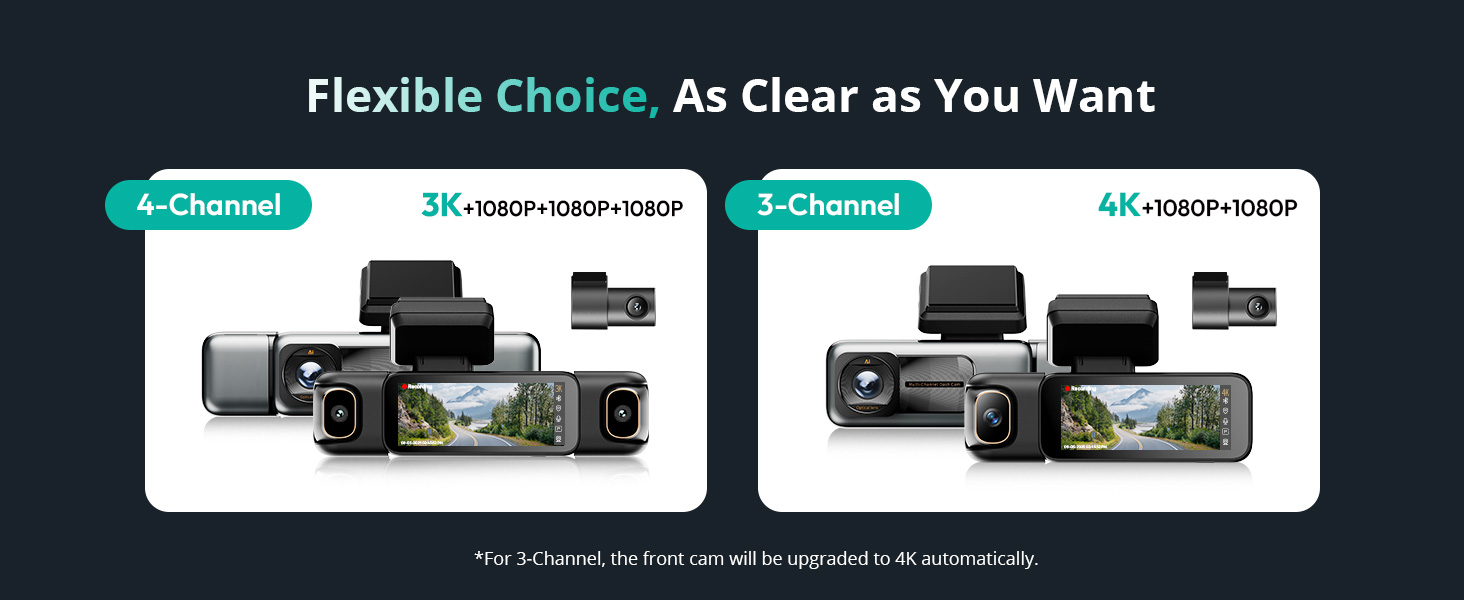
Image: Depicts the flexible choice between 4-channel (3K+1080P+1080P+1080P) and 3-channel (4K+1080P+1080P) configurations.

Image: Visual representation of the 24/7 Smart Parking Protection features, including Sentry Mode, Collision-Detected Recording, and Time-Lapse Recording.

Image: Diagram illustrating the 24/7 Smart Parking Monitor functionality, highlighting Sentry Mode, Collision-detected recording, and Time-lapse recording.
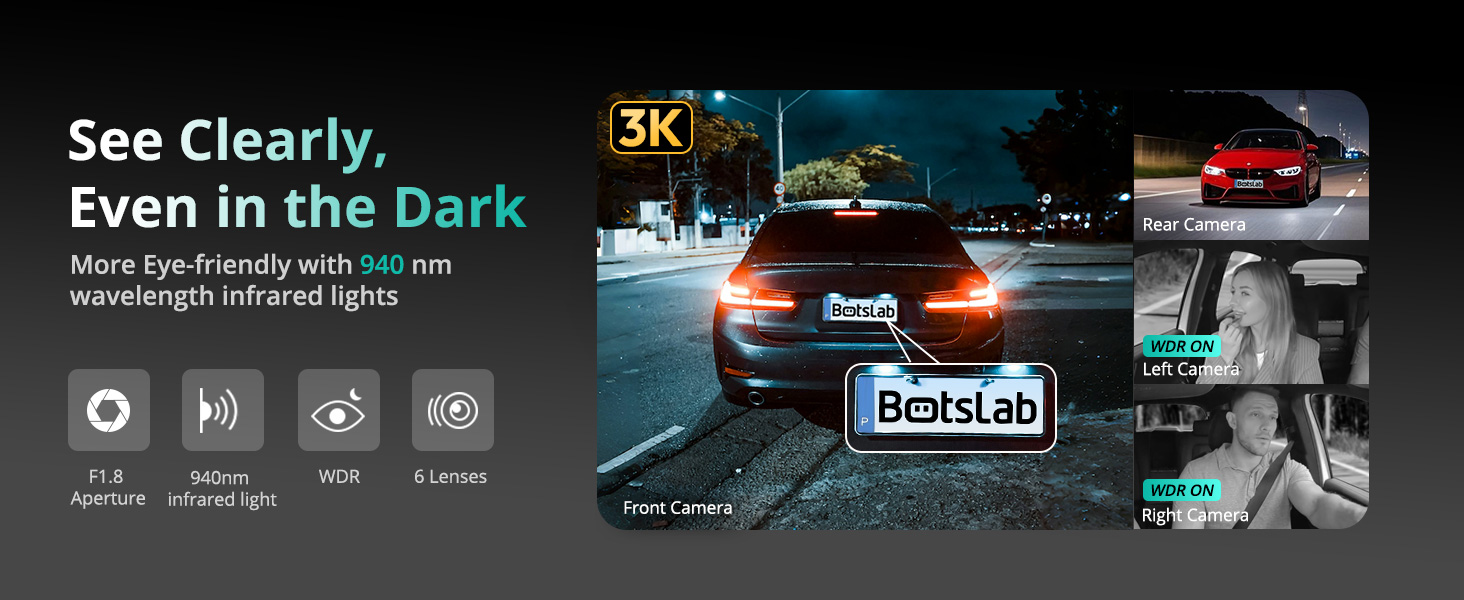
Image: Demonstrates the dash cam's ability to record clearly in the dark, highlighting F1.8 Aperture, 940nm infrared light, WDR, and 6 lenses.

Image: A hand interacting with the 3.18-inch touchscreen display of the dash cam, showing intuitive control.

Image: Illustrates various voice commands for hands-free operation, such as 'Take photo', 'Video start', and 'Turn on screen'.

Image: Shows the built-in GPS functionality tracking a drive on a map, with integration for Google Maps and real-time data display.

Image: Highlights the 5.8GHz Wi-Fi feature, emphasizing 5X faster data transfer speeds for quick preview and playback on a smartphone.

Image: Illustrates how the dash cam secures footage in emergencies, including 8 seconds of buffered recording before an event and subsequent emergency recording.

ภาพ: ผลิตภัณฑ์หลัก view of the BOTSLAB G980H 4 Channel Dash Cam alongside a smartphone displaying its companion app interface.

Image: Shows the dash cam's snap-on design for side cameras and their 90-degree rotation capability, allowing users to choose their preferred view.
3. การตั้งค่า
3.1. การติดตั้ง
- เตรียมกระจกหน้ารถ: Clean the area on your windshield where the dash cam will be mounted. Apply the electrostatic film first to prevent adhesive residue.
- ติดตั้งตัวเครื่องหลัก: Attach the main unit to the windshield using the provided 3M tape. Ensure it is positioned to capture the desired front view โดยไม่บดบังทัศนวิสัยในการขับขี่ของคุณ
- เชื่อมต่อพลังงาน: Plug the car charger into your vehicle's cigarette lighter socket and connect the other end to the main unit. Route the cable neatly using the installation pry bar to tuck it along the vehicle's interior trim.
- ติดตั้งกล้องมองหลัง: Mount the rear camera on your rear windshield. Connect its cable to the main unit and route the cable discreetly.
- Attach Side Cameras: The side cameras attach magnetically to the main unit. Ensure they are securely snapped into place. Adjust their angles (90° rotation) to cover the left and right interior/exterior viewตามความจำเป็น

Image: Diagram showing the easy installation process, including placement of the front camera, power connection, and rear camera.
3.2. การตั้งค่าเริ่มต้น
- ใส่การ์ด SD: Insert the provided 128GB TF card into the designated slot on the dash cam.
- เปิดเครื่อง: Start your vehicle to power on the dash cam. The device will automatically turn on and begin recording.
- ฟอร์แมตการ์ด SD: It is recommended to format the SD card upon first use and periodically thereafter to ensure stable recording performance. Access the settings menu via the touchscreen to find the format option.
- Adjust Basic Settings: Use the 3.18" touchscreen to set the date, time, video resolution, and other preferences.
4. การดำเนินการ
4.1. การบันทึกขั้นพื้นฐาน
Once powered on, the dash cam automatically begins loop recording. Video files are saved to the SD card in segments. When the card is full, the oldest unlocked fileจะถูกเขียนทับ
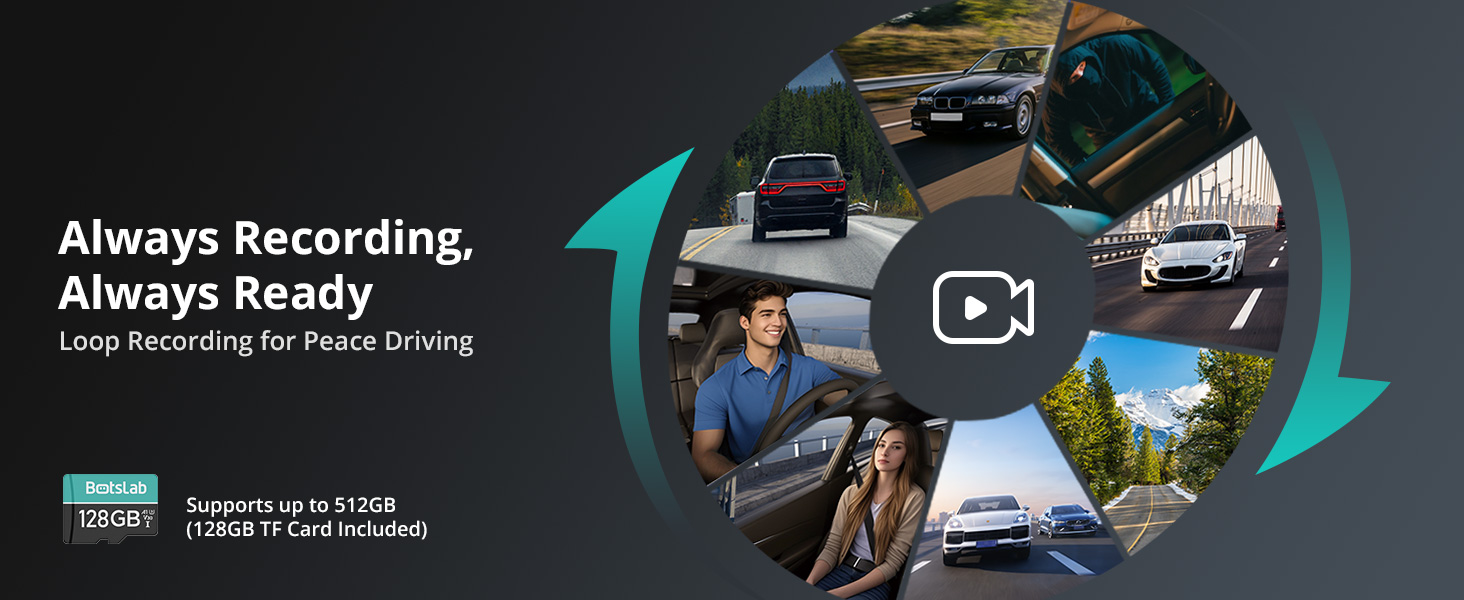
Image: Illustrates the continuous loop recording function, ensuring the dash cam is always ready to capture footage.
4.2. การควบคุมด้วยเสียง
The dash cam supports hands-free voice commands for common operations. Speak clearly and directly to the device:
- "ถ่ายรูป"
- "Video start"
- "เปิดหน้าจอ"
- "ปิดหน้าจอ"
- "แสดงภาพจากกล้องหน้า"
- "แสดงภาพจากกล้องหลัง"
- "Inside video"
- "เปิดเสียง"
- "ปิดเสียง"
4.3. ระบบนำทางด้วยหน้าจอสัมผัส
The 3.18" touchscreen allows for intuitive navigation and settings adjustment. Swipe and tap to access menus, review ฟูtage, and change camera views (including 4-way split screen playback).
4.4. โหมดจอดรถ
To enable 24/7 parking surveillance, a dedicated hardwiring kit (ASIN: B0DT1633D2) is required. Once installed, you can select from:
- การบันทึกไทม์แลปส์: Records at 1 frame per second to conserve storage while providing continuous monitoring.
- Sentry Mode: Automatically records a 1-minute emergency video when the front camera detects movement within 5 meters.
- การตรวจจับการชน: Locks a 1-minute video upon impact to preserve crucial evidence.
4.5. การเชื่อมต่อ Wi-Fi และแอปพลิเคชัน
Connect your smartphone to the dash cam via 5.8GHz Wi-Fi for fast video transfer, live view, and playback. Download the Botslab App from your app store. The app also features a built-in video editor for sharing moments.

Image: Screenshot of the Botslab App showing its built-in video editor and sharing options for recorded footage.
4.6. ฟังก์ชัน GPS
The built-in GPS module accurately records your vehicle's location, speed, and travel route. Use the [DVplayer] software on your PC or the Botslab App to review driving paths with dynamic route animations and AR-enhanced data overlays.
4.7. การบันทึกเหตุการณ์ฉุกเฉิน
The high-precision G-sensor detects collisions or abnormal vibrations. When triggered, it initiates emergency recording and includes an 8-second pre-recording buffer to capture the full event sequence.
5. การบำรุงรักษา
5.1. การจัดการการ์ด SD
Regularly format the SD card (at least once a month) to prevent data corruption and ensure optimal recording performance. Back up any important footage ก่อนการจัดรูปแบบ
5.2. การทำความสะอาด
Use a soft, dry cloth to clean the dash cam's lenses and screen. Avoid using abrasive cleaners or solvents that could damage the device.
5.3. Super Capacitor Care
The super capacitor is designed for durability and performance in varying temperatures. No specific user maintenance is required for the super capacitor itself, but ensure the device is operated within its specified temperature range (-20°C to 70°C).
6 การแก้ไขปัญหา
If you encounter issues with your BOTSLAB G980H Dash Cam, please refer to the following common problems and solutions:
| ปัญหา | วิธีแก้ปัญหาที่เป็นไปได้ |
|---|---|
| กล้องติดรถยนต์ไม่สามารถเปิดได้ | Check the power connection to the car charger and ensure the vehicle's cigarette lighter socket is functioning. Try a different power source if available. |
| การบันทึกหยุดหรือ footage เสียหายแล้ว | Format the SD card. Ensure you are using a high-endurance SD card. Replace the SD card if the issue persists. |
| คุณภาพวิดีโอไม่ดีในเวลากลางคืน | Ensure the lens is clean. Verify that WDR and night vision settings are enabled. |
| ระบบควบคุมด้วยเสียงไม่ตอบสนอง | Speak clearly and ensure there is no excessive background noise. Check the microphone settings. |
| ปัญหาการเชื่อมต่อ Wi-Fi | Restart the dash cam and your smartphone. Ensure you are within range of the dash cam's Wi-Fi signal. |
| โหมดจอดรถไม่ทำงาน | Confirm that the hardwiring kit is correctly installed and connected. Check parking mode settings in the menu. |
If the problem persists after trying these solutions, please contact BOTSLAB customer support for assistance.
7. ข้อมูลจำเพาะ
| คุณสมบัติ | รายละเอียด |
|---|---|
| ขนาดสินค้า | 6.02 x 5.39 x 3.94 นิ้ว |
| น้ำหนักสินค้า | 1.03 ปอนด์ |
| ASIN | B0F8W7CWHK |
| หมายเลขรุ่นสินค้า | G980H 4 Channel |
| แบตเตอรี่ | จำเป็นต้องใช้แบตเตอรี่ลิเธียมไอออน 1 ก้อน |
| วันที่พร้อมใช้งานครั้งแรก | 16 พฤษภาคม 2025 |
| ผู้ผลิต | บอทส์แล็บ |
| ประเทศต้นกำเนิด | จีน |
| ยี่ห้อ | บอทส์แล็บ |
| ชื่อรุ่น | G980H 4 Channel Dash Cam |
| ปฐมนิเทศ | ด้านไดรเวอร์ |
| ประเภทบริการยานพาหนะ | รถ |
| เทคโนโลยีการเชื่อมต่อ | ไร้สาย |
| คุณสมบัติพิเศษ | 4 ช่อง |
| ความละเอียดในการจับภาพวิดีโอ | 3K |
| ส่วนประกอบที่รวมอยู่ | Blu-ray (Note: This appears to be an error in the source data, typically refers to the included SD card or manual) |
| ประเภทการติดตั้ง | Wall (Note: This appears to be an error in the source data, typically refers to windshield mount) |
| สี | เงิน |
8. การรับประกันและการสนับสนุน
8.1. ข้อมูลการรับประกัน
BOTSLAB offers a 365-Day Quality Guarantee for this product. This warranty covers manufacturing defects and ensures the product meets quality standards for one year from the date of purchase.
8.2. การสนับสนุนลูกค้า
For any technical assistance, inquiries, or support needs, BOTSLAB is committed to providing comprehensive customer service:
- บริการช่วยเหลือด้านเทคนิคตลอดอายุการใช้งาน: Access ongoing technical support for the lifespan of your product.
- การคืนสินค้าฟรีภายใน 30 วัน: เพลิดเพลินกับการคืนสินค้าที่สะดวกสบายภายใน 30 วันนับจากวันที่ซื้อ
- บริการช่วยเหลือด่วนภายใน 48 ชั่วโมง: เราจะตอบกลับข้อสงสัยด้านการสนับสนุนของคุณภายใน 48 ชั่วโมง
You can reach BOTSLAB customer support through the following channels:
- 24 Hours Live Chat: Download the Botslab APP, register and sign in, then navigate to Me > Support > Live Chat.
- Webเว็บไซต์: เยี่ยมชมเว็บไซต์อย่างเป็นทางการของ BOTSLAB webไซต์ที่ global.botslab.com
- อีเมล: ส่งคำถามของคุณไปที่ Service@botslab.com
- กลุ่มผู้ใช้งาน Botslab: เข้าร่วมชุมชนบน Facebook เพื่อรับการสนับสนุนจากเพื่อนร่วมกลุ่มและข่าวสารอัปเดต

Image: Provides contact information for BOTSLAB customer support, including live chat via app, website, email, and Facebook group.
Ask a question about this manual
Ask about setup, troubleshooting, compatibility, parts, safety, or missing instructions. Manuals+ will review the question and use this page’s manual context to help answer it.