
1. บทนำ
This manual provides detailed instructions for the installation, operation, and maintenance of your WOOX R8404 4G LTE Outdoor Solar Security Camera. Please read this manual thoroughly before using the product to ensure proper function and safety. This camera is designed for autonomous surveillance in remote areas without Wi-Fi or electricity, utilizing 4G LTE connectivity and solar power.
2. สินค้าหมดview
The WOOX R8404 is a 2K 3MP outdoor security camera featuring 4G LTE connectivity, solar charging, color night vision, and AI-powered human detection. It offers comprehensive surveillance with flexible installation options.
คุณสมบัติหลัก:
- Autonomous 4G LTE Connectivity: Operates independently in areas without Wi-Fi or electricity. Requires a Nano SIM card (not included) with an active data plan.
- 2K Ultra-Clear Vision: 3-megapixel wide-angle lens provides sharp 2K images during the day.
- การมองเห็นสีกลางคืน: Integrated fill light automatically activates color night vision for bright, vivid images at night.
- มุมกว้าง 130° View: Covers large outdoor areas, reducing blind spots.
- พลังงานแสงอาทิตย์: High-performance solar panel and battery ensure year-round operation with approximately 2.5 hours of daily sunlight. Can operate for up to two months without direct sunlight.
- AI การตรวจจับมนุษย์: PIR-based AI technology accurately identifies human activity, reducing false alarms from animals or environmental factors. Sends real-time notifications via the app.
- Customizable Surveillance Zones: Allows setting priority monitoring zones (e.g., parking spaces, pools, garden corners).
- การติดตั้งอย่างรวดเร็ว: Wireless design for flexible mounting, operational in under 5 minutes.
- การออกแบบที่ทนทาน: IP66 certified for weather protection, operating in temperatures from -20°C to 50°C.
- เสียงสองทาง: ไมโครโฟนและลำโพงในตัวสำหรับการสื่อสารทางไกล
- การจัดเก็บข้อมูลที่ปลอดภัย: Supports local storage via microSD card (up to 256GB, not included) and encrypted cloud storage (7-day free trial available).
3. การตั้งค่า
3.1 เนื้อหาบรรจุภัณฑ์
- WOOX R8404 4G LTE Outdoor Solar Security Camera
- ตัวยึด
- สายชาร์จ USB
- สกรูและปลั๊กติดผนัง
- คู่มือการใช้งาน
Note: Nano SIM card and microSD card are not included.
3.2 การตั้งค่าเริ่มต้นและการจับคู่แอป
Follow these steps to set up your WOOX R8404 camera and pair it with the WOOX Home app.
- ดาวน์โหลดแอป WOOX Home: ค้นหา "WOOX Home" on the App Store (iOS) or Google Play Store (Android) and install it. Register or log in to your account.
- ใส่ซิมการ์ด: Important: The SIM card must be inserted first. Open the rubber cover on the back of the camera. Carefully insert a Nano SIM card with an active data plan into the SIM card slot. Ensure it is correctly oriented.
- เปิดเครื่องและรีเซ็ต: It is recommended to connect the camera to USB power during setup to ensure sufficient battery. Press and hold the power button for more than 5 seconds to turn on the camera. Then, press and hold the reset button for about 5 seconds until the camera restarts and emits a pairing prompt sound. The indicator light will flash rapidly in blue.
Video: Step-by-step guide on how to set up your WOOX R8404 Smart 4G Outdoor Camera, including SIM card insertion, power-on, reset, and app pairing process.
- เพิ่มอุปกรณ์ในแอป: Open the WOOX Home app. Tap the "+" icon in the top right corner to add a new device. Select the corresponding product type (e.g., Smart 4G Outdoor Camera R8404) from the product list.
- สแกนรหัส QR: The app will prompt you to scan a QR code. Position the camera to read the QR code displayed on your phone screen from 15-20 cm away. Once the camera reads the QR code, it will emit a confirmation sound. Tap "I Heard a Prompt" in the app.
- เชื่อมต่ออุปกรณ์: The app will search for and register the device to your account. Once successfully added, you can name the device. This name will also be used for integration with Amazon Alexa and Google Home.

ภาพ: รายละเอียด view of inserting a Nano SIM card into the WOOX R8404 camera. Ensure the SIM card is inserted correctly before powering on.

Image: A smartphone displaying a QR code for device pairing, with the camera positioned to scan it. This step connects the camera to your WOOX Home app.
3.3 การติดตั้งทางกายภาพ
The camera's wireless and solar-powered design allows for flexible mounting. Choose a location with good 4G signal reception and sufficient sunlight exposure for optimal charging.
- Use the provided mounting bracket and screws to securely attach the camera to a wall or pole.
- Adjust the camera angle to cover your desired surveillance area.

Image: A person installing the WOOX R8404 camera on a wooden exterior wall, demonstrating the ease of wireless setup. The camera is designed for quick and flexible mounting.
4. คู่มือการใช้งาน
4.1 สด View และการบันทึก
Once connected, access the live feed from your camera through the WOOX Home app. You can view ฟูแบบเรียลไทม์tage, take snapshots, and record video directly from the app.

Image: The WOOX 4G camera mounted on a building, illustrating its 4G connectivity for monitoring anytime, anywhere, without Wi-Fi or power supply. Compatible with major European mobile networks.
4.2 Power Management (Solar & Battery)
The camera features a dual power mode, combining a solar panel with a high-performance battery. Ensure the solar panel receives adequate sunlight for continuous operation.
- Approximately 2.5 hours of daily sunlight are sufficient for stable year-round operation.
- The advanced energy-saving design allows the camera to function for up to two months in cloudy, rainy, or low-light conditions.

Image: Visual representation of the camera's dual power mode, highlighting the solar panel for light-based charging and the internal battery for night and bad weather operation, ensuring continuous functionality.
4.3 การมองเห็นตอนกลางคืน
The camera automatically switches to night vision in low-light conditions. It offers both infrared and color night vision modes.
- การมองเห็นสีกลางคืน: Activated by the integrated fill light, providing bright and vivid images.
- อินฟราเรดคืนวิสัยทัศน์: Standard black and white night vision for discreet monitoring.
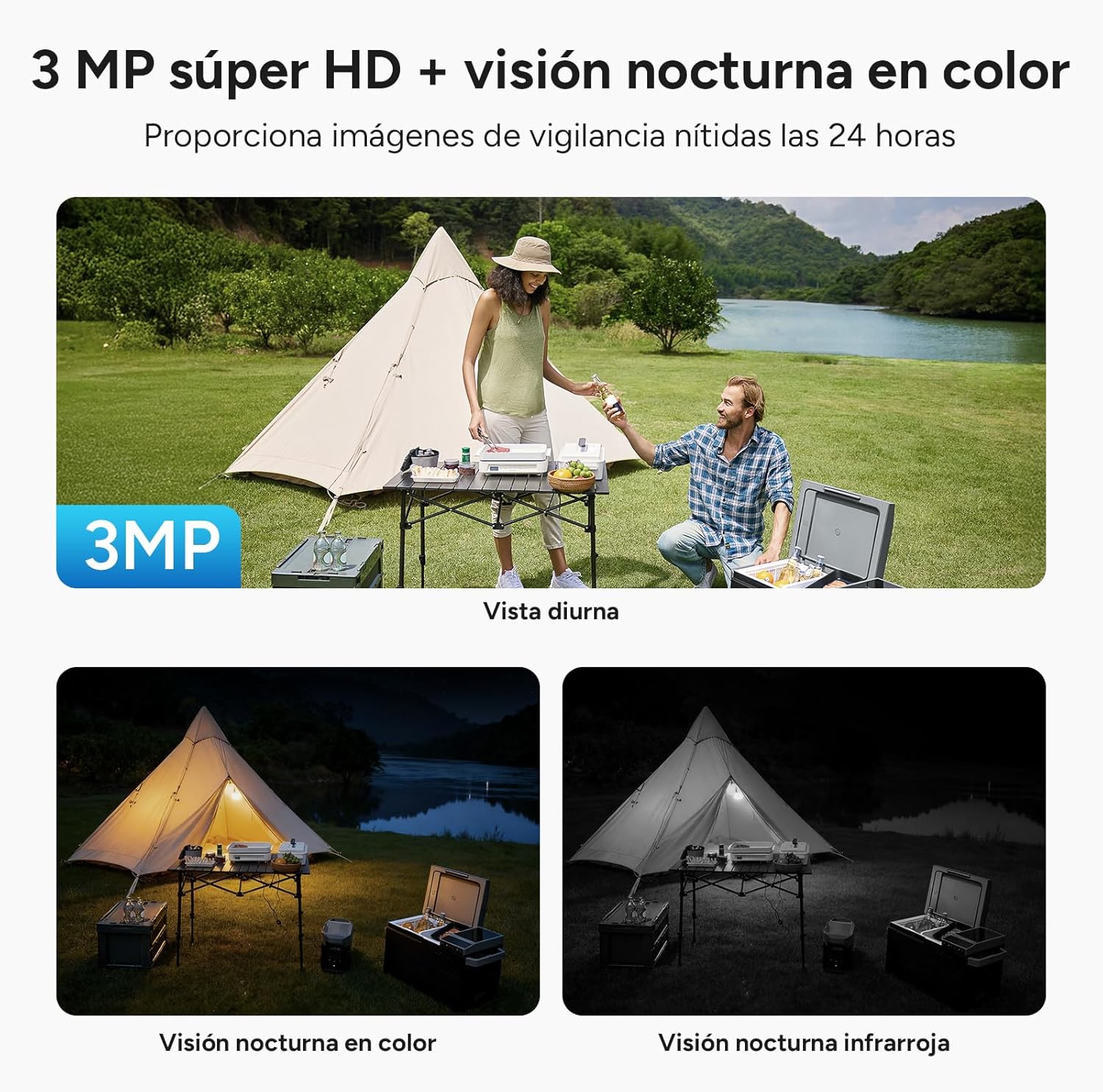
Image: A comparison of the camera's 3MP Super HD daytime view, color night vision, and infrared night vision, demonstrating its 24-hour surveillance capabilities with clear images in various lighting conditions.
4.4 การตรวจจับและแจ้งเตือนมนุษย์ด้วย AI
The camera uses AI to distinguish human movement from other objects, significantly reducing false alarms. When human intrusion is detected, the camera sends real-time alerts to your WOOX Home app.
- Customize detection zones to focus on specific areas.
- The camera can activate a sound and light alarm to deter intruders.

Image: The camera's 130° field of view with AI intelligent detection, showing how it precisely identifies people and vehicles for more reliable security, reducing blind spots.
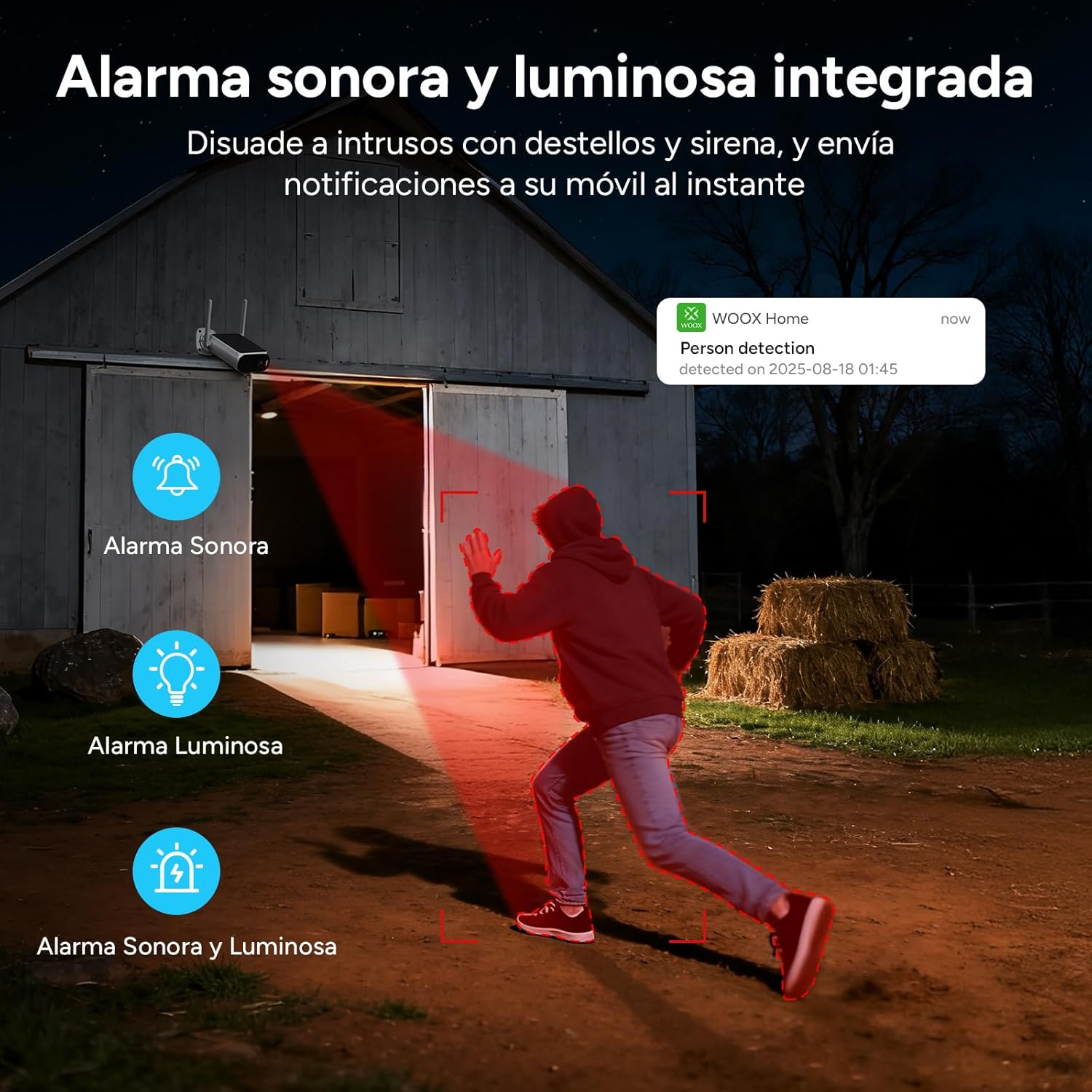
Image: An illustration of the integrated sound and light alarm deterring intruders with flashes and a siren, sending instant notifications to your mobile device.
4.5 เสียงสองทาง
Use the two-way audio feature to communicate with visitors or deter unwanted guests directly through the app.

Image: Depiction of two-way voice communication, with integrated microphone and speaker enabling remote alerts and interaction for enhanced security protection.
4.6 ตัวเลือกการจัดเก็บข้อมูล
กล้องนี้รองรับวิธีจัดเก็บข้อมูลสองวิธี:
- การจัดเก็บข้อมูลภายในเครื่อง: Insert a microSD card (up to 256GB, not included) into the designated slot.
- การเก็บข้อมูลบนคลาวด์: Utilize the cloud storage service offered through the WOOX Home app. Advanced encryption ensures your privacy.

Image: Visual explanation of the two storage modes: support for cloud storage and local storage via a microSD card up to 256 GB (not included).
5. การบำรุงรักษา
The WOOX R8404 camera is designed for outdoor use and requires minimal maintenance.
- ความทนทานต่อสภาพอากาศ: The camera is IP66 certified, protecting it against dust and powerful water jets. It operates reliably in temperatures ranging from -20°C to 50°C.
- การทำความสะอาด: เช็ดเลนส์กล้องและแผงโซลาร์เซลล์ด้วยผ้านุ่มๆ เป็นระยะๆamp cloth to ensure clear vision and efficient charging. Avoid using harsh chemicals.
- อายุการใช้งานแบตเตอรี่: While solar-powered, prolonged periods of extreme low light may require occasional manual charging via the USB port.

Image: The camera with water droplets, highlighting its IP66 rating and robust operating temperature range of -20°C to 50°C, ensuring durability in various weather conditions.
6 การแก้ไขปัญหา
If you encounter issues with your WOOX R8404 camera, refer to the following common solutions:
- No Connection/Delayed Image Transmission:
- ตรวจสอบให้แน่ใจว่าได้ใส่ซิมการ์ดนาโนอย่างถูกต้องและมีแพ็กเกจอินเทอร์เน็ตที่ใช้งานอยู่
- Check 4G signal strength in the camera's location. Move the camera to an area with better signal if necessary.
- Perform a device reset by pressing and holding the reset button for 5 seconds until the camera restarts. Then re-pair with the app.
- Ensure the camera has sufficient battery power. Connect it to USB power if the battery is low.
- สัญญาณเตือนที่ผิดพลาด:
- Adjust the sensitivity of the AI human detection in the WOOX Home app.
- Define specific surveillance zones to exclude areas prone to non-human movement (e.g., swaying branches).
- การมองเห็นตอนกลางคืนไม่ดี:
- ตรวจสอบให้แน่ใจว่าเลนส์กล้องสะอาดและไม่มีสิ่งกีดขวาง
- Check if the integrated fill light is functioning correctly.
- แบตเตอรี่ไม่ชาร์จ:
- Verify the solar panel is clean and free from dirt or debris.
- ตรวจสอบให้แน่ใจว่าแผงโซลาร์เซลล์อยู่ในตำแหน่งที่ได้รับแสงแดดโดยตรงเป็นเวลาหลายชั่วโมงต่อวัน
- In prolonged cloudy periods, consider charging the camera via the USB port.
7. ข้อมูลจำเพาะ
| คุณสมบัติ | ข้อมูลจำเพาะ |
|---|---|
| ชื่อรุ่น | 4G Solar Cam R8404 |
| เทคโนโลยีการเชื่อมต่อ | 4G LTE (เซลลูลาร์) |
| ข้อแนะนำการใช้ | การเฝ้าระวังกลางแจ้ง |
| คุณสมบัติพิเศษ | Two-way audio, Built-in light, HD Resolution, Motion sensor, Night vision (Infrared & White Light) |
| การใช้งานในร่ม/กลางแจ้ง | กลางแจ้ง |
| อุปกรณ์ที่รองรับ | สมาร์ทโฟน, แท็บเล็ต |
| แหล่งพลังงาน | Rechargeable battery, Solar panel charging |
| ประเภทตัวควบคุม | WOOX Home APP |
| ประเภทการติดตั้ง | ติดผนัง |
| สี | สีดำ, สีขาว |
| ประเภทวัสดุ | อะคริโลไนไตรล์ บิวทาไดอีน สไตรีน (ABS), โพลีคาร์บอเนต (PC) |
| ระดับความต้านทานต่อน้ำ | ทนน้ำ (IP66) |
| ประเภทการแจ้งเตือน | การเคลื่อนไหว |
| Lamp พิมพ์ | Infrared Lights, LED |
| ความละเอียดในการบันทึกวิดีโอ | 1296p (2K) |
| อัตราเฟรม | 15 เฟรมต่อวินาที |
| การเข้ารหัสวิดีโอ | เอช.264 |
| รูปแบบการจับภาพวิดีโอ | เอ็มพี 4 |
| ช่วงการมองเห็นตอนกลางคืน | 8 เมตร |
| Max Flash Memory Support | ความจุ 256 GB (Micro SD) |
| เล่มที่tage | 5 โวลต์ |
| พลัง | 7.5 วัตต์ |
| ความจุของแบตเตอรี่ | 10400 มิลลิแอมป์ |
| Viewอิงแองเกิล | 120 Degrees (Note: Feature bullets state 130 degrees, using 120 from specs table) |
| เทคโนโลยีเซ็นเซอร์ออปติคัล | ซีมอส |
| ขนาดรายการ | 13 x 8 x 4 เซนติเมตร |
8. การรับประกันและการสนับสนุน
WOOX products are designed and manufactured to the highest quality standards. In the unlikely event of a defect, WOOX provides a limited warranty from the date of purchase. Please retain your proof of purchase for warranty claims.
For technical support, troubleshooting assistance, or warranty inquiries, please visit the official WOOX website or contact their customer service through the WOOX Home app. Detailed contact information can typically be found on the product packaging or the official webเว็บไซต์.
Please note that the warranty may not cover damages caused by improper installation, misuse, unauthorized modifications, or natural disasters.
