
1. บทนำ
This manual provides detailed instructions for the setup, operation, and maintenance of your HISTTON H4-T Industrial Mini PC. Please read this manual thoroughly before using the device to ensure proper functionality and safety.
2. ข้อมูลด้านความปลอดภัย
- ตรวจสอบแหล่งจ่ายไฟ voltage ตรงตามข้อกำหนดของอุปกรณ์
- อย่าให้เครื่องโดนความชื้น อุณหภูมิที่สูงหรือต่ำเกินไป หรือโดนแสงแดดโดยตรง
- หลีกเลี่ยงการปิดกั้นช่องระบายอากาศ
- อย่าพยายามเปิดหรือซ่อมแซมอุปกรณ์ด้วยตนเอง โปรดติดต่อเจ้าหน้าที่บริการที่มีคุณสมบัติเหมาะสม
- เก็บอุปกรณ์ให้ห่างจากสนามแม่เหล็กแรงสูง
3. เนื้อหาบรรจุภัณฑ์
ตรวจสอบว่ามีรายการทั้งหมดอยู่ในแพ็คเกจ:
- 1 x HISTTON Mini PC
- อะแดปเตอร์ไฟฟ้า 1 ตัว
- 1 x คู่มือผู้ใช้ (เอกสารนี้)
- สาย HDMI 1 เส้น
- Screws (for mounting/storage installation)
- เสาอากาศ WiFi
- VESA Mount (if included with specific models)
- SATA Cable (for 2.5-inch drive installation)

4. สินค้าหมดview
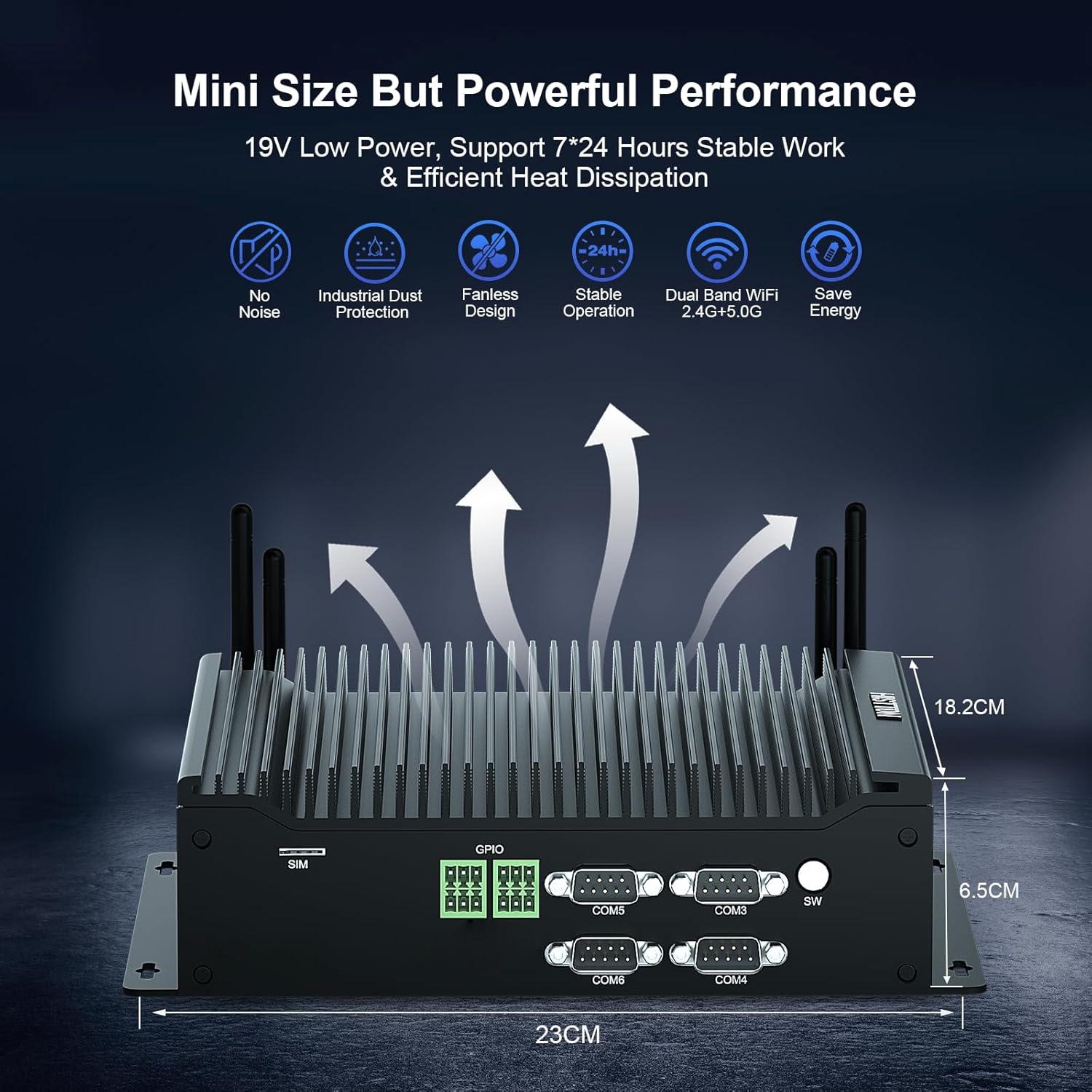
The HISTTON H4-T Mini PC is a compact, fanless industrial computer designed for various applications requiring stable performance and extensive connectivity. It features an Intel Core i7-10710U processor and supports multiple display outputs.
4.1 แผงด้านหน้าและด้านหลัง

The device features a comprehensive set of ports for various industrial and general computing needs. These include multiple USB ports, LAN ports, COM ports, and video outputs.
4.2 คุณสมบัติหลัก
- โปรเซสเซอร์: Intel Core i7-10710U (10th Gen) with up to 4.70 GHz turbo frequency.
- กราฟิก: Intel UHD Graphics for 10th Gen Processors, supporting 4K resolution.
- หน่วยความจำ: Dual DDR4 SO-DIMM slots, expandable up to 64GB.
- พื้นที่จัดเก็บ: M.2 2280 NVME PCIe 3.0x4 / SATA 3 SSD slot and a 2.5-inch SATA HDD/SSD bay.
- การแสดงผลเอาท์พุต: HD, DisplayPort (DP), and Type-C for triple 4K display support.
- เครือข่าย: 2 x RJ45 Intel I210/211 Gigabit LAN, Dual-band WiFi 5 (2.4G+5.0G), Bluetooth 4.2.
- การเชื่อมต่อ: 4 x USB 3.0, 4 x USB 2.0, 6 x DB9pin COM ports (configurable for RS232/RS422/RS485), 2 x 6pin GPIO, 1 x SIM card slot.
- การระบายความร้อน: Fanless design for silent operation and industrial dust protection.
- ระบบปฏิบัติการ: Pre-installed Windows 11 Pro (64-bit, activated) with support for Ubuntu.


5. คำแนะนำในการตั้งค่า
5.1 การเชื่อมต่ออุปกรณ์ต่อพ่วง
- เชื่อมต่อจอแสดงผล: Use the provided HDMI cable or a DisplayPort/Type-C cable to connect your monitor(s) to the Mini PC. The device supports up to three 4K displays simultaneously.
- เชื่อมต่อคีย์บอร์ดและเมาส์: Plug your USB keyboard and mouse into any available USB ports (USB 2.0 or USB 3.0).
- เชื่อมต่อเครือข่าย: For a wired connection, connect an Ethernet cable to one of the RJ45 LAN ports. For wireless, attach the included WiFi antennas to the designated ports.
- เชื่อมต่อเสียง: If using external speakers or headphones, connect them to the SPK (speaker) port. A microphone can be connected to the MIC port.

5.2 การเปิดเครื่อง
- เชื่อมต่ออะแดปเตอร์ไฟ: Plug the power adapter into the DC 19V 5A input port on the Mini PC, then plug the adapter into a power outlet.
- ปุ่มเปิด/ปิด: Press the power button located on the front panel to turn on the Mini PC.
- The system will boot into Windows 11 Pro. Follow the on-screen instructions for initial setup if prompted.
6. คู่มือการใช้งาน
ระบบปฏิบัติการ 6.1
Your HISTTON H4-T Mini PC comes with Windows 11 Pro (64-bit) pre-installed and activated. It also supports other operating systems like Ubuntu, allowing for flexible deployment in various environments.
- Windows 11 โปร: Utilize standard Windows features for productivity, multimedia, and internet browsing.
- Ubuntu Support: For users preferring Linux-based systems, the hardware is compatible with Ubuntu installations. Refer to Ubuntu's official documentation for installation procedures.
6.2 การเชื่อมต่อเครือข่าย
- LAN แบบมีสาย: The two Gigabit Ethernet ports provide stable and high-speed wired network access.
- Wireless (WiFi & Bluetooth): The dual-band WiFi 5 (2.4G+5.0G) and Bluetooth 4.2 modules enable wireless internet access and connection to Bluetooth peripherals. Ensure antennas are securely attached for optimal performance.

6.3 Industrial Features
The H4-T is designed for industrial applications, offering robust connectivity:
- พอร์ต COM: Six DB9pin COM ports support RS232, with four of them configurable for RS422/RS485, suitable for connecting industrial control devices.
- จีพีไอโอ: Two 6pin GPIO interfaces provide programmable input/output capabilities for custom applications.
- ช่องใส่ซิมการ์ด: Supports 4G/5G modules (module not included by default) for mobile network connectivity in remote locations.
7. การบำรุงรักษา
The fanless design of the HISTTON H4-T Mini PC significantly reduces maintenance requirements by eliminating moving parts and minimizing dust accumulation. However, regular care is still recommended.
- การทำความสะอาด: Periodically wipe the exterior of the Mini PC with a soft, dry cloth. Avoid using liquid cleaners or solvents.
- การอัปเดตซอฟต์แวร์: หมั่นอัปเดตระบบปฏิบัติการและไดรเวอร์อยู่เสมอ เพื่อให้มั่นใจได้ถึงประสิทธิภาพและความปลอดภัยสูงสุด
- สภาพแวดล้อม : Ensure the device is operated within recommended temperature and humidity ranges to prolong its lifespan.
- การขยายพื้นที่เก็บข้อมูล: If installing additional storage (2.5-inch HDD/SSD or M.2 SSD), ensure the device is powered off and disconnected from power. Follow proper anti-static procedures.
8 การแก้ไขปัญหา
If you encounter issues with your HISTTON H4-T Mini PC, refer to the following common problems and solutions:
| ปัญหา | สาเหตุที่เป็นไปได้ | สารละลาย |
|---|---|---|
| ไม่มีไฟ / อุปกรณ์ไม่เปิดใช้งาน | Power adapter not connected or faulty; Power outlet issue; Power button not pressed correctly. | Ensure power adapter is securely connected to both the PC and a working power outlet. Try a different outlet. Press the power button firmly. |
| ไม่มีการแสดงผลบนจอภาพ | Display cable loose or faulty; Incorrect input selected on monitor; Monitor off or faulty. | Check display cable connections. Ensure monitor is on and set to the correct input source (HDMI, DP, Type-C). Test with a different monitor or cable if possible. |
| ไม่มีการเชื่อมต่ออินเทอร์เน็ต (แบบใช้สาย) | สายอีเธอร์เน็ตหลวมหรือชำรุด; ปัญหาที่เราเตอร์/โมเด็ม; ปัญหาที่ไดรเวอร์เครือข่าย | Verify Ethernet cable is securely connected. Restart your router/modem. Check network adapter status in OS. |
| ไม่มีการเชื่อมต่ออินเทอร์เน็ต (ไร้สาย) | WiFi antennas not connected; WiFi disabled; Incorrect WiFi password; Router issue. | Ensure WiFi antennas are attached. Check WiFi settings in OS. Verify WiFi password. Restart your router. |
| Peripherals (USB devices) not working | Loose connection; Driver issue; Faulty peripheral. | Try a different USB port. Reinstall or update drivers for the peripheral. Test the peripheral on another computer. |
9. ข้อมูลจำเพาะ
| คุณสมบัติ | รายละเอียด |
|---|---|
| ชื่อรุ่น | เอช4-ที |
| โปรเซสเซอร์ | Intel Core i7-10710U (10th Gen), 6 Cores, 12 Threads, 12M Cache, up to 4.70 GHz |
| โคโปรเซสเซอร์กราฟิก | กราฟิก Intel UHD สำหรับโปรเซสเซอร์ Intel รุ่นที่ 10 |
| แรม | 32GB DDR4 SO-DIMM (Expandable up to 64GB) |
| ฮาร์ดไดรฟ์ | 512GB M.2 NVMe SSD (Supports M.2 2280 NVME PCIe 3.0x4 / SATA 3 SSD and 2.5 inch SATA HDD/SSD) |
| ระบบปฏิบัติการ | Windows 11 Pro (64-bit, activated), Supports Ubuntu |
| การแสดงผลเอาท์พุต | HD, DisplayPort (DP), Type-C (Supports Triple 4K Display) |
| แลน | 2 x RJ45 Intel I210/211 Gigabit LAN |
| การเชื่อมต่อแบบไร้สาย | Dual-band WiFi 5 (2.4G+5.0G), Bluetooth 4.2 |
| พอร์ต USB | 4 x USB 3.0, 4 x USB 2.0 |
| พอร์ต COM | 6 x DB9pin (2 x RS232, 4 x RS422/RS485 configurable) |
| ส่วนติดต่ออื่น ๆ | 2 x 6pin GPIO, 1 x SIM card slot, 1 x SPK, 1 x MIC |
| แหล่งจ่ายไฟ | กระแสตรง19โวลต์ 5แอมป์ |
| การใช้พลังงาน | 15W-20W |
| การทำให้เย็น | การออกแบบที่ไม่มีพัดลม |
| ขนาด (กxยxส) | 9.06 x 7.17 x 2.56 นิ้ว (23 x 18.2 x 6.5 ซม.) |
| น้ำหนักสินค้า | 6.38 ปอนด์ (ประมาณ 2.9 กก.) |
10. ข้อมูลการรับประกัน
HISTTON products are covered by a standard manufacturer's warranty. Please refer to the warranty card included with your product or visit the official HISTTON webดูรายละเอียดข้อกำหนดและเงื่อนไขการรับประกันได้ที่เว็บไซต์ เก็บหลักฐานการซื้อไว้เพื่อใช้ในการเรียกร้องการรับประกัน
11. การสนับสนุนลูกค้า
For technical assistance, troubleshooting, or any questions regarding your HISTTON H4-T Mini PC, please contact HISTTON customer support. Contact information can typically be found on the official HISTTON webไซต์หรือบนวัสดุบรรจุภัณฑ์
แหล่งข้อมูลออนไลน์: For additional support and driver downloads, visit the official HISTTON webเว็บไซต์.