
1. บทนำ
This instruction manual provides essential information for the safe and efficient operation, maintenance, and troubleshooting of your 3i P10 Ultra Robot Vacuum and Mop Combo. Please read this manual thoroughly before using the product and retain it for future reference.
2. ข้อมูลด้านความปลอดภัย
ควรปฏิบัติตามข้อควรระวังด้านความปลอดภัยขั้นพื้นฐานเสมอเมื่อใช้เครื่องใช้ไฟฟ้า เพื่อลดความเสี่ยงจากไฟไหม้ ไฟฟ้าช็อต หรือการบาดเจ็บ เครื่องใช้ไฟฟ้านี้ใช้สำหรับใช้ในครัวเรือนเท่านั้น
- ห้ามปล่อยให้เด็กใช้งานหุ่นยนต์ ควรดูแลเด็กและสัตว์เลี้ยงอย่างใกล้ชิดขณะที่หุ่นยนต์กำลังทำงาน
- ตรวจสอบให้แน่ใจว่าปริมาณพลังงานtage ตรงกับฉลากระบุระดับพลังงานบนแท่นชาร์จ
- ห้ามใช้หุ่นยนต์บนพื้นผิวที่เปียกหรือบริเวณที่มีน้ำขัง
- Remove loose cables, small objects, and fragile items from the cleaning path before operation.
- Do not use the robot to pick up large or sharp objects, flammable materials, or liquids.
- Only use manufacturer-specified accessories and replacement parts.
- หากสายไฟชำรุดเสียหาย จะต้องเปลี่ยนโดยผู้ผลิตหรือตัวแทนบริการที่มีคุณสมบัติเหมาะสมเพื่อหลีกเลี่ยงอันตราย
3. สินค้าหมดview
3.1 ส่วนประกอบที่รวมอยู่
แพ็คเกจประกอบด้วยรายการต่อไปนี้:
- หุ่นยนต์ดูดฝุ่น 1 ตัว
- 1 x สถานีฐาน
- แผ่นม็อบ 2 แผ่น
- 2 x แปรงด้านข้าง
- 1 x 800ml Cleaning Solution
- 1 x ฐานที่ถอดออกได้
- 1 x สายไฟ
- 1 x คู่มือผู้ใช้
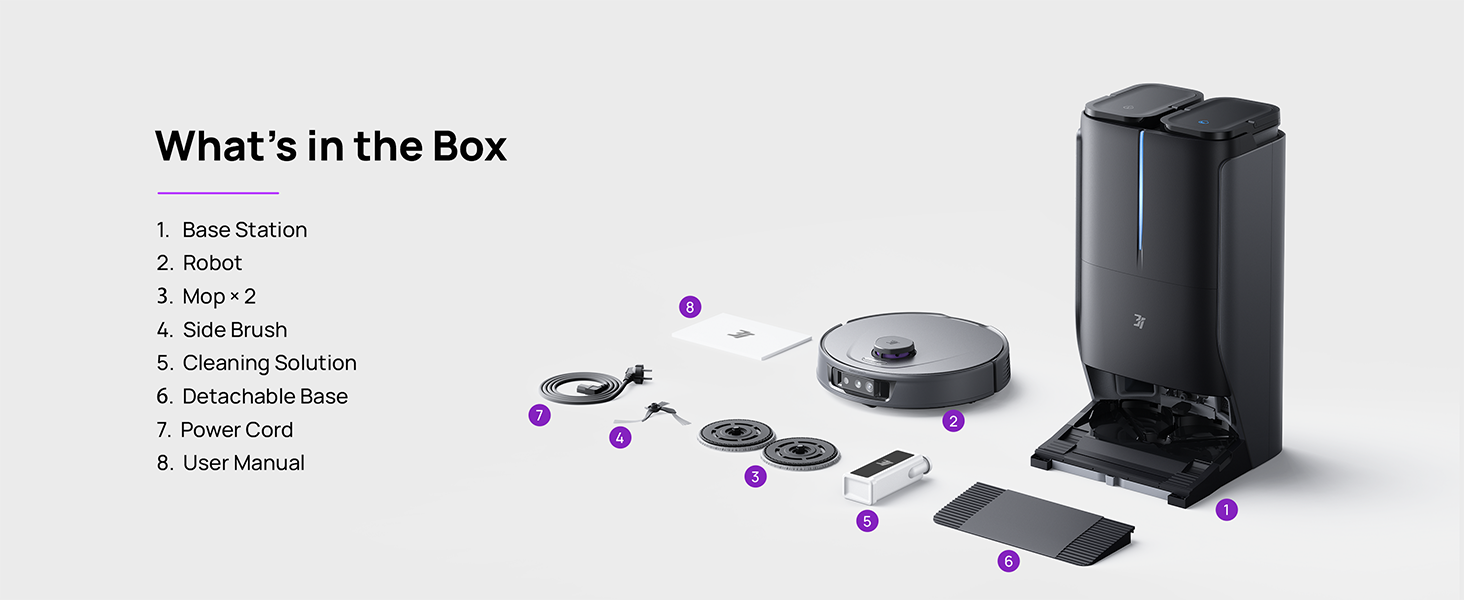
Figure 3.1: Contents of the 3i P10 Ultra package.
3.2 Robot Vacuum Features
- UltraReach Mop: The auto-extending mop system cleans edges and corners thoroughly. Dual mops spin at 220 RPM for effective stain removal.
- แรงดูด 18,000 Pa: Provides powerful suction for deep cleaning on various floor types, including carpets and hard floors. Features smart carpet detection to boost suction and lift mops.
- All-in-One Automated Station: Offers automatic hot-water mop washing, hot air drying, solution adding, and hands-free dust collection for up to 70 days.
- การนำทางขั้นสูง: Utilizes LiDAR for 3D mapping, dual 3D structured light, and an AI camera for obstacle avoidance, threshold crossing, and collision resistance.
- AI-Powered DirtScan: Identifies over 100 household objects and messes, adapting cleaning methods for optimal results, even in low light conditions.
- การจัดการเส้นผม: Equipped with anti-tangle brushes and a TangleCut blade to prevent hair from wrapping around components.
- Smart Route Planning: Learns home layouts for efficient cleaning routes. Supports scheduled cleaning, no-go zones, and app control. Compatible with Alexa and Google Assistant.
- การเชื่อมต่อ Wi-Fi: Supports both 2.4G and 5G Wi-Fi networks.

รูปที่ 3.2: ด้านบน view of the 3i P10 Ultra Robot Vacuum.

Figure 3.3: The 3i P10 Ultra Base Station.
4. การตั้งค่า
4.1 การแกะและการจัดวาง
- นำส่วนประกอบทั้งหมดออกจากบรรจุภัณฑ์อย่างระมัดระวัง
- Choose a suitable location for the base station. Ensure it is placed against a wall, on a hard, level surface, with at least 0.5 meters (1.6 feet) of clear space on both sides and 1.5 meters (4.9 feet) in front. Avoid areas with direct sunlight or strong Wi-Fi interference.
- เชื่อมต่อสายไฟเข้ากับตัวฐานและเสียบเข้ากับเต้ารับไฟฟ้า
4.2 การเตรียมหุ่นยนต์
- Install the side brushes by pressing them into their slots until they click.
- Attach the mop pads to the mop holders on the robot.
- Place the robot onto the base station to charge. Ensure the charging contacts align. The robot will announce its charging status.
4.3 การติดตั้งและการเชื่อมต่อแอป
- Download the 3i app from your mobile device's app store (iOS or Android).
- Open the app and follow the on-screen instructions to create an account and add your 3i P10 Ultra robot.
- Ensure your phone is connected to a 2.4GHz or 5GHz Wi-Fi network during the pairing process.
5. คู่มือการใช้งาน
5.1 Initial Cleaning and Mapping
For the first use, allow the robot to complete a full cleaning cycle to create a map of your home. This map is crucial for advanced features.

Figure 5.1: Precision 3D Mapping in the 3i App.
5.2 การเริ่มรอบการทำความสะอาด
- ผ่านหุ่นยนต์: กดปุ่มเปิด/ปิดบนหุ่นยนต์หนึ่งครั้งเพื่อเริ่มหรือหยุดการทำความสะอาด
- ผ่านแอป: Open the 3i app, select the desired cleaning mode (Vacuum, Mop, Vac & Mop, AI Auto, Custom), and tap 'Start'.
- ควบคุมด้วยเสียง: Use compatible voice assistants (Alexa, Google Assistant) with commands like "Hey Google, start vacuuming."

Figure 5.2: Using voice control to operate the 3i P10 Ultra.
5.3 คุณสมบัติของแอป
The 3i app provides extensive control and customization options:
- การตั้งค่าการทำความสะอาด: Schedule cleaning, select rooms, set no-go zones, customize carpet cleaning.
- การตั้งค่าแผนที่: View 3D maps, quick mapping, multi-floor maps, edit rooms and furniture.
- Station Settings: Customize dust collection, mop washing, auto-drying, and TangleCut.
- การตั้งค่าอื่นๆ: Do Not Disturb mode, Smart Route Planning, Pet Recognition, Child Lock.
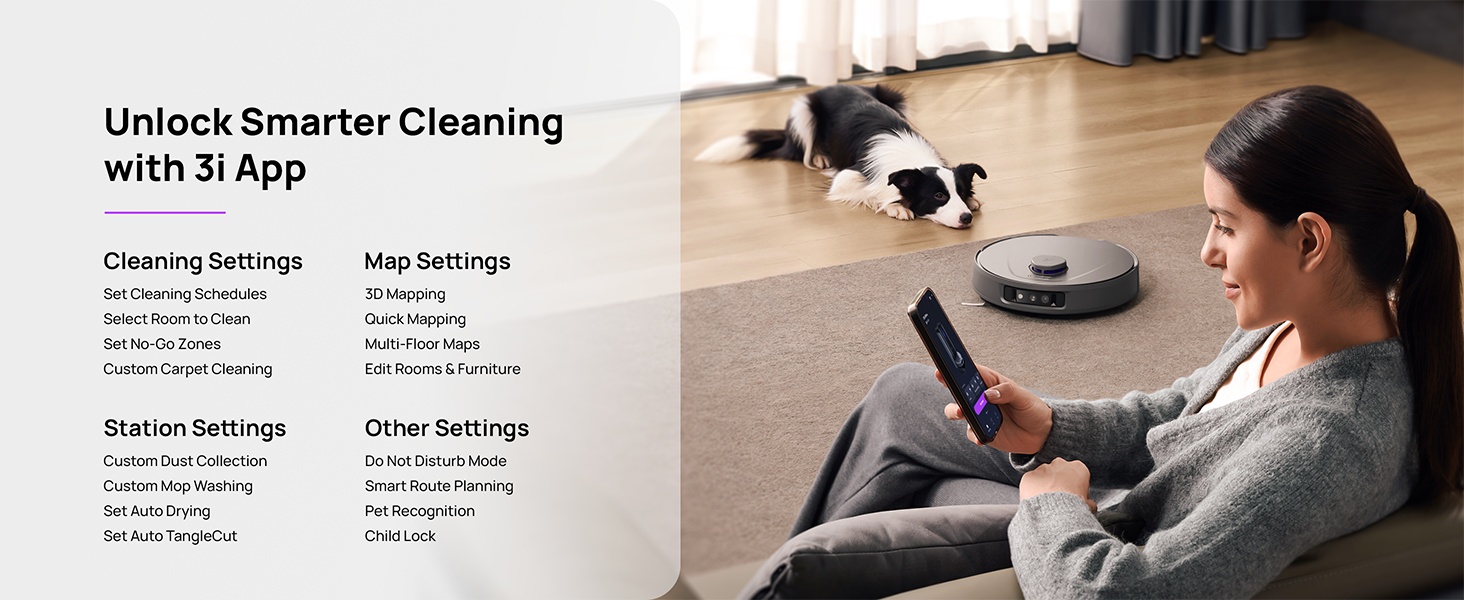
Figure 5.3: The 3i App interface for smart cleaning.
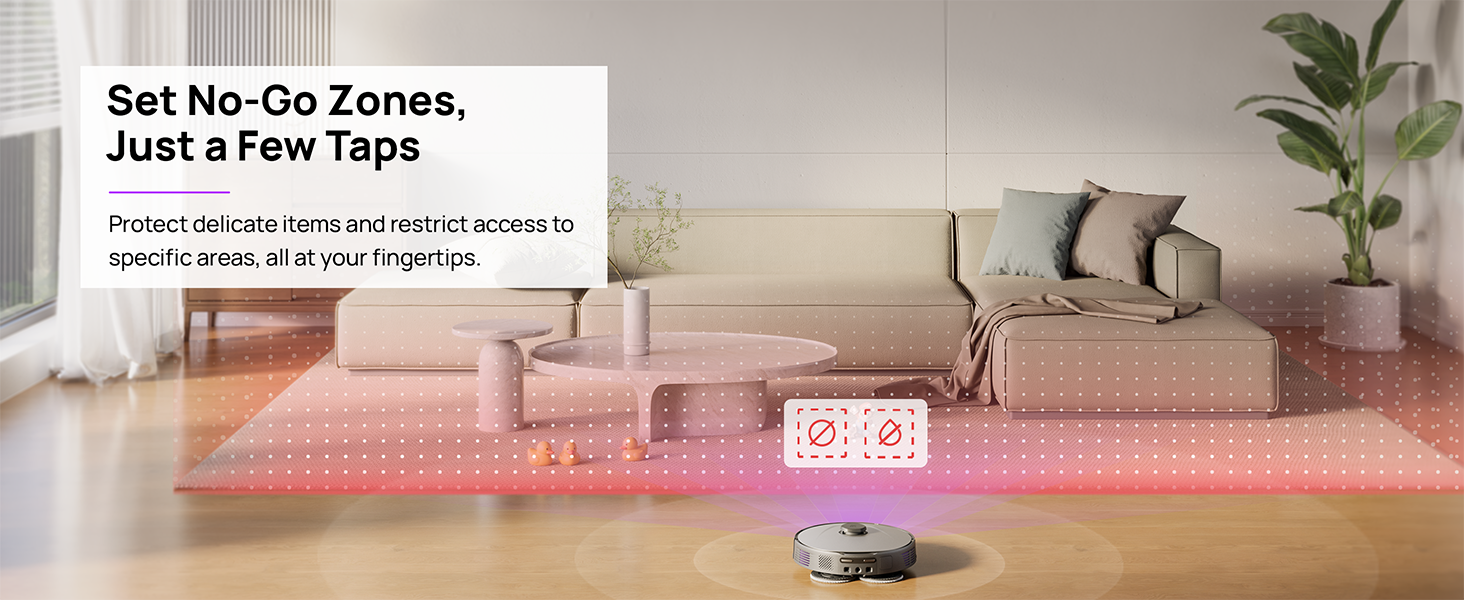
Figure 5.4: Setting No-Go Zones in the 3i App.
6. การบำรุงรักษา
Regular maintenance ensures optimal performance and extends the lifespan of your 3i P10 Ultra.
6.1 การบำรุงรักษาสถานีฐาน
- การเก็บขยะ: The base station automatically empties the robot's dustbin into a 3L bag. Replace the dust bag approximately every 70 days, or as indicated by the app.
- การซักและตากไม้ถูพื้น: The base station automatically washes mop pads with 140°F / 60°C hot water and dries them with hot air (131°F / 55°C) after each cleaning cycle. Ensure the clean and dirty water tanks are properly installed.
- Water Tank Refilling: The extra-large 4L clean water tank automatically refills the robot. Refill the clean water tank as needed. The base station also collects dirty water into a separate wastewater tank. Empty the wastewater tank regularly.
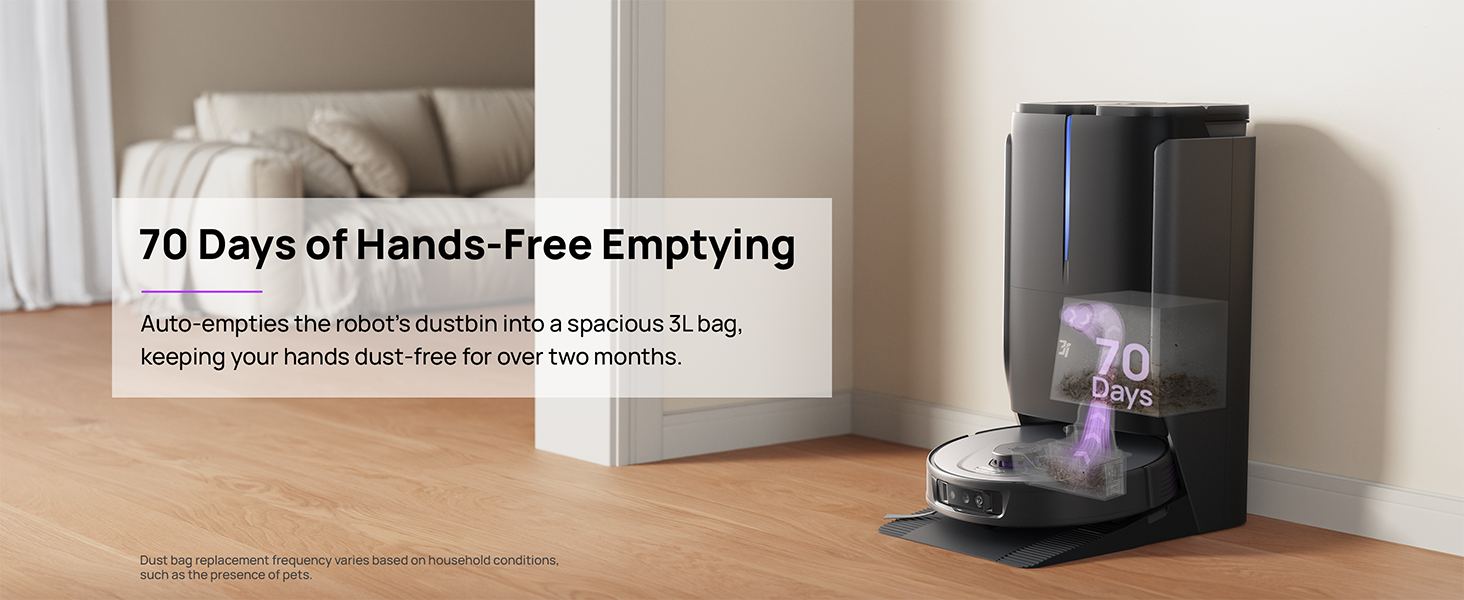
Figure 6.1: Automatic dustbin emptying at the base station.
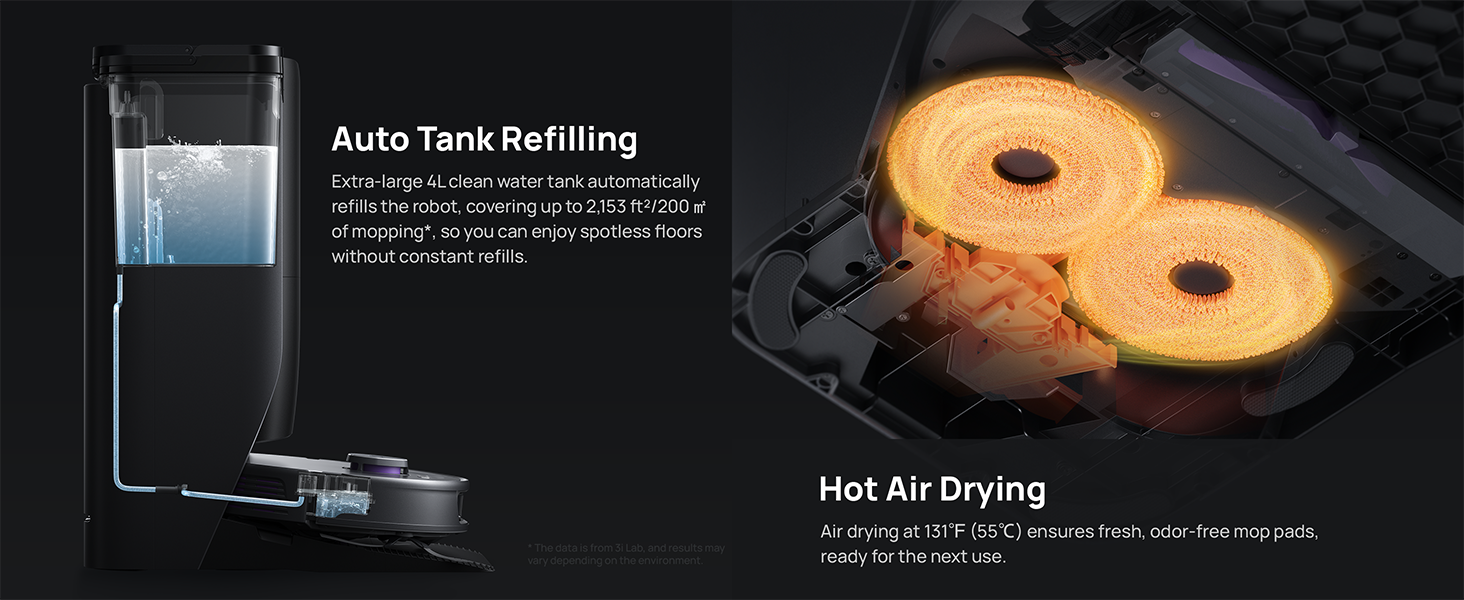
Figure 6.2: Auto tank refilling and hot air drying process.
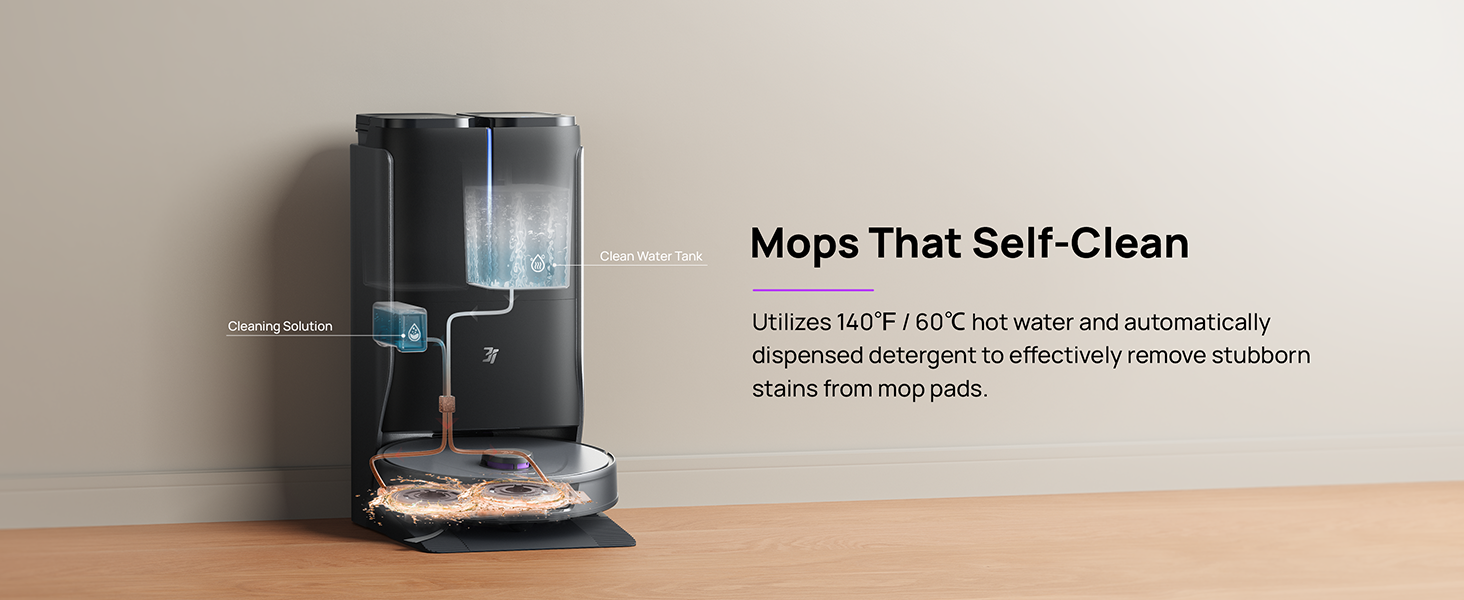
Figure 6.3: Mop self-cleaning function.
6.2 การบำรุงรักษาชิ้นส่วนหุ่นยนต์
- แปรงหลัก: Regularly check the main brush for tangled hair or debris. Use the cleaning tool provided to remove any obstructions. The TangleCut blade helps prevent excessive tangling.
- แปรงด้านข้าง: Inspect side brushes for wear or damage. Clean them periodically and replace if necessary.
- แผ่นม็อบ: Although self-cleaned, inspect mop pads for excessive wear or stubborn stains. Replace them when their cleaning effectiveness diminishes.
- กรอง: The filter is washable. Remove and rinse it under running water. Allow it to air dry completely before reinstalling.
- เซ็นเซอร์: Wipe all sensors (LDS, anti-drop, wall-following, charging contacts) with a clean, dry cloth to ensure proper function.
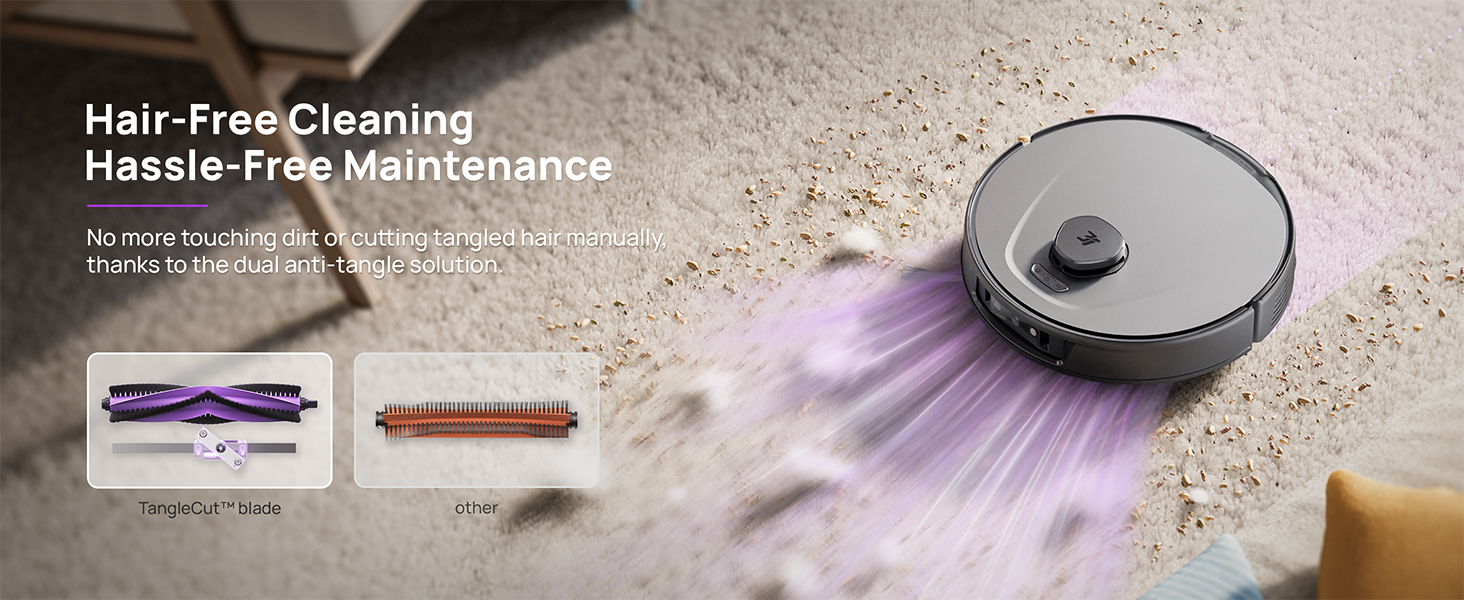
Figure 6.4: Hair-free cleaning with anti-tangle design.
7 การแก้ไขปัญหา
If you encounter issues with your 3i P10 Ultra, refer to the following common problems and solutions:
| ปัญหา | สาเหตุที่เป็นไปได้ | สารละลาย |
|---|---|---|
| หุ่นยนต์ไม่เปิด | แบตเตอรี่อ่อน; กดปุ่มเปิด/ปิดไม่ถูกต้อง | วางหุ่นยนต์ลงบนแท่นชาร์จ กดปุ่มเปิด/ปิดค้างไว้ 3 วินาที |
| หุ่นยนต์ไม่สามารถค้นหาแท่นชาร์จได้ | Dock is obstructed or too far; Poor Wi-Fi signal. | Ensure dock is in an open area; Check Wi-Fi connection. |
| ประสิทธิภาพการทำความสะอาดยังต่ำ | Dustbin full; Brushes tangled; Filter clogged; Mop pads dirty. | Empty dustbin; Clean brushes; Clean/replace filter; Clean/replace mop pads. |
| หุ่นยนต์ติดขัดบ่อยครั้ง | มีสิ่งกีดขวางบนพื้น เซ็นเซอร์สกปรก | Clear floor of obstacles; Clean all sensors. |
| ปัญหาการเชื่อมต่อแอป | รหัสผ่าน Wi-Fi ไม่ถูกต้อง; ปัญหาเกี่ยวกับเราเตอร์; หุ่นยนต์ออฟไลน์ | Verify Wi-Fi password; Restart router; Restart robot; Re-pair device in app. |
For further assistance, please refer to the 3i app's help section or contact customer support.
8. ข้อมูลจำเพาะ
| คุณสมบัติ | รายละเอียด |
|---|---|
| ยี่ห้อ | 3i |
| ชื่อรุ่น | หุ่นยนต์ดูดฝุ่น 3i P10 Ultra |
| ขนาดสินค้า (หุ่นยนต์) | ยาว 13.78 นิ้ว x กว้าง 13.78 นิ้ว x สูง 3.94 นิ้ว |
| Product Dimensions (Station) | ยาว 12.2 นิ้ว x กว้าง 18.43 นิ้ว x สูง 23.39 นิ้ว |
| น้ำหนักสินค้า | 37.3 ปอนด์ |
| อายุการใช้งานแบตเตอรี่ | 180 นาที |
| ประเภทตัวกรอง | สามารถซักล้างได้ |
| คำแนะนำด้านพื้นผิว | พรม, หินอ่อน, ไม้, กระเบื้อง |
| พลังดูด | 18,000 ปา |
| ระบบนำทาง | LDS LiDAR, Dual 3D Structured Light, AI Camera |
| การรองรับ Wi-Fi | 2.4G และ 5G |

Figure 8.1: Dimensions of the 3i P10 Ultra Robot and Base Station.
9. การรับประกันและการสนับสนุน
For warranty information, please refer to the warranty card included with your product or visit the official 3i website. For technical support, troubleshooting beyond this manual, or to inquire about replacement parts, please contact 3i customer service through the contact information provided on their official website or within the 3i app.