
การแนะนำ
Thank you for choosing the OREiN Smart LED Motion Sensor Outdoor Floodlight. This manual provides essential information for the safe and efficient installation, operation, and maintenance of your new floodlight. Please read these instructions thoroughly before use and retain them for future reference.
ข้อมูลด้านความปลอดภัย
- ควรตัดกระแสไฟก่อนทำการติดตั้งหรือซ่อมบำรุงทุกครั้ง
- การติดตั้งควรดำเนินการโดยช่างไฟฟ้าที่มีคุณสมบัติตามมาตรฐานไฟฟ้าท้องถิ่น
- ห้ามพยายามดัดแปลงผลิตภัณฑ์ การดัดแปลงใดๆ อาจทำให้การรับประกันเป็นโมฆะและมีความเสี่ยงด้านความปลอดภัย
- ตรวจสอบให้แน่ใจว่าได้ติดตั้งผลิตภัณฑ์อย่างแน่นหนาเพื่อป้องกันไม่ให้หล่น
- หลีกเลี่ยงการสบตาโดยตรงกับแหล่งกำเนิดแสงเมื่อมีการส่องสว่าง
- This product is designed for outdoor use and is IP65 rated for water and dust resistance.
เนื้อหาแพ็คเกจ
ตรวจสอบว่าส่วนประกอบทั้งหมดมีอยู่ก่อนเริ่มการติดตั้ง:
- OREiN Smart LED Motion Sensor Outdoor Floodlight
- ตัวยึด
- สกรูสำหรับติดตั้งและพุกติดผนัง
- คู่มือการใช้งาน
สินค้าเกินview
The OREiN Smart LED Motion Sensor Outdoor Floodlight features a 28W LED light source providing 3000 lumens of illumination. It includes an integrated motion sensor with a 180-degree detection angle and a range of up to 12 meters. The color temperature is adjustable from 2700K (warm white) to 6500K (cool white), and brightness is dimmable. Control is available via the free Aidot app (Bluetooth connectivity) or manual rotary buttons on the unit.

Figure 1: OREiN Smart LED Motion Sensor Outdoor Floodlight (Model Smart-Blanc).
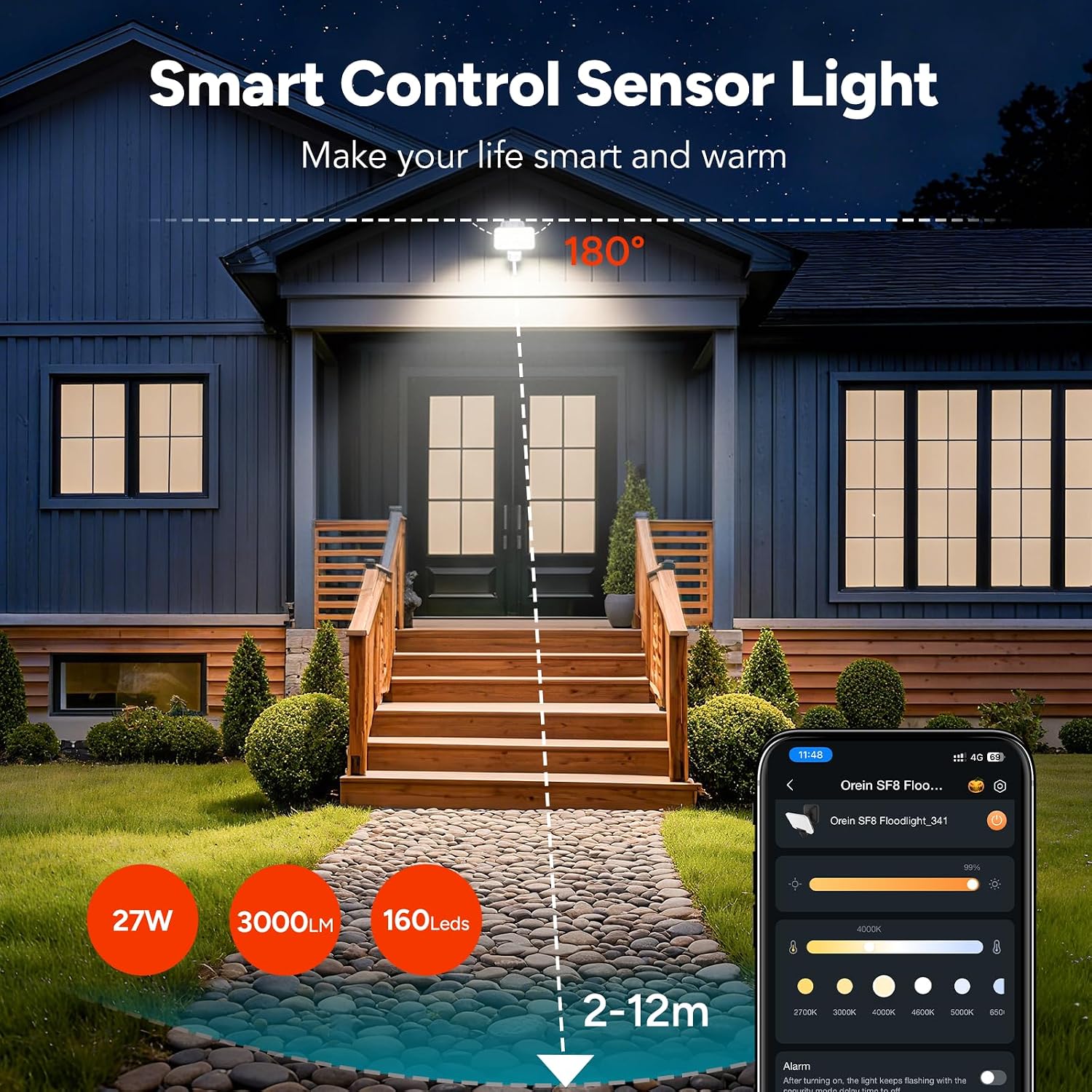
รูปที่ 2: เกินview of the floodlight's smart control and sensor capabilities, highlighting 27W power, 3000 lumens, 160 LEDs, and a 2-12m detection range with a 180-degree angle.
การตั้งค่า
The OREiN Smart LED Motion Sensor Outdoor Floodlight is designed for improved installation. No assembly is required for the light unit itself.
ขั้นตอนการติดตั้ง:
- เลือกสถานที่: Select a suitable outdoor location for wall mounting. The recommended installation height is between 1.8 to 2.5 meters for optimal motion detection.
- ตัดการเชื่อมต่อไฟฟ้า: Ensure the power supply to the installation area is turned off at the circuit breaker before proceeding.
- ตัวยึด: Secure the mounting bracket to the wall using the provided screws and wall plugs. Ensure it is firmly attached.
- การเชื่อมต่อสายไฟ: Connect the electrical cable to the floodlight's wiring. Follow standard electrical wiring practices (Live, Neutral, Earth). Ensure all connections are secure and insulated.
- ติดตั้งไฟสปอตไลท์: Hang the floodlight unit onto the mounted bracket. Secure it in place with any provided fasteners.
- คืนค่าพลัง: เมื่อการติดตั้งเสร็จสิ้นและการเชื่อมต่อทั้งหมดปลอดภัยแล้ว ให้จ่ายไฟให้กับวงจรอีกครั้ง
คำแนะนำการใช้งาน
The floodlight offers both manual and app-based control options.
Manual Control (Rotary Buttons):
On the back of the floodlight, there are three rotary buttons to adjust the infrared motion sensor settings:
- เวลา: Adjusts the lighting duration after motion is detected.
- ความรู้สึก: Adjusts the motion detection distance (sensitivity).
- ลักซ์ : Adjusts the light sensitivity, determining at what ambient light level the sensor becomes active.
Switching Lighting Modes (Manual):
The floodlight supports three lighting modes, which can be cycled by a quick double-click of the manual control button (if present, or via the app):

Figure 3: Illustration of the three available lighting modes: Motion Mode, Light Mode, and Security Mode.
- โหมดการเคลื่อนไหว: The light turns on in dark conditions when motion is detected.
- โหมดแสง: The light automatically turns on at dusk and off at dawn, providing continuous illumination.
- โหมดความปลอดภัย: Provides instant visual alerts (flashing) for motion detected in the dark.
App Control (Aidot App)
The OREiN floodlight can be controlled via the free Aidot app, available for download on the App Store and Google Play. The app connects to the floodlight via Bluetooth, eliminating the need for a separate gateway or hub.
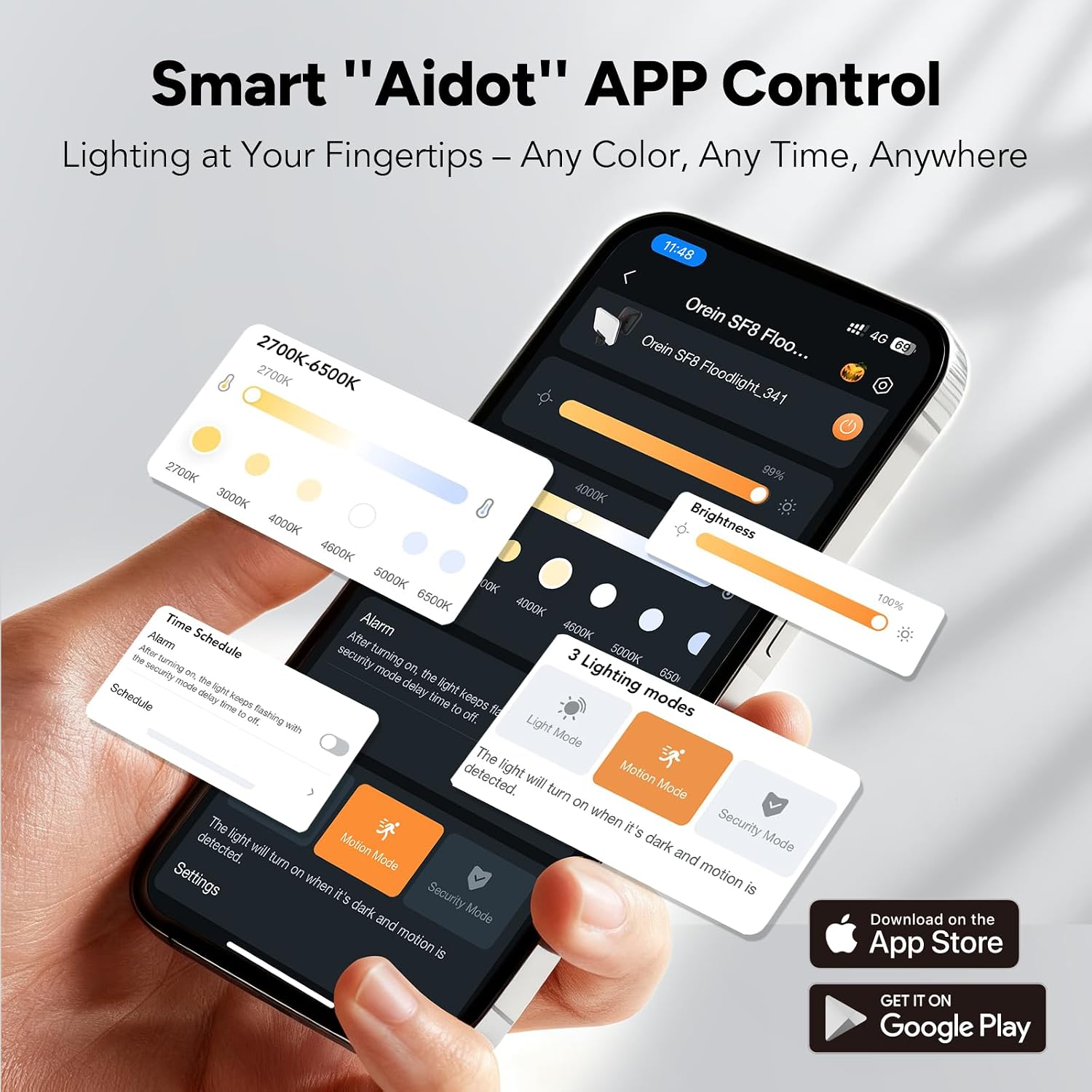
Figure 4: Aidot App interface showing controls for color temperature, brightness, and lighting modes.
คุณสมบัติของแอพ:
- การควบคุมการเปิด/ปิด: Remotely turn the light on or off.
- การปรับความสว่าง: Adjust the light intensity (dimmable).
- การปรับอุณหภูมิสี: Change the light color from warm white (2700K) to cool white (6500K).
- การเลือกโหมดแสงสว่าง: Easily switch between Motion, Light, and Security modes.
- การกำหนดตารางเวลาอย่างชาญฉลาด: Set custom schedules for the light to operate based on time or motion detection.
- การควบคุมกลุ่ม: Control multiple OREiN smart floodlights simultaneously by adding them to the same group within the app. This allows for synchronized adjustments of illumination time, brightness, and lighting mode.

รูปที่ 5: อดีตample of group control, showing multiple floodlights linked for synchronized operation.
การเชื่อมต่อกับแอพ:
- Download the "Aidot" app from your device's app store.
- ตรวจสอบให้แน่ใจว่าได้เปิดใช้งาน Bluetooth บนสมาร์ทโฟนของคุณแล้ว
- Power on the OREiN floodlight.
- Open the Aidot app and follow the on-screen instructions to add a new device. The app will detect nearby OREiN devices.
- Once connected, you can customize settings and control the light.
การกำหนดตารางเวลาอย่างชาญฉลาด
The Aidot app allows you to create flexible schedules for your floodlight's operation. This feature enables you to automate lighting based on your preferences and security needs.
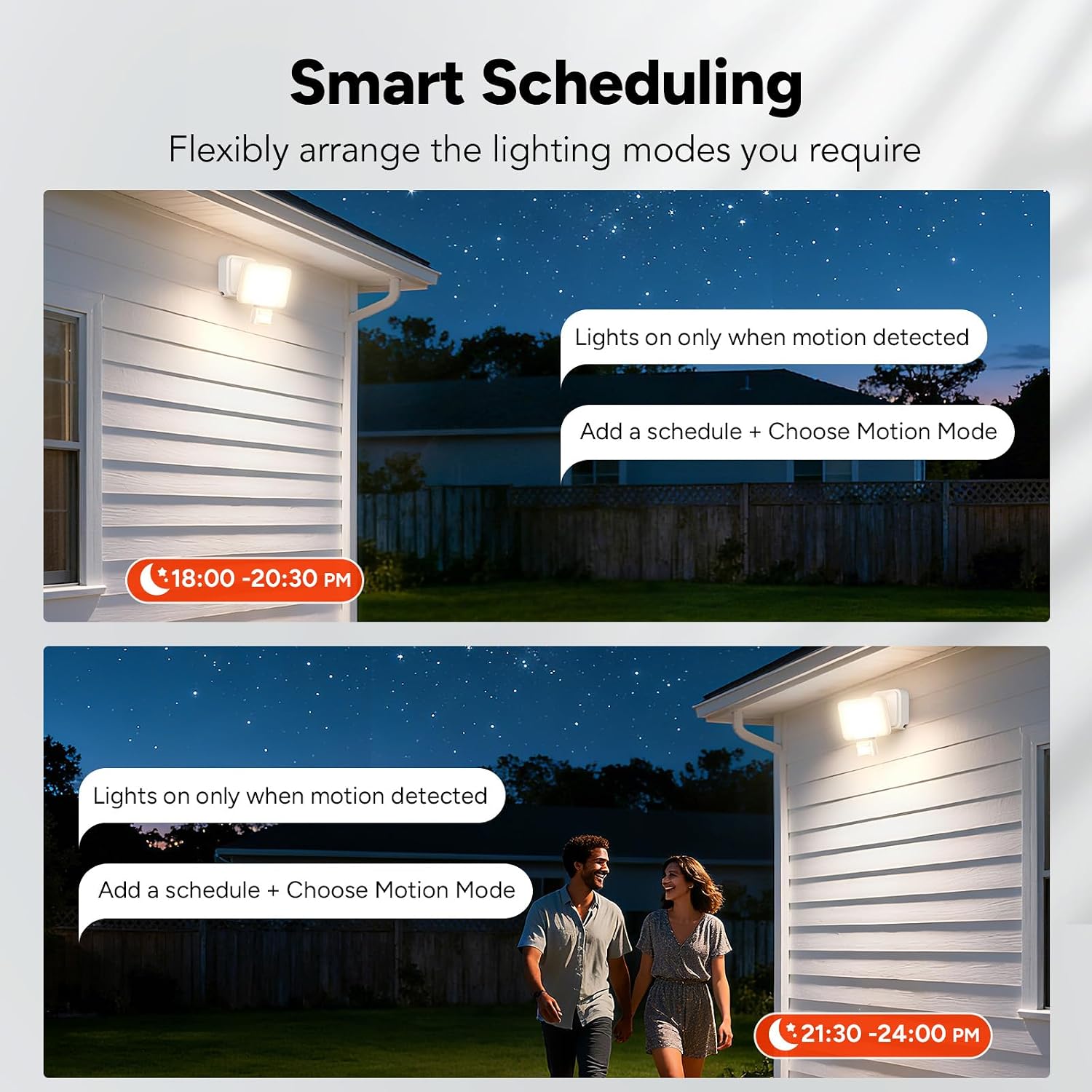
รูปที่ 6: อดีตamples of smart scheduling, setting lights to activate only when motion is detected during specific timeframes.
การตั้งตารางเวลา:
- Open the Aidot app and select your floodlight.
- ไปที่ส่วน "กำหนดการ" หรือ "ตัวจับเวลา"
- Tap to add a new schedule.
- Set the desired start and end times for the schedule.
- Choose the lighting mode (e.g., Motion Mode) and other settings (brightness, color temperature) for that schedule.
- Save the schedule. The light will now operate according to your programmed settings.
การซ่อมบำรุง
The OREiN Smart LED Motion Sensor Outdoor Floodlight requires minimal maintenance. Regular cleaning and inspection will ensure optimal performance and longevity.
- การทำความสะอาด: Periodically clean the floodlight's surface with a soft, damp ใช้ผ้าเช็ดทำความสะอาดเท่านั้น ห้ามใช้สารทำความสะอาดที่มีฤทธิ์กัดกร่อนหรือตัวทำละลาย เพราะอาจทำให้พื้นผิวหรือชิ้นส่วนอิเล็กทรอนิกส์เสียหายได้
- การตรวจสอบ: Regularly check the mounting and wiring for any signs of damage, corrosion, or loosening. Ensure the motion sensor lens is clear of obstructions (e.g., dirt, spiderwebs) to maintain detection accuracy.
- การตัดการเชื่อมต่อไฟฟ้า: Always disconnect power before performing any cleaning or inspection.
การแก้ไขปัญหา
| ปัญหา | สาเหตุที่เป็นไปได้ | สารละลาย |
|---|---|---|
| ไฟไม่เปิด | ไม่มีแหล่งจ่ายไฟ สายไฟไม่ถูกต้อง Light sensor setting (LUX) too high. | ตรวจสอบการเชื่อมต่อไฟฟ้าและเบรกเกอร์ ตรวจสอบการเชื่อมต่อสายไฟ Adjust LUX setting to a lower sensitivity for darker conditions. |
| ไฟติดสว่างต่อเนื่อง | Continuous Light Mode selected. Motion sensor constantly triggered. การตั้งค่าเวลานานเกินไป | Switch to Motion Mode or Security Mode via app or manual control. Check for obstructions or constant movement in sensor's field of view. Reduce TIME setting. |
| เซ็นเซอร์ตรวจจับการเคลื่อนไหวไม่ตรวจจับ | SENSE setting too low. Obstruction on sensor lens. Installation height incorrect. | Increase SENSE setting. ทำความสะอาดเลนส์เซนเซอร์ Ensure installation height is within 1.8-2.5 meters. |
| Cannot connect to Aidot app. | ปิดบลูทูธแล้ว Light not powered on. ไม่ได้รับอนุญาตการเข้าถึงแอป | ตรวจสอบให้แน่ใจว่าได้เปิดใช้งานบลูทูธบนอุปกรณ์ของคุณแล้ว Verify the floodlight is powered on. Check app permissions in your phone settings. |
ข้อมูลจำเพาะ
- ยี่ห้อ: โอรีน
- แบบอย่าง: Smart-Blanc
- หมายเลขชิ้นส่วน: 1075225019
- แหล่งพลังงาน: สายไฟ
- เล่มที่tage: 220 โวลต์
- วัดtage: 28 วัตต์
- ฟลักซ์ส่องสว่าง: 3000 ลูเมน
- ประเภทแหล่งกำเนิดแสง: นำ
- อุณหภูมิสี: 2700K-6500K (ปรับได้)
- คุณสมบัติพิเศษ: Adjustable Color Temperature, Dimmable, Motion Sensor, Waterproof
- มุมการตรวจจับของเซ็นเซอร์ตรวจจับความเคลื่อนไหว: 180 องศา
- Motion Sensor Detection Distance: Up to 12 meters (Adjustable)
- วิธีการควบคุม: App (Bluetooth), Manual Push Button
- โปรโตคอลการเชื่อมต่อ: บลูทูธ
- การใช้งานในร่ม/กลางแจ้ง: กลางแจ้ง
- ระดับการต้านทานน้ำ: IP65
- วัสดุ: อะคริโลไนไตรล์ บิวทาไดอีน สไตรีน (ABS)
- สี: สีขาว
- ขนาดสินค้า (กว้าง x ยาว x สูง) : 13 ซม. x 10 ซม. x 11 ซม.
- อุณหภูมิในการทำงาน: -20°C ถึง 45°C
- ความสูงในการติดตั้งที่แนะนำ: 1.8 ถึง 2.5 เมตร
- จำเป็นต้องประกอบ: เลขที่
การรับประกันและการสนับสนุน
For warranty information and technical support, please refer to the documentation included with your purchase or visit the official OREiN webไซต์นี้ โปรดเก็บหลักฐานการซื้อไว้เพื่อใช้ยืนยันการรับประกัน