
การแนะนำ
This manual provides essential instructions for the safe and efficient operation, installation, and maintenance of your Durastar Through-the-Wall Air Conditioner with Supplemental Heating. This unit offers 14,000 BTU cooling and 10,600 BTU supplemental heating, designed for areas up to 700 sq. ft. Please read all instructions carefully before use and retain this manual for future reference.
ข้อมูลด้านความปลอดภัย
ปฏิบัติตามข้อควรระวังด้านความปลอดภัยขั้นพื้นฐานเสมอเพื่อลดความเสี่ยงจากการเกิดไฟไหม้ ไฟฟ้าช็อต หรือการบาดเจ็บ
- ตรวจสอบให้แน่ใจว่าเครื่องต่อสายดินอย่างถูกต้อง
- อย่าใช้งานเครื่องด้วยสายไฟหรือปลั๊กที่ชำรุด
- ห้ามสอดนิ้วหรือวัตถุเข้าไปในช่องอากาศเข้า/ออก
- ถอดสายไฟก่อนทำความสะอาดหรือซ่อมบำรุง
- เก็บวัสดุไวไฟให้ห่างจากตัวเครื่อง
- เครื่องใช้ไฟฟ้าตัวนี้ไม่ได้มีวัตถุประสงค์เพื่อให้บุคคล (รวมทั้งเด็ก) ที่มีความบกพร่องทางร่างกาย ทางประสาทสัมผัส หรือทางจิตใจ หรือขาดประสบการณ์และความรู้ ใช้งาน เว้นแต่จะมีการดูแลหรือคำแนะนำเกี่ยวกับการใช้เครื่องใช้ไฟฟ้าโดยบุคคลที่รับผิดชอบด้านความปลอดภัยของบุคคลดังกล่าว
สินค้าเกินview
The Durastar DRTHC142XNA1SLV is a versatile through-the-wall unit providing both cooling and supplemental heating. It features a digital display, remote control, and multiple fan speeds for customized comfort.
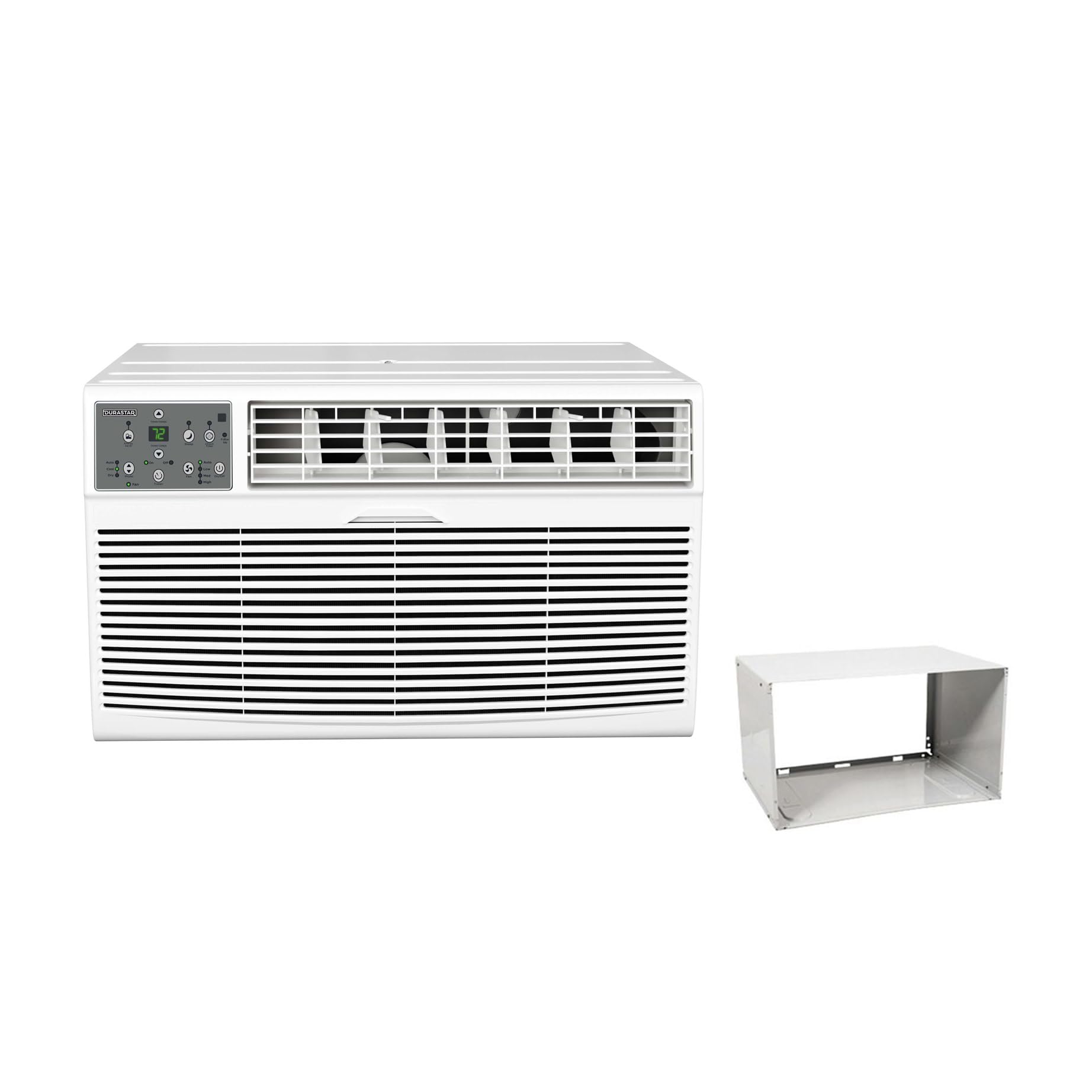
Image: The main Durastar through-the-wall air conditioner unit, showing its front grille and control panel.
คุณสมบัติหลัก:
- 14,000 BTU Cooling Capacity
- 10,600 BTU Supplemental Heating Capacity
- Covers areas up to 700 sq. ft.
- ความเร็วพัดลม 3 ระดับ
- Built-in Dehumidifier (Dry Mode)
- 24-hour Timer
- การควบคุมการทำงานด้วยรีโมทคอนโทรล
แผงควบคุม

ภาพ: รายละเอียด view of the unit's control panel, featuring a digital temperature display, mode selection buttons (Auto, Cool, Dry, Fan), fan speed controls (Low, Med, High), timer, and power button.
The control panel allows direct access to all unit functions. The digital display shows the set temperature or timer settings. Indicator lights confirm the active mode and fan speed.
รีโมทคอนโทรล

Image: The remote control for the air conditioner, featuring an LCD screen and buttons for temperature adjustment, mode selection, fan speed, and timer functions.
The included remote control provides convenient operation from a distance. It mirrors most functions available on the main control panel.
การติดตั้ง
This unit is designed for through-the-wall installation and includes a wall sleeve. Proper installation is crucial for optimal performance and safety. Professional installation is recommended.
ข้อกำหนดของไซต์:
- ไฟฟ้า: The unit requires a 230V electrical supply. Ensure your electrical circuit can support the unit's wattage (1817 watts). The required plug type is NEMA 6-20P.
- Wall Opening: A suitable wall opening is required for the wall sleeve. Refer to the dimensions in the specifications section.
- เคลียร์สต๊อก : Maintain adequate clearance around the unit for proper airflow and maintenance.

Image: A visual representation of the NEMA 6-20P plug type, which is necessary for the unit's electrical connection.

Image: The air conditioner unit shown installed within a wall sleeve, with its power cord plugged into a wall outlet, illustrating a typical installation scenario.
Room Size and BTU Requirements:
Select the appropriate BTU capacity based on your room size for efficient cooling and heating.

Image: A table detailing recommended cooling and heating BTU capacities for various room sizes (in square feet), along with a formula for calculating room area (Length x Width = Area).
| Room Size (Sq Ft) | Cooling BTUs | Heating BTUs (optional) |
|---|---|---|
| 300-350 | 8,000 | 4,200 |
| 400-450 | 10,000 | 10,600 |
| 450-550 | 12,000 | 10,600 |
| 550-700 | 14,000 | 10,600 |
คำแนะนำการใช้งาน
โปรดทำความคุ้นเคยกับแผงควบคุมและฟังก์ชันต่างๆ ของรีโมทคอนโทรลเพื่อการใช้งานอย่างมีประสิทธิภาพสูงสุด
เปิด/ปิดเครื่อง
- กดปุ่ม พลัง กดปุ่มบนแผงควบคุมหรือรีโมทเพื่อเปิดหรือปิดเครื่อง
การเลือกโหมด
กดปุ่ม โหมด ปุ่มสำหรับสลับโหมดการทำงานต่างๆ:
- เย็น: For cooling the room. Adjust temperature using อุณหภูมิขึ้น/ลง ปุ่ม
- ความร้อน: For supplemental heating. Adjust temperature using อุณหภูมิขึ้น/ลง ปุ่ม
- แห้ง: Dehumidifies the air without significant cooling.
- แฟน: หมุนเวียนอากาศโดยไม่ต้องทำความเย็นหรือทำความร้อน
- อัตโนมัติ: Automatically selects cooling or heating based on the set temperature and room temperature.
การปรับความเร็วพัดลม
In Cool, Heat, or Fan mode, press the ความเร็วพัดลม button to select Low, Medium, or High fan speed.
ฟังก์ชั่นจับเวลา
ตัวตั้งเวลา 24 ชั่วโมงช่วยให้คุณตั้งเวลาเฉพาะเจาะจงเพื่อเปิดหรือปิดเครื่องได้
- To Set Auto-On: เมื่อปิดเครื่องแล้ว ให้กดปุ่ม ตัวจับเวลา จากนั้นจึงใช้งาน อุณหภูมิขึ้น/ลง to set the desired delay time (1-24 hours).
- To Set Auto-Off: เมื่อเครื่องเปิดอยู่ ให้กดปุ่ม ตัวจับเวลา จากนั้นจึงใช้งาน อุณหภูมิขึ้น/ลง to set the desired delay time (1-24 hours).
การซ่อมบำรุง
การบำรุงรักษาอย่างสม่ำเสมอจะช่วยให้เครื่องปรับอากาศของคุณทำงานได้อย่างเต็มประสิทธิภาพและยืดอายุการใช้งาน ควรตัดกระแสไฟฟ้าก่อนการบำรุงรักษาทุกครั้ง
การทำความสะอาดตัวกรองอากาศ
- ควรทำความสะอาดแผ่นกรองอากาศทุกสองสัปดาห์ หรือบ่อยกว่านั้นขึ้นอยู่กับการใช้งาน
- Remove the front panel and slide out the air filter.
- Wash the filter with warm, soapy water. Rinse thoroughly and allow it to air dry completely before reinstalling.
- ห้ามใช้งานเครื่องโดยไม่มีแผ่นกรองอากาศ
การทำความสะอาดหน่วย
- เช็ดด้านนอกของตัวเครื่องด้วยผ้านุ่มdamp ผ้า.
- ห้ามใช้สารเคมีรุนแรง สารกัดกร่อน หรือตัวทำละลาย
- ตรวจสอบให้แน่ใจว่าไม่มีน้ำเข้าไปในชิ้นส่วนอิเล็กทรอนิกส์
การแก้ไขปัญหา
ก่อนติดต่อฝ่ายสนับสนุนลูกค้า โปรดดูตารางต่อไปนี้เพื่อดูปัญหาทั่วไปและวิธีแก้ไข
| ปัญหา | สาเหตุที่เป็นไปได้ | สารละลาย |
|---|---|---|
| เครื่องไม่เปิด | ไม่มีแหล่งจ่ายไฟ สายไฟไม่ได้เสียบปลั๊กแน่น เบรกเกอร์สะดุด | Check power connection; Reset circuit breaker; Ensure proper voltagอี (230V) |
| การทำความเย็น/ทำความร้อนไม่เพียงพอ | Dirty air filter; Room size too large for unit capacity; Doors/windows open; Temperature setting too high/low. | Clean air filter; Close doors/windows; Adjust temperature setting; Ensure unit capacity matches room size. |
| หน่วยมีเสียงดัง | ชิ้นส่วนหลวม; ตัวเครื่องไม่อยู่ในระดับที่เหมาะสม; มีสิ่งกีดขวางในพัดลม | Check for loose components; Ensure unit is level; Remove any obstructions. |
| น้ำหยดข้างนอก | การทำงานปกติ (การควบแน่น) | This is normal during cooling mode as condensation drains. |
| รีโมตคอนโทรลไม่ทำงาน | แบตเตอรี่หมด; มีสิ่งกีดขวางระหว่างรีโมทและตัวเครื่อง | Replace batteries; Remove obstructions; Ensure remote is pointed at the unit. |
ข้อมูลจำเพาะ
| คุณสมบัติ | รายละเอียด |
|---|---|
| หมายเลขรุ่น | DRTHC142XNA1SLV |
| ความสามารถในการทำความเย็น | 14,000 บีทียู |
| ความสามารถในการให้ความร้อน | 10,600 BTU (Supplemental) |
| เล่มที่tage | 230 โวลต์ |
| วัดtage | 1817 วัตต์ |
| พื้นที่ทำความเย็น | มากถึง 700 ตร.ว. ฟุต |
| ขนาดสินค้า (ลึก x กว้าง x สูง) | 20.25 x 24.25 x 14.5 นิ้ว |
| น้ำหนักสินค้า | 0.16 ounces (Unit weight is approximately 96.03 lbs) |
| ระดับเสียง | 69.9 เดซิเบล |
| วิธีการติดตั้ง | ทะลุกำแพง |
| ส่วนประกอบที่รวมอยู่ | Product Only (Wall Sleeve Included with this variant) |
ข้อมูลการรับประกัน
This Durastar air conditioner comes with a การรับประกันจากผู้ผลิต 2 ปี. Please retain your proof of purchase for warranty claims. For specific terms and conditions, refer to the warranty documentation included with your product or contact Durastar customer support.
การสนับสนุนลูกค้า
If you have any questions, require technical assistance, or need to report an issue that cannot be resolved using the troubleshooting guide, please contact Durastar customer support. Refer to the contact information provided in your product packaging or on the official Durastar webเว็บไซต์.