
1. บทนำ
Thank you for choosing the VCHICS 3D Holographic Fan PD42-P65. This device is designed to create stunning 3D visual effects for advertising, displays, and events. This manual provides essential information for the safe and efficient use of your holographic fan, including setup, operation, maintenance, and troubleshooting.
2. ข้อมูลด้านความปลอดภัย
Please read all safety warnings and instructions carefully before installation and operation.
- การติดตั้ง: Ensure the device is securely mounted in a location where it cannot be easily accessed or struck by people or objects.
- แหล่งจ่ายไฟ: ใช้เฉพาะอะแดปเตอร์แปลงไฟที่ให้มาเท่านั้น ตรวจสอบให้แน่ใจว่าแหล่งจ่ายไฟตรงกับแรงดันไฟฟ้าtagความต้องการของอุปกรณ์
- ชิ้นส่วนที่เคลื่อนไหว: The fan blades rotate at high speed. อย่าทำ touch the blades while the device is operating or connected to power. Keep hands, hair, and loose clothing away from the fan.
- การระบายอากาศ : ตรวจสอบให้แน่ใจว่ามีการระบายอากาศที่เพียงพอรอบๆ อุปกรณ์เพื่อป้องกันความร้อนสูงเกินไป ห้ามปิดกั้นช่องระบายอากาศ
- สิ่งแวดล้อม: Avoid exposing the device to water, moisture, extreme temperatures, or direct sunlight.
- การซ่อมบำรุง: ตัดการเชื่อมต่อไฟฟ้าก่อนทำความสะอาดหรือดำเนินการบำรุงรักษาใดๆ
- เด็ก: เก็บให้พ้นมือเด็ก นี่ไม่ใช่ของเล่น
3. เนื้อหาบรรจุภัณฑ์
ตรวจสอบว่ามีส่วนประกอบทั้งหมดอยู่ในแพ็คเกจ:
- VCHICS 3D Holographic Fan Unit
- อะแดปเตอร์แปลงไฟ
- รีโมทคอนโทรล
- ฮาร์ดแวร์สำหรับติดตั้ง
- คู่มือการใช้งาน

Image 3.1: The VCHICS 3D Holographic Fan unit, its remote control, and the product packaging box.
4. คำแนะนำในการตั้งค่า
4.1 Assembly and Mounting
The VCHICS 3D Holographic Fan requires assembly before use. Follow these steps for proper installation:
- แกะ: นำส่วนประกอบทั้งหมดออกจากบรรจุภัณฑ์อย่างระมัดระวัง
- ประกอบใบมีด: Attach the fan blades to the central motor unit. Ensure they are securely fastened according to the included assembly diagram.
- เลือกสถานที่: Select a suitable mounting location. The fan should be installed at a height where the rotating blades are out of reach.
- การติดตั้ง: Use the provided mounting hardware to securely fix the fan unit to a wall or ceiling. Ensure the mounting surface can support the weight of the device.
- การเชื่อมต่อไฟฟ้า: Connect the power adapter to the fan unit and then plug it into a power outlet.
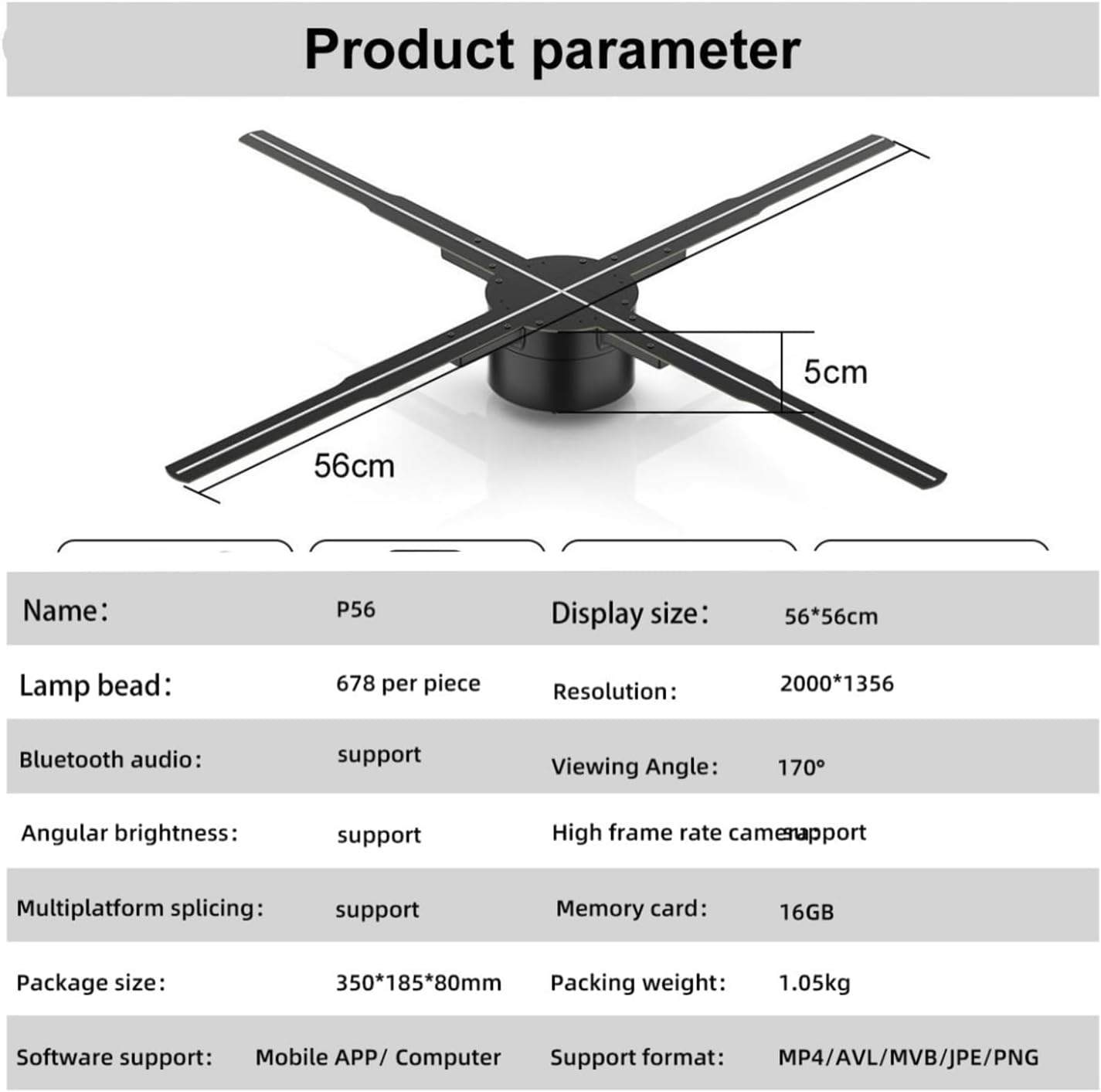
Image 4.1: The VCHICS 3D Holographic Fan unit, illustrating its approximate dimensions of 56cm in width and 5cm in height.
4.2 Content Preparation and Upload
The holographic fan supports various media formats for display. You can upload images, videos, or logos. For creating 3D images, contact customer service for assistance.
- รูปแบบที่รองรับ: MP4, AVL, MVB, JPE, PNG.
- การสนับสนุนซอฟต์แวร์: Content can be managed via a Mobile APP or Computer software.
- การ์ดหน่วยความจำ: The device includes a 16GB memory card for storing content.
Refer to the specific Mobile APP or Computer software instructions for detailed steps on uploading and managing your display content.
5. คู่มือการใช้งาน
The VCHICS 3D Holographic Fan can be controlled via a remote control or a dedicated mobile application/computer software.
5.1 การเปิด/ปิดเครื่อง
- เปิดเครื่อง: Once connected to power, the fan will typically enter a shutdown state. Use the remote control or app to initiate startup.
- ลำดับการเริ่มต้น: The fan blades will begin to rotate, and after a brief initialization period, the holographic effect will appear.
- หมดแรง: Use the remote control or app to shut down the device. The blades will slow down and stop.
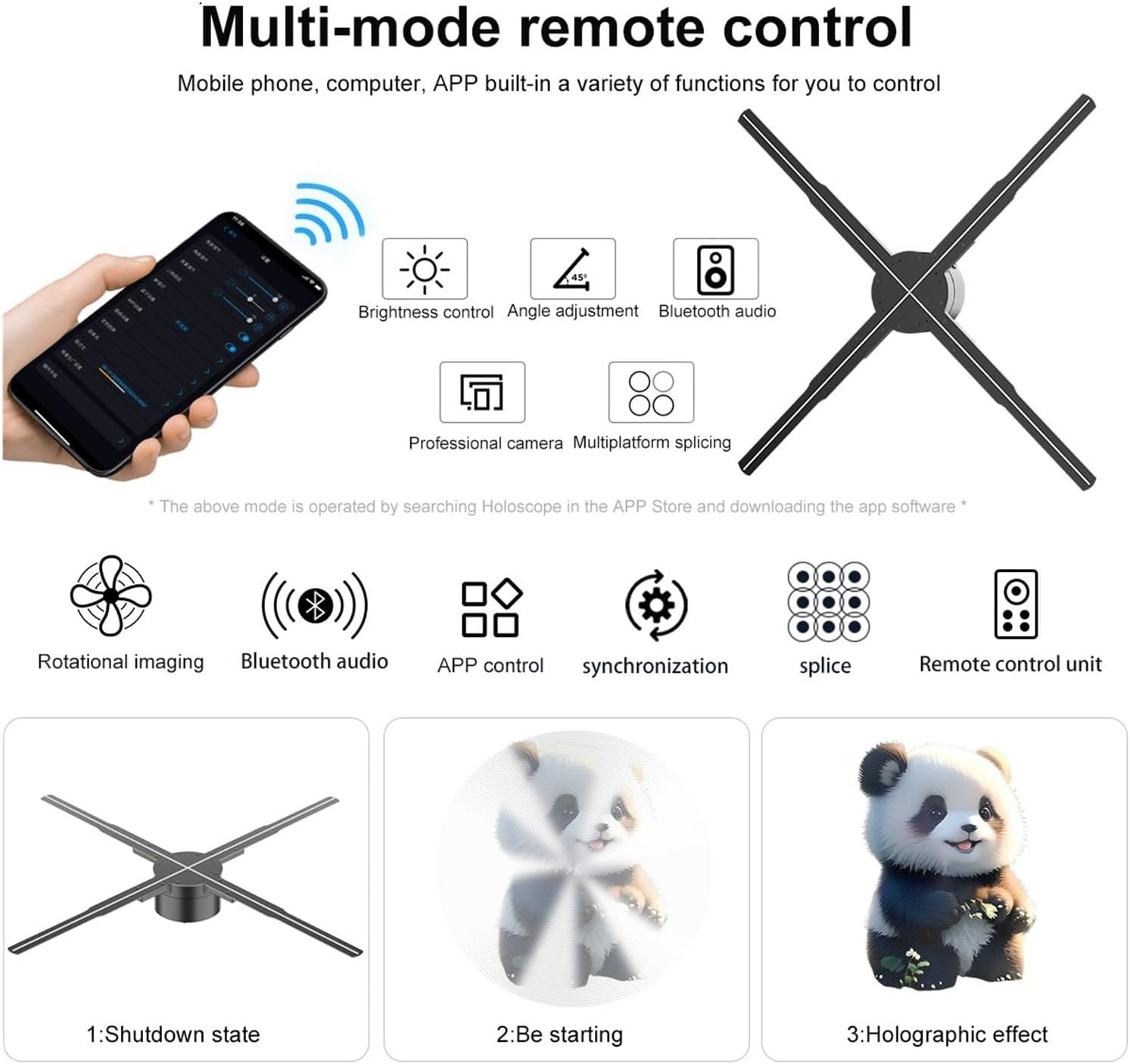
Image 5.1: Illustration of multi-mode control options via mobile phone app and remote, depicting the shutdown state, starting sequence, and the final holographic effect.
5.2 Remote Control and App Functions
The remote control and mobile application offer various functions for managing the display:
- การควบคุมความสว่าง: Adjust the intensity of the LED display.
- การปรับมุม: Modify the display angle for optimal viewการไอเอ็นจี
- บลูทู ธ เสียง: Connect to external Bluetooth speakers for synchronized audio.
- การเลือกเนื้อหา: Choose from uploaded videos, animations, or images.
- Multiplatform Splicing: If using multiple units, control their synchronization for a larger display.

Image 5.2: The VCHICS 3D Holographic Fan demonstrating its Bluetooth audio capability by connecting to an external Bluetooth speaker, enhancing the 3D visual experience with sound.
5.3 Multi-Unit Splicing
For larger display areas, multiple VCHICS 3D Holographic Fan units can be synchronized to create a seamless, expansive holographic image. This feature is supported by the device and can be configured through the control software.

ภาพที่ 5.3: อดีตample of multiple VCHICS 3D Holographic Fans being spliced together to create a larger, continuous holographic display, showcasing a shark image.
6. การบำรุงรักษา
Regular maintenance ensures the longevity and optimal performance of your VCHICS 3D Holographic Fan.
- การทำความสะอาด: Disconnect the power before cleaning. Use a soft, dry cloth to wipe the fan blades and housing. Do not use liquid cleaners or abrasive materials.
- การกำจัดฝุ่น: Periodically check for dust accumulation on the blades and motor unit. Use compressed air or a soft brush to gently remove dust.
- พื้นที่จัดเก็บ: If storing the device for an extended period, ensure it is clean, dry, and stored in its original packaging or a protective case in a cool, dry place.
7 การแก้ไขปัญหา
If you encounter issues with your VCHICS 3D Holographic Fan, refer to the following common problems and solutions:
| ปัญหา | สาเหตุที่เป็นไปได้ | สารละลาย |
|---|---|---|
| พัดลมไม่ติด | ไม่มีแหล่งจ่ายไฟ; การเชื่อมต่อหลวม | Check power adapter connection; Ensure power outlet is functional. |
| No holographic image | Incorrect content format; Fan not fully started | Verify content format (MP4, AVL, MVB, JPE, PNG); Allow fan to complete startup sequence. |
| ภาพกระพริบหรือบิดเบี้ยว | Damaged content file; Loose blade connection | Re-upload content; Check if blades are securely attached. |
| รีโมตคอนโทรลไม่ทำงาน | แบตเตอรี่หมด; สิ่งกีดขวาง | เปลี่ยนแบตเตอรี่รีโมทคอนโทรล ตรวจสอบให้แน่ใจว่าไม่มีสิ่งกีดขวางเส้นทางสัญญาณ |
| Bluetooth audio not connecting | Speaker not in pairing mode; Distance too far | Ensure Bluetooth speaker is in pairing mode; Reduce distance between fan and speaker. |
หากปัญหายังคงมีอยู่หลังจากลองวิธีแก้ไขเหล่านี้แล้ว โปรดติดต่อฝ่ายสนับสนุนลูกค้า
8. ข้อมูลจำเพาะ
The following table details the technical specifications of the VCHICS 3D Holographic Fan PD42-P65:
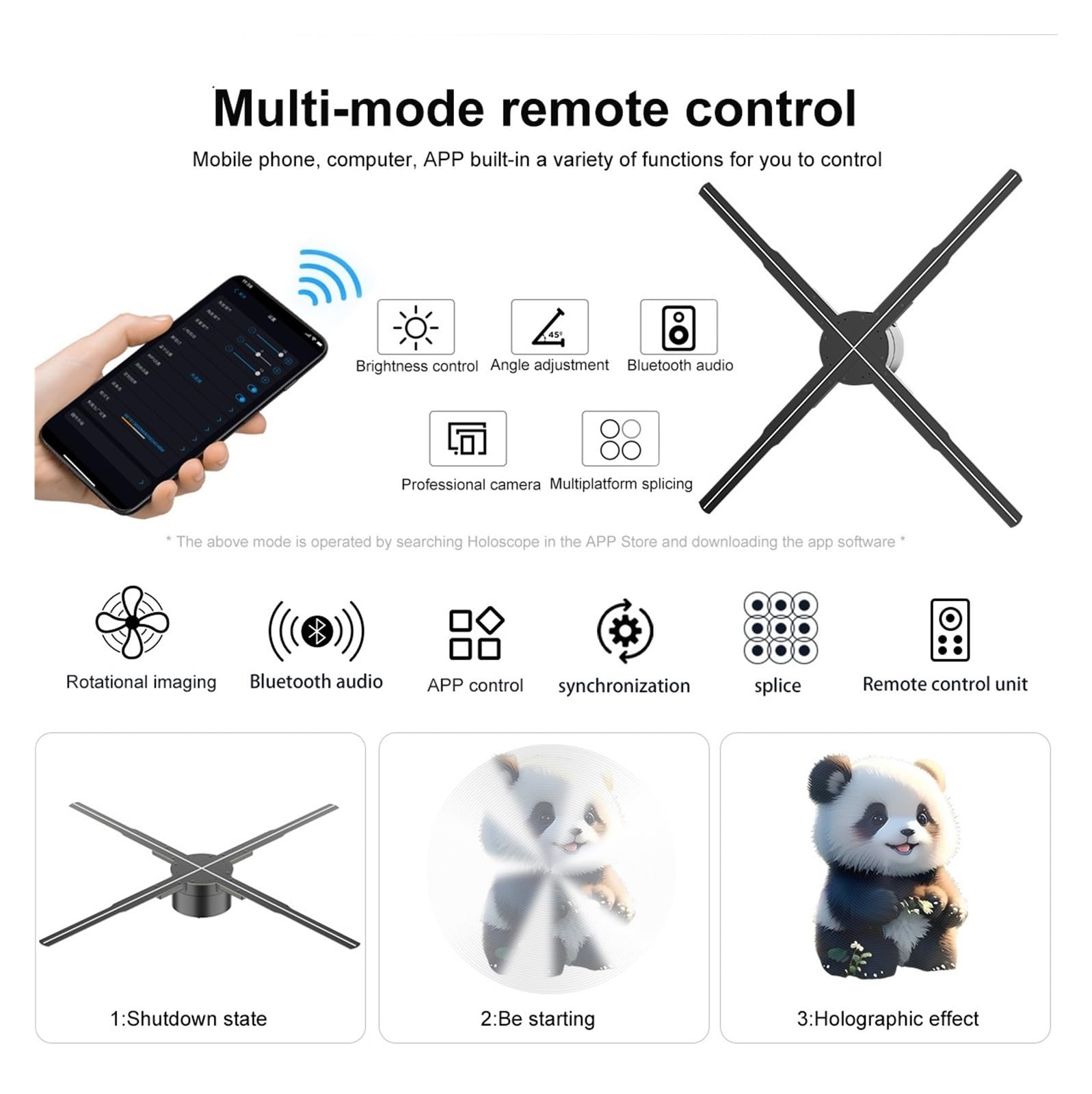
Image 8.1: Detailed product parameters for the VCHICS 3D Holographic Fan PD42-P65.
| คุณสมบัติ | ข้อมูลจำเพาะ |
|---|---|
| ยี่ห้อ | VCHICS |
| แบบอย่าง | PD42-P65 |
| ขนาดจอแสดงผล | 56 x 56 ซม. |
| Lamp ลูกปัด | 678 per piece |
| ปณิธาน | 2000 x 1356 |
| Viewอิงแองเกิล | 170° |
| บลูทูธออดิโอ | รองรับ |
| Angular Brightness | รองรับ |
| High Frame Rate Camera | รองรับ |
| Multiplatform Splicing | รองรับ |
| การ์ดหน่วยความจำ | 16GB |
| การสนับสนุนซอฟต์แวร์ | Mobile APP / Computer |
| รูปแบบที่รองรับ | MP4, AVL, MVB, JPE, PNG |
| ขนาดแพ็คเกจ | 48.01 x 8 x 7.01 ซม. |
| น้ำหนักสินค้า | 4.5 กก. |
9. การรับประกันและการสนับสนุน
For warranty information and technical support, please refer to the documentation provided with your purchase or contact VCHICS customer service directly. Keep your purchase receipt as proof of purchase for warranty claims.
ติดต่อฝ่ายบริการลูกค้า: Please refer to the contact details provided on the product packaging or the official VCHICS webเว็บไซต์.