
1. บทนำ
This manual provides essential instructions for setting up, operating, and maintaining your MAXLEGEN M11S Tablet. Please read this guide thoroughly before using your device to ensure optimal performance and longevity.
2. เนื้อหาบรรจุภัณฑ์
ตรวจสอบว่าสินค้าทั้งหมดที่ระบุไว้ด้านล่างนี้รวมอยู่ในแพ็คเกจของคุณแล้ว หากมีสินค้าใดสูญหายหรือเสียหาย โปรดติดต่อฝ่ายสนับสนุนลูกค้า
- MAXLEGEN M11S Tablet
- เคสป้องกัน
- แป้นพิมพ์บลูทูธ
- เมาส์ไร้สาย
- สัมผัสสไตลัส
- Charging Kit (USB-C Cable and Fast Charger)
- อะแดปเตอร์ OTG
- เครื่องมือถอดซิม
- คู่มือการใช้งาน (เอกสารนี้)

Image 2.1: MAXLEGEN M11S Tablet and its complete accessory kit, including the tablet, protective case, Bluetooth keyboard, charging kit, wireless mouse, OTG adapter, and stylus pen.
3. สินค้าหมดview
Familiarize yourself with the physical components of your MAXLEGEN M11S Tablet.
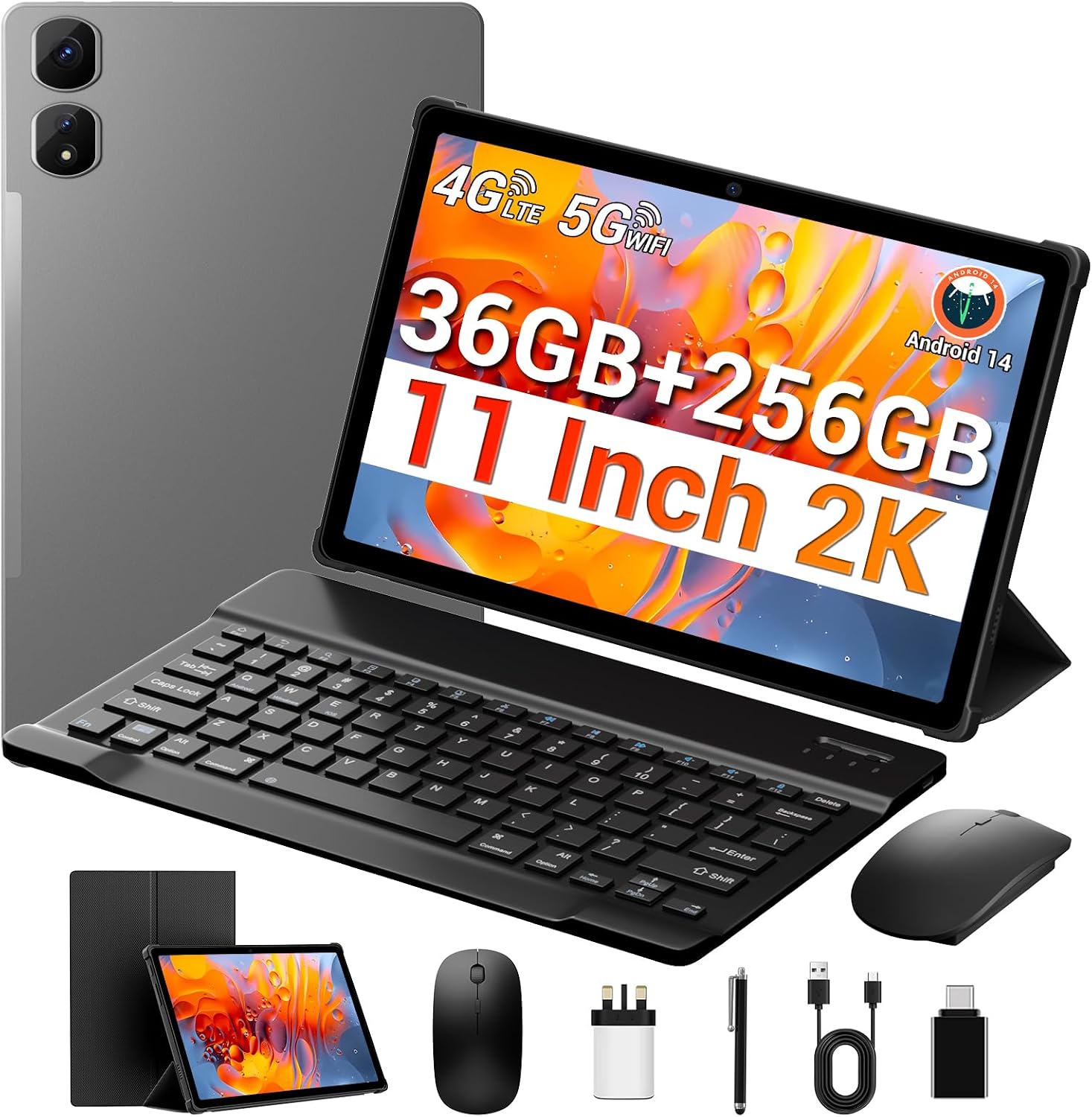
Image 3.1: The MAXLEGEN M11S Tablet displayed with its accompanying Bluetooth keyboard, wireless mouse, and other accessories, showcasing its versatile setup.
3.1 คุณสมบัติหลัก
- แสดง: 11-inch 2K FHD InCell (2000x1200 pixels) for vibrant visuals.
- ผลงาน: Octa-Core 2.0GHz processor and 36GB RAM (12GB physical + 24GB virtual) for smooth multitasking.
- พื้นที่จัดเก็บ: หน่วยความจำภายใน 256GB ขยายได้สูงสุดถึง 1TB ด้วยการ์ด microSD
- ระบบปฏิบัติการ: Android 14 for a fluid and secure user experience.
- แบตเตอรี่: แบตเตอรี่ 9580mAh ใช้งานได้ยาวนานขึ้น
- กล้องถ่ายรูป: 13MP rear camera and 8MP front camera for photos and video calls.
- การเชื่อมต่อ: Dual SIM 4G LTE, Dual-Band Wi-Fi (5G/2.4Ghz), and Bluetooth 5.0.

ภาพที่ 3.2: โอเวอร์view of the MAXLEGEN M11S Tablet's key features, highlighting its 36GB RAM, 256GB ROM, Octa-Core processor, 11-inch 2K InCell display, dual SIM support, 9580mAh battery, 13MP rear and 8MP front cameras, 5G/2.4GHz WiFi, and Bluetooth 5.0 connectivity.
4. การตั้งค่า
4.1 การชาร์จแท็บเล็ต
Before first use, fully charge your tablet using the provided USB-C cable and fast charger. Connect the USB-C cable to the tablet's charging port and the charger to a power outlet. The battery indicator on the screen will show charging status.
4.2 เปิด/ปิดเครื่อง
- การเปิดเครื่อง: Press and hold the Power button until the MAXLEGEN logo appears.
- วิธีปิดเครื่อง: กดปุ่มเปิด/ปิดค้างไว้ จากนั้นเลือก "ปิดเครื่อง" จากตัวเลือกบนหน้าจอ
- ในการรีสตาร์ท: กดปุ่มเปิด/ปิดค้างไว้ จากนั้นเลือก "รีสตาร์ท" จากตัวเลือก
4.3 การติดตั้งซิมการ์ดและการ์ด MicroSD
The tablet supports dual SIM cards and a microSD card for expandable storage.
- หาช่องใส่ซิมการ์ดที่ด้านข้างของแท็บเล็ต
- ใส่เครื่องมือถอดซิมเข้าไปในรูเล็ก ๆ ข้างถาดเพื่อเปิดถาด
- Place your Nano-SIM cards and/or microSD card into the designated slots on the tray. Ensure correct orientation.
- ค่อยๆ ดันถาดกลับเข้าไปในแท็บเล็ตจนกระทั่งล็อคเข้าที่
4.4 Initial Setup (Android 14)
Upon first power-on, follow the on-screen prompts to complete the initial setup, which includes selecting your language, connecting to Wi-Fi, setting up your Google account, and configuring security options.

Image 4.1: This image illustrates the MAXLEGEN M11S Tablet running Android 14, highlighting features like parallel vision, taskbar, confidentiality, and parental control. It also shows the memory expansion capabilities with 36GB RAM and 256GB storage, expandable up to 1TB via Micro SD.
4.5 การเชื่อมต่ออุปกรณ์เสริม
The MAXLEGEN M11S Tablet comes with a Bluetooth keyboard, wireless mouse, and stylus for enhanced productivity.
- คีย์บอร์ด/เมาส์บลูทูธ: Turn on the keyboard/mouse and enable Bluetooth on your tablet (Settings > Connected devices > Bluetooth). Select the accessory from the list of available devices to pair.
- สไตลัส: ปากกาสไตลัสเป็นอุปกรณ์แบบพาสซีฟ ไม่จำเป็นต้องจับคู่ เพียงแค่ใช้งานโดยตรงบนหน้าจอได้เลย
5. คู่มือการใช้งาน
5.1 การนำทางพื้นฐาน
Navigate your Android 14 tablet using touch gestures:
- แตะ: เลือกสินค้า.
- ปัด: เลื่อนดูหน้าจอหรือรายการ
- บีบเพื่อซูม: Enlarge or reduce content.
- กดยาว: เข้าถึงเมนูบริบทหรือย้ายไอคอน
5.2 การเชื่อมต่อ
- ไวไฟ : Go to Settings > Network & internet > Wi-Fi to connect to available networks. The tablet supports 5G and 2.4Ghz bands.
- 4G แอลทีอี: With a valid SIM card installed, cellular data will be available. Manage settings in Settings > Network & internet > Mobile network. The tablet supports TDD-FDD LTE and VoLTE calls.
- บลูทูธ: For connecting wireless headphones, speakers, or other Bluetooth devices, go to Settings > Connected devices > Bluetooth.
5.3 การใช้งานกล้อง
แท็บเล็ตนี้มีกล้องหลังความละเอียด 13 ล้านพิกเซล และกล้องหน้าความละเอียด 8 ล้านพิกเซล
- เปิดแอปพลิเคชันกล้อง
- สลับระหว่างกล้องหน้าและกล้องหลังโดยใช้ไอคอนกล้อง
- แตะปุ่มชัตเตอร์เพื่อถ่ายภาพหรือเริ่ม/หยุดการบันทึกวิดีโอ

Image 5.1: This image highlights the MAXLEGEN M11S Tablet's camera capabilities, featuring an 8MP front camera, 13MP rear camera, and LED flash. It also showcases the 4G LTE cellular connectivity with TDD-FDD LTE support and VoLTE call & browse functionality.
5.4 การจัดการการจัดเก็บข้อมูล
ถึง view and manage your tablet's storage, go to Settings > Storage. You can see how much space is used by apps, photos, videos, and other files. You can also manage your microSD card here.
5.5 การทำงานหลายอย่างพร้อมกันแบบแบ่งหน้าจอ
Android 14 allows for split-screen multitasking. To use this feature:
- เปิดแอปพลิเคชัน
- ปัดขึ้นจากด้านล่างของหน้าจอแล้วกดค้างไว้เพื่อเข้าถึงแอปที่ใช้งานล่าสุด
- แตะไอคอนแอปที่ด้านบนของหน้าจอก่อนใช้งานแอปview and select "Split top" or "Split screen".
- Choose a second app from the recent apps list or app drawer to open in the other half of the screen.

Image 5.2: The MAXLEGEN M11S Tablet's 11-inch InCell display with a 16:10 screen ratio and 2000x1200 FHD resolution, emphasizing its 2K Quad HD visual experience.
6. การบำรุงรักษา
6.1 การทำความสะอาด
Use a soft, lint-free cloth to clean the tablet screen and body. Avoid using harsh chemicals or abrasive materials that could damage the device.
6.2 การอัปเดตซอฟต์แวร์
ตรวจสอบและติดตั้งการอัปเดตซอฟต์แวร์เป็นประจำเพื่อให้แน่ใจว่าแท็บเล็ตของคุณมีคุณสมบัติล่าสุด การแก้ไขช่องโหว่ด้านความปลอดภัย และการปรับปรุงประสิทธิภาพ ไปที่ การตั้งค่า > ระบบ > การอัปเดตระบบ
6.3 การดูแลแบตเตอรี่
- หลีกเลี่ยงการให้แท็บเล็ตสัมผัสกับอุณหภูมิที่สูงหรือต่ำเกินไป
- อย่าปล่อยให้แบตเตอรี่หมดจนหมดบ่อยๆ
- ใช้เฉพาะเครื่องชาร์จที่ให้มาหรือเครื่องชาร์จที่ได้รับการรับรองว่าใช้งานร่วมกันได้เท่านั้น

Image 6.1: This image depicts various daily use scenarios for the MAXLEGEN M11S Tablet, including charging via Type-C, fast connectivity with 5G/2.4G WiFi and Bluetooth 5.0, gaming, and GPS navigation, all powered by its 9580mAh battery.
7 การแก้ไขปัญหา
If you encounter issues with your MAXLEGEN M11S Tablet, refer to the following common solutions:
- แท็บเล็ตไม่เปิด: ตรวจสอบให้แน่ใจว่าแบตเตอรี่ชาร์จเต็มแล้ว เสียบที่ชาร์จแล้วลองอีกครั้ง
- หน้าจอไม่ตอบสนอง: Try restarting the tablet. If the issue persists, perform a force restart by holding the power button for about 10-15 seconds.
- Wi-Fi/Cellular connectivity issues: Check if Wi-Fi or mobile data is enabled in settings. Restart your router or contact your service provider if necessary.
- แอปขัดข้อง: Clear the cache of the problematic app (Settings > Apps > [App Name] > Storage & cache > Clear cache). If the issue continues, try reinstalling the app.
- ประสิทธิภาพช้า: Close unnecessary background apps. Clear cached data. Consider performing a factory reset as a last resort (back up your data first).
8. ข้อมูลจำเพาะ
Detailed technical specifications for the MAXLEGEN M11S Tablet.
| คุณสมบัติ | ข้อมูลจำเพาะ |
|---|---|
| ชื่อรุ่น | เอ็ม11เอส |
| ระบบปฏิบัติการ | แอนดรอยด์ 14 |
| โปรเซสเซอร์ | Octa-Core MediaTek (2.0 GHz) |
| แรม | 36 GB (12 GB จริง + 24 GB เสมือน) |
| การจัดเก็บข้อมูลภายใน | 256GB |
| พื้นที่เก็บข้อมูลแบบขยายได้ | Up to 1 TB via Micro SD card |
| ขนาดจอแสดงผล | 11 นิ้ว |
| ความละเอียดการแสดงผล | 2000 x 1200 Pixels (2K FHD InCell) |
| กล้องหลัง | 13 MP |
| กล้องหน้า | 8 MP |
| ความจุของแบตเตอรี่ | 9580 มิลลิแอมป์ |
| การเชื่อมต่อ | 4G LTE (Dual SIM), Dual-Band Wi-Fi (802.11ac/b/g/n), Bluetooth 5.0 |
| พอร์ต | USB Type-C, Micro SD, SIM Card Slot |
| ขนาด (กว้าง x ยาว x สูง) | 27 x 17 x 0.98 ซม. |
| น้ำหนัก | 900 กรัม |
| คุณสมบัติพิเศษ | Cellular connectivity, Phone call functionality, Stereo speaker, USB OTG support, Stylus support |
9. การรับประกันและการสนับสนุน
The MAXLEGEN M11S Tablet comes with a 1-year manufacturer warranty. For technical assistance, warranty claims, or any product-related inquiries, please contact our dedicated customer support team. Refer to the contact information provided with your purchase or visit the official MAXLEGEN webเว็บไซต์.