
ข้อมูลด้านความปลอดภัยที่สำคัญ
Please read all safety instructions before using this product to ensure proper and safe operation.
- อย่าให้หูฟังหรือเคสชาร์จอยู่ในที่ที่มีอุณหภูมิสูงหรือต่ำเกินไป
- หลีกเลี่ยงการทำตกหรือใช้แรงมากเกินไปกับอุปกรณ์
- เก็บให้พ้นจากมือเด็กและสัตว์เลี้ยง
- Use only a 5V adapter to charge the charging case to prevent battery damage.
- Do not use the earbuds in the bath or while swimming.
เนื้อหาแพ็คเกจ
ตรวจสอบว่ามีรายการทั้งหมดอยู่ในแพ็คเกจของคุณ:
- ZIUTY A1 Wireless Earbuds (x1 pair)
- Portable Charging Case (x1)
- สายชาร์จ USB-C (x1)
- Eartips (pre-installed size M, plus 2 extra pairs in sizes S & L)
- คู่มือการใช้งาน (เอกสารนี้)
สินค้าเกินview
Familiarize yourself with the components of your ZIUTY A1 Wireless Earbuds.
เอียร์บัดและกล่องชาร์จ
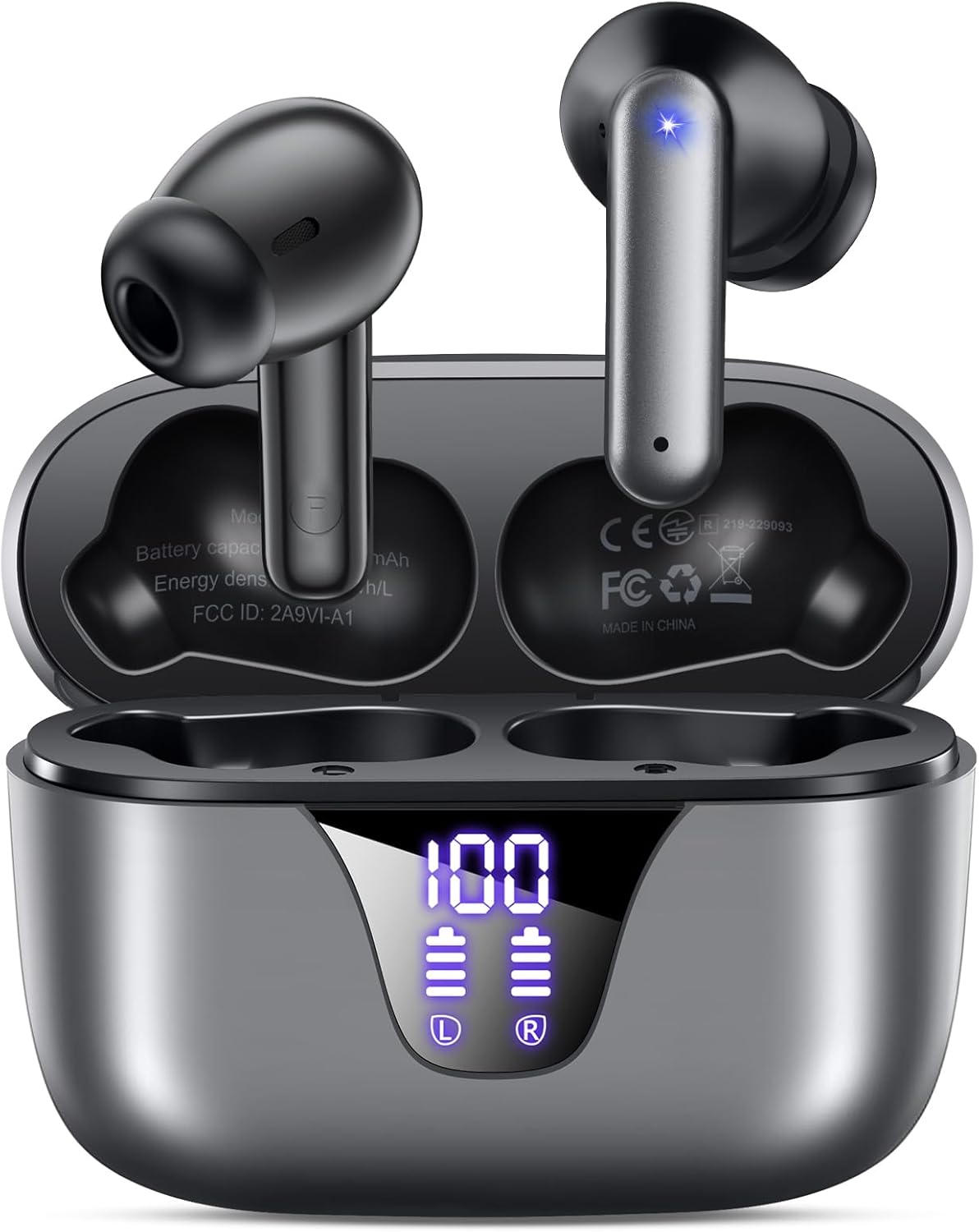
Image: ZIUTY A1 Wireless Earbuds shown inside their open charging case. The case features an LED digital display indicating battery levels for both the case and individual earbuds.
จอแสดงผล LED พลังงาน

Image: Close-up of the ZIUTY A1 charging case's LED display, showing '100' for the case battery and individual battery icons for the left (L) and right (R) earbuds.
The charging case features an LED digital display that shows the exact remaining power percentage (0-100%) for the case and individual battery levels for each earbud.
การตั้งค่า
1. การชาร์จหูฟังและเคส
ก่อนใช้งานครั้งแรก ควรชาร์จหูฟังและกล่องชาร์จให้เต็ม
- ใส่หูฟังลงในกล่องชาร์จ ตรวจสอบให้แน่ใจว่าหูฟังอยู่ในช่องที่ถูกต้อง (L สำหรับซ้าย และ R สำหรับขวา)
- Connect the USB-C charging cable to the charging port on the case and the other end to a 5V USB power adapter (not included).
- หน้าจอ LED บนเคสจะแสดงสถานะการชาร์จ โดยปกติการชาร์จเต็มจะใช้เวลาประมาณ 2 ชั่วโมง

Image: ZIUTY A1 earbuds resting in their charging case, with the LED display showing battery levels.

Image: Diagram illustrating how to connect the USB-C cable to the charging case and a 5V power adapter for charging.
2. การสวมหูฟัง
For optimal sound quality and comfort, select the correct ear tip size and ensure a secure fit.
- Choose the ear tips (S, M, L) that provide the best seal and comfort for your ears.
- Insert the earbuds into your ears, gently twisting them to find a snug and stable position.
- The ergonomic semi-in-ear design is intended for a comfortable fit during various activities.

Image: Diagram showing the ergonomic design of the earbuds and the three available ear tip sizes (S, M, L) for a customized fit.

Image: Step-by-step visual guide on how to correctly insert and adjust the earbuds for a secure fit.
3. การจับคู่กับอุปกรณ์บลูทูธ
เอียร์บัดจะเข้าสู่โหมดจับคู่โดยอัตโนมัติเมื่อถอดออกจากเคสชาร์จ
- เปิดกล่องชาร์จและนำหูฟังทั้งสองข้างออก หูฟังจะเปิดโดยอัตโนมัติและพยายามจับคู่กัน
- บนอุปกรณ์ของคุณ (สมาร์ทโฟน แท็บเล็ต แล็ปท็อป) เปิดใช้งาน Bluetooth และค้นหาอุปกรณ์ที่มีอยู่
- Select "A1" from the list of found devices.
- เมื่อเชื่อมต่อแล้ว คุณจะได้ยินเสียงยืนยัน และหูฟังจะพร้อมใช้งาน
- The earbuds will automatically reconnect to the last paired device when removed from the case.

Image: Illustration showing the ZIUTY A1 earbuds connecting via Bluetooth 5.3 to a smartphone, indicating a stable and fast connection.

Image: Diagram demonstrating the one-step auto-pairing process when the earbuds are removed from the charging case.
คำแนะนำการใช้งาน
การควบคุมแบบสัมผัส
The ZIUTY A1 earbuds feature intuitive touch controls for managing audio playback and calls.

Image: Diagram illustrating the touch control area on the earbuds and various functions like Play/Pause, Voice Assistant, Answer/Hang up, Previous/Next Track, and Volume adjustment.

Image: A more detailed visual guide to the touch controls, showing specific tap and hold gestures for different commands.
| การกระทำ | การทำงาน |
|---|---|
| แตะครั้งเดียว (L/R) | เล่น/หยุดเพลง, รับ/วางสาย |
| ดับเบิ้ลแท็ป (ซ้าย) | เพลงก่อนหน้า |
| ดับเบิ้ลแท็ป (R) | เพลงถัดไป |
| แตะสามครั้ง (ซ้าย/ขวา) | เปิดใช้งาน Voice Assistant (Siri, Google Assistant) |
| Press and Hold (L) | ลดระดับเสียง |
| Press and Hold (R) | เพิ่มระดับเสียง |
| Press and Hold (L/R) during incoming call | ปฏิเสธการรับสาย |
การโทรออกและรับสาย
Use the touch controls to manage your phone calls:
- รับ/วางสาย: แตะเพียงครั้งเดียวที่หูฟังข้างใดข้างหนึ่ง
- ปฏิเสธสาย: กดและค้างไว้ที่หูฟังข้างใดข้างหนึ่งในขณะที่มีสายเรียกเข้า

Image: Illustration showing a user interacting with a voice assistant (Siri) via the earbuds for clear call support.
ผู้ช่วยเสียง
Activate your device's voice assistant by triple-tapping either earbud. This allows you to issue commands such as making calls or checking information hands-free.
การซ่อมบำรุง
การทำความสะอาด
การทำความสะอาดเป็นประจำช่วยรักษาประสิทธิภาพและสุขอนามัยให้เหมาะสมที่สุด
- Clean the charging contacts on both the earbuds and inside the charging case with a dry cotton swab or alcohol pad.
- Gently clean the mesh of the ear tips to remove any dust or earwax that might affect sound volume.
- Wipe the exterior of the earbuds and case with a soft, dry cloth.

Image: Visual guide demonstrating how to clean the earbud charging contacts and ear tip mesh to resolve potential volume or charging issues.
พื้นที่จัดเก็บ
เมื่อไม่ได้ใช้งาน ให้เก็บหูฟังไว้ในกล่องชาร์จเพื่อปกป้องหูฟังและเพื่อให้แน่ใจว่าหูฟังจะยังคงชาร์จอยู่
การแก้ไขปัญหา
If you encounter issues with your ZIUTY A1 earbuds, refer to the following common solutions:
- หูฟังไม่จับคู่กัน: Place both earbuds back into the charging case, close the lid, wait a few seconds, then open the lid and remove them again. They should automatically pair.
- หูฟังไม่เชื่อมต่อกับอุปกรณ์: Ensure Bluetooth is enabled on your device and the earbuds are in pairing mode. Forget the device from your Bluetooth list and attempt to re-pair.
- ไม่มีเสียงหรือระดับเสียงต่ำ: Check the volume levels on both your device and the earbuds. Ensure the ear tips are clean and properly seated in your ears. Refer to the cleaning instructions in the Maintenance section.
- ปัญหาการชาร์จ: Ensure the charging cable is securely connected and the power adapter is 5V. Clean the charging contacts on both the earbuds and the case.
- Accidental touch control activation: When adjusting the earbuds in your ear, grasp them by the sides to avoid touching the control area.
ข้อมูลจำเพาะ
Key technical specifications for the ZIUTY A1 Wireless Earbuds:
| คุณสมบัติ | ข้อมูลจำเพาะ |
|---|---|
| ชื่อรุ่น | A1 |
| เทคโนโลยีการเชื่อมต่อ | ไร้สาย (บลูทูธ 5.3) |
| ช่วงบลูทูธ | สูงถึง 15 เมตร (49 ฟุต) |
| อายุการใช้งานแบตเตอรี่ของหูฟังเอียร์บัด | นานถึง 8 ชั่วโมง |
| เวลาเล่นทั้งหมด (รวมเคส) | นานถึง 50 ชั่วโมง |
| ความจุแบตเตอรี่ของเคสชาร์จ | 500 มิลลิแอมป์ |
| เวลาในการชาร์จ | ประมาณ 2 ชั่วโมง |
| ขนาดไดร์เวอร์เสียง | ไดร์เวอร์ไดนามิก 14.5 มม |
| ช่วงความถี่ | 20 เฮิรตซ์ - 20,000 เฮิรตซ์ |
| ระดับความต้านทานต่อน้ำ | IPX7 (ทนน้ำ) |
| ประเภทการควบคุม | การควบคุมแบบสัมผัส |
| น้ำหนักเอียร์บัด | Approximately 0.14 oz (3.9g) per earbud |
| ส่วนประกอบที่รวมอยู่ | Earbuds, Charging Case, USB-C Cable, Eartips, User Manual |
การรับประกันและการสนับสนุน
ข้อมูลการรับประกัน
ZIUTY provides an 18-month battery promise for this product. This warranty covers defects in materials and workmanship under normal use.
การสนับสนุนลูกค้า
For any questions, technical assistance, or warranty claims, please contact ZIUTY customer service. Refer to the product packaging or the official ZIUTY webเว็บไซต์นี้ใช้สำหรับตรวจสอบรายละเอียดการติดต่อล่าสุด