
DOMO SLP9
DOMO Slate SLP9 OS12 T310 Tablet PC User Manual
รุ่น : SLP9
การแนะนำ
This manual provides essential information for the proper use and maintenance of your DOMO Slate SLP9 OS12 T310 Tablet PC. Please read it thoroughly before operating the device to ensure optimal performance and longevity.
มีอะไรอยู่ในกล่อง
- 1 Pc DOMO Slate SLP9 OS12 T310 Tablet PC
- 1 Pc Charging Power Adapter
- 1 Pc Type-C USB Cable
- 1 Pc Type-C OTG Cable
- 1 Sim Card Tray Eject Pin
- คู่มือการใช้งาน (เอกสารนี้)
สินค้าเกินview
Familiarize yourself with the physical components of your DOMO Slate SLP9 OS12 T310 Tablet PC.
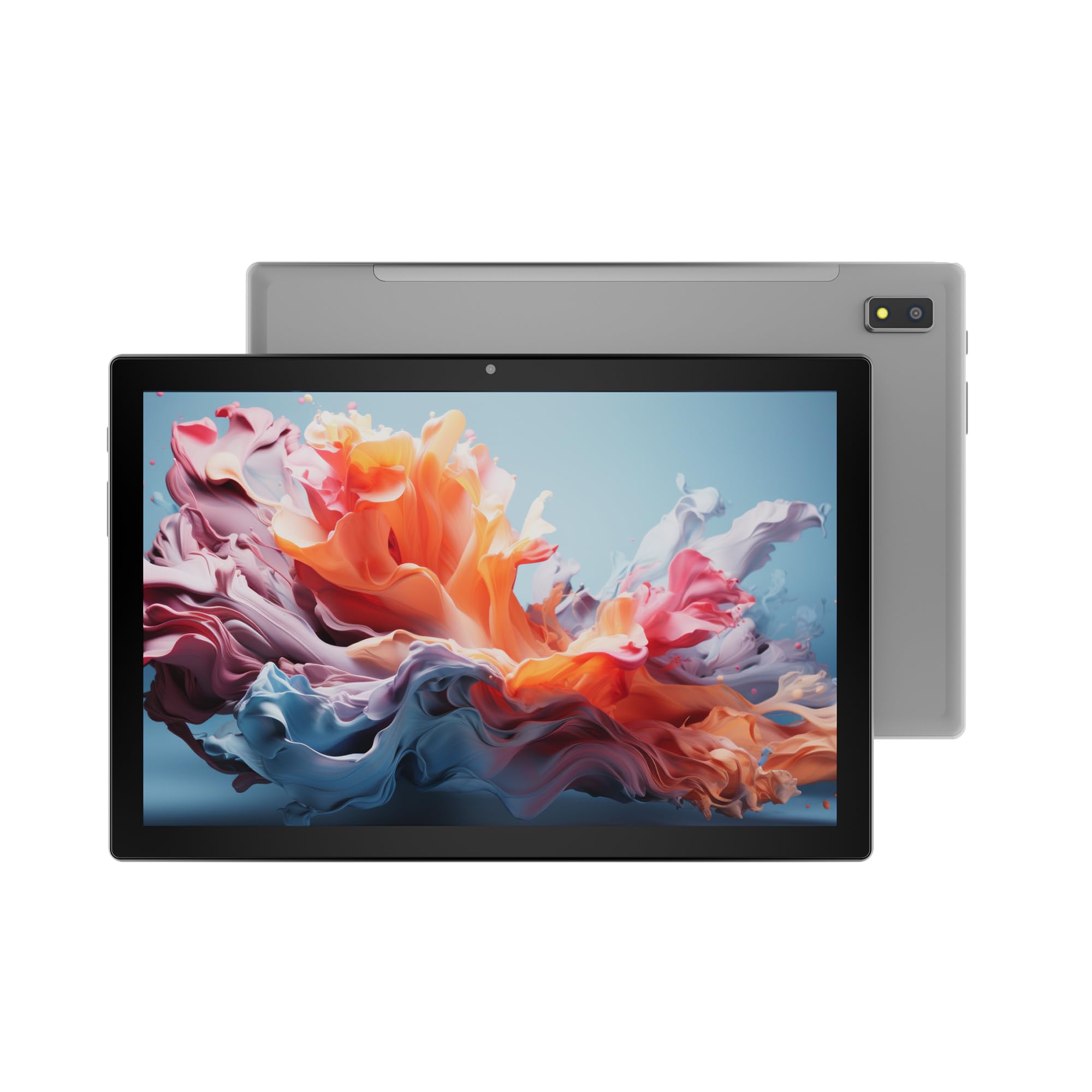
รูปที่ 1: ด้านหน้า view of the DOMO Slate SLP9 OS12 T310 Tablet PC, showcasing the 10.1-inch IPS LCD display.

รูปที่ 2: มุม view of the tablet, highlighting its slim profile และหน้าจอ

รูปที่ 3: ด้านข้าง view of the tablet, showing the placement of buttons and ports.

รูปที่ 4: หลัง view of the tablet, displaying the camera module and branding.
ส่วนประกอบหลัก
- 10.1-inch IPS HD LCD Display: หน้าจอความละเอียดสูงเพื่อภาพที่คมชัด
- กล้องหน้า: Located above the screen for video calls and selfies.
- Rear Camera with LED Flash: สำหรับการบันทึกภาพถ่ายและวีดีโอ
- ปุ่มเปิด/ปิด: เพื่อเปิด/ปิดอุปกรณ์หรือทำให้เครื่องเข้าสู่โหมดสลีป
- ปุ่มปรับระดับเสียง: เพื่อปรับระดับเสียง
- พอร์ต USB Type-C: สำหรับการชาร์จและถ่ายโอนข้อมูล
- Dual SIM Slot: Supports 4G, 3G, and 2G SIM cards for cellular connectivity and voice calling.
- ช่องเสียบการ์ด MicroSD: สำหรับเพิ่มพื้นที่จัดเก็บข้อมูลได้สูงสุดถึง 1TB
- Dual Box Type Speakers: สำหรับเอาต์พุตเสียง
การตั้งค่า
1. การชาร์จแท็บเล็ต
Before first use, fully charge your tablet. Connect the provided Type-C USB cable to the tablet's Type-C port and the other end to the charging power adapter. Plug the adapter into a wall outlet. The battery indicator on the screen will show charging status.
2. การใส่ซิมการ์ดและ MicroSD
- ค้นหาถาดใส่การ์ด SIM/MicroSD ที่ด้านข้างของแท็บเล็ต
- Insert the provided SIM eject pin into the small hole next to the tray to open it.
- Carefully place your 4G/3G/2G SIM card(s) and/or MicroSD card into the designated slots on the tray. Ensure correct orientation as indicated on the tray.
- ค่อยๆ ดันถาดกลับเข้าไปในแท็บเล็ตจนกระทั่งล็อคเข้าที่
3. การเปิดเครื่องครั้งแรกและการตั้งค่า
- กดปุ่มค้างไว้ ปุ่มเปิดปิด until the DOMO logo appears on the screen.
- ทำตามคำแนะนำบนหน้าจอเพื่อเลือกภาษา เชื่อมต่อกับเครือข่าย Wi-Fi ตั้งค่าบัญชี Google และกำหนดค่าการตั้งค่าเริ่มต้นอื่นๆ
- Once setup is complete, your tablet is ready for use.
คำแนะนำการใช้งาน
การนำทางพื้นฐาน
- สัมผัส: แตะไอคอนเพื่อเปิดแอปหรือเลือกรายการ
- แตะค้างไว้: Press and hold an item to access contextual menus or move icons.
- ปัด: ลากนิ้วของคุณบนหน้าจอเพื่อเลื่อนดูหน้าต่างๆ หรือรายการต่างๆ
- หยิก: ใช้สองนิ้วเพื่อซูมเข้าหรือออกจากรูปภาพและ web หน้า
การเชื่อมต่อกับเครือข่าย
การเชื่อมต่อ Wi-Fi
- ไปที่ การตั้งค่า > เครือข่ายและอินเตอร์เน็ต > ไวไฟ.
- สลับ Wi-Fi On.
- เลือกเครือข่ายที่คุณต้องการจากรายการและป้อนรหัสผ่านหากได้รับแจ้ง
จับคู่บลูทู ธ
- ไปที่ การตั้งค่า > อุปกรณ์ที่เชื่อมต่อ > บลูทูธ.
- สลับบลูทูธ On.
- Select the device you wish to pair with from the list of available devices. Confirm the pairing code if prompted.
Cellular Data and Voice Calling (4G)
With a valid SIM card inserted, your tablet supports 4G cellular data and voice calling (VoLTE). Ensure your SIM card is activated for these services.
- To enable/disable mobile data, go to การตั้งค่า > เครือข่ายและอินเตอร์เน็ต > เครือข่ายมือถือ.
- หากต้องการโทรออก ให้เปิด โทรศัพท์ app and dial the number.
การทำงานของกล้อง
เปิด กล้อง แอปจากหน้าจอหลักหรือลิ้นชักแอปของคุณ
- แตะที่ ชัตเตอร์ ปุ่มถ่ายภาพ
- แตะที่ วีดีโอ ไอคอนสำหรับสลับไปยังโหมดบันทึกวิดีโอ
- ใช้ สลับกล้อง icon to toggle between the front and rear cameras.
ฟังก์ชั่น GPS
The tablet has an inbuilt GPS chip and antenna. To use location services, ensure GPS is enabled in การตั้งค่า > ที่ตั้ง. You can then use navigation apps or other location-based services.
การซ่อมบำรุง
การทำความสะอาดอุปกรณ์
- ใช้ผ้านุ่มที่ไม่เป็นขุยในการทำความสะอาดหน้าจอและตัวเครื่องแท็บเล็ต
- หลีกเลี่ยงการใช้สารเคมีที่รุนแรง น้ำยาทำความสะอาดที่มีฤทธิ์กัดกร่อน หรือสเปรย์แอโรซอล
- อย่าปล่อยให้ความชื้นเข้าไปในช่องเปิดต่างๆ
การดูแลแบตเตอรี่
- หลีกเลี่ยงอุณหภูมิที่สูงเกินไป เพราะอาจทำให้แบตเตอรี่มีอายุการใช้งานลดลง
- ใช้เฉพาะเครื่องชาร์จและสายเคเบิลที่ให้มาเท่านั้น
- อย่าทิ้งแท็บเล็ตไว้ชาร์จเป็นเวลานานหลังจากชาร์จเต็มแล้ว
การอัพเดตซอฟต์แวร์
Periodically check for system updates to ensure your tablet has the latest features and security enhancements. Go to การตั้งค่า > ระบบ > การอัพเดทระบบ.
การแก้ไขปัญหา
| ปัญหา | วิธีแก้ปัญหาที่เป็นไปได้ |
|---|---|
| แท็บเล็ตไม่สามารถเปิดเครื่องได้ | ตรวจสอบให้แน่ใจว่าแบตเตอรี่ชาร์จเต็มแล้ว เสียบที่ชาร์จและลองอีกครั้ง หากยังไม่ตอบสนอง ให้กดปุ่มเปิด/ปิดค้างไว้ 10-15 วินาทีเพื่อบังคับรีสตาร์ท |
| ไม่สามารถเชื่อมต่อ Wi-Fi ได้ | Check if Wi-Fi is enabled in settings. Ensure the Wi-Fi password is correct. Restart your router and the tablet. |
| ตรวจไม่พบซิมการ์ด | Ensure the SIM card is correctly inserted into the tray. Restart the tablet. Check if the SIM card is active with your service provider. |
| ประสิทธิภาพการทำงานช้า | Close unused applications. Clear cache. Consider uninstalling unnecessary apps. Perform a factory reset as a last resort (backup data first). |
| กล้องไม่ทำงาน | Ensure the camera app has necessary permissions. Restart the tablet. |
ข้อมูลจำเพาะ
| คุณสมบัติ | รายละเอียด |
|---|---|
| ยี่ห้อ | โดโม |
| ชื่อรุ่น | Slate SLP9 OS12 T310 |
| แสดง | 10.1-inch IPS HD LCD, 1920 x 1200 Pixels, 400 NITS Brightness, 2.5D Corning Glass Touch Screen |
| โปรเซสเซอร์ | UNISOC Tiger T310 - 64-bit Quadcore @ 3.8Ghz |
| แรม | แรม 4GB |
| การจัดเก็บข้อมูลภายใน | 64GB |
| พื้นที่เก็บข้อมูลแบบขยายได้ | สูงสุด 1TB ผ่านการ์ด MicroSD |
| ระบบปฏิบัติการ | แอนดรอยด์ 12 |
| กล้องหลัง | กล้อง 13 ล้านพิกเซล พร้อมแฟลช LED |
| กล้องหน้า | 5MP |
| แบตเตอรี่ | 5020 mAh rechargeable polymer battery |
| การเชื่อมต่อ | Dual SIM (4G VoLTE, 3G, 2G), DualBand Wi-Fi (2.4GHz & 5GHz), Bluetooth 5.0, GPS, FM Radio |
| พอร์ต | Type-C USB Port, POGO Connector |
| ขนาด (ยาว x กว้าง x หนา) | 24.4L x 16.2W x 1Th Centimeters |
| น้ำหนัก | 505 กรัม |
| ที่อยู่อาศัย | โลหะ |
| ประเทศต้นกำเนิด | อินเดีย |
การรับประกันและการสนับสนุน
ข้อมูลการรับประกัน
The DOMO Slate SLP9 OS12 T310 Tablet PC comes with a รับประกัน 1 ปี for the device and รับประกัน 3 เดือน for accessories. The warranty type is Onsite, which includes free pickups and deliveries for service.
ข้อยกเว้นการรับประกัน: Physical damages, water damages, moisture damages, seal tampering, and burnout cases are not covered under warranty.
การสนับสนุนลูกค้า
For technical assistance, troubleshooting, or warranty claims, please contact DOMO customer support. Support options include an online knowledge base, support tickets, and phone support. Post-warranty services are available as paid onsite services.
หากต้องการข้อมูลเพิ่มเติม กรุณาเยี่ยมชมเว็บไซต์อย่างเป็นทางการ DOMO Store on Amazon.
Ask a question about this manual
Ask about setup, troubleshooting, compatibility, parts, safety, or missing instructions. Manuals+ will review the question and use this page’s manual context to help answer it.