
1. บทนำ
The OTTOCAST Nano AI Box is a compact device designed to upgrade your in-car entertainment system. It converts your vehicle's existing wired CarPlay or Android Auto into a wireless experience, integrating an Android 13.0 operating system and advanced AI voice control. This manual provides essential information for setting up, operating, maintaining, and troubleshooting your Nano AI Box.

Image: The OTTOCAST Nano AI Box, showcasing its core features including AI voice operation, wireless CarPlay and Android Auto, and compatibility with various streaming services.
2. ข้อมูลด้านความปลอดภัย
- ให้ความสำคัญกับการขับขี่อย่างปลอดภัยเสมอ อย่าใช้งานอุปกรณ์ในลักษณะที่ทำให้เสียสมาธิจากถนน
- ตรวจสอบให้แน่ใจว่าอุปกรณ์ติดตั้งอย่างแน่นหนาและไม่กีดขวางทางเดินของคุณ view หรือรบกวนการควบคุมรถ
- หลีกเลี่ยงการให้เครื่องสัมผัสกับอุณหภูมิที่สูงหรือต่ำเกินไป แสงแดดโดยตรงเป็นเวลานาน หรือความชื้น
- ห้ามถอดประกอบหรือดัดแปลงอุปกรณ์ การกระทำดังกล่าวอาจทำให้การรับประกันเป็นโมฆะและก่อให้เกิดความเสี่ยงด้านความปลอดภัย
- Use only the provided cables and accessories to prevent damage to the device or vehicle.
3. เนื้อหาบรรจุภัณฑ์
ตรวจสอบว่ามีรายการทั้งหมดอยู่ในแพ็คเกจ:
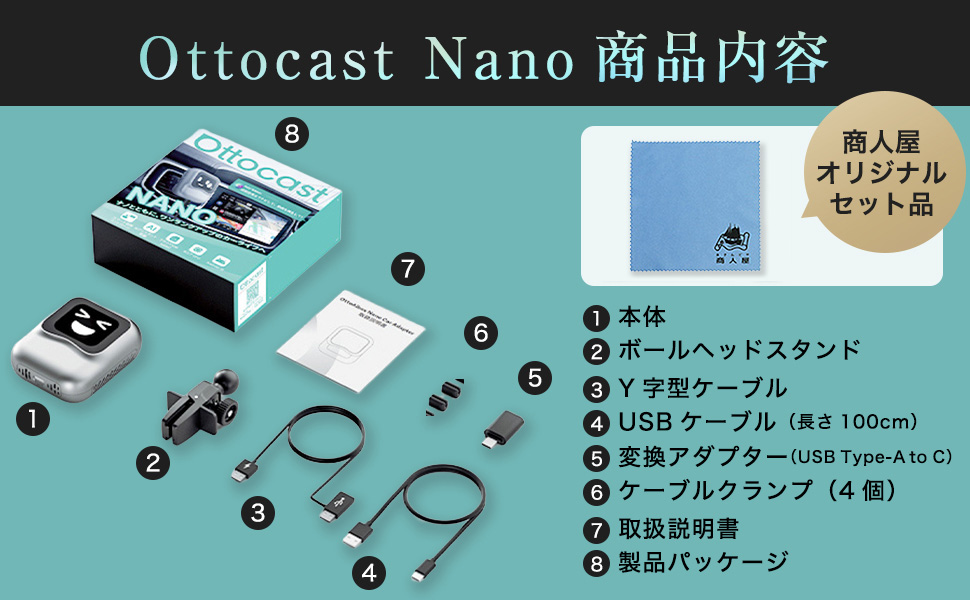
ภาพ: รายละเอียด view of the OTTOCAST Nano AI Box package contents.
- OTTOCAST Nano Main Unit
- Ball Head Stand
- Y-Type Cable
- สาย USB (100ซม.)
- USB Type-A to C Conversion Adapter
- สายเคเบิล Clampเอส (4 ชิ้น)
- คู่มือการใช้งาน
- บรรจุภัณฑ์ผลิตภัณฑ์
4. คำแนะนำในการตั้งค่า
4.1 ข้อกำหนดด้านความเข้ากันได้
The OTTOCAST Nano AI Box is designed exclusively for vehicles equipped with a genuine wired CarPlay system. Operation is not guaranteed for all vehicle models or display audio systems. Compatibility may vary depending on the specific car model and navigation specifications.

Image: The OTTOCAST Nano AI Box supports a wide range of CarPlay-compatible car models and popular applications.
4.2 การเชื่อมต่อเริ่มต้น
Follow these two steps for initial setup:

Image: Step-by-step guide for connecting the OTTOCAST Nano AI Box to your vehicle and the internet.
- เชื่อมต่อกับยานพาหนะ: Insert the Nano AI Box into your vehicle's USB port. Press the power button to start the device. The connection is complete when the device powers on.
- การเชื่อมต่ออินเตอร์เน็ต: For video streaming and online features, connect to the internet via Wi-Fi, your smartphone's tethering function, or a nano SIM card.
4.3 การติดตั้งอุปกรณ์
The Nano AI Box can be easily mounted to various air vents using the included ball head stand. Ensure it is securely attached for stability and optimal heat dissipation.

Image: Connecting the Nano AI Box to the vehicle's USB port while mounted on an air vent.
5. คู่มือการใช้งาน
5.1 การควบคุมด้วยเสียง AI
The Nano AI Box features next-generation AI voice control, allowing for hands-free operation of basic functions such as navigation and music playback. This reduces the operational burden while driving, enhancing safety and comfort.

Image: Safe and comfortable driving with AI voice control, allowing hands-free operation.
- เปิดใช้งาน: Say "Hey Nano" to activate the voice assistant.
- การนำทาง: Command "Start navigation to [destination]" to begin route guidance.
- ดนตรี: Say "Play music" or "Play [song/artist]" to control audio playback.
- โทร: Use commands like "Answer call" or "Call [contact name]" for hands-free communication.
5.2 CarPlay ไร้สายและ Android Auto
The device converts your vehicle's wired CarPlay and Android Auto into wireless functionality. This allows you to use compatible applications (navigation, music, calls, etc.) directly on your car's display without a physical cable connection after the initial setup.
5.3 คุณสมบัติของ Android 13.0
Equipped with Android 13.0 OS, the Nano AI Box allows you to install and use various applications. Please note that some applications may not function or may have limited functionality due to compatibility or system restrictions.
5.4 Customizable Home Screen (OttoDrive 2.5)
The UI2.5 smart adaptation system automatically supports 99% of major in-car displays in Japan. You can customize your in-car screen by setting photos of your family or pets as the background.

Image: Customizable home screen and screen split function of the OTTOCAST Nano AI Box.
5.5 Screen Split Function
The device supports a screen split function with three adjustable ratios: 5:5, 3:7, and 7:3. This allows you to view multiple applications simultaneously on your car's display.
6. การบำรุงรักษา
6.1 การอัปเดตซอฟต์แวร์ (OTA)
The OTTOCAST Nano AI Box supports Over-The-Air (OTA) updates, allowing you to update the firmware online. This ensures you always have the latest system with new features and improvements without needing to visit a car electronics specialist.

Image: Continuous software updates via OTA to keep your device optimized.
6.2 การทำความสะอาด
เช็ดอุปกรณ์ด้วยผ้าแห้งเนื้อนุ่ม ห้ามใช้น้ำยาทำความสะอาดหรือวัสดุขัดถู เพราะอาจทำให้พื้นผิวหรือชิ้นส่วนภายในเสียหายได้
7 การแก้ไขปัญหา
If you encounter issues with your OTTOCAST Nano AI Box, refer to the following common solutions:
- No Display/Connection Issues:
- Ensure your vehicle has a genuine wired CarPlay system.
- Verify the USB cable is securely connected to both the device and the vehicle's USB port.
- Restart the vehicle's infotainment system and the Nano AI Box.
- For initial connection, a wired connection may be required.
- การเชื่อมต่ออินเทอร์เน็ตไม่เสถียร:
- Communication stability can be affected by the usage environment, area, and vehicle compatibility.
- It is recommended to use smartphone tethering for a more stable internet connection.
- Ensure your Wi-Fi or SIM card has sufficient signal strength.
- AI Voice Control Issues:
- ตรวจสอบให้แน่ใจว่าไมโครโฟนไม่ได้ถูกกีดขวาง
- พูดให้ชัดเจนและใช้เสียงในระดับปานกลาง
- Background noise can affect voice recognition accuracy.
- App Not Working/Restricted:
- Some applications may not be fully compatible with the Android 13.0 system on the device or may have regional restrictions.
- Check for available software updates for the Nano AI Box.
หากปัญหายังคงมีอยู่หลังจากพยายามแก้ไขปัญหาเหล่านี้แล้ว โปรดติดต่อฝ่ายสนับสนุนลูกค้า
8. ข้อมูลจำเพาะ
| คุณสมบัติ | ข้อมูลจำเพาะ |
|---|---|
| ยี่ห้อ | ออตโตแคสต์ |
| แบบอย่าง | นาโน |
| ระบบปฏิบัติการ | แอนดรอยด์ 13.0 |
| การเชื่อมต่อ | Wireless CarPlay, Wireless Android Auto, Wi-Fi, Cloud SIM |
| คุณสมบัติพิเศษ | AI Voice Control, Customizable Home Screen (OttoDrive 2.5), Screen Split Function |
| น้ำหนัก | 100 กรัม |
| อุปกรณ์เสริมที่รวมอยู่ด้วย | USB Cable, USB Type-A to C Adapter, Ball Head Stand, Cable Clamps |
| ต้นทาง | จีน |
| จีทีอิน (UPC) | 611624748379 |
9. การรับประกันและการสนับสนุน
The OTTOCAST Nano AI Box comes with a รับประกัน 1 ปี from the date of purchase. As a domestic authorized dealer, we offer comprehensive support for our products.

Image: OTTOCAST provides reliable support and a 1-year warranty through its domestic authorized dealer.
If you experience any initial defects, believe the product differs from expectations, or find it incompatible with your vehicle, please contact us within one year of receiving the product for return, refund, or exchange. Our Japanese-speaking staff are available to provide prompt assistance.
For any inquiries or concerns, please do not hesitate to contact our customer support team.