
Bmax B4 Turbo
Bmax B4 Turbo Mini PC User Manual
Model: B4 Turbo
1. สินค้าหมดview
The Bmax B4 Turbo Mini PC is a compact and powerful desktop computer designed for various applications, including office work, business tasks, web browsing, streaming, and light gaming. It features the new Intel 13th Gen N150 processor, ample memory, and fast storage, all within a small form factor.
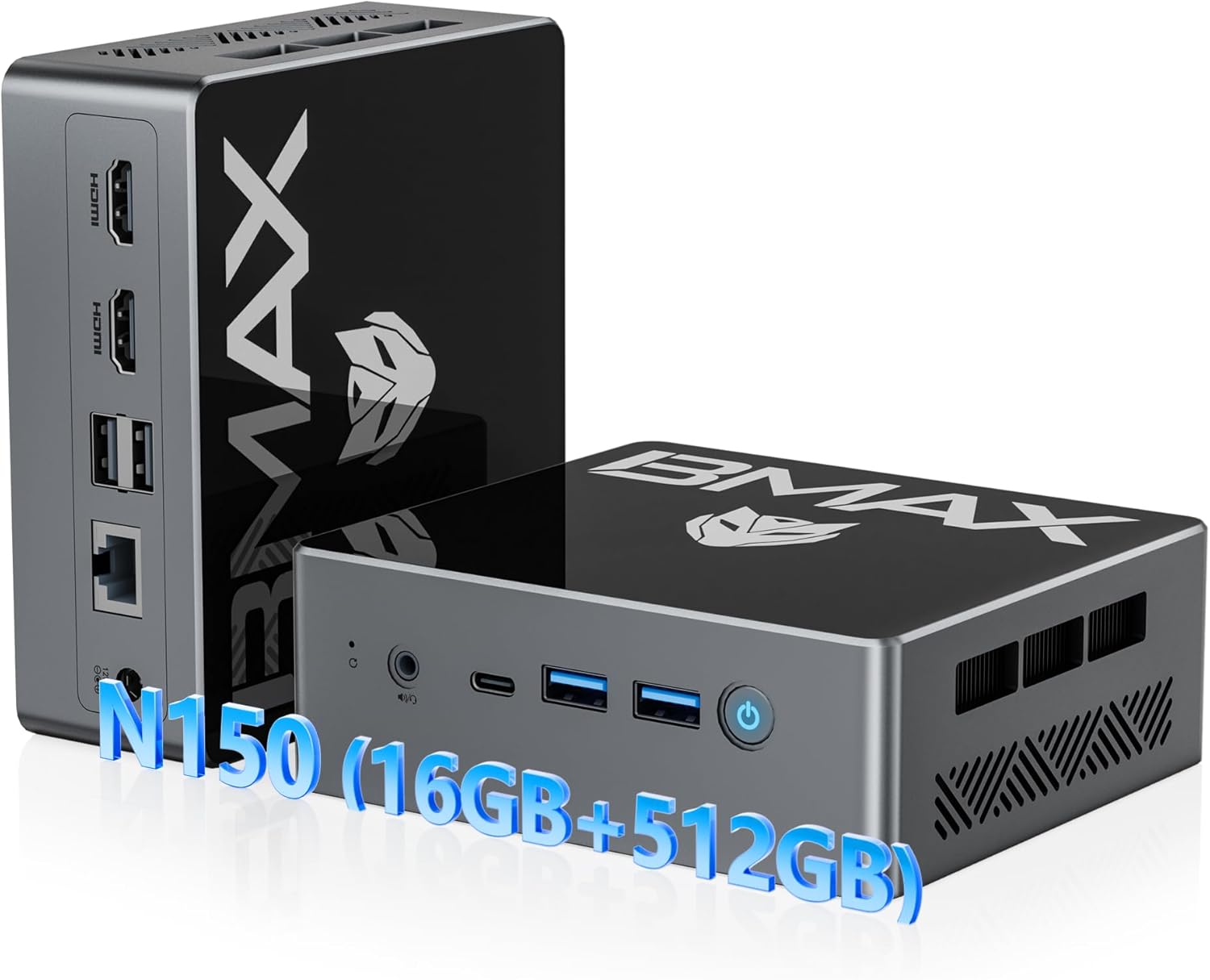
Figure 1: Bmax B4 Turbo Mini PC and its primary components.
คุณสมบัติหลัก:
- โปรเซสเซอร์: New 13th Gen Intel N150 CPU (4-core, 4-thread, up to 3.6 GHz)
- หน่วยความจำ: แรม DDR16 4GB
- พื้นที่จัดเก็บ: 512GB M.2 SSD (upgradable to 2TB)
- กราฟิก: Intel UHD Graphics with 4K@60Hz triple-screen display support
- การเชื่อมต่อ: Dual-band Wi-Fi 5 (2.4GHz/5GHz), Bluetooth 5.0, RJ45 Ethernet
- พอร์ต: 2x HDMI 2.0, 1x Full-featured Type-C (10Gbps), 2x USB 3.0, 2x USB 2.0, 1x 3.5mm Audio Jack
- ฟอร์มแฟกเตอร์: Ultra-compact and portable design with VESA mount compatibility
2. การตั้งค่า
2.1 เนื้อหาบรรจุภัณฑ์
ก่อนเริ่ม โปรดตรวจสอบให้แน่ใจว่ามีสิ่งของครบถ้วนในบรรจุภัณฑ์:
- 1 x Bmax B4 Turbo Mini PC
- สาย HDMI 1 เส้น
- 1 x แหล่งจ่ายไฟของสหรัฐฯ
- 1 x คู่มือผู้ใช้ (เอกสารนี้)
- 1 x Mount with Screws (for VESA mounting)

Figure 2: All items included in the Bmax Mini PC package.
2.2 การเชื่อมต่อมินิพีซีของคุณ
- เชื่อมต่อกับพลังงาน: Insert the DC12V/2A power adapter into the power port on the Mini PC and plug the adapter into a wall outlet.
- เชื่อมต่อกับจอแสดงผล: Use the provided HDMI cable to connect the Mini PC to your monitor or TV. The Mini PC supports dual HDMI 2.0 ports and one full-featured Type-C port for triple-screen display.
- เชื่อมต่ออุปกรณ์ต่อพ่วง: เสียบแป้นพิมพ์และเมาส์ USB เข้ากับพอร์ต USB 3.0 หรือ USB 2.0 ที่ว่างอยู่
- การเชื่อมต่อเครือข่าย (ทางเลือก): For a wired connection, connect an Ethernet cable to the RJ45 port. For wireless, the device supports Wi-Fi 5 (2.4GHz/5GHz).
Video 1: A demonstration of connecting the Bmax Mini PC and its various features, including video playback, web browsing, office work, and gaming. This video highlights the device's compact size and rich interface options.
2.3 การบูตครั้งแรก
After connecting all necessary components, press the power button on the front of the Mini PC. The device comes with a pre-installed operating system (OS) and supports Linux and Ubuntu. Follow the on-screen instructions for initial setup of the operating system.
3. คู่มือการใช้งาน
3.1 เปิด/ปิดเครื่อง
- เปิดเครื่อง: กดปุ่มเปิด/ปิดที่อยู่ด้านหน้าเครื่อง ไฟแสดงสถานะการทำงานจะสว่างขึ้น
- หมดแรง: To safely shut down the system, use the operating system's shutdown function. Alternatively, press and hold the power button for a few seconds for a forced shutdown (not recommended for regular use).
3.2 การกำหนดค่าการแสดงผล
The Bmax B4 Turbo Mini PC supports up to three displays simultaneously, offering 4K@60Hz resolution. This is achieved through its two HDMI 2.0 ports and one full-featured Type-C port.

รูปที่ 3: อดีตample of a triple-screen 4K display setup using the Mini PC's HDMI and Type-C ports.
To configure multiple displays, access your operating system's display settings. You can extend your desktop across multiple screens or duplicate the display.
3.3 การเชื่อมต่อเครือข่ายและบลูทูธ
- ไวไฟ : The Mini PC supports dual-band 2.4GHz/5GHz Wi-Fi 5. To connect, navigate to your operating system's network settings, select your desired Wi-Fi network, and enter the password.
- บลูทูธ: Bluetooth 5.0 is integrated for connecting wireless peripherals such as keyboards, mice, and headphones. Enable Bluetooth in your OS settings and pair with your devices.
- อีเธอร์เน็ต: For a stable wired connection, plug an Ethernet cable into the RJ45 port.
3.4 Performance and Usage
The Bmax B4 Turbo Mini PC is equipped with an Intel N150 processor, 16GB of RAM, and a 512GB SSD, providing efficient performance for a variety of tasks:
- Office Productivity: Smooth operation for office software like Microsoft Office Suite, enabling efficient document creation, spreadsheets, and presentations.
- Web Browsing and Streaming: Enjoy seamless web browsing and high-definition video streaming.
- การสร้างเนื้อหา: Capable of handling light photo and video editing tasks.
- เล่นเกมเบาๆ: Provides a satisfactory experience for casual and light gaming titles.

Figure 4: The Mini PC efficiently runs various applications, including productivity software and media playback.

Figure 5: The N150 GPU provides enhanced graphics performance, supported by a silent built-in fan for optimal cooling.
4. การบำรุงรักษา
4.1 การขยายพื้นที่เก็บข้อมูล
The 512GB M.2 SSD can be upgraded to a larger capacity (up to 2TB) if needed. The Mini PC also features a 2.5-inch laptop hard drive slot for additional storage. Please refer to the detailed upgrade instructions in the full user manual or contact support for assistance.

รูปที่ 6: ภายใน view highlighting the 16GB SO-DIMM DDR4 RAM and 512GB M.2 2280 SATA(AHCI) SSD, along with the 2.5-inch hard drive slot for expansion.
4.2 ระบบทำความเย็น
The Bmax B4 Turbo Mini PC incorporates an efficient cooling system with a silent built-in fan to maintain optimal operating temperatures for the SSD and RAM. Ensure proper airflow around the device by keeping vents clear of obstructions.
4.3 การทำความสะอาด
To maintain performance and longevity, regularly clean the exterior of the Mini PC with a soft, dry cloth. Avoid using liquid cleaners or abrasive materials. Periodically, gently clear dust from the ventilation openings using compressed air.
5 การแก้ไขปัญหา
5.1 ปัญหาทั่วไปและแนวทางแก้ไข
| ปัญหา | สาเหตุที่เป็นไปได้ | สารละลาย |
|---|---|---|
| ไม่มีการแสดงผลบนจอภาพ | Loose display cable, incorrect input source, power issue. | Check HDMI/Type-C cable connections. Ensure monitor is on and set to correct input. Verify power adapter is securely connected. |
| ไม่มีการเชื่อมต่อเครือข่าย | Wi-Fi disabled, incorrect password, Ethernet cable disconnected. | Check Wi-Fi settings and password. Ensure Ethernet cable is properly connected to both PC and router. Restart router/modem. |
| ประสิทธิภาพการทำงานช้า | Too many background applications, low storage space, outdated drivers. | Close unnecessary applications. Free up disk space. Update operating system and drivers. |
| Peripheral not recognized | Loose USB connection, driver issue, faulty peripheral. | Try a different USB port. Reinstall or update peripheral drivers. Test peripheral on another device. |
5.2 ปุ่มล้าง CMOS
The Mini PC includes a "Clear CMOS Button" (often a small pinhole button) which can be used to reset BIOS settings to their default values. This can be useful for resolving boot issues or configuration problems. Consult the full user manual for the exact location and procedure, or contact technical support.
6. ข้อมูลจำเพาะ
| คุณสมบัติ | รายละเอียด |
|---|---|
| ยี่ห้อ | บีแม็กซ์ |
| แบบอย่าง | B4 เทอร์โบ |
| โปรเซสเซอร์ | Intel 13th Gen Twin Lake N150 (4 Cores, 4 Threads, up to 3.6 GHz) |
| แรม | แรม 16GB DDR4 |
| พื้นที่จัดเก็บ | SSD M.2 ขนาด 512GB (สามารถเพิ่มความจุได้สูงสุดถึง 2TB) |
| กราฟฟิก | กราฟิก Intel UHD (รวม) |
| เอาท์พุตวิดีโอ | 2x HDMI 2.0, 1x Type-C (supports 4K@60Hz triple display) |
| พอร์ต USB | พอร์ต USB 2 จำนวน 3.0 พอร์ต, พอร์ต USB 2 จำนวน 2.0 พอร์ต |
| เครือข่าย | RJ45 Ethernet, Wi-Fi 5 (2.4GHz/5GHz) |
| บลูทูธ | บลูทูธ 5.0 |
| เสียง | 1x 3.5mm Headset Jack |
| ระบบปฏิบัติการ | Pre-installed OS (supports Linux, Ubuntu) |
| ขนาด (กxยxส) | 4.92 x 4.4 x 1.73 นิ้ว |
| น้ำหนัก | 1.61 ปอนด์ |
| คุณสมบัติพิเศษ | Wake On LAN, PXE Boot, RTC Wake, Auto Power On, VESA Mount Kit included |
7. การรับประกันและการสนับสนุน
BMAX is committed to providing high-quality products and excellent customer service. Your B4 Turbo Mini PC comes with comprehensive support and warranty coverage.
7.1 ข้อมูลการรับประกัน
- การรับประกันจำกัด 1 ปี: BMAX offers a 1-year limited warranty for each Mini PC, effective from the date of purchase.
- 12-Month Warranty or Replacement: For quality defects, a 12-month warranty or replacement is provided.
- คืนสินค้าได้ฟรีภายใน 30 วัน: Enjoy a 30-day free return period from the date of purchase.


Figure 7: BMAX's commitment to product quality and customer satisfaction, including warranty and return policies.
7.2 การสนับสนุนด้านเทคนิค
BMAX provides lifetime technical support for your Mini PC. If you encounter any issues, have questions about system updates, or require troubleshooting assistance, please contact our professional after-sales team.
วิธีติดต่อฝ่ายสนับสนุน:
- เข้าสู่ระบบบัญชี Amazon ของคุณ
- Navigate to "Your Account" then "Your Orders".
- Locate your Bmax B4 Turbo Mini PC order and click on "Ask Product Question".

Figure 8: Instructions for accessing after-sales support through your Amazon account.
Ask a question about this manual
Ask about setup, troubleshooting, compatibility, parts, safety, or missing instructions. Manuals+ will review the question and use this page’s manual context to help answer it.