
Lumena Lamp
Lumena Lamp คู่มือการใช้งาน
Model: Lumena Lamp
การแนะนำ
ขอบคุณสำหรับการซื้อasing the Lumena Lamp. This device is designed to create a calming and immersive atmosphere with its unique ocean wave water ripple projection and customizable lighting options. Please read this manual carefully before use to ensure proper operation and maintenance.
The Lumena Lamp imitates the natural wonders of the Northern Lights, wrapping any room with soft waves of light, and immersing you in a calm and dreamy experience. It features 16 stunning color options, allowing you to customize your room's ambiance to your personal preference.
ข้อมูลด้านความปลอดภัย
- เก็บอุปกรณ์ให้ห่างจากน้ำและสภาพแวดล้อมที่มีความชื้นสูง
- ห้ามถอดประกอบหรือพยายามซ่อมแซมอุปกรณ์ด้วยตนเอง โปรดติดต่อช่างผู้ชำนาญการ
- ใช้เฉพาะสายชาร์จที่ให้มาเท่านั้น
- ควรหลีกเลี่ยงการสบตาโดยตรงกับแหล่งกำเนิดแสงเป็นเวลานาน
- Ensure the device is placed on a stable, flat surface to prevent tipping.
เนื้อหาแพ็คเกจ
เมื่อเปิดบรรจุภัณฑ์ โปรดตรวจสอบว่าอุปกรณ์ทุกชิ้นครบถ้วนและอยู่ในสภาพดี:
- 1 x Ocean Wave Water Ripple Projector Light
- 1 x รีโมทคอนโทรล
- 1 x สายชาร์จ

Image: The Lumena Lamp, a cube-shaped light with a textured surface, emitting a blue light, shown next to its remote control. This image illustrates the main components included in the package.
การตั้งค่า
- การแกะกล่อง: Carefully remove the Lumena Lamp และอุปกรณ์เสริมทั้งหมดจากบรรจุภัณฑ์
- การจัดวาง: วางลamp on a stable, flat surface in your desired location. For optimal projection effect, ensure there is a clear wall or ceiling surface for the light to project onto.
- การเชื่อมต่อไฟฟ้า:
- For "Plug in" models: Connect the provided charging cable to the lamp's USB port and plug the other end into a standard USB power adapter (not included) or a compatible USB port.
- For "Rechargeable" models (if applicable): Ensure the lamp is fully charged before first use. Connect the provided charging cable to the lamp's USB port and a USB power source. The charging indicator (if present) will show charging status.
- แบตเตอรี่รีโมทคอนโทรล: Insert 2 AAA batteries (not included) into the remote control, observing polarity.

Image: A diagram showing the dimensions of the Lumena Lamp, which is approximately 4.3 inches (11 cm) in width and depth, and 4.6 inches (11.5 cm) in height, with the light source elevated 0.78 inches (2 cm) from the base.
คำแนะนำการใช้งาน
การใช้รีโมทคอนโทรล
The Lumena Lamp comes with a remote control for convenient operation. Ensure the remote is pointed towards the lamp for best response.
- เปิด/ปิดเครื่อง: กดปุ่ม ON ปุ่มสำหรับเปิด/ปิดamp และ ปิด ปุ่มเพื่อปิด
- การเลือกสี: Use the color buttons (R, G, B, W, and other color swatches) to select from 16 different light colors.
- การปรับความสว่าง: The remote control allows for 6 adjustable brightness levels. Use the brightness up/down buttons to increase or decrease the light intensity.
- การเลือกโหมด:
- โหมดจาง: Activates a gradient mode where colors change automatically, creating a smooth transition effect.
- โหมดแฟลช: (If available on remote) Cycles through colors with a quick flash.
- โหมดแฟลช: (If available on remote) Flashes a single color.
- โหมดสมูท: (If available on remote) Provides a smooth transition between a limited set of colors.
การใช้ระบบควบคุมแบบสัมผัส
The Lumena Lamp also features a touch control on its base for basic functions.
- เปิด/ปิดเครื่อง: แตะเบาๆ บริเวณจุดสัมผัสที่กำหนดบนลamp's base to turn it on or off.
- เปลี่ยนสี/โหมด: Continue touching the area to cycle through different colors and lighting modes.
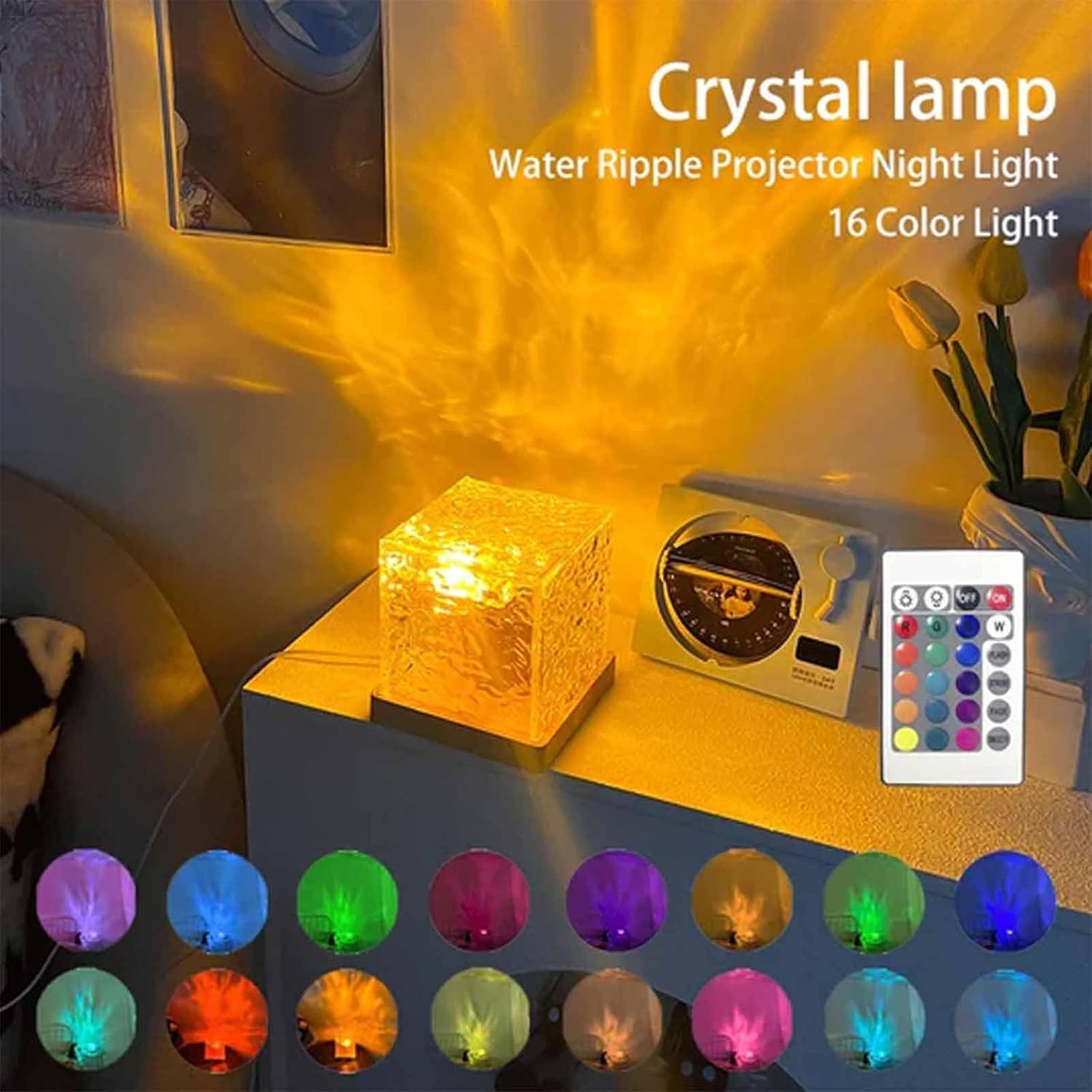
Image: The Lumena Lamp projecting a warm yellow water ripple effect on a wall, with an array of 16 color swatches displayed below, demonstrating the variety of available light colors.

Image: A collage of nine images, each showing the Lumena Lamp projecting different colored water ripple effects onto a wall, including shades of orange, green, blue, and white, highlighting its versatile ambiance creation.
การซ่อมบำรุง
- การทำความสะอาด: ถอดปลั๊กไฟก่อนทำความสะอาด ใช้ผ้าแห้งนุ่มๆ เช็ดทำความสะอาดamp's surface. Do not use abrasive cleaners or solvents.
- พื้นที่จัดเก็บ: เมื่อไม่ได้ใช้งานเป็นเวลานาน ให้เก็บamp เก็บไว้ในที่เย็นและแห้ง หลีกเลี่ยงแสงแดดโดยตรง
- การเปลี่ยนแบตเตอรี่ (รีโมท): If the remote control's range decreases or it becomes unresponsive, replace the AAA batteries.
การแก้ไขปัญหา
| ปัญหา | สาเหตุที่เป็นไปได้ | สารละลาย |
|---|---|---|
| Lamp ไม่เปิด | No power connection / Low battery (rechargeable model) / Remote control battery dead. | Ensure the charging cable is securely connected and plugged into a working power source. Charge the lamp if it's a rechargeable model. Replace remote control batteries. |
| รีโมทคอนโทรลไม่ทำงาน | Batteries are dead or incorrectly inserted / Obstruction between remote and lamp / Remote out of range. | Check and replace remote control batteries, ensuring correct polarity. Remove any obstructions. Ensure remote is within effective range and pointed at the lamp. |
| Light projection is dim or unclear. | Lamp surface is dirty / Room is too bright. | ทำความสะอาดลamp's projection surface with a soft, dry cloth. Use the lamp in a darker environment for best results. Adjust brightness settings. |
| สีไม่เปลี่ยนแปลง | Stuck in a single color mode. | Press the mode buttons on the remote control (e.g., Fade Mode) to activate color cycling. |
ข้อมูลจำเพาะ
| คุณสมบัติ | รายละเอียด |
|---|---|
| ชื่อสินค้า | Lumena Lamp |
| หมายเลขรุ่น | Lumena Lamp |
| วัสดุ | ABS+PC (Acrylonitrile Butadiene Styrene, Polycarbonate) |
| ขนาด | 4.3 x 4.3 x 4.3 นิ้ว (11 x 11 x 11 ซม.) |
| สีอ่อน | 16 สี |
| ระดับความสว่าง | ปรับระดับได้ 6 ระดับ |
| วิธีการควบคุม | สัมผัสและควบคุมระยะไกล |
| แหล่งพลังงาน | USB Powered (Plug-in version) |
| ส่วนประกอบที่รวมอยู่ | Ocean Wave Water Ripple Projector Light, Remote Control, Charging Cable |
การรับประกันและการสนับสนุน
This product is manufactured by Generic. For any warranty claims or technical support, please contact your retailer or the manufacturer directly. Please retain your proof of purchase for warranty purposes.
Note: The manufacturer's warranty typically covers defects in materials and workmanship under normal use. It does not cover damage caused by misuse, accident, unauthorized modification, or neglect.
Ask a question about this manual
Ask about setup, troubleshooting, compatibility, parts, safety, or missing instructions. Manuals+ will review the question and use this page’s manual context to help answer it.