
ATTACK SHARK X82 PRO HE
ATTACK SHARK X82 PRO HE Gaming Keyboard User Manual
Wireless Rapid Trigger RGB Mechanical Gaming Keyboard
1. สินค้าหมดview
The ATTACK SHARK X82 PRO HE is a high-performance 75% layout mechanical gaming keyboard designed for competitive gaming and efficient daily use. It features Hall Effect magnetic switches, rapid trigger technology, adjustable actuation points, and versatile tri-mode connectivity (wired, 2.4GHz wireless, and Bluetooth). With an 8000Hz polling rate and a 5000mAh battery, it delivers ultra-low latency and extended usage.
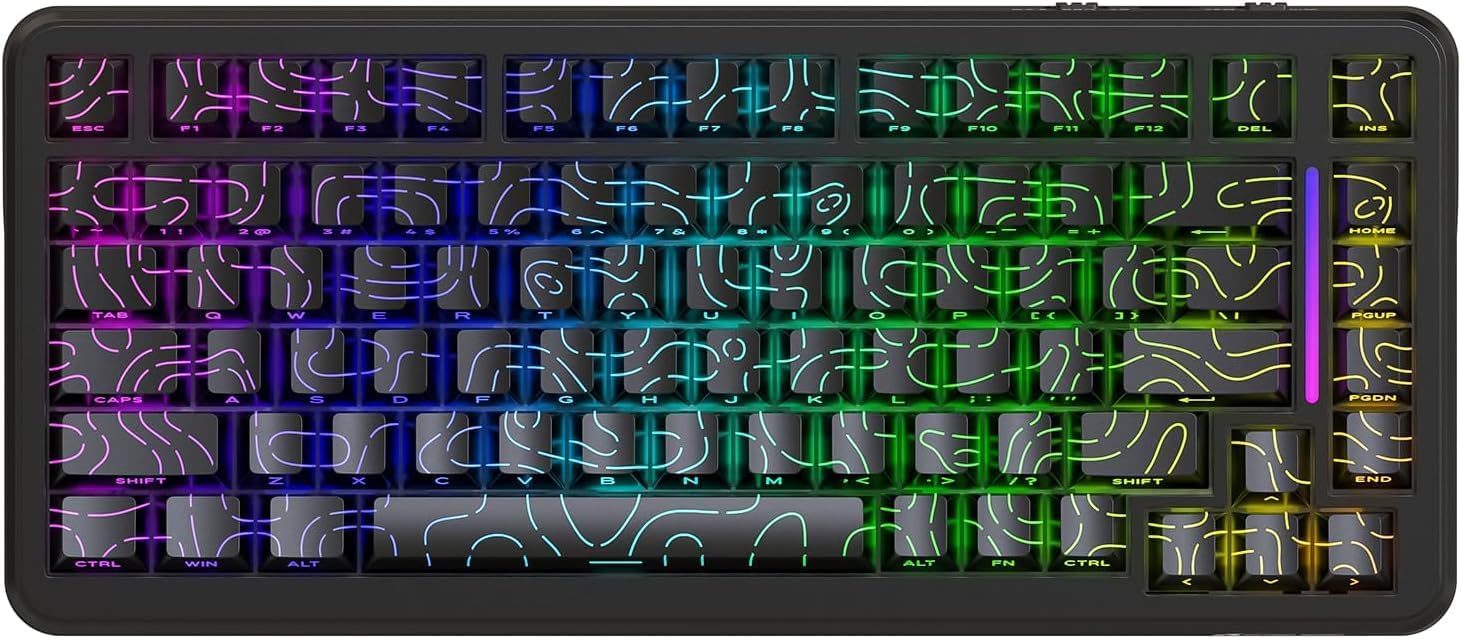
รูปที่ 1 : ด้านหน้า view of the ATTACK SHARK X82 PRO HE Gaming Keyboard, showcasing its RGB lighting and compact 75% layout.

Figure 2: Visual summary of key features including 75% TKL layout, magnetic switches, web driver, tri-mode connectivity, long battery life, full RGB, 8000Hz polling rate, and low latency.
2. การตั้งค่าและการเชื่อมต่อ
The X82 PRO HE keyboard offers three versatile connection methods:
2.1. การเชื่อมต่อแบบมีสาย (USB-C)
Connect the provided USB-C cable from the keyboard to an available USB port on your computer. The keyboard will be automatically recognized and ready for use. This mode supports the full 8000Hz polling rate.
2.2. การเชื่อมต่อไร้สาย 2.4GHz
- ค้นหาตัวรับสัญญาณ USB 2.4GHz ซึ่งโดยปกติจะอยู่ในช่องเก็บของบนแป้นพิมพ์
- เสียบตัวรับสัญญาณ USB เข้ากับพอร์ต USB ที่พร้อมใช้งานบนคอมพิวเตอร์ของคุณ
- Switch the keyboard to 2.4GHz wireless mode. Refer to the keyboard's physical switch or key combination for mode selection (e.g., FN + อาร์).
- แป้นพิมพ์ควรจับคู่กับตัวรับสัญญาณโดยอัตโนมัติ
2.3. การเชื่อมต่อบลูทูธ 5.0
- Switch the keyboard to Bluetooth mode. Refer to the keyboard's physical switch or key combination for mode selection (e.g., FN + Q/W/E for different Bluetooth profileส).
- บนอุปกรณ์ของคุณ (คอมพิวเตอร์ โทรศัพท์ แท็บเล็ต) เปิดใช้งานบลูทูธ แล้วค้นหาอุปกรณ์ใหม่
- Select "ATTACK SHARK X82 PRO HE" from the list of available devices to pair.
- ปฏิบัติตามคำแนะนำบนหน้าจอเพื่อดำเนินการจับคู่ให้เสร็จสมบูรณ์

Figure 3: Illustration of the three connectivity modes: USB-C wired, 2.4GHz wireless, and Bluetooth, with corresponding key combinations for switching.
2.4. การชาร์จครั้งแรก
Before first use, it is recommended to fully charge the keyboard using the provided USB-C cable. The 5000mAh battery provides extended usage time.
3. โหมดการทำงานและฟังก์ชันต่างๆ
3.1. อัตราการสำรวจข้อมูลและความหน่วง
The X82 PRO HE supports an 8000Hz polling rate in wired mode, ensuring ultra-low latency of 0.1ms and a 128K scanning rate. This provides immediate response to keystrokes, crucial for competitive gaming. In 2.4GHz wireless mode, the polling rate is 1000Hz.

Figure 4: Visual representation of the 8000Hz polling rate in wired mode and 1000Hz in wireless mode, highlighting the ultra-low latency.
3.2. Hall Effect Magnetic Switches
Equipped with self-developed Hall Effect magnetic switches, the keyboard offers 0.01mm actuation precision. These switches are hot-swappable, allowing for easy replacement with other N-pole downward magnetic switches.
3.3. Rapid Trigger and Adjustable Actuation
Rapid Trigger (RT) technology allows keys to register actuation and reset based on movement distance rather than a fixed point, enabling faster repeated inputs. The adjustable actuation point feature allows users to customize the key travel distance required for a keystroke to register, from 0.1mm to 3.4mm, providing personalized responsiveness.

Figure 5: Diagram illustrating the difference between a regular switch and a rapid trigger switch, emphasizing improved accuracy and zero dead zone for gaming.

รูปที่ 6: รายละเอียด view of the magnetic switch and its specifications, including actuation range and operation force, highlighting the adjustable actuation point.
3.4. การควบคุมแสง RGB
The keyboard features south-facing RGB lighting with over 20 dynamic backlight effects and side-bar effects, offering 16.8 million colors. Use the following key combinations to control the lighting:
- เอฟเอ็น + \|: สลับโหมดไฟ
- FN + ก: Switch light bar color
- เอฟเอ็น + ↑: ความสว่างของแสงไฟ +
- เอฟเอ็น + ↓: Backlight brightness -
- เอฟเอ็น + ←: Backlight speed -
- เอฟเอ็น + →: Backlight speed +
- FN + ป้อน: Switch light color
- FN + Caps: Switch light bar mode

Figure 7: Visual guide to the full RGB light effects and the key combinations for controlling various lighting parameters.
3.5. WIN and Mac Compatibility
The keyboard supports one-key switching between Windows and Mac operating systems, enhancing versatility for different user environments.
4. การปรับแต่งและซอฟต์แวร์
The ATTACK SHARK X82 PRO HE keyboard offers extensive customization options through its web-based software. This allows users to fine-tune various settings to match their preferences and optimize performance for different applications.
4.1. การเข้าถึง Web คนขับรถ
ในการเข้าถึงซอฟต์แวร์การปรับแต่ง ให้ไปที่ qmk.top ในของคุณ web browser. This network-driven platform provides a comprehensive interface for managing your keyboard settings.
4.2. คุณสมบัติการปรับแต่ง
- การตั้งค่าทริกเกอร์เร็ว (RT): Adjust the sensitivity and behavior of the rapid trigger function for individual keys.
- SOCD (ทิศหลักตรงข้ามพร้อมกัน): Configure how simultaneous opposing inputs are handled, useful for fighting games.
- ฟังก์ชั่นขั้นสูง: Utilize features like DKS (Dynamic Keystroke), MT (Macro Toggle), and TGL (Toggle) for complex key behaviors.
- Key Remapping and Macros: Freely remap any key and create custom macros for automated sequences of commands.
- Deadzones: Define deadzones for key actuation to prevent accidental inputs.
- การปรับแต่งแสงสว่าง: Personalize RGB lighting effects, colors, and patterns beyond the onboard controls.
- โปรfiles: Create and save unlimited profiles for different games, work applications, or user preferences, allowing quick switching between configurations.

Figure 8: Interface of the web-based driver, showing options for rapid trigger settings, key personalization, and RGB lighting control.
5. การบำรุงรักษา
Proper maintenance ensures the longevity and optimal performance of your ATTACK SHARK X82 PRO HE keyboard.
5.1. การทำความสะอาด
- การทำความสะอาดทั่วไป: ใช้ผ้านุ่มไม่เป็นขุยเช็ดเล็กน้อยampเช็ดทำความสะอาดปุ่มกดและโครงแป้นพิมพ์ด้วยน้ำหรือน้ำยาทำความสะอาดอ่อนๆ หลีกเลี่ยงความชื้นมากเกินไป
- การกำจัดฝุ่น: ใช้ลมเป่าอัดเพื่อกำจัดฝุ่นและเศษสิ่งสกปรกที่อยู่ระหว่างปุ่มกดและสวิตช์
- การทำความสะอาดคีย์แคป: For deeper cleaning, keycaps can be carefully removed. Use a keycap puller to avoid damage. Clean keycaps with mild soap and water, then ensure they are completely dry before reattaching.
5.2. สวิตช์แบบ Hot-Swappable
The X82 PRO HE features hot-swappable Hall Effect magnetic switches. This allows for easy replacement or customization of switches without soldering. Use a switch puller to carefully remove switches. Ensure replacement switches are compatible N-pole downward magnetic switches.

Figure 9: Close-up of the Doubleshot PBT keycaps, highlighting their contour design and OEM profile, which are durable and easy to clean.
6 การแก้ไขปัญหา
If you encounter issues with your ATTACK SHARK X82 PRO HE keyboard, refer to the following common solutions:
| ปัญหา | สาเหตุที่เป็นไปได้ | สารละลาย |
|---|---|---|
| แป้นพิมพ์ไม่ตอบสนอง (มีสาย) | การเชื่อมต่อสายเคเบิลหลวม, พอร์ต USB ชำรุด | ตรวจสอบให้แน่ใจว่าเสียบสาย USB-C แน่นดีแล้ว ลองใช้พอร์ต USB หรือสายอื่นดู |
| 2.4GHz ไร้สายไม่เชื่อมต่อ | ตัวรับสัญญาณไม่ได้เสียบปลั๊ก, แป้นพิมพ์อยู่ในโหมดที่ไม่ถูกต้อง, แบตเตอรี่เหลือน้อย | Ensure receiver is plugged in. Switch keyboard to 2.4GHz mode (FN + อาร์). Charge the keyboard. |
| บลูทูธไม่จับคู่ | แป้นพิมพ์ไม่อยู่ในโหมดจับคู่ บลูทูธของอุปกรณ์ปิดอยู่ มีสัญญาณรบกวน | Switch keyboard to Bluetooth mode (FN + Q/W/E). Ensure device Bluetooth is on. Try re-pairing. |
| แสง RGB ไม่ทำงาน/ไม่ถูกต้อง | Incorrect lighting mode, software settings override. | หมุนเวียนผ่านโหมดแสงโดยใช้ เอฟเอ็น + \|. Check lighting settings in the web คนขับ (qmk.top). |
| กุญแจไม่ลงทะเบียนหรือพิมพ์ซ้ำ | Switch issue, software calibration needed. | Ensure switches are properly seated. Calibrate actuation points and deadzones using the web คนขับรถ |
| Keyboard feels unstable (uneven feet) | Manufacturing variance. | If the issue persists and affects usability, contact customer support. |
For advanced troubleshooting or issues not listed here, please refer to the official ATTACK SHARK support resources or the webซอฟต์แวร์ปรับแต่งตาม -พื้นฐาน
7. ข้อมูลจำเพาะ
| คุณสมบัติ | รายละเอียด |
|---|---|
| แบบอย่าง | ATTACK SHARK X82 PRO HE |
| เค้าโครง | 75% (83 คีย์) |
| ประเภทสวิตซ์ | Hall Effect Magnetic Switches (Hot-swappable) |
| การเชื่อมต่อ | USB-C แบบมีสาย, ไร้สาย 2.4GHz, บลูทูธ 5.0 |
| อัตราการสำรวจความคิดเห็น | 8000Hz (Wired), 1000Hz (2.4GHz Wireless) |
| ความหน่วงเวลา | 0.1ms (Wired) |
| ความแม่นยำในการทำงาน | 0.01มม. |
| ช่วงการทำงาน | 0.1 มม. - 3.4 มม. (ปรับได้) |
| ความจุของแบตเตอรี่ | 5000mAh |
| ปุ่มกด | Doubleshot PBT (Contour Design) |
| การแบ็คไลท์ | Full RGB (South-facing, 20+ effects, 16.8M colors) |
| การพลิกแป้น N | โรลโอเวอร์ N-Key แบบเต็ม |
| การก่อสร้าง | Top Mounted, Aluminum Alloy Positioning Plate, Dual-layer PORON foam |
| ซอฟต์แวร์ | Web-based Driver (qmk.top) |
| ความเข้ากันได้ของระบบปฏิบัติการ | วินโดวส์, แมคโอเอส |
| น้ำหนักสินค้า | 1.16 กก. |
| ขนาดแพ็คเกจ | 36.79 x 19.3 x 5.3 ซม. |
8. การรับประกันและการสนับสนุน
For warranty information, technical support, or service inquiries, please contact ATTACK SHARK customer support through their official webติดต่อเว็บไซต์หรือร้านค้าที่คุณซื้อสินค้ามา เก็บหลักฐานการซื้อไว้เพื่อใช้ในการเคลมประกัน
เป็นทางการ Webเว็บไซต์: ร้าน ATTACK SHARK บน Amazon
Ask a question about this manual
Ask about setup, troubleshooting, compatibility, parts, safety, or missing instructions. Manuals+ will review the question and use this page’s manual context to help answer it.