
1. บทนำ
Thank you for choosing the KLIM KLCD-0582 CD Cassette Boombox. This versatile audio system combines classic and modern features, allowing you to enjoy music from various sources including CDs, cassette tapes, AM/FM radio, Bluetooth-enabled devices, USB drives, and auxiliary input. This manual provides detailed instructions for safe operation, setup, and maintenance of your device. Please read it thoroughly before use and retain it for future reference.
2. คำแนะนำด้านความปลอดภัยที่สำคัญ
- อ่านคำแนะนำเหล่านี้อย่างละเอียดก่อนใช้งานเครื่อง
- เก็บคำแนะนำเหล่านี้ไว้เพื่อใช้อ้างอิงในอนาคต
- ปฏิบัติตามคำเตือนทั้งหมดเกี่ยวกับผลิตภัณฑ์และในคู่มือการใช้งาน
- ปฏิบัติตามคำแนะนำทั้งหมด
- ห้ามใช้อุปกรณ์นี้ใกล้น้ำ
- ทำความสะอาดด้วยผ้าแห้งเท่านั้น
- อย่าปิดกั้นช่องระบายอากาศใดๆ ติดตั้งตามคำแนะนำของผู้ผลิต
- ห้ามติดตั้งใกล้แหล่งความร้อน เช่น หม้อน้ำ เครื่องทำความร้อน เตา หรืออุปกรณ์อื่น ๆ (รวมถึง ampเครื่องให้ความร้อน) ที่ผลิตความร้อน
- ปกป้องสายไฟไม่ให้ถูกเหยียบหรือถูกหนีบ โดยเฉพาะที่ปลั๊ก เต้ารับไฟฟ้า และจุดที่สายไฟออกจากเครื่อง
- ใช้เฉพาะอุปกรณ์เสริม/สิ่งที่แนบตามที่ผู้ผลิตกำหนดเท่านั้น
- ถอดปลั๊กอุปกรณ์นี้ในระหว่างพายุฝนฟ้าคะนองหรือเมื่อไม่ได้ใช้งานเป็นเวลานาน
- แจ้งบริการทั้งหมดให้ช่างที่ผ่านการรับรองทราบ จำเป็นต้องให้บริการเมื่ออุปกรณ์ได้รับความเสียหายในลักษณะใดก็ตาม เช่น สายไฟหรือปลั๊กชำรุด ของเหลวหกหรือมีวัตถุตกลงไปในอุปกรณ์ อุปกรณ์โดนฝนหรือความชื้น ไม่สามารถทำงานได้ตามปกติ หรือตกหล่น
3. เนื้อหาบรรจุภัณฑ์
กรุณาตรวจสอบแพ็คเกจสำหรับรายการต่อไปนี้:
- KLIM CD Cassette Player (KLCD-0582)
- สายไฟ (สายไฟ AC)
- AAA alkaline batteries * 2 (for remote control)
- KLIM envelope
- คู่มือการใช้งาน (เอกสารนี้)
4. สินค้าหมดview
Familiarize yourself with the main components and controls of your KLIM KLCD-0582 boombox.
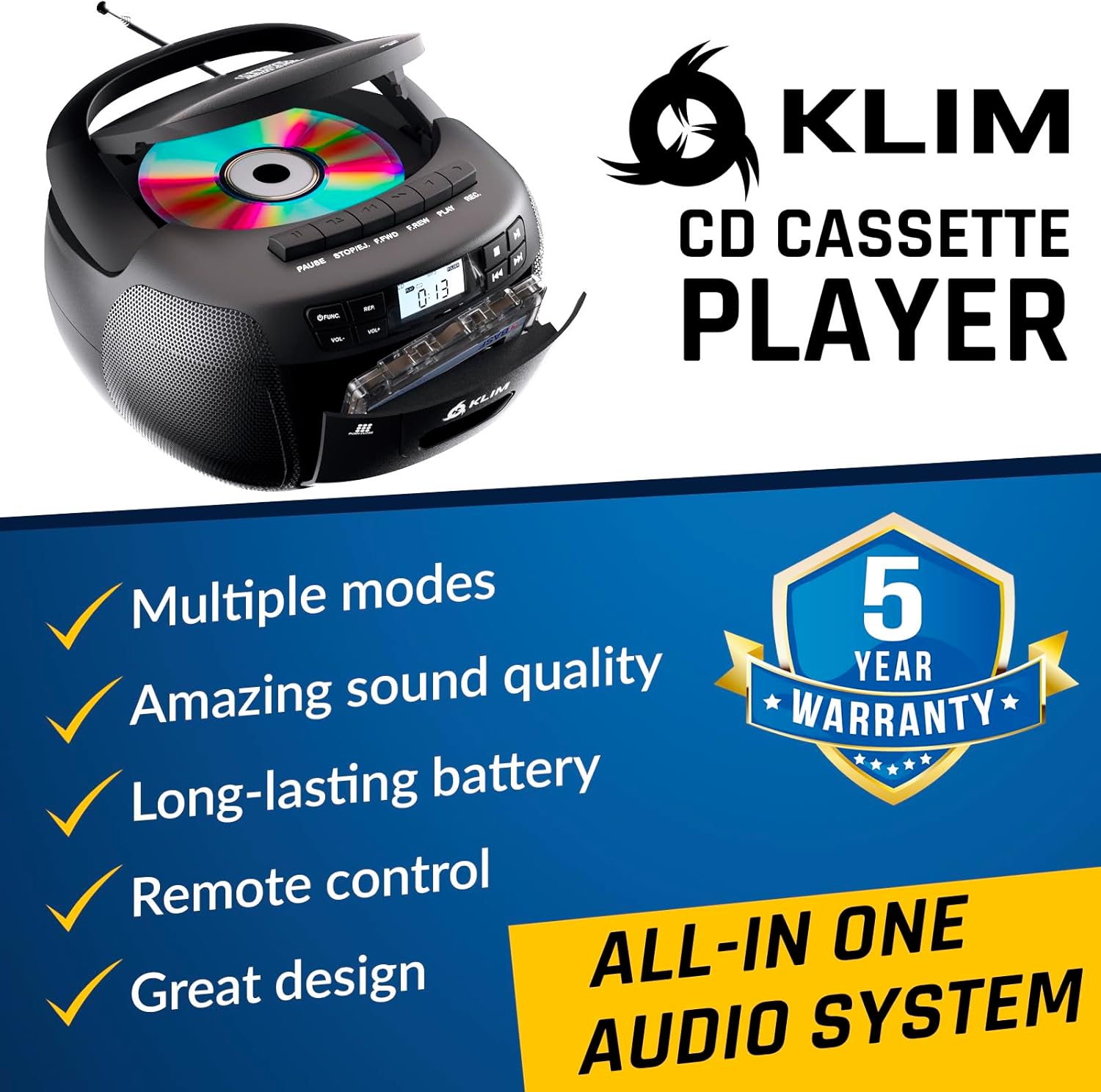
รูปที่ 4.1 : ด้านหน้า view of the KLIM KLCD-0582 CD Cassette Boombox, showing the CD lid, cassette deck, and control buttons.
แผงควบคุมด้านหน้า:
- ปุ่มเปิด/ปิด: เปิดหรือปิดเครื่อง
- ปุ่มฟังก์ชั่น/โหมด: Switches between CD, Cassette, Radio, Bluetooth, USB, and AUX modes.
- Volume Control (VOL+/-): ปรับระดับเสียงในการเล่น
- Play/Pause Button (CD/USB): เริ่มหรือหยุดชั่วคราวการเล่น CD/USB
- Stop Button (CD/USB/Cassette): หยุดการเล่น
- ปุ่มข้าม/ค้นหา (<< / >>): Skips tracks or searches within a track (CD/USB). Tunes radio stations.
- Repeat Button (CD/USB): เล่นซ้ำแทร็กปัจจุบันหรือทุกแทร็ก
- Program Button (CD/USB): Programs track order for CD/USB playback.
- Record Button (Cassette): Initiates recording to cassette tape.
- Eject Button (Cassette): Opens the cassette deck.
- จอแสดงผล LCD: แสดงโหมดปัจจุบัน หมายเลขแทร็ก ความถี่วิทยุ ฯลฯ

รูปที่ 4.2: รายละเอียด view of the LCD display and speaker area, highlighting the digital interface.
Side/Rear Panel Connections:
- อินพุตไฟ AC: เชื่อมต่อสายไฟ AC
- ช่องใส่แบตเตอรี่: Holds 6 C-size batteries for portable use.
- พอร์ต USB: สำหรับการเล่นเสียง fileจากไดรฟ์ USB
- ช่องต่อ AUX (3.5 มม.): เชื่อมต่ออุปกรณ์เสียงภายนอก
- แจ็คหูฟัง (3.5 มม.): สำหรับการฟังส่วนตัว
- เสาอากาศยืดไสลด์: สำหรับการรับสัญญาณวิทยุ AM/FM

Figure 4.3: Product label on the bottom of the unit, indicating model number and electrical ratings.
5. การตั้งค่า
5.1 การจ่ายไฟให้กับอุปกรณ์
เครื่องเล่นเพลงพกพาของคุณสามารถใช้พลังงานจากไฟบ้านหรือแบตเตอรี่ก็ได้
ไฟฟ้ากระแสสลับ (สำหรับใช้ภายในอาคาร):
- ตรวจสอบให้แน่ใจว่าได้ปิดเครื่องแล้ว
- Connect the supplied AC power cord to the AC power input on the rear of the boombox.
- Plug the other end of the AC power cord into a standard wall outlet (110-120V, 60Hz).
DC Power (Battery Operation - Portable Use):
- โปรดตรวจสอบให้แน่ใจว่าเครื่องปิดอยู่และถอดปลั๊กออกจากแหล่งจ่ายไฟ AC แล้ว
- เปิดฝาช่องใส่แบตเตอรี่ที่ด้านล่างของตัวเครื่อง
- Insert 6 C-size (UM-2) batteries, ensuring correct polarity (+/-) as indicated inside the compartment.
- ปิดฝาช่องใส่แบตเตอรี่ให้แน่น
บันทึก: ถอดแบตเตอรี่ออกหากจะไม่ได้ใช้งานเครื่องเป็นเวลานาน เพื่อป้องกันการรั่วไหลและความเสียหาย
5.2 การติดตั้งแบตเตอรี่รีโมทคอนโทรล
- เปิดช่องใส่แบตเตอรี่ที่ด้านหลังของรีโมทคอนโทรล
- Insert 2 AAA alkaline batteries, observing the correct polarity.
- ปิดฝาช่องใส่แบตเตอรี่

Figure 5.1: The boombox shown with its remote control, which requires AAA batteries.
5.3 การตั้งค่าเสาอากาศ
เพื่อการรับสัญญาณวิทยุ FM ที่ดีที่สุด ให้ยืดเสาอากาศออกจนสุด สำหรับการรับสัญญาณ AM ให้หมุนตัวเครื่องเพื่อให้ได้สัญญาณที่ดีที่สุด
6. การดำเนินการ
6.1 การควบคุมขั้นพื้นฐาน
- เปิด/ปิดเครื่อง: กดปุ่ม พลัง ปุ่ม.
- เลือกโหมด: กดปุ่ม การทำงาน or โหมด button repeatedly to cycle through CD, Cassette, Radio (AM/FM), Bluetooth, USB, and AUX modes.
- ปรับระดับเสียง: ใช้ เล่ม+ และ ฉบับ- ปุ่ม
6.2 การเล่นแผ่นซีดี
- กดปุ่ม การทำงาน ปุ่มเพื่อเลือกโหมดซีดี
- เปิดฝาช่องใส่ซีดี
- Place a CD (audio CD or MP3/WMA CD) with the label side facing up.
- Close the CD compartment lid. The unit will read the disc and begin playback automatically or display the total number of tracks.
- กด เล่น/หยุดชั่วคราว เพื่อเริ่มหรือหยุดการเล่นชั่วคราว
- กด หยุด เพื่อหยุดการเล่น
- ใช้ ข้าม (<< / >>) buttons to skip tracks. Hold to fast forward/rewind within a track.
- โปรแกรมการเล่น: ในโหมดหยุด กด โปรแกรม. ใช้ ข้าม เพื่อเลือกแทร็กที่ต้องการ จากนั้นกดปุ่ม โปรแกรม again to confirm each track. Press เล่น เพื่อเริ่มการเล่นตามโปรแกรม
- เล่นซ้ำ: กด ทำซ้ำ once for single track repeat, twice for all tracks repeat.
6.3 การเล่นและการบันทึกเทปคาสเซ็ต
- กดปุ่ม การทำงาน ปุ่มสำหรับเลือกโหมด TAPE
- กดปุ่ม ดีดออก button to open the cassette deck.
- Insert a cassette tape and close the deck.
- กด เล่น เพื่อเริ่มการเล่น
- ใช้ FAST FORWARD (FFWD) or ย้อนกลับ (REW) ปุ่มสำหรับนำทางเทป
- กด หยุด เพื่อหยุดการเล่น
การบันทึกลงเทปคาสเซ็ต:
- Insert a blank, recordable cassette tape.
- Select the desired source (CD, Radio, AUX, Bluetooth, USB).
- Start playback on the source (e.g., play a CD track, tune to a radio station).
- กดปุ่ม บันทึก button on the boombox. The เล่น button will also engage. Recording will begin.
- กด หยุด เพื่อสิ้นสุดการบันทึก
สำคัญ: Ensure the cassette tape has its record-protection tabs intact for recording.
วิทยุ AM/FM 6.4
- กดปุ่ม การทำงาน button to select RADIO mode.
- ยืดเสาอากาศแบบยืดหดได้เพื่อรับสัญญาณ FM สำหรับ AM ให้หมุนตัวเครื่อง
- ใช้ การปรับแต่ง ลูกบิดหรือ ข้าม (<< / >>) buttons to tune to your desired station. The frequency will be displayed on the LCD.
6.5 การเชื่อมต่อบลูทูธ
- กดปุ่ม การทำงาน button to select BLUETOOTH mode. The LCD will display "BT" and the unit will enter pairing mode, indicated by a flashing Bluetooth icon.
- บนอุปกรณ์ที่รองรับ Bluetooth ของคุณ (เช่น สมาร์ทโฟน แท็บเล็ต) ให้เปิดใช้งาน Bluetooth และค้นหาอุปกรณ์ที่มีอยู่
- Select "KLIM Boombox" from the list of devices.
- Once paired, the Bluetooth icon on the boombox's LCD will stop flashing. You can now play audio from your device through the boombox.
- Control playback (play/pause, skip tracks) either from your connected device or using the boombox's controls.
6.6 การเล่น USB
- ใส่แฟลชไดรฟ์ USB เข้ากับพอร์ต USB
- กดปุ่ม การทำงาน button to select USB mode. The unit will automatically detect and begin playing compatible audio fileไฟล์เสียง (MP3/WMA)
- ใช้ เล่น/หยุดชั่วคราว, หยุด, และ ข้าม (<< / >>) buttons to control playback, similar to CD mode.
- โปรแกรมการเล่น: ในโหมดหยุด กด โปรแกรม. ใช้ ข้าม เพื่อเลือกแทร็กที่ต้องการ จากนั้นกดปุ่ม โปรแกรม again to confirm each track. Press เล่น เพื่อเริ่มการเล่นตามโปรแกรม
อินพุต AUX 6.7 ช่อง
- Connect an external audio device (e.g., MP3 player, smartphone) to the AUX input jack using a 3.5mm audio cable (not included).
- กดปุ่ม การทำงาน button to select AUX mode. The LCD will display "AUX".
- เริ่มเล่นเสียงบนอุปกรณ์ภายนอกของคุณ เสียงจะถูกส่งผ่านลำโพงของเครื่องเล่นเพลงพกพา
- Volume can be adjusted on both the boombox and the external device. Playback controls are managed on the external device.
6.8 การใช้รีโมทคอนโทรล
The included remote control allows convenient operation from a distance of up to 20 feet. Ensure line of sight to the boombox's front panel.
- ปุ่มเปิด/ปิด (ปุ่มสีแดง): เปิด/ปิดเครื่อง
- ปิดเสียง: ปิดเสียง/เปิดเสียง
- ฉบับ+/-: ปรับระดับเสียง
- ฟังก์: Cycles through modes (CD, TAPE, FM, AM, BT, USB, AUX).
- ตัวแทน: Repeat function for CD/USB.
- โปรแกรม: Program function for CD/USB.
- PLAY/PAUSE, STOP, FFWD, REW: Playback controls for CD/USB/Cassette.
- Number Buttons (0-9, -10, +10): Direct track selection for CD/USB.
7. การบำรุงรักษา
7.1 การทำความสะอาดหน่วย
- ถอดปลั๊กเครื่องออกจากแหล่งจ่ายไฟทุกครั้งก่อนทำความสะอาด
- ใช้ผ้าแห้งนุ่มๆ เช็ดทำความสะอาดพื้นผิวภายนอก
- ห้ามใช้สารทำความสะอาดที่มีฤทธิ์กัดกร่อน ขี้ผึ้ง หรือตัวทำละลาย เพราะอาจทำให้พื้นผิวเสียหายได้
- สำหรับเลนส์ซีดี ให้ใช้แผ่นทำความสะอาดเลนส์ซีดีโดยเฉพาะ
- สำหรับเครื่องเล่นเทปคาสเซ็ต ให้ทำความสะอาดหัวอ่านเทปและลูกกลิ้งหนีบเทปเป็นระยะ โดยใช้สำลีชุบน้ำยาทำความสะอาดเบาๆampเคลือบด้วยแอลกอฮอล์ไอโซโพรพิล
7.2 พื้นที่จัดเก็บ
When not in use for extended periods, store the unit in a cool, dry place away from direct sunlight and extreme temperatures. Remove batteries from both the main unit and the remote control to prevent leakage.
8 การแก้ไขปัญหา
If you encounter issues with your boombox, please refer to the following common problems and solutions before contacting support.
| ปัญหา | สาเหตุที่เป็นไปได้ | สารละลาย |
|---|---|---|
| ไม่มีไฟฟ้า | สายไฟ AC ไม่ได้เชื่อมต่อ; แบตเตอรี่หมดหรือใส่ไม่ถูกต้อง | ตรวจสอบการเชื่อมต่อสายไฟ AC เปลี่ยนแบตเตอรี่หรือตรวจสอบให้แน่ใจว่าขั้วถูกต้อง |
| ไม่มีเสียง | Volume too low; Mute function active; Incorrect mode selected; Headphones connected. | Increase volume; Press MUTE on remote; Select correct mode; Disconnect headphones. |
| ซีดีไม่เล่น / ข้อผิดพลาด "ไม่มีดิสก์" | ใส่แผ่นซีดีไม่ถูกต้อง; แผ่นซีดีสกปรกหรือมีรอยขีดข่วน; ช่องใส่แผ่นซีดีปิดไม่สนิท; เครื่องอยู่ในโหมดที่ไม่ถูกต้อง | Insert CD label side up; Clean or replace CD; Close CD lid securely; Select CD mode. |
| เทปคาสเซ็ตเล่น/บันทึกไม่ได้ | Tape inserted incorrectly; Tape damaged; Record-protection tab missing (for recording); Unit in wrong mode. | Insert tape correctly; Use a new tape; Cover record-protection tab with tape; Select TAPE mode. |
| การรับสัญญาณวิทยุไม่ดี | เสาอากาศไม่ยืดออก ตำแหน่งของหน่วย | ยืดเสาอากาศ FM ออกได้เต็มที่ หมุนตัวเครื่องเพื่อการรับสัญญาณ AM ที่ดีขึ้น |
| การจับคู่บลูทูธล้มเหลว | เครื่องเล่นเพลงไม่อยู่ในโหมดจับคู่; บลูทูธของอุปกรณ์ปิดอยู่; อุปกรณ์อยู่ไกลเกินไป | Ensure boombox is in BT mode and flashing; Enable Bluetooth on device; Move device closer (within 30 ft). |
| รีโมตคอนโทรลไม่ทำงาน | แบตเตอรี่หมดหรือใส่ไม่ถูกต้อง; มีสิ่งกีดขวางระหว่างรีโมทและตัวเครื่อง | Replace batteries; Ensure clear line of sight to the unit's front panel. |
9. ข้อมูลจำเพาะ
| คุณสมบัติ | รายละเอียด |
|---|---|
| หมายเลขรุ่น | KLCD-0582 |
| ยี่ห้อ | คลิม |
| เทคโนโลยีการเชื่อมต่อ | อุปกรณ์เสริม, บลูทูธ 5.1, USB |
| สี | สีดำ |
| ขนาดรายการ (ยาว x กว้าง x สูง) | 8.5 x 8.39 x 4.92 นิ้ว |
| น้ำหนักสินค้า | 1.5 กิโลกรัม |
| แหล่งพลังงาน | Corded Electric (AC 110-120V/60Hz), 6 x C-size batteries (DC 9V) |
| อุปกรณ์ที่รองรับ | เครื่องเล่น MP3, อุปกรณ์ที่รองรับบลูทูธ |
| มาตรฐานที่รองรับ | ซีดี, MP3, WMA |
| รูปแบบเสียงที่รองรับ | ซีดี-ดา, MP3, WMA |
| ลำโพง | 3W Dual Speakers |
| แบนด์วิทยุ | เอเอ็ม/เอฟเอ็ม |
10. การรับประกันและการสนับสนุน
10.1 ข้อมูลการรับประกัน
The KLIM KLCD-0582 CD Cassette Boombox comes with a รับประกัน 5 ปี. This warranty covers manufacturing defects and ensures the product meets its specified performance. Please retain your proof of purchase for warranty claims.
10.2 การสนับสนุนลูกค้า
For any questions, technical assistance, or warranty claims, please contact KLIM customer support. You can typically find contact information on the manufacturer's website or through the retailer where you purchased the product. KLIM offers 24/7 customer support to assist you.
For more information, visit the official KLIM webไซต์หรือดูรายละเอียดการติดต่อที่ระบุไว้ในบรรจุภัณฑ์ผลิตภัณฑ์ของคุณ