
การแนะนำ
Thank you for choosing the Ledwood ACCESS130 Portable HiFi Speaker. This manual provides essential information for the safe and efficient operation of your device. The ACCESS130 is a versatile portable speaker featuring dynamic RGB LED effects, Bluetooth 5.3 connectivity, USB input, and a karaoke function with an included wireless microphone. It is designed to deliver a powerful audio experience for various occasions.
ข้อมูลด้านความปลอดภัย
- อ่านคำแนะนำทั้งหมดอย่างละเอียดก่อนใช้ผลิตภัณฑ์
- อย่าให้ลำโพงโดนน้ำหรือความชื้นมากเกินไป ผลิตภัณฑ์นี้ไม่กันน้ำ
- ควรวางลำโพงให้ห่างจากแหล่งความร้อน แสงแดดโดยตรง และวัสดุที่ติดไฟได้ง่าย
- ห้ามถอดประกอบ ซ่อมแซม หรือดัดแปลงอุปกรณ์ด้วยตนเอง โปรดส่งต่ออุปกรณ์ดังกล่าวให้ช่างผู้ชำนาญการเป็นผู้ดำเนินการซ่อมแซม
- ใช้เฉพาะสายชาร์จ USB-C ที่ให้มาเท่านั้น
- หลีกเลี่ยงการฟังในระดับเสียงสูงเป็นเวลานานเพื่อป้องกันความเสียหายต่อการได้ยิน
- เก็บให้พ้นจากมือเด็ก
เนื้อหาแพ็คเกจ
กรุณาตรวจสอบแพ็คเกจสำหรับรายการต่อไปนี้:
- Ledwood ACCESS130 Portable HiFi Speaker
- สายชาร์จ USB-C
- ไมโครโฟนไร้สาย
- สายสะพาย
สินค้าเกินview
Familiarize yourself with the components and controls of your Ledwood ACCESS130 speaker.
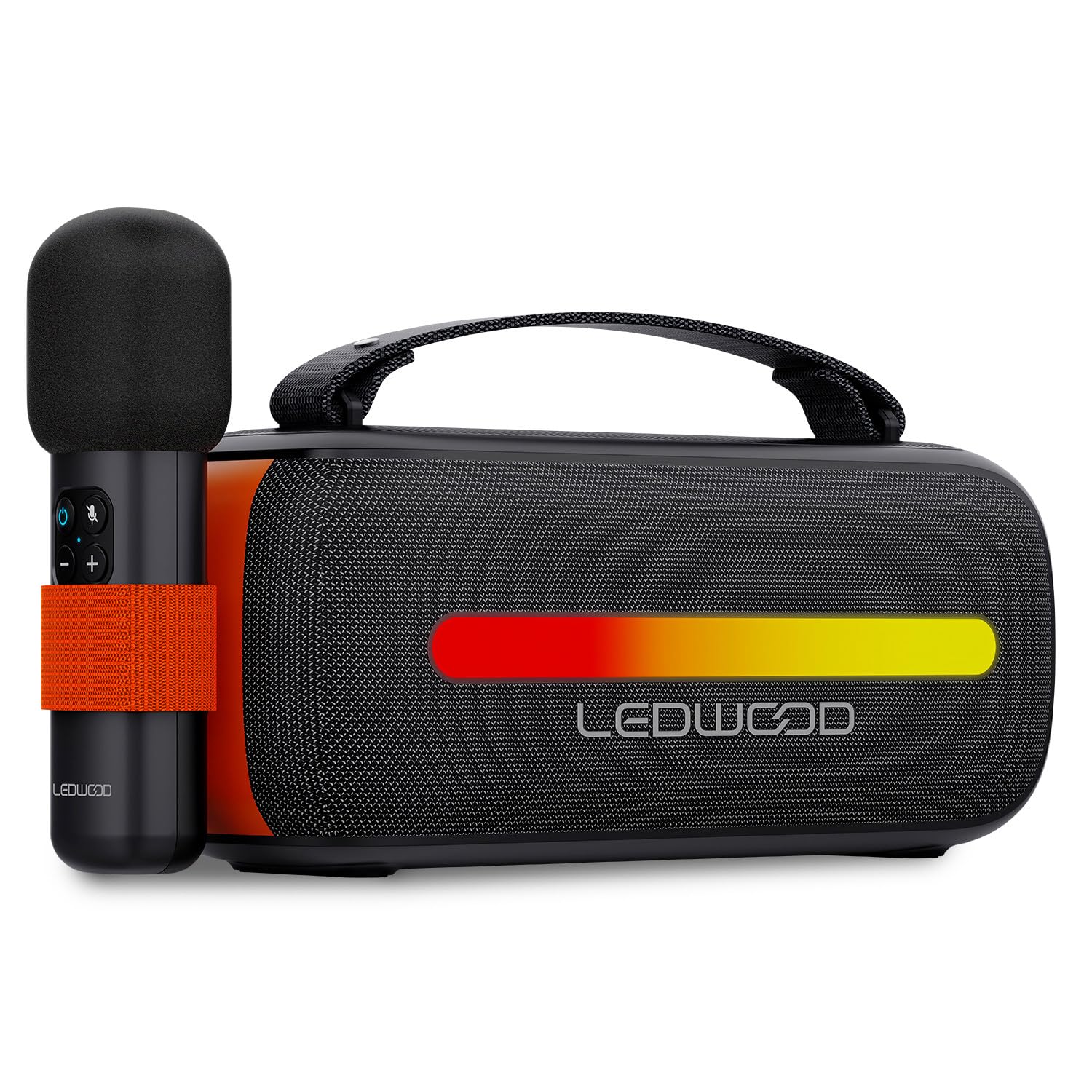
Image: The Ledwood ACCESS130 portable speaker shown with its wireless microphone attached to the side. The speaker features a black mesh grille and an illuminated LED strip on the front.
การควบคุมและพอร์ต

ภาพ: จากบนลงล่าง view of the Ledwood ACCESS130 speaker, highlighting the control panel with buttons for power, volume, mode, and LED effects. Icons for LED colors, microphone, karaoke function, USB-C, and wireless connection are also visible.
- ปุ่มเปิด/ปิด: กดค้างไว้เพื่อเปิด/ปิดลำโพง
- ปุ่มโหมด (M): Press to switch between Bluetooth, USB, and other input modes.
- เพิ่มระดับเสียง (+): เพิ่มปริมาณ
- ลดเสียงลง (-): ลดระดับเสียง.
- ปุ่มเล่น/หยุดชั่วคราว: เล่นหรือหยุดชั่วคราวการเล่นเสียง
- LED Effect Button: Cycle through different LED lighting modes or turn them off.
- พอร์ต USB-C: สำหรับชาร์จลำโพง
- พอร์ต USB-A: For USB audio playback.
การตั้งค่า
1. ชาร์จลำโพง
- เชื่อมต่อสายชาร์จ USB-C ที่ให้มากับพอร์ต USB-C ของลำโพง
- เชื่อมต่อปลายสายอีกด้านหนึ่งเข้ากับอะแดปเตอร์ไฟ USB ที่ใช้งานร่วมกันได้ (ไม่รวมอยู่ด้วย) หรือพอร์ต USB ของคอมพิวเตอร์
- The LED indicator will show charging status. A full charge takes approximately [Charging Time - not specified in input, omit if not available].
2. การเปิด/ปิดเครื่อง
- ในการเปิดเครื่อง ให้กดปุ่มเปิด/ปิดค้างไว้จนกว่าลำโพงจะทำงาน
- หากต้องการปิดเครื่อง ให้กดปุ่มเปิด/ปิดค้างไว้อีกครั้งจนกว่าลำโพงจะปิดลง
3. การจับคู่บลูทู ธ
- Ensure the speaker is powered on and in Bluetooth mode (indicated by a flashing Bluetooth LED). If not, press the 'M' (Mode) button to switch to Bluetooth mode.
- บนสมาร์ทโฟน แท็บเล็ต หรือคอมพิวเตอร์ของคุณ ให้เปิดใช้งานบลูทูธ แล้วค้นหาอุปกรณ์ที่ใช้งานได้
- Select "Ledwood ACCESS130" from the list of devices.
- Once paired, the Bluetooth LED will stop flashing and remain solid, indicating a successful connection.
4. การเชื่อมต่อไมโครโฟนไร้สาย
- ตรวจสอบให้แน่ใจว่าไมโครโฟนไร้สายได้รับการชาร์จและเปิดใช้งานแล้ว
- The microphone should automatically connect to the speaker when both are powered on and within range.
- Test the microphone by speaking into it to confirm audio output from the speaker.
การดำเนินงาน
1. การเล่นบลูทูธ
- หลังจากจับคู่บลูทูธสำเร็จแล้ว ให้เปิดแอปพลิเคชันเพลงบนอุปกรณ์ที่เชื่อมต่อของคุณ
- Start playing audio. The sound will be transmitted wirelessly to the ACCESS130 speaker.
- ใช้ปุ่มปรับระดับเสียงบนลำโพงหรืออุปกรณ์ที่เชื่อมต่อเพื่อปรับระดับเสียง
- Press the Play/Pause button on the speaker to control playback.
2. การเล่นผ่าน USB
- ใส่แฟลชไดรฟ์ USB ที่มีเสียง files (e.g., MP3) into the speaker's USB-A port.
- Press the 'M' (Mode) button to switch to USB mode.
- The speaker will automatically begin playing audio from the USB drive.
- Use the speaker's controls to adjust volume and navigate tracks.
3. ฟังก์ชั่นคาราโอเกะ
- Ensure the wireless microphone is connected to the speaker as described in the Setup section.
- Play your desired instrumental track via Bluetooth or USB.
- พูดหรือร้องเพลงใส่ไมโครโฟน เสียงของคุณจะถูกบันทึก amplified through the speaker, mixing with the music.
4. เอฟเฟกต์แสง LED
- Press the LED Effect button to cycle through various dynamic RGB lighting modes.
- Continue pressing the button to select your preferred lighting effect or to turn the LEDs off.
การซ่อมบำรุง
- การทำความสะอาด: ใช้ผ้านุ่มและแห้งเช็ดทำความสะอาดพื้นผิวของลำโพง ห้ามใช้น้ำยาทำความสะอาดหรือตัวทำละลายที่มีฤทธิ์กัดกร่อน
- พื้นที่จัดเก็บ: เก็บลำโพงไว้ในที่แห้งและเย็น หลีกเลี่ยงแสงแดดโดยตรงและอุณหภูมิที่สูงหรือต่ำเกินไปเมื่อไม่ได้ใช้งานเป็นเวลานาน
- การดูแลแบตเตอรี่ เพื่อยืดอายุการใช้งานแบตเตอรี่ ควรชาร์จลำโพงให้เต็มก่อนใช้งานครั้งแรก และควรชาร์จอย่างน้อยทุกสามเดือนหากไม่ได้ใช้งานเป็นประจำ หลีกเลี่ยงการปล่อยให้แบตเตอรี่หมดเกลี้ยง
การแก้ไขปัญหา
| ปัญหา | สาเหตุที่เป็นไปได้ | สารละลาย |
|---|---|---|
| ลําโพงไม่เปิดขึ้น | แบตเตอรี่อ่อน | ชาร์จลำโพงโดยใช้สาย USB-C ที่ให้มา |
| ไม่มีการเชื่อมต่อบลูทูธ | Speaker not in pairing mode; device out of range; previously connected device. | Ensure speaker is in Bluetooth pairing mode. Move device closer. Disconnect from other devices. |
| ไม่มีเสียงจากไมโครโฟน | Microphone not powered on; microphone not paired. | Ensure microphone is charged and powered on. Check if it automatically connects. |
| การเล่น USB ไม่ทำงาน | โหมดไม่ถูกต้อง ไม่รองรับ file format; corrupted USB drive. | Press 'M' button to select USB mode. Ensure fileไฟล์เป็น MP3 ลองใช้แฟลชไดรฟ์ USB อื่นดู |
| ไฟ LED ไม่ทำงาน | LED effects turned off. | Press the LED Effect button to cycle through modes. |
ข้อมูลจำเพาะ
| ชื่อรุ่น : | การเข้าถึง 130 |
| ยี่ห้อ: | Ledwood |
| ประเภทลำโพง: | ลำโพงแบบพกพา |
| กำลังขับสูงสุดของลำโพง: | 130 วัตต์ (12 วัตต์ RMS) |
| โหมดเอาต์พุตเสียง: | สเตอริโอ |
| เทคโนโลยีการสื่อสารไร้สาย: | บลูทูธ 5.3 |
| บลูทูธพลังงานสูงสุด: | -6 ถึง 4dBm |
| อัตราส่วนสัญญาณต่อเสียงรบกวน: | ≥80เดซิเบล |
| แหล่งพลังงาน: | ใช้พลังงานจากแบตเตอรี่ |
| แบตเตอรี่: | 3.7V - 3600mAh |
| Total Playtime (50% volume): | 6 ชั่วโมง 30 นาที |
| วิธีการควบคุม: | Application, Touch |
| การเชื่อมต่อ: | Bluetooth 5.3, USB-A |
| Dimensions (H x D x L): | 12.04 ซม. x 9.9 ซม. x 26.1 ซม. |
| น้ำหนัก: | 1 กก. |
| กันน้ำ: | เลขที่ |
| ส่วนประกอบที่รวมอยู่: | USB-C charging cable, Wireless microphone, Carrying strap |
การรับประกันและการสนับสนุน
For warranty information or technical support, please refer to the documentation provided at the time of purchase or contact your retailer. You may also visit the official Ledwood webเว็บไซต์เพื่อขอความช่วยเหลือเพิ่มเติม