
1. บทนำ
ขอบคุณสำหรับการซื้อasing the Greadio CD-W16 Multifunction Portable CD Player. This device offers a comprehensive audio experience with multiple playback options including CD, cassette, FM radio, Bluetooth 5.1, USB, AUX, and TF/SD card. Designed for ease of use and portability, it features a rechargeable battery, remote control, and high-quality stereo sound. Please read this manual carefully to ensure proper operation and to fully enjoy all the features of your new audio system.
2. ข้อมูลด้านความปลอดภัย
- อย่าให้เครื่องโดนฝนหรือความชื้นเพื่อป้องกันไฟไหม้หรือไฟฟ้าช็อต
- อย่าเปิดcasinก. ควรส่งซ่อมโดยช่างผู้ชำนาญเท่านั้น
- หลีกเลี่ยงการวางเครื่องไว้ใกล้แหล่งความร้อนหรือโดนแสงแดดโดยตรง
- ใช้เฉพาะอะแดปเตอร์แปลงไฟและสายเคเบิลที่ระบุไว้เท่านั้น
- เก็บให้พ้นจากมือเด็ก
3. เนื้อหาบรรจุภัณฑ์
- Greadio CD-W16 CD Radio Cassette Player x 1
- สาย AUX x 1
- สายเคเบิลชนิด C x 1
- รีโมทคอนโทรล x 1
- คู่มือการใช้งาน x 1
4. สินค้าหมดview
The Greadio CD-W16 is a versatile audio system designed for various listening preferences. It combines classic and modern features in a compact, portable design.
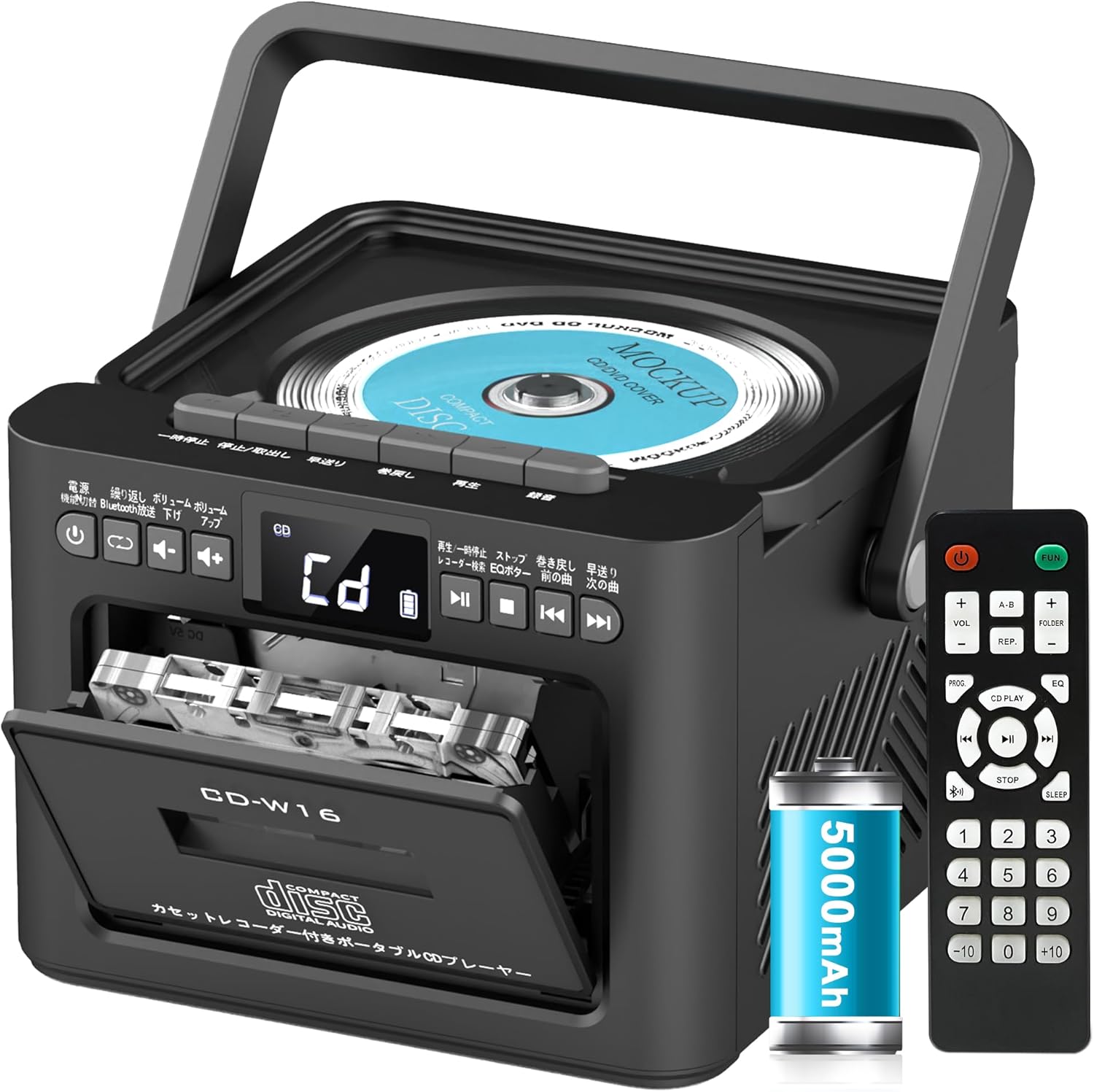
คุณสมบัติที่สำคัญ ได้แก่:
- CD Player (CD, CD-R, CD-RW compatible)
- Cassette Player & Recorder
- วิทยุ FM (76-108MHz)
- Bluetooth 5.1 (Transmitter & Receiver)
- การเล่นผ่าน USB
- อินพุต AUX
- TF/SD Card Playback
- แบตเตอรี่แบบชาร์จไฟได้ 5000mAh
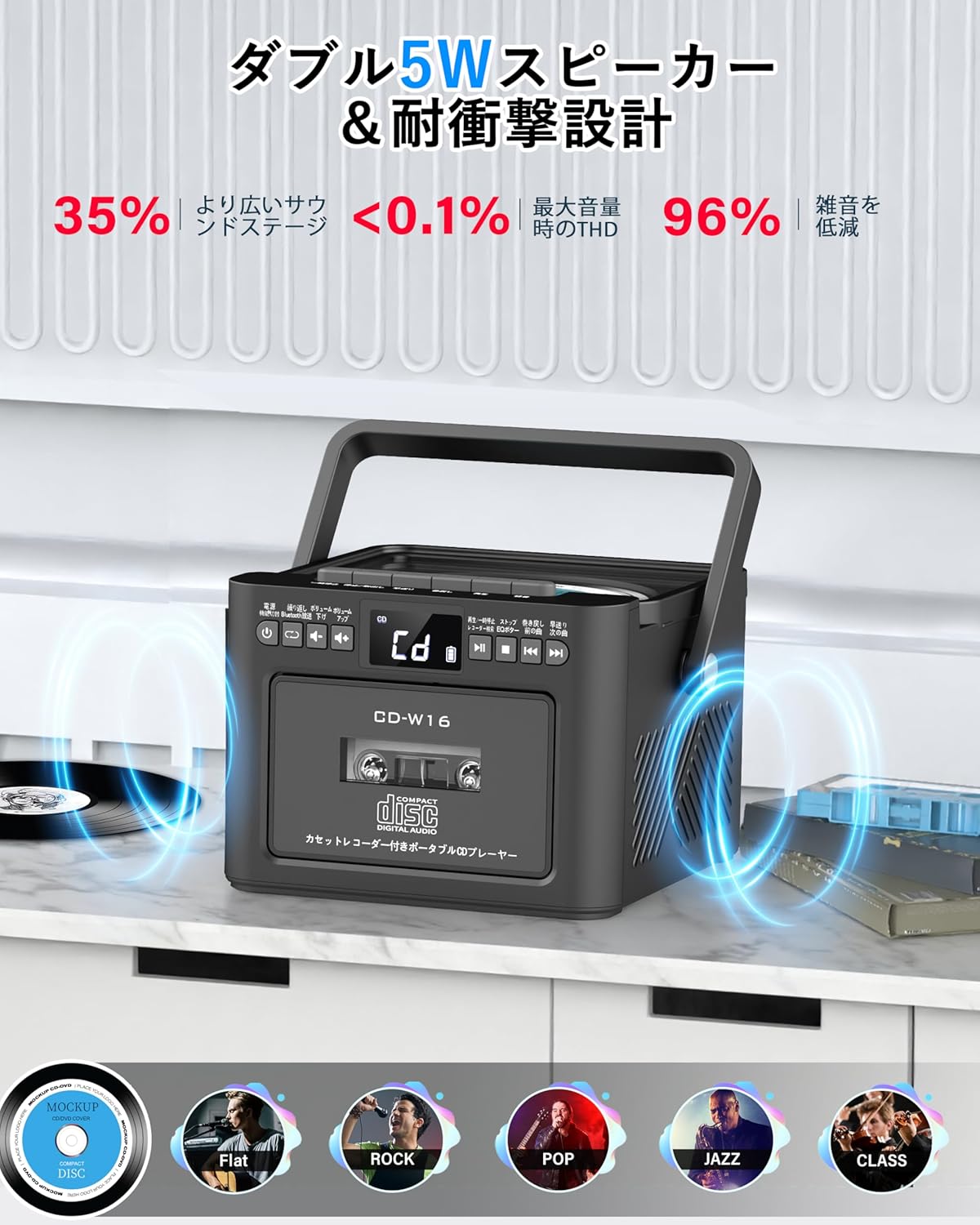
- ลำโพงสเตอริโอคู่ 5W
- รีโมทคอนโทรล
- ตัวตั้งเวลาปิดเครื่อง
- 5 โหมดปรับเสียง EQ

5. การตั้งค่า
5.1. การชาร์จแบตเตอรี่
The Greadio CD-W16 is equipped with a built-in 5000mAh rechargeable battery. To charge the device:
- Connect the provided Type-C cable to the charging port on the unit.
- Connect the other end of the Type-C cable to a 5V/2A USB power adapter (not included).
- The charging indicator will illuminate. A full charge takes approximately 3 hours and provides up to 16 hours of playback.

5.2. เปิด/ปิดเครื่อง
To power on or off the CD player:
- กดปุ่มค้างไว้ ปุ่มเปิดปิด on the unit or the remote control for 2 seconds.
- หรือกดสั้นๆ ปุ่มเปิดปิด on the remote control to toggle the CD player on/off.
6. คู่มือการใช้งาน
6.1. General Controls (Remote Control)
The remote control provides convenient access to all functions. Refer to the video below for a demonstration of remote control operations.
- เปิด/ปิดเครื่อง: กดสั้น ๆ ปุ่มเปิดปิด.
- การเลือกโหมดฟังก์ชั่น: กดสั้น ๆ ฟังก์ชั่น ปุ่ม to cycle through CD, Bluetooth, Radio, Cassette, AUX, USB, and TF/SD card modes.
- การปรับระดับเสียง: การพิมพ์แบบสั้น เล่ม+ or ฉบับ- ปุ่ม
- ติดตามการนำทาง: การพิมพ์แบบสั้น NEXT (>>|) for the next track or PREV (|<<) for the previous track.
- กรอไปข้างหน้า / ย้อนกลับ: กดแบบยาว NEXT (>>|) for fast forward or PREV (|<<) for rewind.
- Direct Track Selection: In CD mode, input 0-9 on the remote to quickly skip to the desired track.
- โหมด EQ: กดสั้น ๆ ปุ่มอีควอไลเซอร์ to cycle through NORMAL, ROCK, POP, JAZZ, and CLASS sound modes.
- โหมดเล่นซ้ำ: กดสั้น ๆ ปุ่ม REP to cycle through repeat options (ONE, FOLDER, ALL, SHUFFLE, OFF).
6.2. การเล่นซีดี
- ตรวจสอบให้แน่ใจว่าเครื่องเปิดอยู่
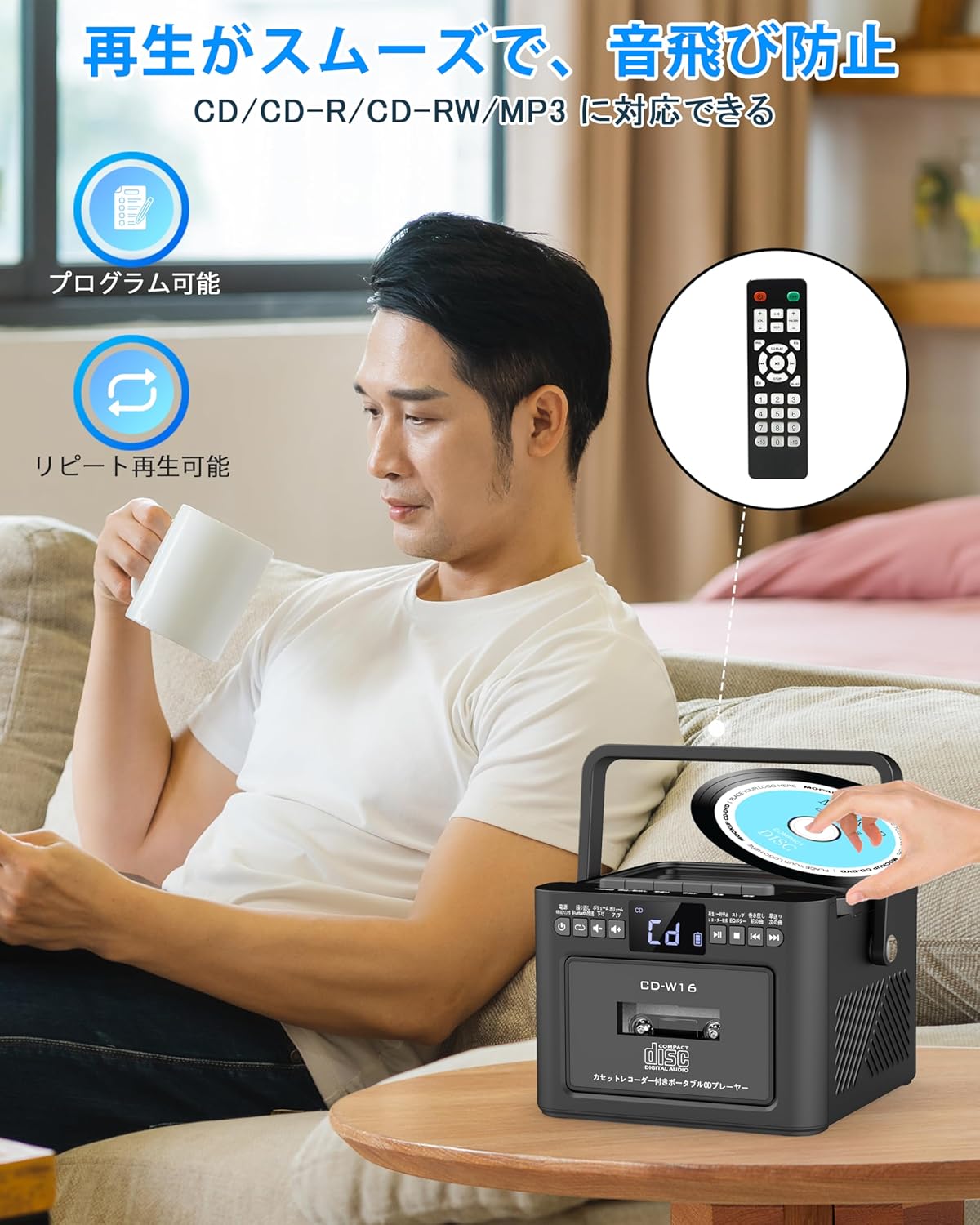
- กดสั้น ๆ ฟังก์ชั่น ปุ่ม to select CD mode. The display will show "CD".
- Open the CD compartment lid by gently lifting it.
- Place a CD (CD, CD-R, CD-RW compatible) onto the spindle with the label side facing up.
- Close the CD compartment lid. The CD will begin playing automatically.
- ใช้ เล่น/หยุดชั่วคราว (||) button for temporary stop/resume.
- ใช้ NEXT (>>|) และ PREV (|<<) ปุ่มสำหรับการนำทางเส้นทาง
6.3. Cassette Playback & Recording
- กดสั้น ๆ ฟังก์ชั่น ปุ่ม to select Tape mode. The display will show "TAPE".
- กดปุ่ม STOP/EJ. button to open the cassette compartment.
- Insert a cassette tape into the compartment and close the lid.
- กดปุ่ม ปุ่มเล่น to start cassette playback.
- To fast forward or rewind, long press the ฟฟ.ดับบลิวดี or FREW ปุ่มตามลำดับ
- To stop playback, short press the STOP/EJ. button.
การบันทึกเทปคาสเซ็ต:
To record audio from other modes (CD, FM Radio, USB, AUX, TF/SD) onto a blank cassette:
- Insert a blank cassette into the cassette compartment.
- Select the desired source mode (e.g., CD, FM Radio).
- กดปุ่มพร้อมกัน เล่น และ REC (บันทึก) buttons. Recording will begin.
- กดปุ่ม STOP/EJ. button เพื่อหยุดการบันทึก

6.4. การใช้งานวิทยุ FM
- กดสั้น ๆ ฟังก์ชั่น ปุ่ม to select FM Radio mode. The display will show the FM frequency.
- ขยายเสาอากาศแบบยืดหดเพื่อการรับสัญญาณที่ดีขึ้น
Auto Scan & Preset Stations:
- กดค้างไว้ ปุ่มสแกน to automatically scan and save available FM stations. The unit can store up to 30 preset stations.
- กดสั้น ๆ ปุ่มสแกน to recall preset stations (P01, P02, etc.).
การปรับด้วยตนเอง:
- กดสั้น ๆ NEXT (>>|) or PREV (|<<) buttons to manually tune to the desired frequency.

6.5. การทำงานของบลูทูธ
The Greadio CD-W16 supports Bluetooth 5.1 for both transmitting and receiving audio.
โหมดเครื่องส่งสัญญาณบลูทูธ:
To transmit audio from the CD player to a Bluetooth speaker or headphones:
- กดค้างไว้ ปุ่มบลูทูธ on the unit or remote to activate Bluetooth transmission mode. The display will show "BT".
- Ensure your Bluetooth receiving device (speaker, headphones) is in pairing mode.
- The CD-W16 will automatically search for nearby Bluetooth devices. Once found, it will connect.

โหมดรับสัญญาณบลูทูธ:
To play audio from your smartphone or other Bluetooth device through the CD player's speakers:
- กดสั้น ๆ ฟังก์ชั่น ปุ่ม to select Bluetooth mode. The display will show "BLUE".
- On your smartphone or Bluetooth device, enable Bluetooth and search for available devices.
- Select "CD-W16" from the list to connect.
- Once connected, you can play music from your device, and the audio will output through the CD-W16 speakers.
6.6. USB & TF/SD Card Playback
The unit supports playback from USB drives and TF/SD cards (up to 32GB, not included).
- กดสั้น ๆ ฟังก์ชั่น ปุ่ม to select USB mode or TF/SD card mode. The display will show "USB" or "TF" respectively.
- Insert your USB drive into the USB port or your TF/SD card into the card slot.
- The unit will automatically detect and begin playing MP3 audio files.
- ใช้ NEXT (>>|) และ PREV (|<<) ปุ่มสำหรับการนำทางเส้นทาง

6.7. อินพุต AUX
To play audio from an external device via AUX cable:
- กดสั้น ๆ ฟังก์ชั่น ปุ่ม to select AUX mode. The display will show "LINE".
- Connect one end of the provided AUX cable to the AUX port on the CD-W16.
- Connect the other end to the audio output of your external device (e.g., smartphone, MP3 player).
- Play audio on your external device, and it will be output through the CD-W16 speakers.
6.8. ตั้งเวลาปิดเครื่อง
The sleep timer allows you to set a duration after which the unit will automatically power off.
- กดสั้น ๆ ปุ่มนอน on the remote control. The display will show the current sleep timer setting (e.g., 10, 20, 30 minutes).
- ใช้ NEXT (>>|) or PREV (|<<) buttons to adjust the sleep timer duration (10-120 minutes).
- กดสั้น ๆ ปุ่มนอน อีกครั้งเพื่อยืนยันการตั้งค่า

6.9. EQ Sound Modes
Customize your audio experience with five different EQ sound modes.
- กดสั้น ๆ ปุ่มอีควอไลเซอร์ on the unit or remote control to cycle through the available modes: NORMAL, ROCK, POP, JAZZ, and CLASS.
7. การบำรุงรักษา
7.1. การทำความสะอาด
- เช็ดตัวเครื่องด้วยผ้านุ่มและแห้ง ห้ามใช้น้ำยาทำความสะอาดที่มีฤทธิ์กัดกร่อนหรือตัวทำละลาย
- สำหรับเลนส์ CD ให้ใช้ผลิตภัณฑ์ทำความสะอาดเลนส์ CD โดยเฉพาะ
- Keep the cassette head clean to ensure optimal playback and recording quality.
7.2. การจัดเก็บ
- เก็บอุปกรณ์ไว้ในที่แห้งและเย็น หลีกเลี่ยงแสงแดดโดยตรงและอุณหภูมิที่สูงหรือต่ำเกินไป
- ถอดแบตเตอรี่ออกจากรีโมทคอนโทรลหากไม่ได้ใช้งานเป็นเวลานาน
8 การแก้ไขปัญหา
| ปัญหา | สาเหตุที่เป็นไปได้ | สารละลาย |
|---|---|---|
| ไม่มีไฟฟ้า | Battery depleted or power cable not connected. | Charge the unit or ensure the power cable is securely connected. |
| ซีดีไม่เล่น | CD inserted incorrectly, dirty, scratched, or incompatible format. | Reinsert CD correctly, clean the CD, try a different CD. Ensure it's CD/CD-R/CD-RW. |
| เทปคาสเซ็ตไม่เล่น/บันทึก | Cassette inserted incorrectly, tape damaged, or dirty head. | Reinsert cassette, try a different tape, clean the cassette head. |
| การรับสัญญาณวิทยุ FM ไม่ดี | เสาอากาศไม่ได้ยื่นออกไป หรืออยู่ในพื้นที่ที่มีสัญญาณอ่อน | ยืดเสาอากาศแบบยืดหดได้จนสุด ลองขยับตำแหน่งของเครื่องดู |
| บลูทูธไม่เชื่อมต่อ | Device not in pairing mode, too far, or already connected to another device. | Ensure both devices are in pairing mode and within range. Disconnect from other devices. |
| USB/TF/SD card not recognized | Card/drive not inserted correctly, incompatible format, or damaged. | Reinsert, ensure files are MP3 format, try a different card/drive. |
9. ข้อมูลจำเพาะ
- ยี่ห้อ: Gredio
- แบบอย่าง: ซีดี-W16
- เทคโนโลยีการเชื่อมต่อ: AUX, บลูทูธ, USB
- สี: สีดำ
- ประเภทลำโพง: สเตอริโอ
- แหล่งพลังงาน: ใช้พลังงานจากแบตเตอรี่
- อุปกรณ์ที่รองรับ: สมาร์ทโฟน แท็บเล็ต พีซี
- วัดtage: 5 W (Dual 5W speakers)
- รูปแบบเสียงที่รองรับ: ซีดี/ซีดีอาร์/ซีดีอาร์
- จำนวนลำโพง: 2
- โหมดเอาต์พุตเสียง: สเตอริโอ
- ความจุแบตเตอรี่: 5000mAh
- เวลาในการชาร์จ: ประมาณ 3 ชั่วโมง
- เวลาเล่น: นานถึง 16 ชั่วโมง
- ช่วงความถี่ FM: 76-108เมกะเฮิรตซ์
10. การรับประกันและการสนับสนุน
This product comes with a 1-year manufacturer's warranty. For any issues or support inquiries, please contact Greadio customer service.