
การแนะนำ
Thank you for choosing the Kiwi KAP 6730 Air Purifier. This manual provides essential information for the safe and efficient use of your device. Please read it thoroughly before operation and retain it for future reference.
The Kiwi KAP 6730 is designed to improve indoor air quality using advanced filtration technology, including a medical-grade H13 HEPA filter, to capture various airborne particles and odors.
คำแนะนำด้านความปลอดภัยที่สำคัญ
ปฏิบัติตามข้อควรระวังด้านความปลอดภัยพื้นฐานอยู่เสมอเมื่อใช้เครื่องใช้ไฟฟ้า เพื่อลดความเสี่ยงต่อการเกิดไฟไหม้ ไฟฟ้าช็อต และการบาดเจ็บ
- อ่านคำแนะนำทั้งหมดก่อนใช้เครื่องใช้ไฟฟ้า
- ตรวจสอบให้แน่ใจว่าแหล่งจ่ายไฟตรงกับปริมาตรtage ระบุไว้บนฉลากเครื่องใช้ไฟฟ้า
- ห้ามใช้งานเครื่องใช้ไฟฟ้าในขณะที่สายไฟหรือปลั๊กชำรุด
- วางสายไฟให้ห่างจากพื้นผิวที่ร้อน
- ห้ามจุ่มอุปกรณ์ สายไฟ หรือปลั๊กในน้ำหรือของเหลวอื่นๆ
- ถอดปลั๊กเครื่องฟอกอากาศก่อนทำความสะอาดหรือดำเนินการบำรุงรักษาใดๆ
- ห้ามปิดกั้นช่องรับหรือช่องระบายอากาศ
- เครื่องใช้ไฟฟ้าตัวนี้มีไว้สำหรับใช้ภายในอาคารเท่านั้น
- เก็บให้พ้นจากมือเด็ก
สินค้าเกินview
The Kiwi KAP 6730 Air Purifier features a compact design with an intuitive control panel and multi-stagระบบการกรองอี

ภาพ: สูงสุด view of the Kiwi KAP 6730 Air Purifier, highlighting the circular control panel with various function icons including power, fan speed, timer, and Wi-Fi connectivity. The top grille for air output is also visible.

ภาพ: An exploded diagram of the Kiwi KAP 6730 Air Purifier, illustrating its internal components. The image shows the outer casing, the fan assembly, and the cylindrical multi-layer filter system, with arrows indicating airflow and the capture of dust and pet hair by different filter stagใช่
คุณสมบัติหลัก:
- Medical-grade H13 HEPA filter for effective air purification.
- มัลติ-เอสtagระบบการกรองอี
- Intuitive control panel.
- การออกแบบที่กะทัดรัดและน้ำหนักเบา
- Smart connectivity (Wi-Fi enabled).
การตั้งค่า
การแกะกล่อง
- นำเครื่องฟอกอากาศออกจากบรรจุภัณฑ์อย่างระมัดระวัง
- Remove all packaging materials, including any protective films or bags.
- ตรวจสอบความเสียหายระหว่างการขนส่ง หากเกิดความเสียหาย ห้ามใช้งานและติดต่อฝ่ายสนับสนุนลูกค้า
การติดตั้งตัวกรอง (หากยังไม่ได้ติดตั้งไว้ล่วงหน้า)
The air purifier comes with a multi-layer filter. Ensure it is properly installed before first use.
- พลิกเครื่องฟอกอากาศคว่ำลง
- หมุนฝาครอบด้านล่างทวนเข็มนาฬิกาเพื่อปลดล็อกและถอดออก
- นำบรรจุภัณฑ์พลาสติกออกจากตัวกรอง
- Insert the filter into the air purifier, ensuring it sits securely.
- ใส่ฝาครอบฐานกลับเข้าไป แล้วหมุนตามเข็มนาฬิกาเพื่อล็อคให้เข้าที่
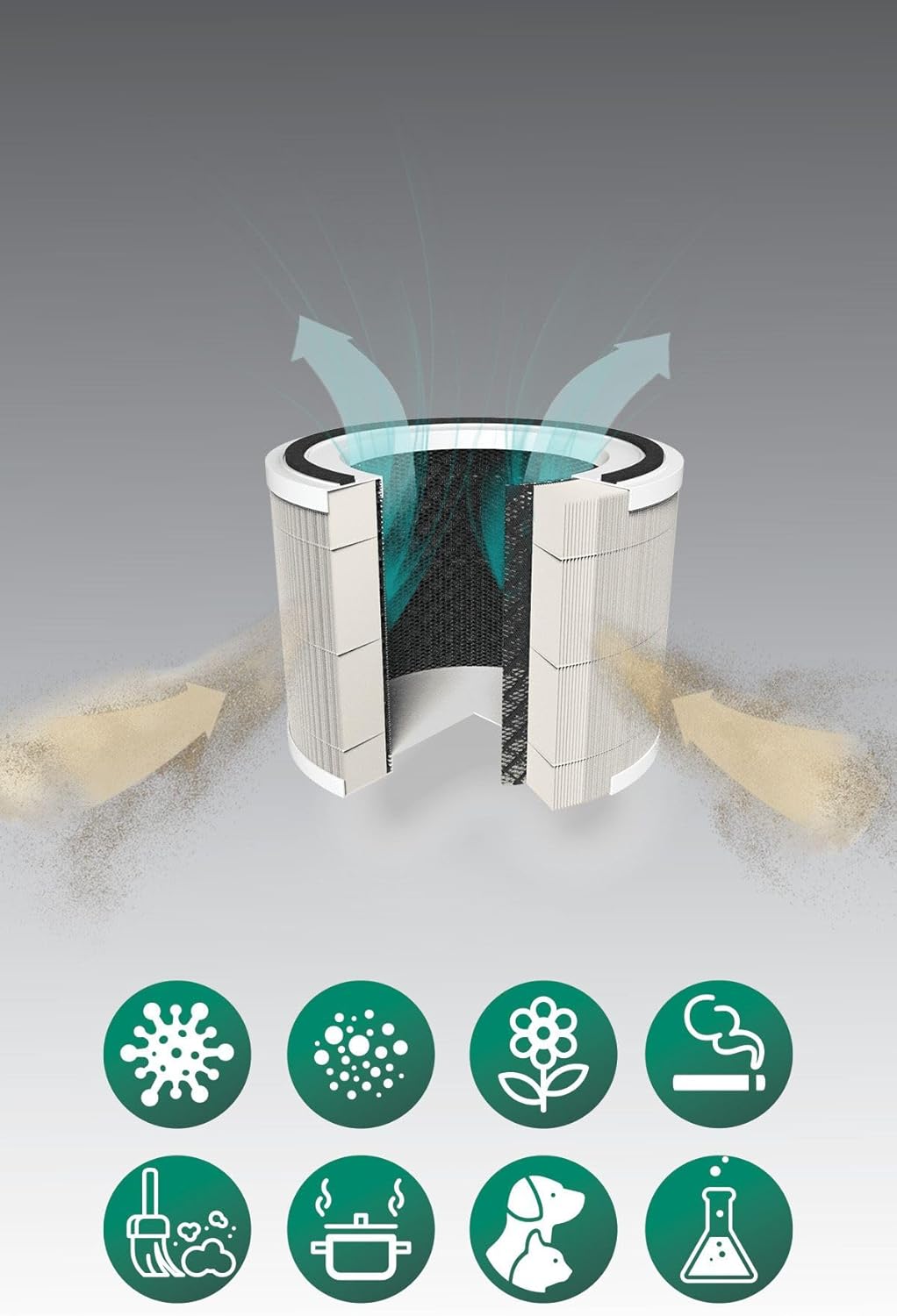
ภาพ: A cutaway diagram illustrating the multi-layer filter system of the Kiwi KAP 6730 Air Purifier. Arrows show air entering and exiting the filter. Below the filter, icons represent various airborne pollutants that the system is designed to filter, including bacteria, dust, pollen, smoke, pet dander, cooking odors, and chemical fumes.
การจัดวาง
- วางเครื่องฟอกอากาศบนพื้นผิวที่มั่นคงและได้ระดับ
- Ensure there is at least 15-30 cm (6-12 inches) of space around all sides for optimal airflow.
- Avoid placing near heat sources, direct sunlight, or in damp สภาพแวดล้อม
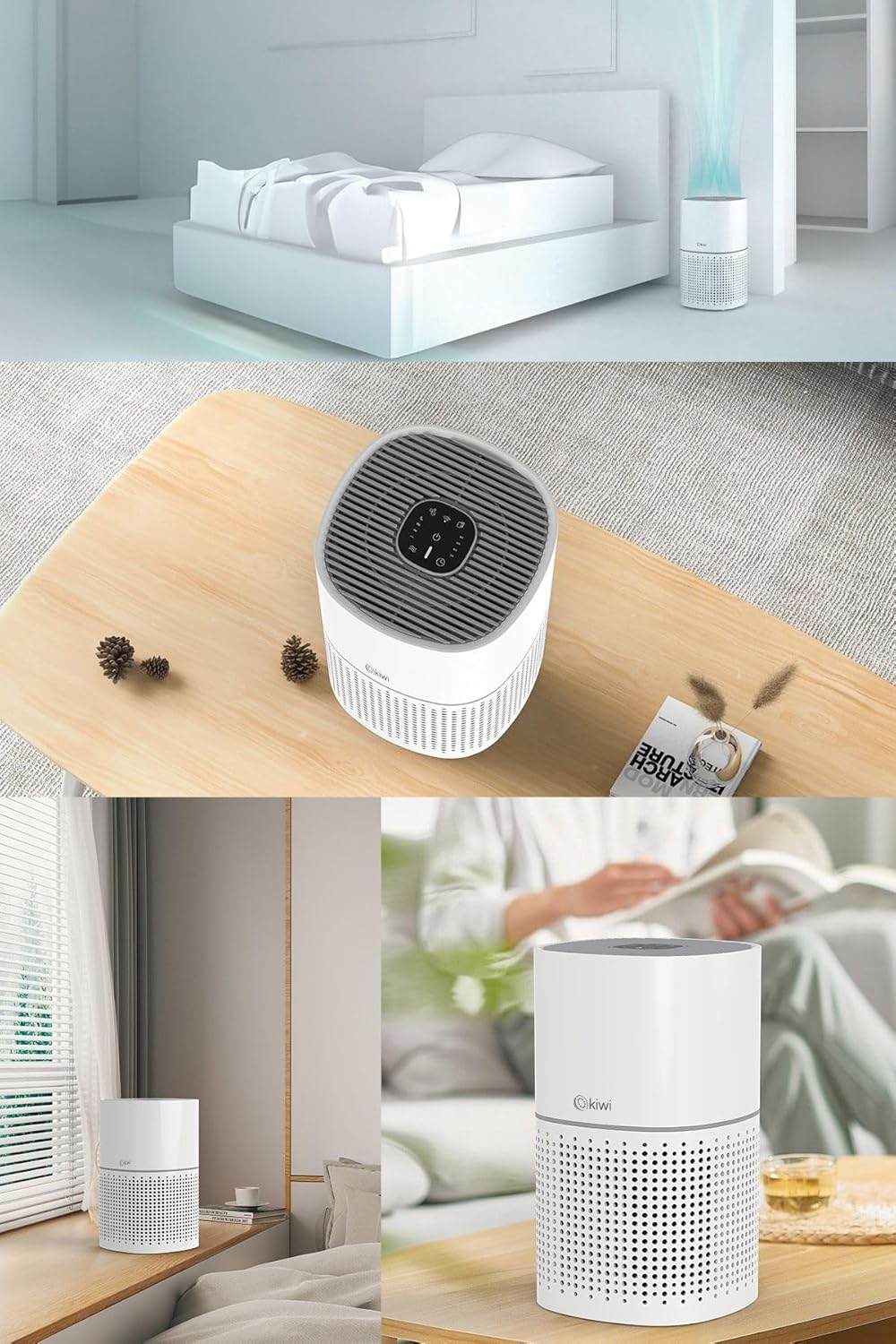
ภาพ: A collage of images showing the Kiwi KAP 6730 Air Purifier in different home environments. It is depicted on a bedside table in a bedroom, on a wooden table in a living area, and on a windowsill, demonstrating its compact size and versatility for placement.
การเชื่อมต่อไฟฟ้า
เสียบสายไฟเข้ากับเต้ารับไฟฟ้าที่เหมาะสม
การดำเนินการ
ฟังก์ชั่นแผงควบคุม
แผงควบคุมจะอยู่ด้านบนของเครื่องฟอกอากาศ
ภาพ: รายละเอียด view of the circular control panel on the top of the Kiwi KAP 6730 Air Purifier. Icons for power, fan speed, timer settings (1H, 2H, 4H, 8H), sleep mode, and Wi-Fi connectivity are clearly visible, along with an indicator light.
- ปุ่มเพาเวอร์ (⏻): Press to turn the air purifier ON or OFF.
- ปุ่มปรับความเร็วพัดลม (💨): Press to cycle through different fan speeds (e.g., Low, Medium, High, Auto).
- ปุ่มตั้งเวลา (⏱): Set the operating time (e.g., 1 hour, 2 hours, 4 hours, 8 hours). The unit will automatically turn off after the set time.
- ปุ่มโหมดพักเครื่อง (🌙): เปิดใช้งานโหมดพักเครื่อง ลดความเร็วพัดลม และหรี่ไฟแสดงสถานะ เพื่อการทำงานที่เงียบสงบ
- Wi-Fi Button (📶): Press and hold to activate Wi-Fi pairing mode for smart control via a mobile application.
- ตัวบ่งชี้การรีเซ็ตตัวกรอง: Illuminates when the filter needs replacement. Press and hold after filter replacement to reset.
Smart Control (App)
The Kiwi KAP 6730 can be controlled via a dedicated mobile application. Follow the app's instructions for pairing and remote control.

ภาพ: The Kiwi KAP 6730 Air Purifier positioned in a room, with a hand holding a smartphone in the foreground. The smartphone screen displays a mobile application interface, indicating that the air purifier can be controlled remotely via a smart app, showing air quality readings and control options.
การซ่อมบำรุง
การบำรุงรักษาตามปกติจะช่วยให้เครื่องฟอกอากาศของคุณทำงานได้อย่างเหมาะสมที่สุดและยืดอายุการใช้งาน
การทำความสะอาดภายนอก
- ถอดปลั๊กเครื่องฟอกอากาศก่อนทำความสะอาดทุกครั้ง
- เช็ดพื้นผิวภายนอกด้วยผ้านุ่ม damp ผ้า.
- ห้ามใช้น้ำยาทำความสะอาดที่มีฤทธิ์กัดกร่อน ขี้ผึ้ง หรือตัวทำละลาย
- ตรวจสอบให้แน่ใจว่าไม่มีน้ำเข้าไปในภายในเครื่องใช้
การเปลี่ยนตัวกรอง
The filter life depends on air quality and usage. The filter replacement indicator will illuminate when a new filter is needed (typically every 6-12 months).
- ถอดปลั๊กเครื่องฟอกอากาศ
- พลิกเครื่องฟอกอากาศคว่ำลง
- หมุนฝาครอบด้านล่างทวนเข็มนาฬิกาเพื่อปลดล็อกและถอดออก
- ถอดตัวกรองเก่าออกและกำจัดอย่างถูกวิธี
- Unpack the new filter and insert it into the air purifier.
- ใส่ฝาครอบฐานกลับเข้าไป แล้วหมุนตามเข็มนาฬิกาเพื่อล็อคให้เข้าที่
- Plug in the air purifier. Press and hold the Filter Reset button (often the Wi-Fi or a dedicated filter icon) for 3-5 seconds until the indicator light turns off.
บันทึก: Only use genuine Kiwi replacement filters to ensure proper performance and maintain warranty validity.
การแก้ไขปัญหา
| ปัญหา | สาเหตุที่เป็นไปได้ | สารละลาย |
|---|---|---|
| เครื่องฟอกอากาศไม่ทำงาน | ไม่ได้เสียบปลั๊ก; ปลั๊กไฟเสีย; ไม่ได้กดปุ่มเปิด/ปิด | Ensure the power cord is securely plugged in. Try a different outlet. Press the power button firmly. |
| ปริมาณลมไหลเวียนลดลง หรือประสิทธิภาพการฟอกอากาศลดลง | Blocked air inlets/outlets; Dirty filter; Filter packaging not removed. | Check for obstructions and clear them. Replace the filter if the indicator is on or if it appears dirty. Ensure all filter packaging is removed. |
| เสียงรบกวนที่ผิดปกติ | Filter not installed correctly; Foreign object inside; Unit not on a level surface. | ตรวจสอบการติดตั้งตัวกรอง ถอดปลั๊กและตรวจสอบสิ่งแปลกปลอม วางบนพื้นผิวที่มั่นคงและเรียบ |
| ไฟแสดงสถานะการเปลี่ยนไส้กรองยังคงติดอยู่หลังจากเปลี่ยนไส้กรองแล้ว | ไม่ได้ทำการรีเซ็ตตัวกรอง | กดปุ่ม Filter Reset ค้างไว้ 3-5 วินาที จนกว่าไฟจะดับลง |
| ไม่สามารถเชื่อมต่อ Wi-Fi/แอปได้ | Incorrect Wi-Fi password; Router too far; App not updated; Wi-Fi pairing mode not activated. | Ensure correct password. Move unit closer to router. Update app. Press and hold Wi-Fi button to activate pairing mode. Consult app instructions. |
ข้อมูลจำเพาะ
| คุณสมบัติ | รายละเอียด |
|---|---|
| แบบอย่าง | เคเอพี-6730 |
| ยี่ห้อ | กีวี |
| สี | สีขาว |
| ประเภทการกรอง | H13 HEPA Filter (Medical Grade) |
| แหล่งพลังงาน | ไฟฟ้าแบบมีสาย |
| น้ำหนักผลิตภัณฑ์ | 2 กิโลกรัม |
| การเชื่อมต่อ | Wi-Fi (Smart App Control) |
| ขนาด (โดยประมาณ) | การออกแบบที่กะทัดรัด |
การรับประกันและการสนับสนุน
For warranty information and customer support, please refer to the warranty card included with your product or visit the official KIWI webเว็บไซต์.
You can also contact customer service for assistance with troubleshooting or replacement parts.
KIWI Official Webเว็บไซต์: www.kiwi.com.tr (หมายเหตุ: นี่เป็นเพียงตัวอย่างชั่วคราว URL, please refer to your product documentation for the correct support webเว็บไซต์.)