
การแนะนำ
This manual provides comprehensive instructions for the OMAIC EN2Q36H replacement remote control, designed for Hisense Smart TVs. It covers essential information regarding setup, operation, and maintenance to ensure optimal performance and user experience. This remote offers a direct replacement solution without the need for complex programming.
การตั้งค่า
The OMAIC EN2Q36H remote control is designed for immediate use with compatible Hisense Smart TVs. No programming or pairing is required.
การติดตั้งแบตเตอรี่
- ค้นหาช่องใส่แบตเตอรี่ที่ด้านหลังของรีโมทคอนโทรล
- เลื่อนฝาครอบแบตเตอรี่ลงด้านล่างหรือไปในทิศทางที่ลูกศรระบุเพื่อเปิดออก
- ใส่แบตเตอรี่อัลคาไลน์ AAA สองก้อน (ไม่ได้รวมอยู่ในชุด) โดยตรวจสอบให้แน่ใจว่าขั้วบวก (+) และขั้วลบ (-) ตรงกับเครื่องหมายภายในช่องใส่แบตเตอรี่อย่างถูกต้อง
- ปิดฝาครอบแบตเตอรี่กลับเข้าที่โดยเลื่อนกลับเข้าที่จนกระทั่งล็อคเข้าที่อย่างแน่นหนา
Once batteries are installed, the remote is ready to operate your Hisense Smart TV.

คำแนะนำการใช้งาน
This remote control utilizes infrared (IR) technology for communication with your Hisense Smart TV. Ensure a clear line of sight between the remote and the TV's IR receiver for optimal performance.
คุณสมบัติหลัก
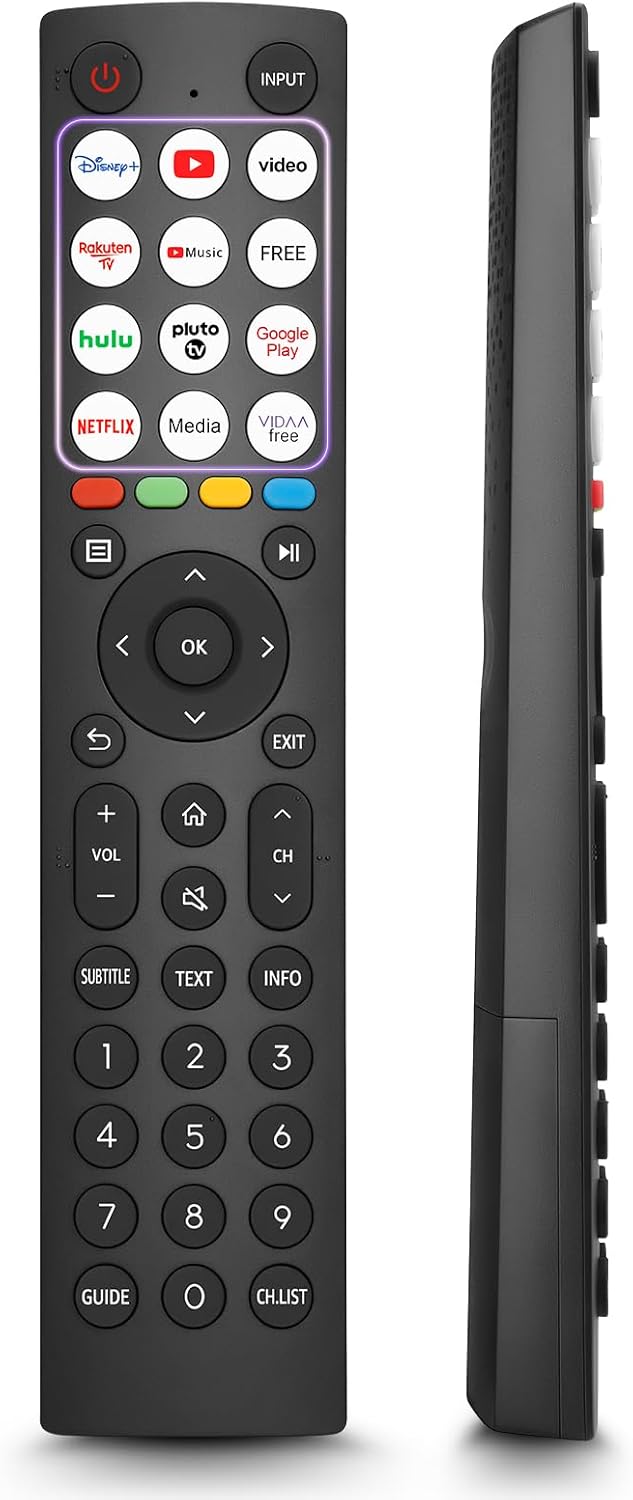
- 12 Shortcut Buttons: Quickly access popular streaming services and applications with dedicated buttons.
- Strong IR Signal: Provides a longer transmission distance and quick response without noticeable delay.
- โครงสร้างทนทาน: Made from high-quality ABS and silicone materials for extended lifespan.

ปุ่มฟังก์ชั่น
Familiarize yourself with the functions of each button on your OMAIC EN2Q36H remote control:
| ปุ่ม | การทำงาน |
|---|---|
| พลัง | Switches the TV on or into standby mode. |
| ป้อนข้อมูล | เลือกแหล่งสัญญาณอินพุต (HDMI, AV ฯลฯ) |
| APP Buttons | Quick access buttons for specific applications (e.g., Disney+, Netflix, YouTube). |
| เมนู | Displays the Quick Setup menu. |
| การควบคุมสื่อ | Buttons for Play, Pause, Stop, Fast Forward, Rewind. |
| การนำทาง (ขึ้น/ลง/ซ้าย/ขวา) | Navigates on-screen menus and adjusts system settings. |
| OK | Confirms selection in on-screen menus. |
| กลับ | กลับไปยังเมนูก่อนหน้า |
| EXIT | ออกจากเมนูปัจจุบัน |
| ฉบับ +/- | ปรับระดับเสียง |
| บ้าน | Enters the Home screen. |
| MUTE | ปิดเสียงหรือคืนค่าเสียงทีวี |
| ช ^/ว | Switches channels. |
| คำบรรยาย | Activates or deactivates subtitle mode. |
| ข้อความ | Turns teletext function on and off. |
| ข้อมูล | แสดงข้อมูลโปรแกรมปัจจุบัน |
| NUMBER Buttons (0-9) | Direct channel selection or number input. |
| แนะนำ | Displays the Electronic Programme Guide (DTV input). |
| ช.รายการ | Displays the Channel List on the screen. |

Compatible Hisense TV Models
The OMAIC EN2Q36H replacement remote control is compatible with the following Hisense VIDAA 4K HDTV Smart TV series:
- 32A4K, 40A4K, 43A4K
- 32A5KQ, 40A5KQ
- 43A6K, 50A6K, 55A6K, 58A6K, 65A6K, 70A6K, 75A6K, 85A6K
- 55U6KQ, 65U6KQ
- 43A7KQ, 50A7KQ, 55A7KQ, 65A7KQ, 75A7KQ
- 43E7KQ, 50E7KQ, 55E7KQ, 65E7KQ, 75E7KQ
การซ่อมบำรุง
เพื่อให้รีโมทคอนโทรลของคุณใช้งานได้ยาวนานและทำงานได้อย่างถูกต้อง โปรดปฏิบัติตามคำแนะนำในการบำรุงรักษาเหล่านี้:
- การทำความสะอาด: Use a soft, dry cloth to clean the remote. Avoid using liquid cleaners or abrasive materials, as they may damage the surface or internal components.
- การเปลี่ยนแบตเตอรี่: Replace batteries when the remote's response becomes sluggish or stops working. Always replace both batteries at the same time with new ones of the same type (AAA alkaline).
- พื้นที่จัดเก็บ: เก็บรีโมทไว้ในที่แห้งและเย็น หลีกเลี่ยงแสงแดดโดยตรง อุณหภูมิที่สูงหรือต่ำเกินไป และความชื้นสูง
- หลีกเลี่ยงการหยด: ควรเก็บรักษารีโมทให้พ้นจากแรงกระแทก เพราะการตกหล่นอาจทำให้วงจรภายในเสียหายได้
การแก้ไขปัญหา
หากคุณพบปัญหาเกี่ยวกับรีโมทคอนโทรล โปรดลองทำตามขั้นตอนการแก้ไขปัญหาต่อไปนี้:
| ปัญหา | สาเหตุที่เป็นไปได้ | สารละลาย |
|---|---|---|
| รีโมทไม่ตอบสนอง | แบตเตอรี่หมดหรือใส่ไม่ถูกต้อง | เปลี่ยนแบตเตอรี่ด้วยแบตเตอรี่อัลคาไลน์ AAA ใหม่ โดยตรวจสอบให้แน่ใจว่าขั้วถูกต้อง |
| รีโมทไม่ตอบสนอง | มีสิ่งกีดขวางระหว่างรีโมทและทีวี | Ensure a clear line of sight to the TV's IR receiver. Remove any objects blocking the path. |
| รีโมทไม่ตอบสนอง | Remote is too far from the TV. | Move closer to the TV. The remote has an extended range, but extreme distances may affect performance. |
| ปุ่มติดหรือไม่ตอบสนอง | มีสิ่งสกปรกหรือเศษฝุ่นอยู่ใต้กระดุม | Gently clean around the buttons with a soft, dry cloth. Avoid liquids. |
| Specific functions not working | TV model incompatibility (rare). | Verify your Hisense TV model is listed in the 'Compatible Hisense TV Models' section. |
ข้อมูลจำเพาะ
| คุณสมบัติ | รายละเอียด |
|---|---|
| ชื่อรุ่น | EN2Q36H |
| ยี่ห้อ | โอเอ็มเอไอซี |
| อุปกรณ์ที่รองรับ | Hisense Smart TVs |
| เทคโนโลยีการเชื่อมต่อ | อินฟาเรด (IR) |
| จำนวนปุ่ม | 48 |
| ประเภทการควบคุม | ปุ่มควบคุม |
| คุณสมบัติพิเศษ | Universal, Comfortable |
| สี | สีดำ |
| คำอธิบายแบตเตอรี่ | AAA (อัลคาไลน์) |
| Supported Devices (Max) | 1 |
| ขนาดสินค้า (โดยประมาณ) | 34.7 x 24.7 x 2.2 ซม. |
| น้ำหนักผลิตภัณฑ์ (โดยประมาณ) | 80 กรัม |

การรับประกันและการสนับสนุน
OMAIC is committed to the quality and compatibility of its replacement remote controls. We provide professional after-sales support to ensure customer satisfaction.
If you have any questions or concerns regarding your OMAIC EN2Q36H remote control or your order, please contact us directly. Our support team aims to respond to inquiries within 12 working hours.