
1. บทนำ
Thank you for choosing the BAMEOS RGB LED Floating Shelves. This manual provides detailed instructions for the safe installation, operation, and maintenance of your new wall-mounted shelves. These shelves feature integrated RGB LED lighting, offering customizable ambiance for various rooms such as bedrooms, living rooms, kitchens, and studies. Please read this manual thoroughly before installation and retain it for future reference.
2. ข้อมูลด้านความปลอดภัย
เพื่อให้มั่นใจถึงความปลอดภัยในการใช้งานและป้องกันความเสียหาย โปรดปฏิบัติตามสิ่งต่อไปนี้:
- Always follow the installation instructions carefully.
- ห้ามเกินขีดจำกัดน้ำหนักของ 22 ปอนด์ (10 กก.) per shelf.
- Always ensure the shelf is securely mounted to the wall before placing items on it.
- Avoid using the LED strips in humid environments to prolong their lifespan.
- เก็บชิ้นส่วนขนาดเล็กและวัสดุบรรจุภัณฑ์ให้ห่างจากเด็ก
3. เนื้อหาบรรจุภัณฑ์
ตรวจสอบว่าส่วนประกอบทั้งหมดมีอยู่ก่อนเริ่มการติดตั้ง:
- 2 x Floating Shelves (35 x 7 inches, Black)
- 2 x RGB LED Light Strips
- 2 x Battery Boxes (AA batteries not included)
- 2 x 3M Adhesive Tape sets (for LED strips)
- Invisible Brackets (pre-installed or included for assembly)
- ฮาร์ดแวร์สำหรับติดตั้ง (สกรู, พุกยึดผนัง)
- คู่มือการใช้งาน
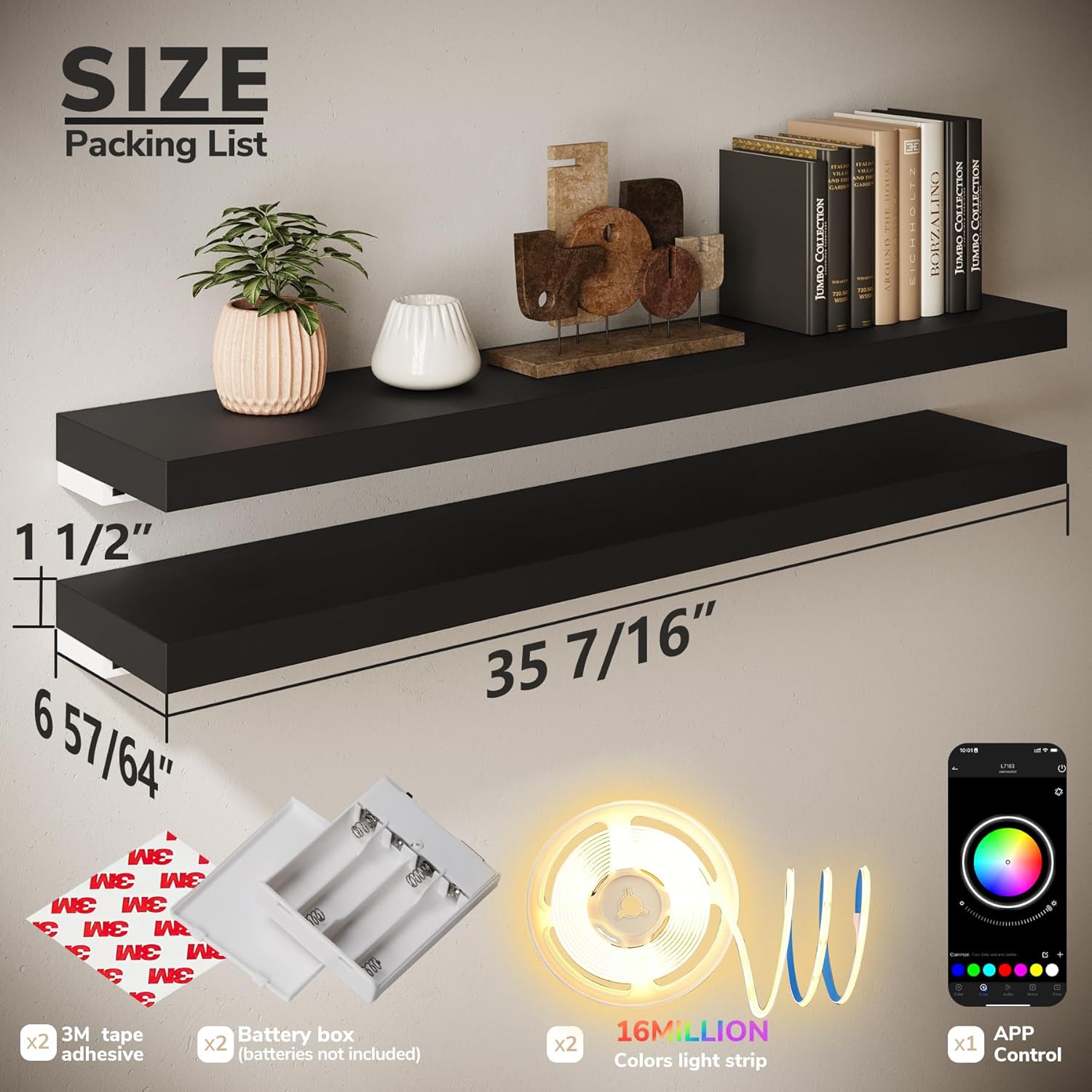
รูปที่ 3.1: เนื้อหาและขนาดของบรรจุภัณฑ์
4. ข้อมูลจำเพาะ
| ชื่อรุ่น | CFSBR027USBE03 |
| วัสดุ | Medium-Density Fiberboard (MDF) |
| สี | สีดำ |
| Dimensions (each shelf) | 35.43" W x 6.89" D x 1.5" H (90cm x 17.5cm x 3.8cm) |
| Weight Capacity (each shelf) | มากถึง 22 ปอนด์ (10 กก.) |
| ประเภทการติดตั้ง | Wall Mount (Invisible Brackets) |
| แหล่งพลังงานสำหรับ LED | AA Batteries (not included) or USB connection |
| คุณสมบัติ LED | RGB (16 Million Colors), Music Sync, App Control, Timer Function |
5. คำแนะนำในการติดตั้ง
ปฏิบัติตามขั้นตอนเหล่านี้เพื่อการติดตั้งที่ปลอดภัย:
5.1 Prepare the Wall
- Choose a suitable wall location. Ensure the wall material is appropriate for mounting (Concrete Wall, Wood Stud, Drywall are generally suitable; Plasterboard Wall is not recommended).

Figure 5.1: Applicable Wall Types
- Use a level and pencil to mark the desired height and position for your shelves. Mark the drill points for the invisible brackets.
5.2 ติดตั้งวงเล็บ
- Drill pilot holes at the marked points. Insert wall anchors if necessary (for drywall).
- Attach the invisible brackets to the wall using the provided screws. Ensure they are firmly secured and level.
5.3 Install the Shelves
- Slide the shelves onto the mounted brackets. The shelves are designed to fit snugly over the invisible brackets.
- Secure the shelf to the support rod using the additional securing screw at the bottom to prevent slippage and wear.

Figure 5.2: Installed Floating Shelf Example
5.4 Attach LED Strips
- Clean the underside of the shelf where the LED strip will be attached.
- Peel the backing from the 3M adhesive tape on the LED strip and firmly press the strip along the underside of the shelf.
- Connect the LED strip to the battery box (insert AA batteries, not included) or a USB power source.

Figure 5.3: Shelf Features and Power Options
6. Operating Instructions (RGB LED Lighting)
Your BAMEOS RGB LED Floating Shelves offer versatile lighting options controlled via a mobile application.
6.1 การควบคุมแอพมือถือ
- Download the free mobile app (available for iOS and Android devices). Refer to the packaging or a QR code on the product for the specific app name.
- Ensure your phone's Bluetooth is enabled. Open the app and follow the on-screen instructions to pair with your LED shelves.

Figure 6.1: Mobile App Interface for LED Control
6.2 คุณสมบัติหลัก
- 16 ล้านสี: Select from a vast spectrum of colors and adjust brightness to create your desired ambiance.
- โหมดซิงค์เพลง: Activate Sound Sync Mode to synchronize the LED lights with your music, creating dynamic light shows that pulse with the rhythm.
- ฟังก์ชั่นจับเวลา: Set schedules for the lights to turn on or off automatically at specific times, such as sunrise, sunset, or custom intervals.
- ฉากที่กำหนดเอง: สร้างและบันทึกฉากแสงไฟแบบกำหนดเองสำหรับอารมณ์หรือโอกาสต่างๆ
Video 6.1: Demonstration of RGB LED color changing and effects on BAMEOS floating shelves.

Figure 6.2: RGB LED Features Overview
7. การบำรุงรักษา
To keep your BAMEOS RGB LED Floating Shelves in optimal condition:
- For daily cleaning, simply wipe the shelves with a damp ผ้า หลีกเลี่ยงสารเคมีรุนแรงหรือน้ำยาทำความสะอาดที่มีฤทธิ์กัดกร่อน
- Ensure the LED strips remain dry. Avoid using the shelves in excessively humid environments to prevent damage to the electronics.
- ตรวจสอบสกรูยึดเป็นระยะเพื่อให้แน่ใจว่าขันแน่นและแน่นหนาดี
8 การแก้ไขปัญหา
If you encounter issues with your shelves, refer to the following common solutions:
| ปัญหา | สาเหตุที่เป็นไปได้ | สารละลาย |
| ไฟ LED ไม่เปิด | No power, loose connection, dead batteries. | Check if batteries are correctly inserted or replaced. Ensure USB cable is securely connected to a power source. Verify LED strip connection to the power source. |
| App cannot connect to LED lights. | Bluetooth off, app issue, lights not powered. | Ensure your device's Bluetooth is enabled. Restart the app and try pairing again. Confirm the LED lights are powered on. |
| ไฟกระพริบหรือเปลี่ยนสีโดยไม่คาดคิด | Loose connection, power fluctuation, app setting. | Check all connections. Try a different power source. Verify app settings for any active effects or music sync modes. |
| Shelf feels unstable after installation. | Improper mounting, loose screws. | Re-check installation steps. Ensure all screws are tightened and wall anchors are properly seated. Do not exceed the weight capacity. |
9. การรับประกันและการสนับสนุน
BAMEOS products are designed for quality and durability. For warranty information, technical support, or any questions not covered in this manual, please contact BAMEOS customer service through the retailer's platform or the official BAMEOS website. Please have your model number (CFSBR027USBE03) and purchase date available when contacting support.