
1. บทนำ
This manual provides detailed instructions for the installation, operation, and maintenance of your UNITOPSCI 2G+64G Android Car Stereo Radio. Please read this manual thoroughly before installation and use to ensure proper function and safety.
The UNITOPSCI 2G+64G Android Car Stereo Radio is an advanced in-dash multimedia system featuring a 7-inch capacitive touchscreen, Android 13 operating system, 2GB RAM, and 64GB ROM. It integrates wireless CarPlay, Android Auto, GPS navigation, Bluetooth, FM/RDS radio, and supports a backup camera and steering wheel controls.
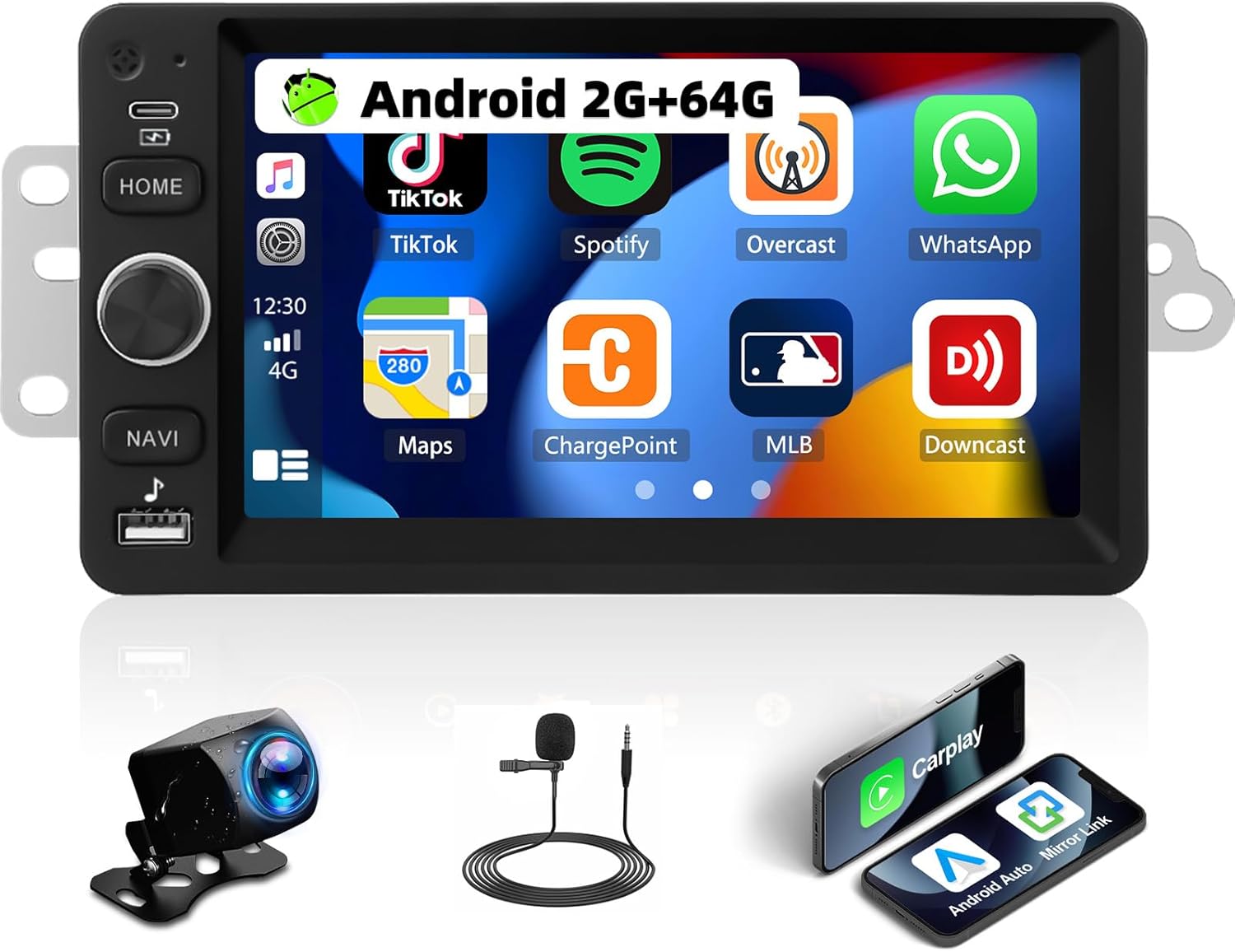
Image 1.1: UNITOPSCI 2G+64G Android Car Stereo Radio and included components.
2. ความเข้ากันได้ของยานพาหนะ
This Android car stereo is designed to fit specific vehicle models. Please verify your vehicle's compatibility before proceeding with installation.
- Chevy Chevrolet: Silverado, SSR, Tahoe (2003-2006)
- จีเอ็มซี: Siera, Yukon (2003-2006)
- ฮัมเมอร์: (2003-2006)
It is recommended to measure the size and shape of your original radio in the car's center console to confirm fitment.

Image 2.1: Visual comparison of a vehicle's dashboard before and after installing the UNITOPSCI car stereo.

Image 2.2: Detailed list of compatible Chevrolet, GMC, Hummer, Isuzu, Oldsmobile, Saturn, Pontiac, Buick, and Cadillac models and their respective years.
Special Note for Bose Audio System Owners:
If your vehicle is factory-equipped with a Bose premium audio system, a high-end wiring harness and a Bose-specific CANBUS decoder are required for proper function of all features, including the audio system and steering wheel controls. Consult with a professional or the manufacturer for accessory recommendations if unsure.
3. การตั้งค่าและการติดตั้ง
3.1. เนื้อหาบรรจุภัณฑ์
ตรวจสอบว่ามีส่วนประกอบทั้งหมดอยู่ในแพ็คเกจ:
- เครื่องเสียงรถยนต์ระบบแอนดรอยด์
- สายไฟ
- อาร์ซีเอเคเบิ้ล
- สายเคเบิลอินพุตกล้องด้านหลัง
- กล้อง
- เสาอากาศ GPS
- กล่องแคนบัส
- สาย USB
- Small Horn (External Microphone)
- อะแดปเตอร์เสาอากาศ
- เสาอากาศวิทยุ
- คู่มือการใช้งาน

Image 3.1: Illustration of all items included in the product package.
3.2. แผนภาพการเดินสายไฟ
Refer to the following diagrams for correct wiring connections. Incorrect wiring can damage the unit or vehicle electronics.

Image 3.2: Comprehensive wiring diagram illustrating connections for power, RCA, USB, camera, GPS, and CANBUS.
- สายไฟ: เชื่อมต่อกับแหล่งจ่ายไฟของรถยนต์ (ACC, B+, GND)
- สาย RCA: For audio output (FR OUT, FL OUT, RR OUT, RL OUT, SUBWOOFER) and auxiliary input (AUX IN L/R), video output (VIDEO OUT), and camera input (CVBS IN).
- สาย USB: สำหรับเชื่อมต่ออุปกรณ์ USB
- สายอินพุตกล้องด้านหลัง: Connects the backup camera.
- เสาอากาศ GPS: ติดตั้งในตำแหน่งที่โล่ง view ของท้องฟ้าเพื่อการรับสัญญาณที่ดีที่สุด
- Canbus Box: Connect for vehicle data communication, especially for steering wheel controls and vehicle information.
- เสาอากาศวิทยุ: เชื่อมต่อเพื่อรับสัญญาณวิทยุ FM/AM
หมายเหตุการติดตั้งที่สำคัญ:
- ตรวจสอบให้แน่ใจว่าการเชื่อมต่อทั้งหมดแน่นหนาเพื่อป้องกันปัญหาการหยุดชะงักเป็นระยะ
- If your vehicle does not provide an Ignition (IGN) wire, a manual switch may be required to power the unit.
- For vehicles with complex wiring or premium sound systems, professional installation is recommended.
4. คู่มือการใช้งาน
4.1. การทำงานพื้นฐาน
- เปิด/ปิดเครื่อง: Press and hold the power button (usually labeled HOME or a dedicated power icon) to turn the unit on or off. A short press typically mutes or returns to the home screen.
- การควบคุมระดับเสียง: Use the physical knob or on-screen controls to adjust the audio volume.
- หน้าจอสัมผัส: The 7-inch capacitive touchscreen responds to touch gestures for navigation and control.
4.2. CarPlay แบบไร้สายและ Android Auto
เชื่อมต่อสมาร์ทโฟนของคุณแบบไร้สายเพื่อเข้าถึงระบบนำทาง เพลง การโทร และข้อความผ่านทางอินเทอร์เฟซเครื่องเสียงรถยนต์
- ตรวจสอบให้แน่ใจว่าเปิดใช้งาน Bluetooth และ Wi-Fi บนสมาร์ทโฟนของคุณแล้ว
- บนเครื่องเสียงรถยนต์ ให้เลือกแอปพลิเคชัน CarPlay หรือ Android Auto
- ทำตามคำแนะนำบนหน้าจอเพื่อจับคู่อุปกรณ์ของคุณ
- Voice control functions (Siri for CarPlay, Google Assistant for Android Auto) are supported.

Image 4.1: Demonstrates the user interfaces for Wireless CarPlay, Android Auto, and Mirror Link functionality.
4.3. ลิงก์มิเรอร์
Mirror your smartphone screen to the car stereo display for video and map viewการไอเอ็นจี
- Compatible with both Android and iOS devices.
- Access the Mirror Link application on the stereo and follow the pairing instructions.
4.4. WiFi and GPS Navigation
The unit features built-in WiFi and GPS for online and offline navigation.
- ไวไฟ: Connect to a Wi-Fi hotspot to access online functions such as streaming videos (YouTube), online TV, music, and downloading applications.
- จีพีเอส: Preloaded with free offline maps. Connect to Wi-Fi to download updated maps via applications like Here WeGo. Supports online real-time navigation.

Image 4.2: Displays the interfaces for WiFi connectivity, GPS navigation, FM/RDS radio, and the audio equalizer settings.
4.5. บลูทู ธ
เปิดใช้งานการโทรแบบแฮนด์ฟรีและการสตรีมเสียงผ่านบลูทูธ
- Pair your phone with the stereo via Bluetooth settings.
- Supports hands-free calling, Bluetooth audio streaming, and automatic phone book download.
- An external microphone can be added for improved call quality.
4.6. วิทยุ FM/RDS
Enjoy radio broadcasts with 18 preset stations.
- Tune to your preferred FM stations.
- RDS (Radio Data System) provides additional information like station name and song title where available.
4.7. EQ Audio Settings
ปรับแต่งประสบการณ์การฟังเพลงของคุณด้วยอีควอไลเซอร์ในตัว
- Adjust various frequency bands to match your audio preferences.
- Pre-set EQ modes may also be available.
4.8. ฟังก์ชันการแบ่งหน้าจอ
แสดงแอปพลิเคชันสองแอปพร้อมกันบนหน้าจอ
- เช่นampเช่น ใช้การนำทางด้านหนึ่งและการเล่นเพลงอีกด้านหนึ่ง
- Easily switch between applications.

Image 4.3: Illustrates the Bluetooth interface, split-screen mode, various UI themes, and the clarity of the HD touchscreen.
4.9. กล้องสำรอง
The system supports a backup camera for safer parking.
- Automatically switches to the clear reversing image when the vehicle is in reverse.
- The included camera features a 170-degree wide viewมีมุมมองกว้าง มองเห็นได้ในเวลากลางคืน และกันน้ำได้

Image 4.4: Shows the clear reversing image from the backup camera and the interface for setting up steering wheel controls.
4.10. ระบบควบคุมพวงมาลัย (SWC)
Configure your vehicle's steering wheel buttons to control the stereo functions.
- Access the SWC settings menu on the stereo.
- Follow the on-screen instructions to map functions (e.g., volume, track skip, mode) to your steering wheel buttons.
4.11. เอาต์พุตวิดีโอ
Share video content with rear-seat passengers.
- The unit can work with a headrest monitor to display the same video content.
- A USB video output box may be required (not included).

Image 4.5: Depicts the video output feature, allowing rear-seat passengers to view content on separate monitors.
4.12. Multiple UI Themes
Personalize the stereo's appearance with various user interface themes.
- Choose from 26 available UI themes to match your preference.
5. การบำรุงรักษา
เพื่อให้เครื่องเสียงในรถยนต์ของคุณมีอายุการใช้งานยาวนานและมีประสิทธิภาพเหมาะสมที่สุด โปรดปฏิบัติตามคำแนะนำในการบำรุงรักษาดังต่อไปนี้:
- การทำความสะอาด: ใช้ผ้าแห้งเนื้อนุ่มเช็ดทำความสะอาดหน้าจอสัมผัสและภายนอกตัวเครื่อง หลีกเลี่ยงการใช้สารทำความสะอาดที่มีฤทธิ์กัดกร่อนหรือตัวทำละลาย
- การอัปเดตซอฟต์แวร์: Periodically check for and install software updates provided by UNITOPSCI to enhance features and improve stability.
- สภาพแวดล้อม : หลีกเลี่ยงการให้เครื่องสัมผัสกับอุณหภูมิที่สูงหรือต่ำเกินไป แสงแดดโดยตรงเป็นเวลานาน หรือความชื้นที่มากเกินไป
- การจัดการสายเคเบิล: Ensure all cables are properly routed and secured to prevent damage from vibration or snagging.
6 การแก้ไขปัญหา
If you encounter issues with your UNITOPSCI car stereo, refer to the following common problems and solutions:
6.1. ไม่มีอำนาจ
- ตรวจสอบการเชื่อมต่อพลังงาน: Ensure the power cable is securely connected to the vehicle's power supply (ACC, B+, GND).
- ฟิวส์รถยนต์: ตรวจสอบกล่องฟิวส์ของรถยนต์ว่ามีฟิวส์ใดขาดหรือไม่ โดยเฉพาะฟิวส์ที่เกี่ยวข้องกับวิทยุหรืออุปกรณ์เสริมอื่นๆ
- สายจุดระเบิด: If your vehicle lacks a dedicated IGN wire, verify that any custom wiring for ignition is correctly implemented.
6.2. ไม่มีเสียง
- การเชื่อมต่อลำโพง: Verify that all speaker wires are correctly connected to the stereo and the vehicle's speaker harness.
- ระดับเสียง: ตรวจสอบให้แน่ใจว่าระดับเสียงไม่ได้ถูกปิดไว้หรือตั้งไว้ที่ระดับต่ำมาก
- Bose System: If your vehicle has a Bose audio system, confirm that the correct wiring harness and CANBUS decoder are installed.
- ที่มาของเสียง : Check if the correct audio source (e.g., Radio, Bluetooth, CarPlay) is selected.
6.3. Steering Wheel Controls Not Working
- CANBUS Connection: Ensure the CANBUS box is correctly connected and configured in the stereo's settings.
- SWC Learning: Re-perform the steering wheel control learning process in the stereo's settings menu.
- ความเข้ากันได้ของยานพาหนะ: Confirm that your vehicle's steering wheel control system is compatible with the stereo's CANBUS.
6.4. ปัญหาสัญญาณ GPS
- ตำแหน่งการวางเสาอากาศ: ตรวจสอบให้แน่ใจว่าได้ติดตั้งเสาอากาศ GPS ในตำแหน่งที่ไม่มีสิ่งกีดขวาง view ของท้องฟ้า
- การเชื่อมต่อเสาอากาศ: Check that the GPS antenna is securely connected to the stereo.
- ข้อมูลแผนที่: Verify that offline maps are downloaded and up-to-date, or that a stable internet connection is available for online maps.
6.5. หน้าจอสัมผัสไม่ตอบสนอง
- หน่วยรีสตาร์ท: Try restarting the car stereo.
- ทำความสะอาดหน้าจอ: ตรวจสอบให้แน่ใจว่าหน้าจอสะอาดและไม่มีเศษสิ่งสกปรกหรือความชื้น
หากมีปัญหาเกิดขึ้นอย่างต่อเนื่อง โปรดติดต่อฝ่ายสนับสนุนลูกค้า
7. ข้อมูลจำเพาะ
| คุณสมบัติ | รายละเอียด |
|---|---|
| แบบอย่าง | 2G+64G Android Car Stereo |
| ระบบปฏิบัติการ | แอนดรอยด์ 13 |
| แรม | 2GB |
| รอม | 64GB |
| ขนาดจอแสดงผล | 7 นิ้ว |
| ความละเอียดการแสดงผล | 1024*600 |
| เทคโนโลยีการเชื่อมต่อ | บลูทู ธ Wi-Fi |
| คุณสมบัติพิเศษ | Wireless CarPlay, Android Auto, Mirror Link, Built-in GPS, FM/RDS Radio, EQ Audio, Split Screen, Backup Camera Support, Steering Wheel Control |
| โหมดเอาต์พุตเสียง | สเตอริโอ |
| ประเภทการติดตั้ง | แผงหน้าปัด |
| น้ำหนักสินค้า | 0.634 ออนซ์ |
| ขนาดแพ็คเกจ | 13.54 x 9.06 x 4.25 นิ้ว |
8. ข้อมูลการรับประกัน
The UNITOPSCI 2G+64G Android Car Stereo Radio comes with a รับประกัน 1 ปี from the date of purchase. Additionally, a replacement is available within 24 months for eligible issues.
This warranty covers manufacturing defects and malfunctions under normal use. It does not cover damage caused by improper installation, misuse, accidents, unauthorized repairs, or external factors.
โปรดเก็บหลักฐานการซื้อของคุณไว้เพื่อเรียกร้องการรับประกัน
9. การสนับสนุนลูกค้า
For any questions, technical assistance, or warranty claims, please contact UNITOPSCI customer support:
- อีเมล: UNITOPSCI@126.com
- เวลาตอบสนอง: Quick responses typically within 16 hours.
- การสนับสนุนหลังการขาย: Lifetime after-sales consultation and technical support are provided.
- การส่งคืน: 60-day no-worry return policy.