
1. บทนำ
This manual provides essential information for setting up, operating, maintaining, and troubleshooting your GIGABYTE AORUS Elite 16 BWH gaming laptop. The AORUS Elite 16 BWH is designed for high-performance gaming and demanding applications, featuring an Intel Core Ultra 9 processor, NVIDIA GeForce RTX 5070 laptop GPU, a 16-inch WQXGA 165Hz display, and Windows 11 Pro.
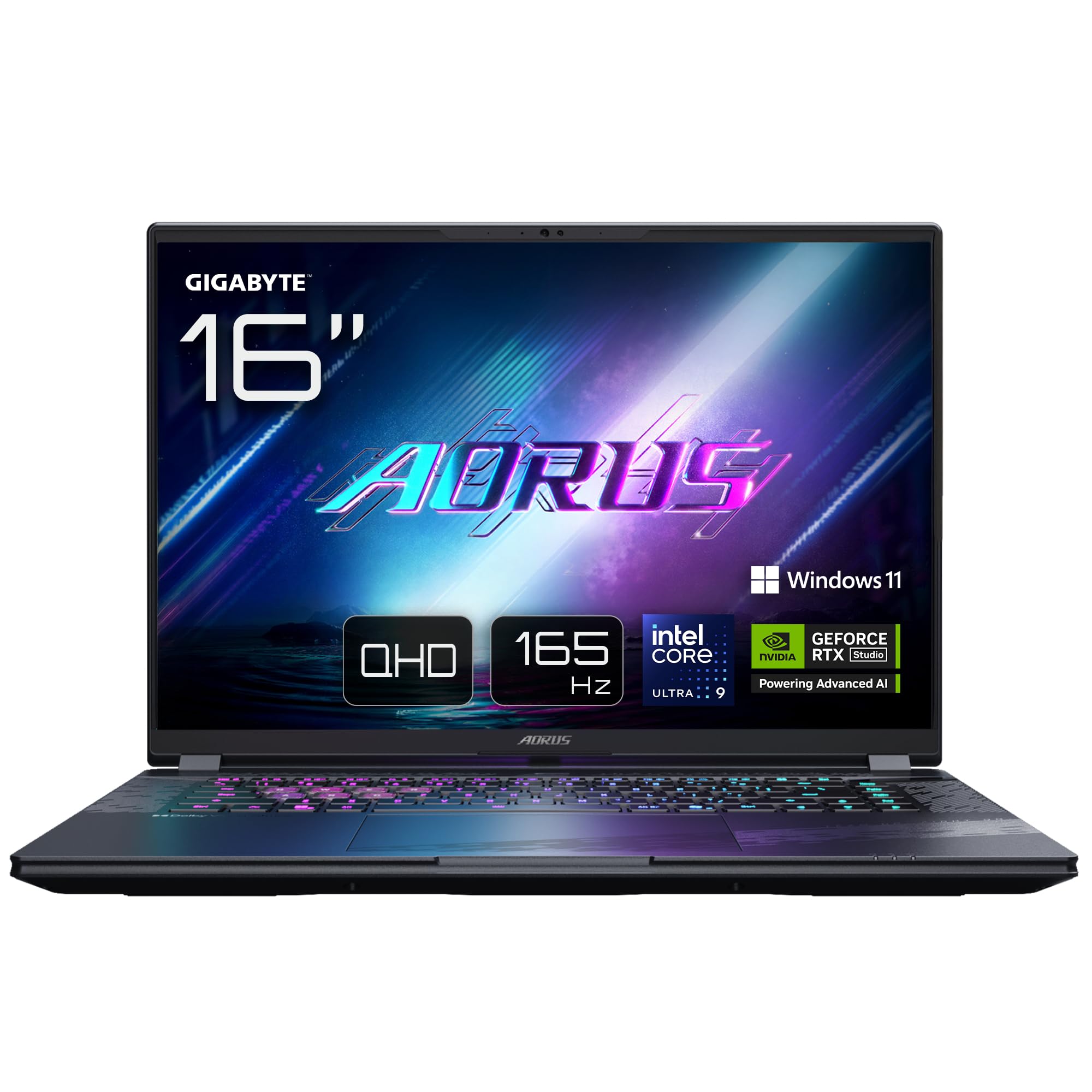
Image: The GIGABYTE AORUS Elite 16 BWH gaming laptop, showcasing its open display and keyboard.
2. การตั้งค่า
2.1 การแกะกล่องและการตรวจสอบเบื้องต้น
นำแล็ปท็อปและอุปกรณ์เสริมทั้งหมดออกจากบรรจุภัณฑ์อย่างระมัดระวัง ตรวจสอบให้แน่ใจว่าส่วนประกอบทั้งหมดที่ระบุไว้ในส่วน "สิ่งที่มีอยู่ในกล่อง" นั้นครบถ้วนและไม่เสียหาย
- GIGABYTE AORUS ELITE 16 BWHC3FRC65SP Laptop
- อะแดปเตอร์แปลงไฟและสายเคเบิล
- เอกสารประกอบ (คู่มือนี้, บัตรรับประกัน)
2.2 การต่อสายไฟ
Connect the power adapter to the laptop's power input port and then plug the power cable into an electrical outlet. It is recommended to fully charge the battery before initial use.
2.3 เปิดเครื่องครั้งแรก
Press the power button to turn on the laptop. Follow the on-screen instructions to complete the Windows 11 Pro setup process, including language selection, network connection, and user account creation.
2.4 การเชื่อมต่ออุปกรณ์ต่อพ่วงและเครือข่าย
The laptop features various ports for connecting external devices and networks.
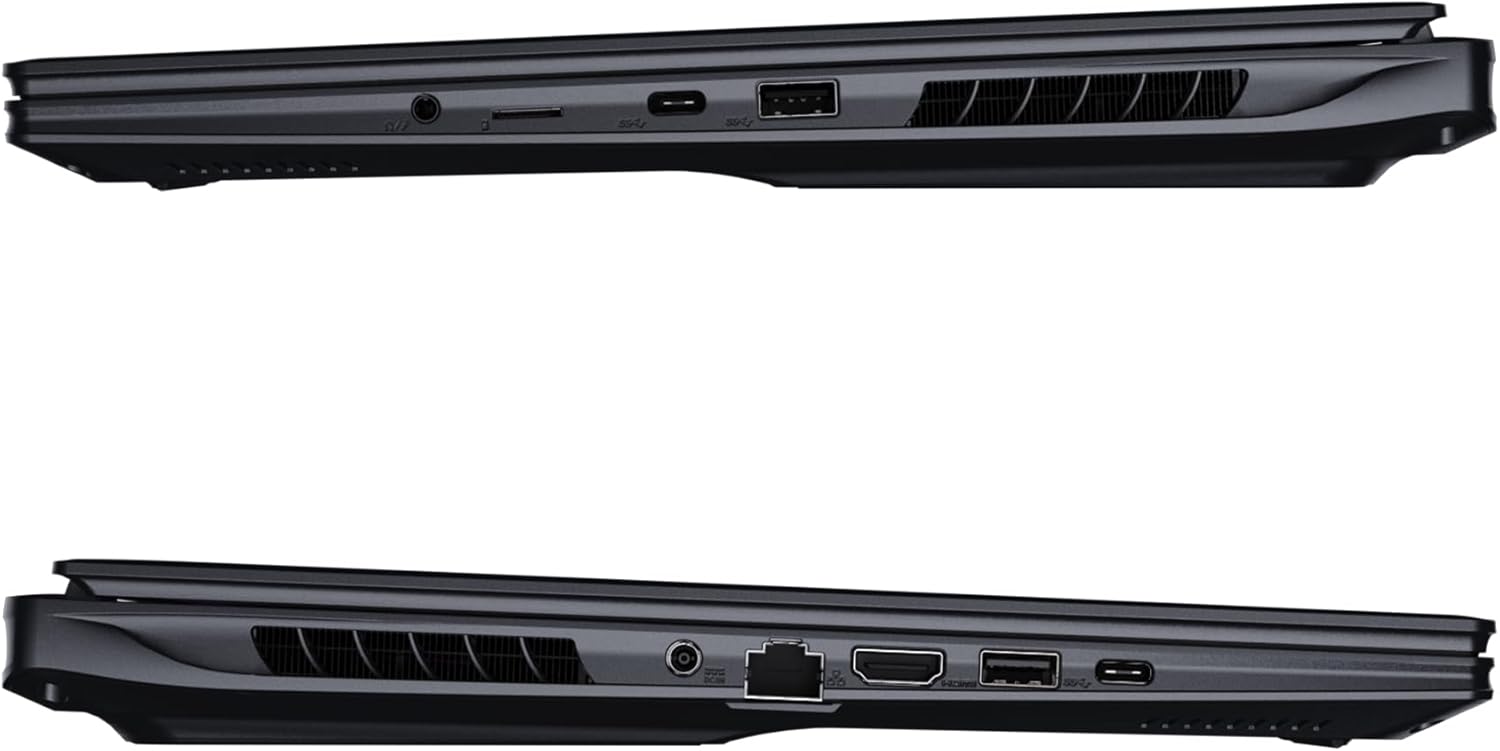
ภาพ: ด้านข้าง view of the laptop illustrating the available ports for connectivity.
- พอร์ต USB: Connect USB devices such as mice, keyboards, or external storage.
- พอร์ต HDMI: Connect to an external display or TV.
- พอร์ตสายฟ้า 4: สำหรับการถ่ายโอนข้อมูลและการแสดงผลความเร็วสูง
- พอร์ตอีเธอร์เน็ต: สำหรับการเชื่อมต่อเครือข่ายแบบใช้สาย
- แจ็คหูฟัง: สำหรับเอาท์พุตเสียงไปยังหูฟังหรือลำโพงภายนอก
- ไวไฟ 7: Connect to wireless networks via the integrated Wi-Fi 7 module.
- Bluetooth 5.4: จับคู่กับอุปกรณ์ที่เปิดใช้งาน Bluetooth
3. การใช้งานแล็ปท็อปของคุณ
3.1 คุณสมบัติการแสดงผล
Your AORUS Elite 16 BWH features a 16-inch WQXGA (2560x1600) IPS display with a 165Hz refresh rate and 16:10 aspect ratio, offering a wide viewing experience. It supports Dolby Vision for enhanced visual quality and is Pantone validated for color accuracy.

Image: The laptop's 16:10 aspect ratio display, highlighting its IPS panel and Pantone validation.
3.2 คีย์บอร์ดและทัชแพด
The laptop is equipped with a backlit keyboard for comfortable typing in various lighting conditions and a responsive touchpad for navigation.
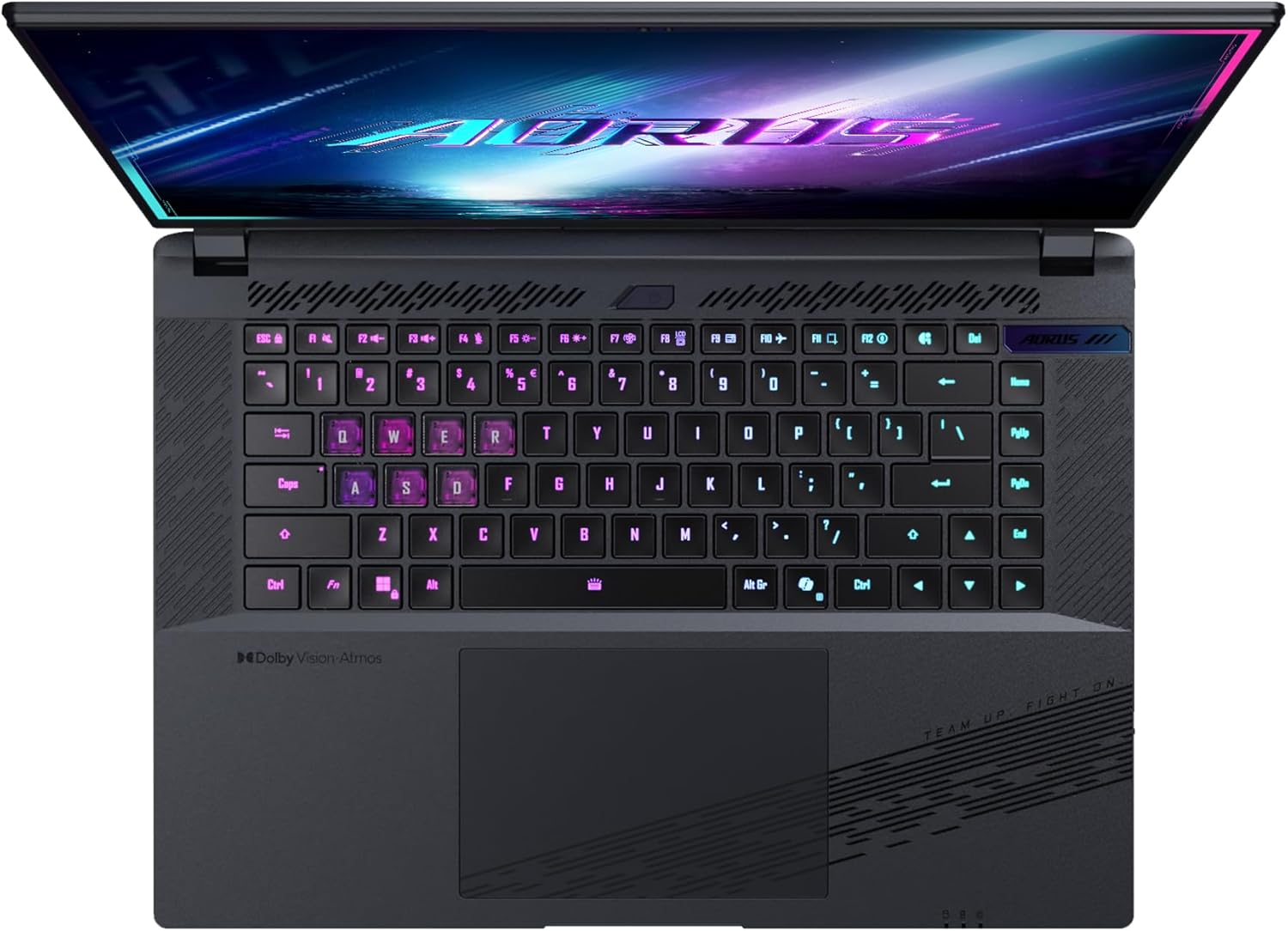
ภาพ: จากบนลงล่าง view of the laptop's keyboard, showcasing its backlit keys.
The keyboard also features a dedicated Copilot Key for quick access to AI functionalities in Windows 11.

Image: Close-up of the keyboard, highlighting the Copilot Key for AI features.
3.3 ระบบเสียง
Experience immersive audio with Dolby Atmos support and integrated 2W speakers. The laptop also includes a built-in microphone for communication.

Image: Visual representation of Dolby Atmos and Dolby Vision audio and visual enhancements.
3.4 คุณสมบัติด้านประสิทธิภาพ
The AORUS Elite 16 BWH is powered by an Intel Core Ultra 9 processor with an integrated NPU for AI acceleration and an NVIDIA GeForce RTX 5070 laptop GPU, ensuring high performance for gaming and demanding tasks. It also features Advanced Optimus with DDS Technology for optimized graphics performance.

ภาพ: รายละเอียด view of the Intel Core Ultra 9 processor chip.

ภาพ: รายละเอียด view of the NVIDIA GeForce RTX 50 Series laptop GPU chip.
3.5 GiMATE AI Agent
Utilize GiMATE, your personal AI agent, to optimize performance, manage smart cooling, enhance privacy, control power settings, and improve audio and voice functionalities.

Image: GiMATE AI Agent interface showing various optimization features.
4. การบำรุงรักษา
4.1 ระบบทำความเย็น
The laptop features the WINDFORCE Infinity cooling system to maintain optimal temperatures during intensive use. Ensure the vents are clear of obstructions to allow proper airflow.

Image: Representation of the WINDFORCE Infinity cooling system.
4.2 การทำความสะอาด
ใช้ผ้าเนื้อนุ่มที่ไม่เป็นขุยเช็ดทำความสะอาดหน้าจอและพื้นผิวด้านนอก สำหรับคราบฝังแน่น ให้ใช้ผ้าชนิดอื่นเช็ดampen the cloth slightly with water or a screen-cleaning solution. Avoid harsh chemicals.
4.3 การดูแลแบตเตอรี่
To prolong battery life, avoid extreme temperatures and do not leave the laptop fully charged or fully discharged for extended periods.
4.4 การอัปเดตซอฟต์แวร์
Regularly update your Windows operating system, drivers, and GIGABYTE software to ensure optimal performance and security.
5 การแก้ไขปัญหา
5.1 ปัญหาพลังงาน
- โน๊ตบุ๊คเปิดไม่ติด: ตรวจสอบให้แน่ใจว่าอะแดปเตอร์แปลงไฟเสียบแน่นดีแล้ว และปลั๊กไฟใช้งานได้ปกติ ตรวจสอบระดับประจุแบตเตอรี่ด้วย
- ไม่ชาร์จแบตเตอรี่: ตรวจสอบว่าอะแดปเตอร์และสายไฟไม่ได้รับความเสียหาย ลองใช้เต้ารับอื่น
5.2 ปัญหาการแสดงผล
- ไม่มีการแสดงผล: Connect an external monitor to check if the issue is with the laptop's screen. Ensure the laptop is powered on.
- จอภาพกระพริบหรือบิดเบี้ยว: อัปเดตไดรเวอร์การ์ดจอ ตรวจสอบการเชื่อมต่อสายเคเบิลจอแสดงผลหากใช้จอภาพภายนอก
5.3 ปัญหาการเชื่อมต่อ
- Wi-Fi ไม่เชื่อมต่อ: ตรวจสอบว่า Wi-Fi เปิดใช้งานอยู่ในการตั้งค่า Windows หรือไม่ รีสตาร์ทเราเตอร์และแล็ปท็อปของคุณ
- อุปกรณ์บลูทูธไม่จับคู่: Ensure the device is in pairing mode and within range. Update Bluetooth drivers.
5.4 ปัญหาประสิทธิภาพโดยทั่วไป
- ประสิทธิภาพช้า: Close unnecessary applications. Check for malware. Ensure sufficient free disk space.
- ความร้อนสูงเกินไป: Ensure cooling vents are clear. Use the laptop on a hard, flat surface.
For more complex issues, refer to the GIGABYTE support webเว็บไซต์หรือติดต่อฝ่ายบริการลูกค้า
6. ข้อมูลจำเพาะ
| คุณสมบัติ | รายละเอียด |
|---|---|
| ยี่ห้อ | กิกะไบต์ |
| ชื่อรุ่น | AORUS ELITE 16 BWHC3FRC65SP |
| ขนาดหน้าจอ | 16 นิ้ว |
| สี | สีเทา |
| ขนาดฮาร์ดดิสก์ | 2000 GB (2x 1TB SSD Gen4) |
| รุ่นซีพียู | Intel Core Ultra 9 275HX |
| ขนาด RAM ที่ติดตั้ง | แรม 32GB DDR5 |
| ระบบปฏิบัติการ | วินโดวส์ 11 โปร |
| คุณสมบัติพิเศษ | Backlit Keyboard, Memory Card Slot |
| คำอธิบายการ์ดจอ | อุทิศ |
| โคโปรเซสเซอร์กราฟิก | การ์ดจอ NVIDIA GeForce RTX 5070 |
| Hard Disk Technology | เอสดีเอสดี |
| น้ำหนักสินค้า | 2300 กรัม |
| Webความสามารถของแคม | Yes (Frontal) |
| ขนาดแรมการ์ดจอ | แรม 8GB GDDR6 |
| รองรับ RAM สูงสุด | 64GB |
| ปริมาณพลังงานแบตเตอรี่ | 99 Watt-hours (Lithium-polymer, 4 cells) |
| การเชื่อมต่อ | Bluetooth 5.4, Ethernet (10/1000 Mbit/s), HDMI (1 port), Thunderbolt 4 (1 port), USB 3.2 Gen 2 (2 ports), Wi-Fi 7 (802.11.be) |
| ความเร็วของโปรเซสเซอร์ | 2.7 GHz (Max 5.4 GHz) |
| จำนวนโปรเซสเซอร์ | 24 |
| ความละเอียดหน้าจอ | 2560 x 1600 พิกเซล (WQXGA) |
| ประเภทจอภาพ | จอ LCD ไอพีเอส |
| คุณสมบัติด้านเสียง | Dolby Atmos, 2x 2W Integrated Speakers, Integrated Microphone |
7. ข้อมูลการรับประกัน
Your GIGABYTE AORUS Elite 16 BWH laptop comes with a รับประกันจำกัด 2 ปี. This warranty covers manufacturing defects and hardware malfunctions under normal use. Please retain your proof of purchase for warranty claims. For detailed terms and conditions, refer to the warranty card included with your product or visit the official GIGABYTE webเว็บไซต์.
8. การสนับสนุน
For technical assistance, driver downloads, and further product information, please visit the official GIGABYTE support webเว็บไซต์ คุณยังสามารถค้นหาคำถามที่พบบ่อยและฟอรัมชุมชนได้ที่นั่น
- GIGABYTE อย่างเป็นทางการ Webเว็บไซต์: www.gigabyte.com
- บริการลูกค้า: Refer to your regional GIGABYTE webเว็บไซต์สำหรับข้อมูลการติดต่อในท้องถิ่น