
1. คำแนะนำด้านความปลอดภัยที่สำคัญ
Please read this manual carefully before operating your Daitsu Alisios Premium APD09FX2 portable air conditioner. Keep it for future reference.
- ตรวจสอบให้แน่ใจว่าวางเครื่องไว้บนพื้นผิวที่เรียบและมั่นคงเพื่อป้องกันการพลิกคว่ำ
- อย่าปิดกั้นช่องรับลมเข้าหรือช่องระบายอากาศ ควรเว้นระยะห่างรอบตัวเครื่องให้เพียงพอเพื่อให้อากาศไหลเวียนได้อย่างเหมาะสม
- Always use a grounded power outlet. Do not use extension cords or adapters.
- อย่าใช้งานเครื่องด้วยสายไฟหรือปลั๊กที่ชำรุด
- ให้เด็กและสัตว์เลี้ยงอยู่ห่างจากเครื่องขณะใช้งาน
- Before cleaning or maintenance, always unplug the unit from the power supply.
- If the unit has been tilted or laid on its side during transport, allow it to stand upright for at least 12-24 hours before plugging it in. This allows the refrigerant and oils to settle, preventing damage to the compressor.
- This appliance uses R290 refrigerant, which is flammable. Handle with care and ensure proper ventilation during installation and maintenance.
2. สินค้าหมดview
The Daitsu Alisios Premium APD09FX2 is a versatile portable air conditioner designed for cooling, dehumidifying, and ventilation in rooms up to 22 m². It features Wi-Fi connectivity for smart control and a compact design for easy portability.
ส่วนประกอบหลัก
- ตัวเครื่องหลัก (เครื่องปรับอากาศแบบพกพา)
- ท่อไอเสีย
- Window Kit (Adjustable Panel)
- รีโมทคอนโทรล
- ท่อระบายน้ำ
ผลิตภัณฑ์ Views


3. การตั้งค่า
3.1 การแกะและการจัดวาง
- ถอดหน่วยและอุปกรณ์เสริมทั้งหมดออกจากบรรจุภัณฑ์อย่างระมัดระวัง
- Place the unit on a firm, level surface. The integrated wheels allow for easy movement.
- Ensure there is at least 30 cm of space around the unit for proper air circulation.
3.2 การติดตั้งชุดท่อไอเสียและหน้าต่าง
The exhaust hose is crucial for expelling hot air outside the room, ensuring efficient cooling.
- Attach the exhaust hose to the designated outlet on the back of the air conditioner.
- Assemble the adjustable window kit panels to fit your window opening.
- ใส่ตัวแปลงท่อไอเสียเข้าในช่องเปิดของชุดกระจกหน้าต่าง
- Secure the window kit in your window frame, ensuring a tight seal to prevent hot air from re-entering the room.


3.3 Drainage Hose Connection
For continuous dehumidification or in high humidity environments, connect the drainage hose for continuous water removal.
- Locate the drainage outlet on the back of the unit.
- เชื่อมต่อท่อระบายน้ำที่ให้มากับช่องระบายน้ำนี้
- Direct the other end of the hose to a suitable drain or collection container.
3.4 Visual Guide: Product Features and Setup
4. คู่มือการใช้งาน
4.1 แผงควบคุม
The intuitive control panel on top of the unit allows direct access to all functions. The LED display shows the current temperature and selected settings.
4.2 การควบคุมระยะไกล
Use the remote control for convenient operation from a distance. It allows you to adjust temperature, mode, fan speed, and timer settings.
4.3 โหมดการทำงาน
- โหมดทำความเย็น: Provides powerful cooling to maintain a comfortable room temperature.
- โหมดลดความชื้น: Reduces excess humidity in the air, improving air quality and comfort.
- โหมดพัดลม: Circulates air without cooling, providing a constant fresh breeze.
4.4 Smart Control (Wi-Fi)
The unit includes integrated Wi-Fi, allowing you to control it remotely via the Daitsu Connect application on your smartphone or tablet. Download the app to configure temperature, set the 24-hour timer, or select your preferred mode from anywhere.
4.5 ฟังก์ชั่นพิเศษ
- ตัวจับเวลา 24 ชั่วโมง: ตั้งโปรแกรมให้เครื่องเปิดหรือปิดอัตโนมัติ
- โหมดสลีป: Adjusts temperature and fan speed for quiet, comfortable sleep.
- Auto Fan: Automatically adjusts fan speed based on ambient temperature for energy efficiency.
- Automatic Swing: Ensures uniform air distribution throughout the room.

5. การบำรุงรักษา
การบำรุงรักษาตามปกติจะช่วยให้เครื่องปรับอากาศของคุณทำงานได้อย่างเหมาะสมและมีอายุการใช้งานยาวนาน
5.1 การทำความสะอาดแผ่นกรองอากาศ
- The unit features an easy-to-wash air filter.
- Periodically remove the air filter (located on the back or side of the unit).
- Clean it with warm water and a mild detergent. Rinse thoroughly and allow it to dry completely before reinserting.
5.2 การระบายถังเก็บน้ำ
- The unit has an internal water tank that collects condensed water.
- When the tank is full, the unit will stop operating and an indicator light will illuminate.
- To drain, place a shallow pan or container under the drainage outlet.
- Remove the rubber stopper from the drainage outlet to allow water to flow out.
- Replace the stopper once the tank is empty.
5.3 พื้นที่จัดเก็บ
- Before long-term storage, ensure the water tank is completely drained.
- Clean the air filter and allow the unit to dry for a few hours in fan-only mode.
- เก็บเครื่องไว้ในที่เย็นและแห้ง โดยควรเก็บไว้ในบรรจุภัณฑ์เดิม
6 การแก้ไขปัญหา
หากคุณพบปัญหาเกี่ยวกับเครื่อง โปรดดูปัญหาและวิธีแก้ไขที่พบบ่อยต่อไปนี้:
| ปัญหา | สาเหตุที่เป็นไปได้ | สารละลาย |
|---|---|---|
| เครื่องไม่เปิด | No power supply; Water tank full | Check power connection; Empty water tank. |
| การระบายความร้อนไม่เพียงพอ | Blocked air filter; Room too large; Doors/windows open | Clean air filter; Ensure room size is within unit capacity; Close all doors/windows. |
| เสียงดังขณะใช้งาน | Unit not on a level surface; Obstruction in fan | วางเครื่องบนพื้นผิวระดับ ตรวจสอบและกำจัดสิ่งกีดขวางใดๆ |
| การรั่วซึมของน้ำ | Drainage hose not properly connected or blocked | Check drainage hose connection; Clear any blockages. |
7. ข้อมูลจำเพาะ
Detailed technical information for the Daitsu Alisios Premium APD09FX2.
| คุณสมบัติ | รายละเอียด |
|---|---|
| หมายเลขรุ่น | APD09FX2 |
| ความสามารถในการทำความเย็น | 2.6 กิโลวัตต์ |
| พื้นที่ให้บริการ | มากถึง 22 m² |
| สารทำความเย็น | อาร์-290 |
| ประสิทธิภาพการใช้พลังงาน (SEER) | 3.5 |
| ระดับเสียง | 53 เดซิเบล |
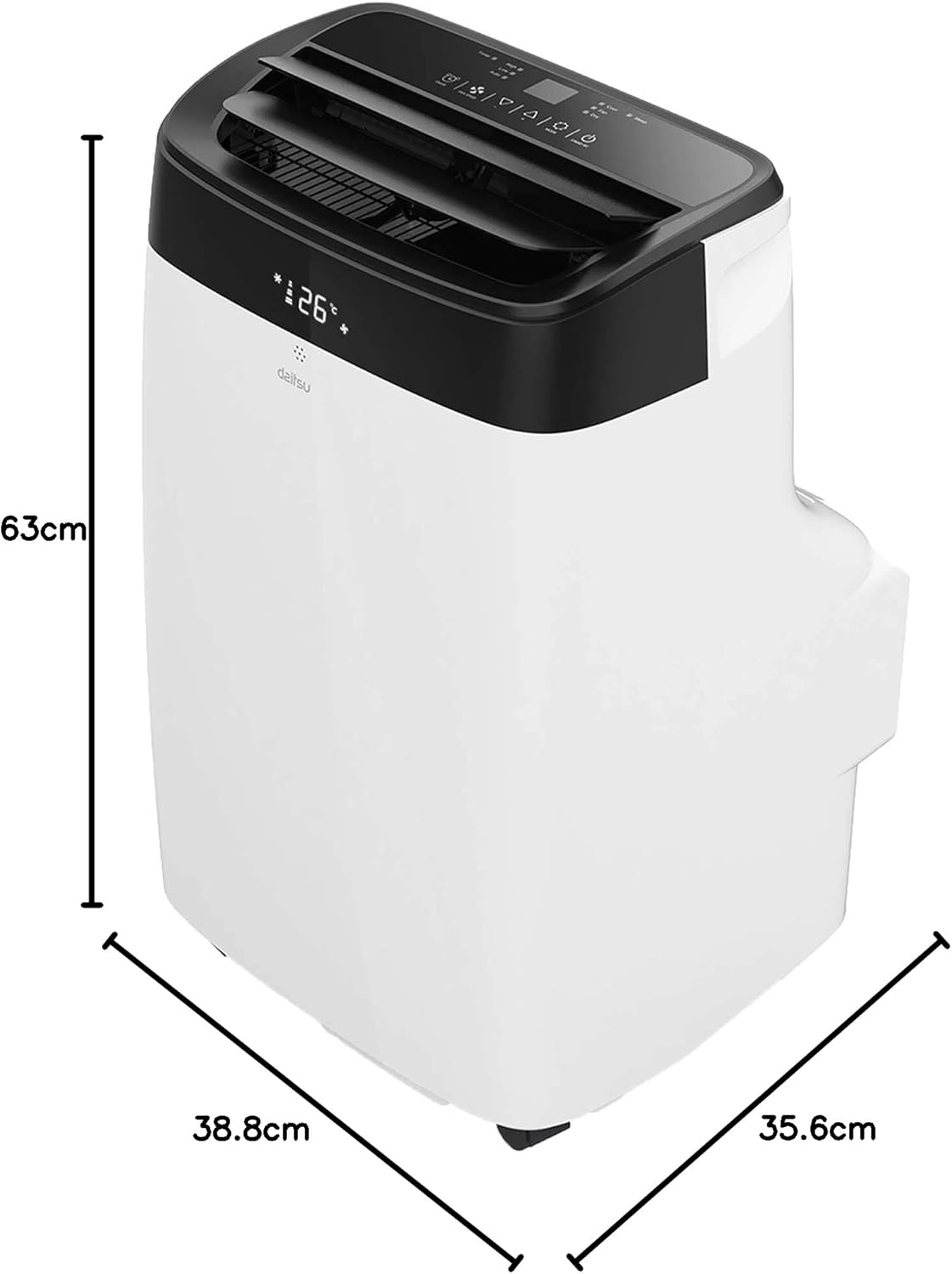
| ขนาด (D x W x H) | 35.6 x 38.8 x 63 ซม. |
| น้ำหนัก | 25 กิโลกรัม |
| แหล่งจ่ายไฟ | 230 Volts (Wired Electric) |
| วิธีการควบคุม | App, Remote Control, Touch |
| คุณสมบัติพิเศษ | Remote control, Dehumidifier, Silent mode, Wi-Fi enabled |
8. การรับประกันและการสนับสนุน
The Daitsu Alisios Premium APD09FX2 comes with a two-year manufacturer's warranty.
- For warranty claims or technical support, please contact Daitsu customer service or your retailer.
- เก็บหลักฐานการซื้อของคุณไว้เพื่อใช้ยืนยันการรับประกัน
- Refer to the full warranty terms and conditions provided in the separate warranty document.


