
1. บทนำ
ขอบคุณสำหรับการซื้อasing the THINKYA TH-A10 Portable CD Player. This device combines classic CD playback with modern connectivity options, including Bluetooth 5.1, USB, AUX, and optical output. Designed for high-fidelity audio, it features built-in stereo speakers, a rechargeable battery, and anti-skip protection for stable playback. Please read this manual thoroughly before use to ensure proper operation and to maximize your listening experience.

Image: The THINKYA TH-A10 Portable CD Player, highlighting its elegant wooden finish and compact form factor.
2. สินค้าหมดview
2.1 ส่วนประกอบและการควบคุม
The TH-A10 CD player is designed with user-friendly controls and a robust build. It features a wooden cabinet for enhanced sound quality and reduced resonance.
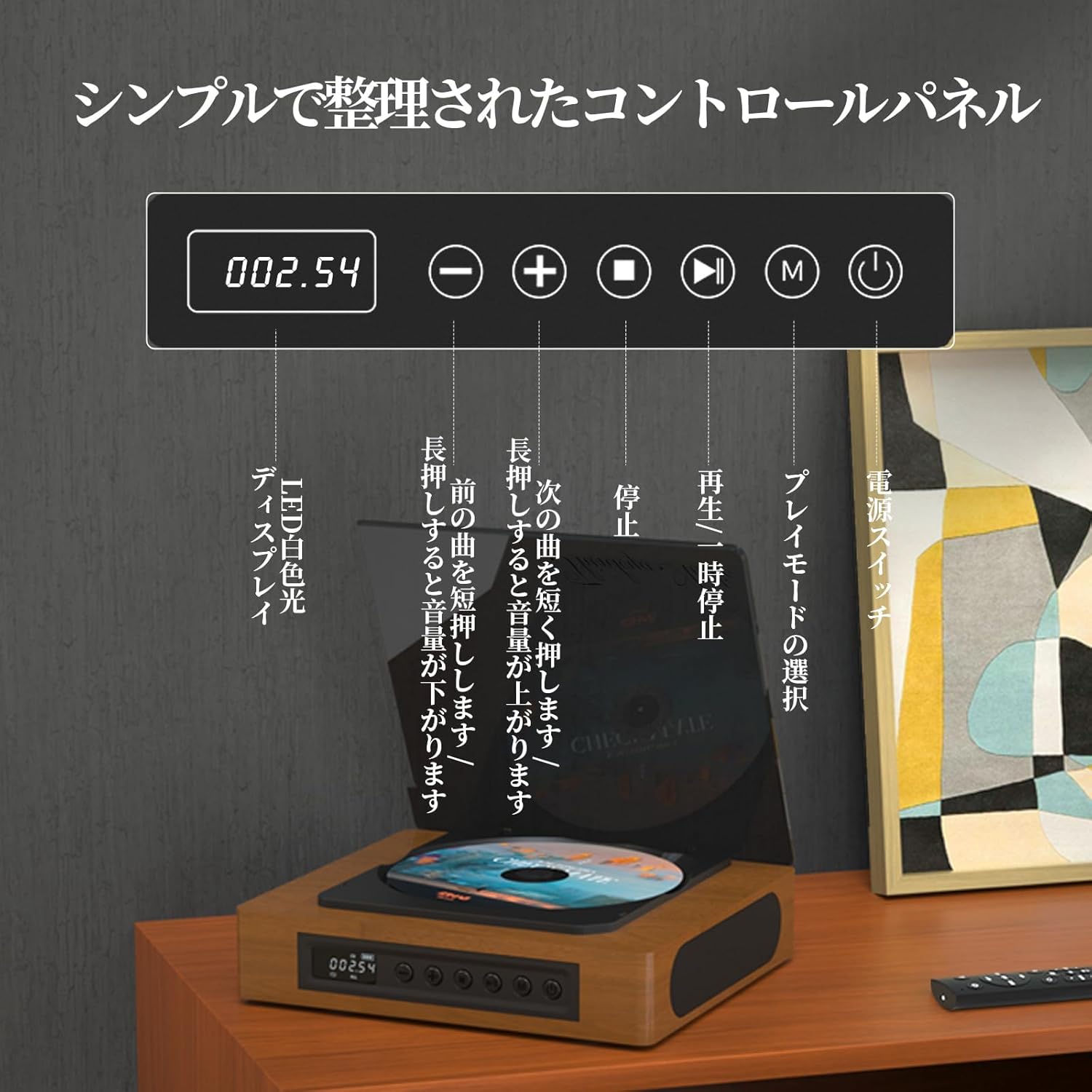
Image: The control panel and LED display of the TH-A10 CD Player. The LED display shows track number and time, while buttons control playback, volume, and mode selection.
ฟังก์ชั่นแผงควบคุม:
- จอแสดงผล LED: Shows current track, time, and mode.
- สวิตช์ไฟ: เปิด/ปิดอุปกรณ์
- ปุ่มเล่น/หยุดชั่วคราว: เริ่มหรือหยุดเล่นชั่วคราว
- ปุ่มก่อนหน้า/ลดระดับเสียง: กดสั้นๆ เพื่อเล่นเพลงก่อนหน้า กดค้างเพื่อลดระดับเสียง
- ปุ่มถัดไป/เพิ่มระดับเสียง: กดสั้นๆ เพื่อเล่นเพลงถัดไป กดค้างเพื่อเพิ่มระดับเสียง
- ปุ่มหยุด: หยุดการเล่น
- ปุ่มโหมด (M): Selects playback mode (CD, Bluetooth, USB, AUX, Optical).

ภาพ: รายละเอียด view of the LED display, indicating operational status and battery level.
2.2 การเชื่อมต่อแผงด้านหลัง
The rear panel provides various ports for external connections.

Image: The rear panel of the TH-A10, displaying the various input/output ports including USB, AUX, Type-C for charging, and Optical output.
พอร์ต:
- อินพุต DC (ชนิด C): For charging the internal battery or powering the device.
- พอร์ต USB: สำหรับการเล่นเสียง files from a USB memory stick.
- AUX IN/OUT (3.5mm Jack): For connecting external audio devices or outputting audio to headphones/speakers.
- Optical Output (SPDIF): สำหรับการเชื่อมต่อกับอุปกรณ์ภายนอก amplifier or DAC for high-fidelity audio.
3. การตั้งค่า
3.1 การเปิดเครื่องและการชาร์จ
- Connect the provided Type-C charging cable to the DC IN port on the rear of the player.
- ต่อปลายอีกด้านของสายเคเบิลเข้ากับอะแดปเตอร์แปลงไฟ USB (ไม่ได้รวมอยู่ในชุด) หรือพอร์ต USB ที่มีไฟเลี้ยง
- The LED display will indicate charging status. A full charge provides approximately 6 hours of playback.
- กดสวิตช์เปิด/ปิดเพื่อเปิดใช้งานอุปกรณ์

Image: Charging options for the TH-A10, including wall adapter, car charger, and power bank, connected via the Type-C port.
3.2 การจัดวางเริ่มต้น
Place the CD player on a stable, flat surface. Ensure adequate ventilation around the unit.
4. คู่มือการใช้งาน
4.1 การเล่นแผ่นซีดี
- ค่อยๆ เปิดฝาครอบกันฝุ่น
- Place a CD (CD, CD-R, CD-RW) onto the spindle, label side up.
- ปิดฝาครอบกันฝุ่น
- Press the 'M' (Mode) button until 'CD' mode is selected.
- กดปุ่มเล่น/หยุดชั่วคราวเพื่อเริ่มเล่น
- Use the Previous/Next buttons to skip tracks. Long press for volume adjustment.
บันทึก: This player does not support Blu-ray discs.

Image: Playback modes (sequential, repeat one, repeat all, random) and the ASP anti-shock function are shown, indicating versatile and stable audio experience.
4.2 Bluetooth Operation (Receive/Transmit)
The TH-A10 supports Bluetooth 5.1 for both receiving and transmitting audio.

Image: The TH-A10's Bluetooth functionality, demonstrating connections to various devices like smartphones, tablets (receiving), and Bluetooth speakers or headphones (transmitting).
4.2.1 Bluetooth Receive Mode:
- Press the 'M' (Mode) button until 'BT' mode is selected. The LED display will show 'BT' and flash, indicating pairing mode.
- บนสมาร์ทโฟนหรือแท็บเล็ตของคุณ ให้เปิดใช้งาน Bluetooth และค้นหาอุปกรณ์ที่มีอยู่
- Select 'TH-A10' from the list to pair. Once connected, the 'BT' indicator will stop flashing.
- You can now play audio from your device through the TH-A10's speakers.
4.2.2 Bluetooth Transmit Mode:
- ตรวจสอบให้แน่ใจว่าหูฟังหรือลำโพง Bluetooth ของคุณอยู่ในโหมดจับคู่
- Press the 'M' (Mode) button until 'BT' mode is selected.
- The TH-A10 will automatically search for nearby Bluetooth receiving devices.
- Once connected, audio from the CD player (or other selected source) will be transmitted to your Bluetooth headphones/speaker.
4.3 การเล่น USB
- Insert a USB memory stick containing MP3, WMA, or WAV audio fileเสียบเข้ากับพอร์ต USB ที่แผงด้านหลัง
- Press the 'M' (Mode) button until 'USB' mode is selected.
- The player will automatically begin playing audio fileจากแท่ง USB
4.4 ช่องต่อ AUX อินพุต/เอาต์พุต
4.4.1 AUX Input:
- Connect an external audio device (e.g., smartphone, MP3 player) to the AUX port using a 3.5mm audio cable.
- Press the 'M' (Mode) button until 'AUX' mode is selected.
- Play audio from your external device. The sound will be output through the TH-A10's speakers.
4.4.2 AUX Output (Headphones/External Speakers):
- Connect headphones or external speakers to the AUX port using a 3.5mm audio cable.
- Select your desired playback mode (CD, Bluetooth, USB).
- Audio will be routed to the connected headphones or external speakers.
4.5 เอาต์พุตออปติคัล
For the highest audio fidelity, use the optical output.
- Connect an optical cable (not included) from the SPDIF Optical Output port on the TH-A10 to an optical input on your ampไลไฟเออร์หรือ DAC
- Select the optical input on your ampแอมพลิฟายเออร์/DAC
- Play audio from the TH-A10 (CD, USB, or Bluetooth source).
4.6 การควบคุมระยะไกล
The included remote control allows for convenient operation from a distance of up to 10 meters.
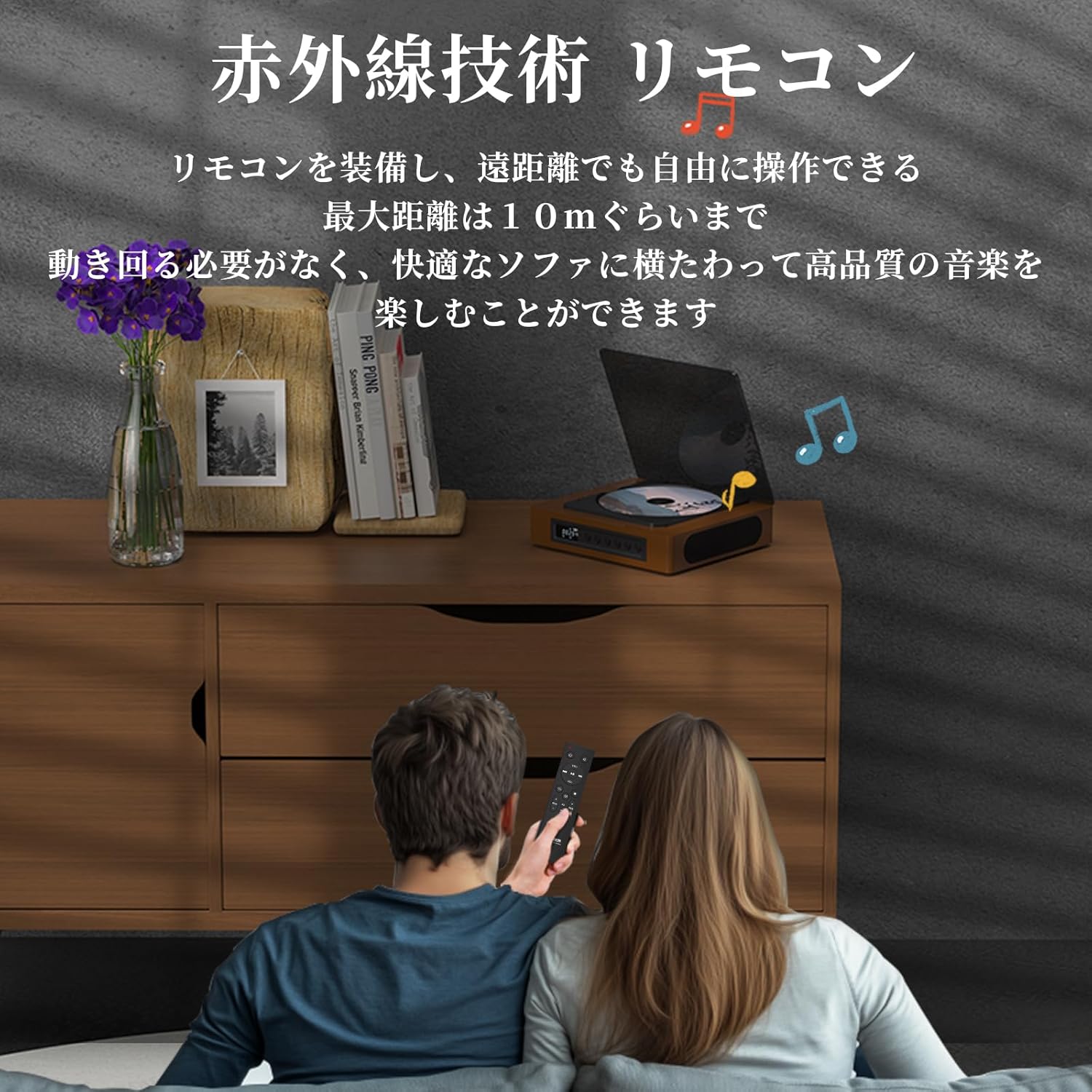
Image: A couple using the remote control for the TH-A10 CD Player, demonstrating its convenience for remote operation.
5. การบำรุงรักษา
5.1 การทำความสะอาด
- เช็ดภายนอกตัวเครื่องด้วยผ้าแห้งและนุ่ม
- For the CD lens, use a specialized CD lens cleaner. Do not touch the lens directly.
- Keep the transparent dust cover clean to prevent dust accumulation on the CD.

Image: The transparent dust cover of the TH-A10, designed to protect the CD mechanism from dust and moisture.
5.2 พื้นที่จัดเก็บ
เมื่อไม่ได้ใช้งานเป็นเวลานาน ควรเก็บเครื่องเล่นไว้ในที่แห้งและเย็น หลีกเลี่ยงแสงแดดโดยตรงและอุณหภูมิที่สูงหรือต่ำเกินไป
6 การแก้ไขปัญหา
| ปัญหา | สาเหตุที่เป็นไปได้ | สารละลาย |
|---|---|---|
| ไม่มีไฟฟ้า | แบตเตอรี่หมด สายไฟไม่ได้เชื่อมต่อ | ชาร์จแบตเตอรี่ ตรวจสอบให้แน่ใจว่าเสียบสายไฟแน่นดีแล้ว |
| ซีดีไม่เล่น | CD inserted incorrectly; Disc is dirty or scratched; Incorrect mode selected; Blu-ray disc inserted. | Reinsert CD correctly; Clean or replace disc; Select 'CD' mode; Blu-ray discs are not supported. |
| ไม่มีเสียงออกจากลำโพง | Volume too low; Mute activated; External headphones/speakers connected to AUX out. | Increase volume; Check mute status; Disconnect external audio devices from AUX out if using internal speakers. |
| การจับคู่บลูทูธล้มเหลว | Device not in pairing mode; Out of range; Interference. | Ensure both devices are in pairing mode; Move devices closer; Restart Bluetooth on both devices. |
| Skipping during CD playback | Player is unstable; Disc is damaged; Excessive vibration. | Place player on a stable surface; Clean or replace disc; ASP anti-shock function is active for minor vibrations. |
7. ข้อมูลจำเพาะ
| คุณสมบัติ | รายละเอียด |
|---|---|
| หมายเลขรุ่น | TH-A10 |
| ยี่ห้อ | ธิงเกีย |
| การเชื่อมต่อ | Bluetooth 5.1 (Receive/Transmit), USB, AUX (3.5mm), Optical (SPDIF), Type-C (Power) |
| รูปแบบดิสก์ที่รองรับ | CD, CD-R, CD-RW (Not compatible with Blu-ray discs) |
| รูปแบบเสียงที่รองรับ | MP3, WMA, WAV, APE, FLAC (from USB) |
| ความจุของแบตเตอรี่ | 2600mAh |
| Playback Time (Battery) | ประมาณ 6-8 ชั่วโมง (ขึ้นอยู่กับการใช้งาน) |
| ลำโพง | Built-in Stereo Speakers (2x50mm Neodymium Iron Boron Magnetic Units) |
| Anti-Shock Protection (ASP) | 60 วินาทีสำหรับซีดี 120 วินาทีสำหรับ MP3 |
| ขนาด (กว้าง x ยาว x สูง) | 17.8 x 15.8 x 4.85 ซม. |
| น้ำหนัก | 1.12 กก. |
| อุปกรณ์เสริมที่รวมอยู่ด้วย | CD Player, Audio Line, Type-C Charging Cable, Remote Control, Instruction Manual |
8. การรับประกันและการสนับสนุน
8.1 ข้อมูลการรับประกัน
This THINKYA TH-A10 CD Player comes with a รับประกัน 1 ปี from the date of purchase. This warranty covers defects in materials and workmanship under normal use. If the product fails due to a manufacturing defect within this period, we will provide a free replacement. Please retain your proof of purchase for warranty claims.
บันทึก: การรับประกันไม่ครอบคลุมความเสียหายที่เกิดจากการใช้งานผิดวิธี อุบัติเหตุ การดัดแปลงโดยไม่ได้รับอนุญาต หรือการสึกหรอตามปกติ
8.2 การสนับสนุนลูกค้า
For any questions, technical assistance, or warranty claims, please contact THINKYA customer support through the retailer where you purchased the product. Our team is dedicated to providing prompt and helpful service.