

การแนะนำ
Welcome to the Parsonver SR2 Smart Watch user manual. This guide provides detailed instructions on how to set up, operate, maintain, and troubleshoot your new smart watch. Please read this manual thoroughly to ensure optimal performance and longevity of your device.

Image: The Parsonver SR2 Smart Watch, showcasing its display with time, date, steps, and heart rate, alongside a smaller inset of its GPS tracking feature.
1. การตั้งค่า
1.1 เนื้อหาบรรจุภัณฑ์
ก่อนที่คุณจะเริ่มต้น โปรดตรวจสอบว่าสินค้าทั้งหมดมีอยู่ในแพ็คเกจของคุณ:
- Parsonver SR2 สมาร์ทวอทช์
- สายชาร์จ
- คู่มือการใช้งาน (เอกสารนี้)

Image: An illustration showing the Parsonver SR2 Smart Watch, its magnetic charging cable, and the included user manual.
1.2 การชาร์จอุปกรณ์
Upon first use, fully charge your smart watch. Connect the magnetic charging cable to the charging contacts on the back of the watch and plug the USB end into a power adapter (not included) or a computer's USB port. A full charge typically takes approximately 2 hours.
Image: The Parsonver SR2 Smart Watch connected to its magnetic charging cable, displaying a 100% charge indicator.
1.3 การติดตั้งและการจับคู่แอป
To unlock the full functionality of your Parsonver SR2 Smart Watch, download and install the companion application on your smartphone.
- Scan the QR code in the manual or search for the 'Parsonver' app in your phone's app store (Google Play Store for Android, Apple App Store for iPhone).
- ติดตั้งแอปพลิเคชันและสร้างบัญชีหรือเข้าสู่ระบบ
- ตรวจสอบให้แน่ใจว่าได้เปิดใช้งาน Bluetooth บนสมาร์ทโฟนของคุณแล้ว
- Open the Parsonver app, navigate to the device section, and follow the on-screen instructions to pair your SR2 Smart Watch.
- Grant all necessary permissions requested by the app for full functionality, including notifications and location services.
2. การใช้งานสมาร์ทวอทช์ของคุณ
2.1 การนำทางพื้นฐาน
The Parsonver SR2 Smart Watch features a responsive touchscreen and dual physical buttons for intuitive control.
- หน้าจอสัมผัส: ปัดไปทางซ้าย/ขวา และขึ้น/ลง เพื่อเลื่อนดูเมนูและฟีเจอร์ต่างๆ แตะเพื่อเลือก
- ปุ่มบน: โดยทั่วไปใช้เพื่อกลับไปยังหน้าจอหลักหรือปลุกอุปกรณ์
- ปุ่มล่าง: Customizable. Can be set to quickly access workout modes or frequently used applications via the companion app.

Image: A close-up of the Parsonver SR2 Smart Watch highlighting its dual button design and a menu showing 'Exercise', 'Walking', and 'Treadmill' options.
2.2 การโทรผ่านบลูทูธและการแจ้งเตือนอัจฉริยะ
The SR2 Smart Watch supports Bluetooth 5.3 for stable connectivity, allowing you to answer and make calls directly from your wrist and receive smart notifications.
- การรับ/โทรออก: Once paired, incoming calls will display on your watch. You can answer or reject them. Use the integrated microphone and speaker for conversations.
- การแจ้งเตือนอัจฉริยะ: Receive alerts for calls, SMS, and various social media applications directly on your watch. Ensure app permissions are granted for notifications.
- Quick Call Replies: (Android only) Respond instantly to calls with pre-set messages.

Image: A person interacting with the Parsonver SR2 Smart Watch, showing a call screen with a dial pad and contact list, along with icons for various social media notifications.
2.3 Sports Modes & Built-in GPS
Track your fitness activities with over 100 sports modes and accurate built-in GPS.
- โหมดกีฬามากกว่า 100 แบบ: Select your activity from a wide range of sports to get precise tracking of duration, distance, calories burned, and heart rate zones.
- GPS ในตัว: Accurately record your workout routes without needing your phone. View detailed maps and statistics in the companion app after your activity.
- การตรวจจับอัจฉริยะ: The watch can automatically recognize when you are running, walking, or using a treadmill.

Image: A person running outdoors, with the Parsonver SR2 Smart Watch displaying a GPS-tracked route on its screen and a smartphone app showing detailed workout data including distance and time.
2.4 การติดตามสุขภาพตลอด 24 ชั่วโมง
Monitor your health metrics continuously with the SR2 Smart Watch.
- การตรวจสอบอัตราการเต้นของหัวใจ: Tracks your heart rate throughout the day. Set custom alerts for high or low readings.
- การติดตามการนอนหลับ: Analyzes your sleep patterns (deep sleep, light sleep, REM, awake time, sporadic naps) to provide insights into your sleep quality.
- การตรวจวัดออกซิเจนในเลือด (SpO2): Measures your blood oxygen levels, providing clear trends and real-time tracking.
- การติดตามความเครียด: Understand your emotional fluctuations through data-driven body-mind analysis.
- Women's Health Companion: Provides data-driven cycle management features.

Image: A person sleeping, wearing the Parsonver SR2 Smart Watch, with graphics illustrating sleep monitoring, heart rate monitoring, stress monitoring, and blood oxygen monitoring features.
2.5 Watch Faces & DIY
Personalize your watch with a variety of watch faces or create your own.
- 100+ หน้าปัดนาฬิกา: Choose from a wide selection of pre-installed watch faces to match your style.
- DIY Watch Faces: Use the companion app to upload your own photos and customize your watch face.

Image: The Parsonver SR2 Smart Watch displaying a custom watch face with a photo, surrounded by various other watch face designs and a smartphone screen showing the watch face synchronization interface.
2.6 คุณสมบัติเพิ่มเติม
The SR2 Smart Watch offers a range of other useful functions:
- นาฬิกาโลก
- การปรับความสว่าง
- เตือน
- เครื่องคิดเลข
- ตัวจับเวลา
- ค้นหาโทรศัพท์ของฉัน
- ยกเพื่อปลุก
- นาฬิกาจับเวลา
- การควบคุมเพลง
- Remote Camera Trigger
- การออกกำลังกายการหายใจ
- Reminders (Handwashing, Medication, Event, Drinking, Standing)

Image: The Parsonver SR2 Smart Watch screen surrounded by icons representing various features like weather, music, camera control, alarm, and more.
3. การบำรุงรักษา
3.1 ระดับการกันน้ำ (IP68)
The Parsonver SR2 Smart Watch is rated IP68 waterproof, meaning it is rigorously tested to withstand splashes, hand washing, face washing, and intense sweat. It is suitable for daily use and light water exposure.
Note: Avoid using the watch while showering, in saunas, or swimming, as hot water, steam, or prolonged submersion can compromise the seal and cause damage.

Image: A man kayaking on a river, wearing the Parsonver SR2 Smart Watch, illustrating its IP68 waterproof capability against splashes.
3.2 การทำความสะอาดและการดูแล
- ทำความสะอาดนาฬิกาและสายนาฬิกาของคุณเป็นประจำด้วยผ้านุ่มๆamp ผ้า.
- หลีกเลี่ยงการใช้สารเคมีรุนแรง น้ำยาทำความสะอาดที่มีฤทธิ์กัดกร่อน หรือตัวทำละลาย
- ตรวจสอบให้แน่ใจว่าหน้าสัมผัสการชาร์จสะอาดและแห้งก่อนชาร์จเพื่อป้องกันการกัดกร่อน
3.3 การดูแลแบตเตอรี่
- ควรชาร์จนาฬิกาเป็นประจำ และหลีกเลี่ยงการปล่อยให้แบตเตอรี่หมดเกลี้ยงเป็นเวลานาน
- ควรเก็บนาฬิกาไว้ในที่แห้งและเย็นเมื่อไม่ได้ใช้งาน
- Typical battery life is 5-7 days with normal use, and up to 40 days in standby mode. Actual battery life may vary based on usage.
4 การแก้ไขปัญหา
หากคุณพบปัญหาเกี่ยวกับสมาร์ทวอทช์ Parsonver SR2 โปรดดูวิธีแก้ไขปัญหาทั่วไปต่อไปนี้:
| ปัญหา | วิธีแก้ปัญหาที่เป็นไปได้ |
|---|---|
| นาฬิกาเปิดไม่ติด | ตรวจสอบให้แน่ใจว่านาฬิกาชาร์จเต็มแล้ว เสียบนาฬิกาเข้ากับเครื่องชาร์จอย่างน้อย 30 นาที |
| ไม่สามารถจับคู่กับโทรศัพท์ได้ | Ensure Bluetooth is enabled on your phone. Restart both the watch and phone. Make sure the watch is within Bluetooth range. Check app permissions. |
| ไม่ได้รับการแจ้งเตือน | Verify that notification permissions are granted in the Parsonver app and your phone's settings. Ensure the app is running in the background. |
| ข้อมูลสุขภาพที่ไม่ถูกต้อง | ตรวจสอบให้แน่ใจว่าสวมนาฬิกาให้กระชับพอดีข้อมือ ไม่แน่นหรือหลวมเกินไป ทำความสะอาดเซ็นเซอร์ด้านหลังนาฬิกา หลีกเลี่ยงการเคลื่อนไหวมากเกินไประหว่างการวัด |
| GPS ไม่ติดตาม | ให้แน่ใจว่าคุณอยู่ในพื้นที่กลางแจ้งที่เปิดโล่งและมีน้ำใส view of the sky. Wait for the watch to acquire a GPS signal before starting your activity. |
| อายุการใช้งานแบตเตอรี่สั้น | Reduce screen brightness, disable 'Lift-to-wake' if not needed, limit continuous heart rate monitoring, and close unused apps on the watch. |
หากปัญหายังคงอยู่ โปรดติดต่อฝ่ายสนับสนุนลูกค้าเพื่อขอความช่วยเหลือเพิ่มเติม
5. ข้อมูลจำเพาะ
| คุณสมบัติ | รายละเอียด |
|---|---|
| หมายเลขรุ่น | เอสอาร์2 |
| ขนาดสินค้า | 9.84 x 1.69 x 0.46 นิ้ว |
| น้ำหนักสินค้า | 1.41 ออนซ์ (40 กรัม) |
| ขนาดหน้าจอ | 1.27 นิ้ว (ขนาดหน้าจอแบบตั้ง) |
| เส้นทแยงมุมของหน้าจอที่มองเห็นได้ | 2" / 4 ซม. |
| ความจุของหน่วยความจำ | 256MB |
| การสื่อสารแบบไร้สาย | บลูทูธ 5.3 |
| อินพุตอินเทอร์เฟซมนุษย์ | หน้าจอสัมผัส |
| การให้คะแนนการคุ้มครองระหว่างประเทศ | IP68 |
| แบตเตอรี่ | ต้องใช้แบตเตอรี่ C 1 ก้อน (รวมอยู่ด้วย) |
| ผู้ผลิต | พาร์สันเวอร์ |
| วันที่พร้อมใช้งานครั้งแรก | 12 ตุลาคม 2025 |
6. การรับประกันและการสนับสนุน
6.1 การรับประกันสินค้า
Parsonver products are designed and manufactured to the highest quality standards. This product is covered by a limited warranty against defects in materials and workmanship. Please refer to the warranty card included in your package or contact Parsonver customer support for specific warranty terms and conditions.
6.2 การสนับสนุนลูกค้า
For any questions, technical assistance, or support needs, please contact Parsonver customer service. Our support team is available 24/7 to assist you.
- การสนับสนุนทางออนไลน์: Visit the official Parsonver website or contact us through the companion app for online assistance.
- การสนับสนุนทางอีเมล์: Refer to your warranty card or product packaging for email contact information.
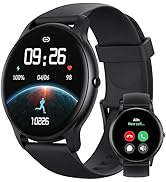
Image: An icon representing 24/7 online customer support, featuring a headset and chat bubbles.